

Krool World UI
HUD/UI: compass, skill XP bars, carry weight / encumbrance bar, food timers, health and stamina lost to food decay, build materials, day/night bar and clock, autosave and rested countdowns, workbench map pins, auto repair. Client-side; F7 settings.
Quality-of-life HUD additions for Valheim: skill XP, carry weight, build materials, food timers, a compass, a day/night bar, and a few countdowns the game doesn't show.
- No new items, mechanics or balance changes.
- Every feature can be switched off or adjusted in game with F7.
- Client-side. The server and other players don't need it.
- Display only, except two features you can turn off: Bench Pins adds a map pin when you build a workbench, and Auto Repair repairs your gear when you open a crafting station.
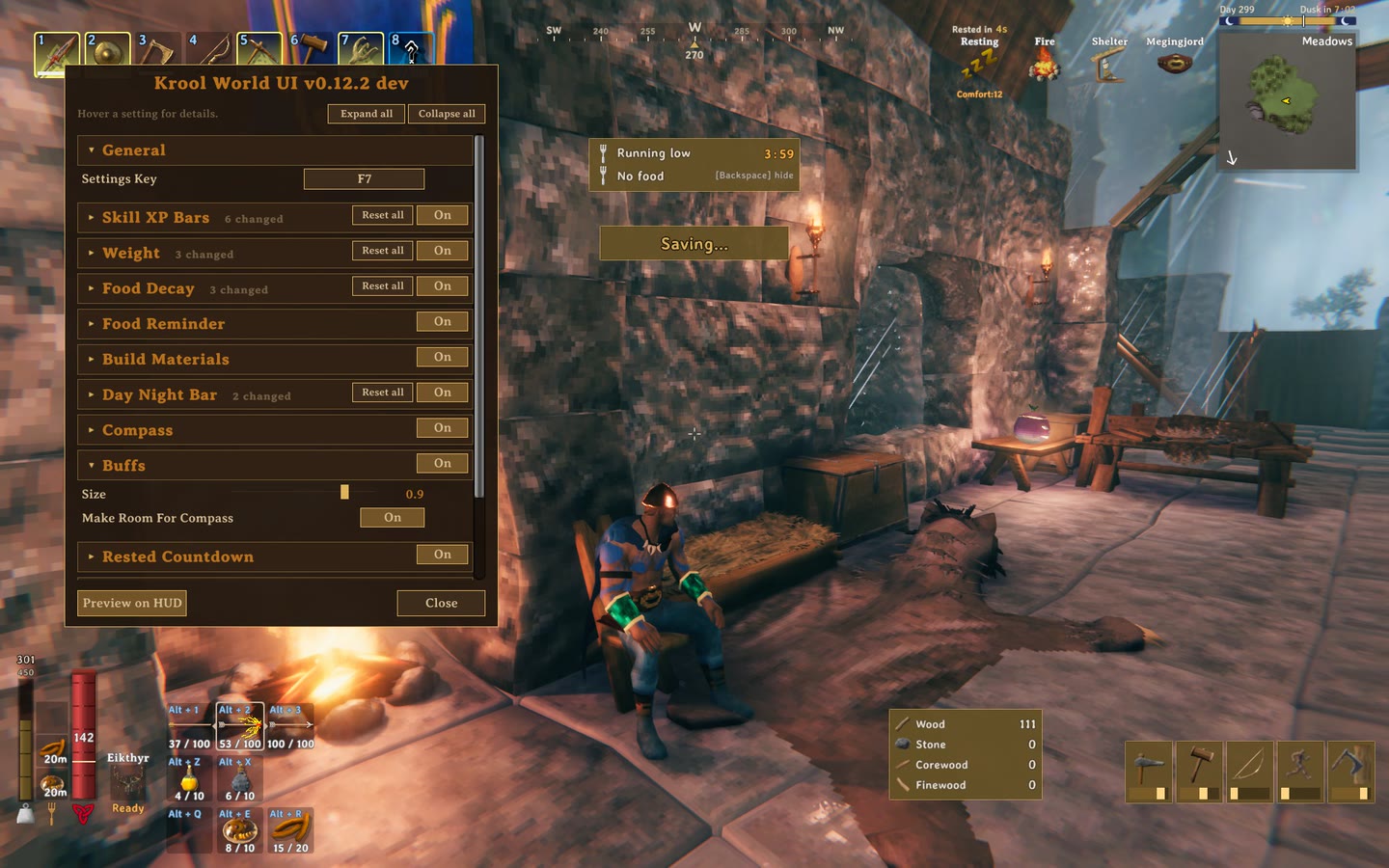
All elements at once, using the F7 window's Preview on HUD setup view. In play, each one only shows when it applies.
Compass. Your heading, friends and nearby map pins.

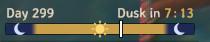
Day/night bar. Time of day and the time until dusk or dawn.
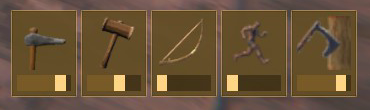
Skill XP. A tile per skill with an XP bar toward the next level.
Carry weight. Fills as you pick things up, red when over.
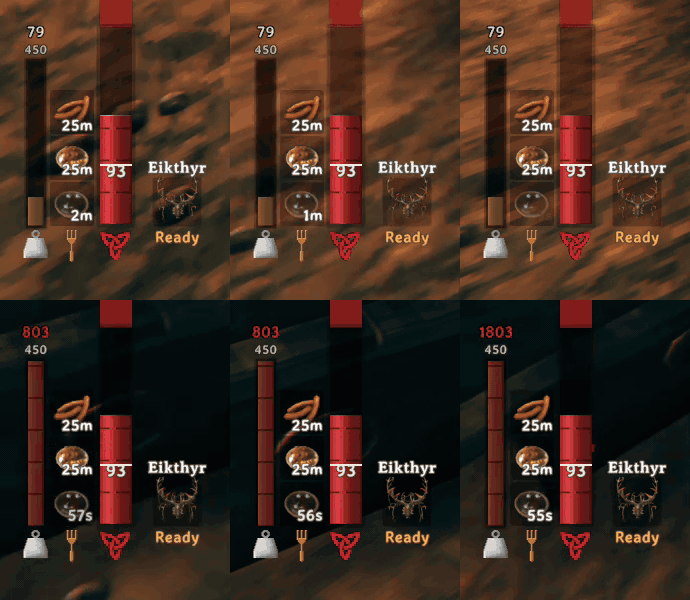
Food reminders. A toast when a food is running out.
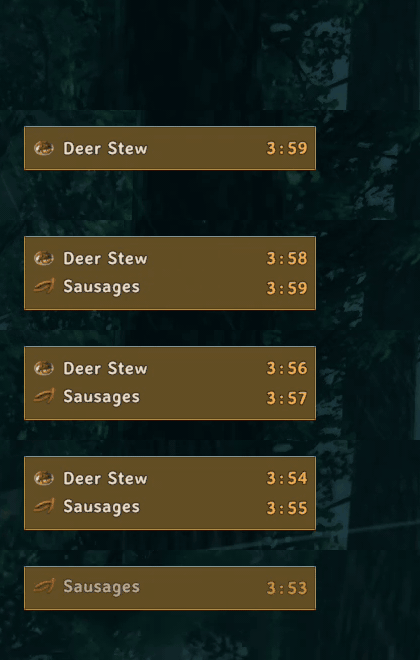
Rested countdown. Seconds until Rested, above the Resting buff.
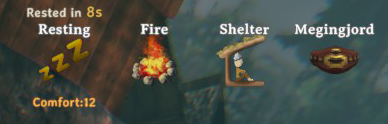
Features
| Feature | What it does |
|---|---|
| Skill XP bars | Skill tiles with XP bars, and a +0.8% Swords popup as you earn XP |
| Carry weight | Weight bar beside your food |
| Build materials | With the hammer out: what the selected piece costs, what you have, how many you can build |
| Food decay | Shows how much max health, stamina and eitr your food has lost as it wears off |
| Food reminders | Running out, no food, and optionally "can eat again" (off by default) |
| Compass | Heading, friends, pins and pings at the top of the screen |
| Buff icons | Buff icons at 90% size, wrapped before they reach the compass |
| Day/night bar | Day and night above the minimap, with time to dusk or dawn |
| Rested countdown | Seconds until Rested while you rest |
| Save countdown | 5-second warning before the auto-save lag spike |
| Auto repair | Opening a crafting station repairs everything it can |
| Bench pins | A map pin with a Norse name when you build a workbench |
Skill XP bars
Earn XP and a tile for that skill appears at the bottom right, above the key hints.
- The dark part of the bar is where you started; the light part is what you've earned since.
- Up to 4 tiles side by side. A tile fades after 3 seconds without XP.
- A blue
+0.8% Swordsfloats over your character. Can be set to level-ups only, or off. - Tiles or wide rows, size, level number, color and placement are all settings.
- Hidden while the inventory, map or menu is open.
Carry weight
A vertical bar left of the food icons, with your weight over your max on top.
- Same number as the inventory screen, including Megingjord and backpack mods.
- Grows taller as your max weight goes up (can be turned off).
- Orange from 80%, red and flashing when over. Gradient or single color also available.
- Show it always, only near the limit, or for a few seconds after your weight changes.
Build materials
With the hammer out, a panel beside the build menu's piece box.
- With a piece selected: each material it costs, how many you have (
Wood 245 /2, red if short), and Enough for 12. - With nothing selected: your common building materials. Wood, Stone, Core Wood and Fine Wood once you've found them; Resin, nails, Black Marble and later materials only while carried.
- Each material's rule is a setting, and you can add others by name (
Copper, Deer Hide). - Counts your inventory only, like the game does when placing.
Food decay
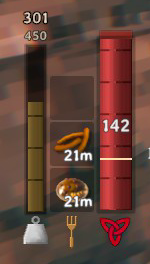
Food bonuses shrink as the food wears off. At half its time a food gives about 81% of its health, stamina and eitr.
- A faint segment past the end of each bar shows what you've lost: red on health, gold on stamina, purple on eitr.
- That's exactly what eating fresh food would give back.
- Each bar has its own switch and color.
Food reminders
A toast at the top of the screen with the food's icon, name and time left.
| Reminder | Default | When |
|---|---|---|
| Running out | On | A food drops under 4 minutes (adjustable) |
| Can eat again | Off | A food passes half its time, when the game lets you eat it again |
| No food | On | While you have no food, until you eat or press Backspace |
- Each reminder shows once per food and fades after 6 seconds.
- A soft chime with each, which can be turned down or off.
Compass

A strip at the top center for calling out directions: "trolls at 210".
- Heading in degrees under the center mark, optionally with the direction (212 SW).
- Shows 120 degrees by default.
- Friends in their colors. A friend behind you waits at the edge with an arrow.
- Your map pins, bed, tombstone and bosses within 300 m, and map pings at any distance.
- Look at a marker to see its name and distance. Or show distance under every marker.
- Overlapping markers merge with a count, and at most 12 show at once.
- Up and down arrows on markers 10 m or more above or below you.
- Moves down under a boss bar or raid banner.
Buff icons
- The game's buff icons at 90% size (set 1 for the game's size).
- Wrap to a new row before reaching the compass.
Day/night bar
A bar on top of the minimap covering the whole day, with a marker for now.
- Dusk in 6:40 by day, Dawn in 2:10 by night. Turns orange in the last minute before dark.
- The day number, and an optional 24-hour clock.
- Uses the game's clock, synced from the server.
Rested countdown
While Resting, Rested in 14s counts down above the Resting buff, with a chime at the end (can be turned off). It reads the game's own timer.
Save countdown
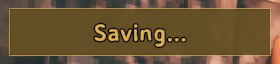
The auto-save every 30 minutes can freeze a big world for a moment. A box counts down World save in 5 before it, then Saving...
- Exact in single player and as host. On a dedicated server it uses the server's 30-second save warning.
- Your character's own save shows as Character save in 5.
- A tick each second, which can be turned off. Start time and position are adjustable.
Bench pins
Building a workbench adds a map pin with a Norse name like Hrafnvik or Trollhaven.
- No new pin within 50 m of an existing one, so one base gets one pin.
- Choose the icon (fire, house, hammer, dot, portal) and the name (random, station name, or none).
- 100 prefixes and 100 suffixes, both editable in F7.
- Workbenches only by default; can include forges and other stations.
- Removing the bench with the hammer removes its pin, or moves it to another bench nearby. Can be turned off.
Auto repair
Opening a crafting station repairs every item it can, as if you'd pressed its repair button for each.
- Same rules as the button: station type and level decide what gets fixed.
- Same Crafting XP as repairing by hand.
- One sound and one message (Repaired 4 items). The message can be turned off.
Settings window
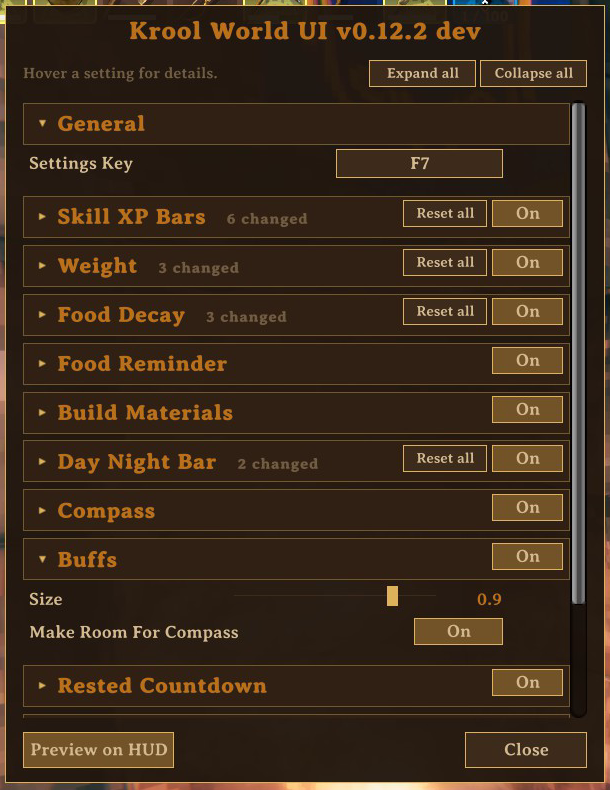
Press F7 in game.
- One section per feature, each with an On/Off switch.
- Hover a setting for what it does, its default and its range.
- Reset next to anything changed, Reset all per section.
- Preview on HUD shows sample versions of everything so you can place and size them.
The same settings are in BepInEx/config/krool.kroolworldui.cfg. Colors there are hex RRGGBBAA.
Full settings list
Generated from the mod's code, so it matches the F7 window.
General
| Setting | Default | Range or choices | What it does |
|---|---|---|---|
| Settings Key | F7 | Any key | Key that opens this settings window. |
Skill XP Bars
| Setting | Default | Range or choices | What it does |
|---|---|---|---|
| Enabled | On | Show a skill on the HUD while you gain XP in it. | |
| Style | Tiles | Tiles, Rows | Tiles: the skill icon with its XP bar underneath, side by side. Rows: a wide bar with the icon on the left, stacked. |
| Placement | Bottom Right | Bottom Right, Below Stamina, Right Side, Custom | Bottom Right: above the key hints, growing left. Below Stamina: centered under the stamina bar. Right Side: right edge of the screen, below the minimap. Custom: placed by Anchor X and Anchor Y. |
| Tile Size | 64 | 40 to 128 | Tiles: width in HUD pixels. The tile is a third taller than it is wide. |
| Tile Level | Off | Tiles: show the skill level in the tile's corner. | |
| Labels | Name And Level | Name And Level, Icon Only | Rows: Name And Level shows the skill name and level on the bar. Icon Only: just the icon and the bar. |
| Show Gain Text | On | Rows with Name And Level: show the XP gained since the bar appeared, as a percent of a level. | |
| Bar Width | 220 | 100 to 500 | Rows: width of one bar in HUD pixels. |
| Bar Height | 22 | 12 to 48 | Rows: height of one bar in HUD pixels. |
| Bar Color | DBA847FF |
Hex RRGGBBAA (AA = opacity) | Bar color. Progress you had is a darker shade, new XP a lighter one. |
| Hold Seconds | 3 | 0.5 to 30 | Seconds a bar stays fully visible after the last XP gain. |
| Fade Seconds | 0.6 | 0 to 5 | Seconds the fade-out takes. |
| Max Bars | 4 | 1 to 10 | Most skills shown at once (fewer if they would not fit on screen). The stalest one is reused past this. |
| Offset X | 0 | -400 to 400 | Nudge left (-) or right (+), in HUD pixels. |
| Offset Y | 0 | -400 to 400 | Nudge down (-) or up (+), in HUD pixels. |
| Anchor X | 0.5 | 0 to 1 | Custom placement: horizontal center (0 = left of screen, 1 = right). |
| Anchor Y | 0.3 | 0 to 1 | Custom placement: top edge (0 = bottom of screen, 1 = top). |
| Floating Text | Every Gain | Off, Every Gain, Level Up Only | Float each XP gain over your character like a damage number, seen only by you. Level Up Only: just new levels. |
| Floating Text Color | 73B8FFFF |
Hex RRGGBBAA (AA = opacity) | Color of the floating XP text. |
Weight
| Setting | Default | Range or choices | What it does |
|---|---|---|---|
| Enabled | On | Show your carry weight on the HUD, left of the food icons. | |
| Show | Always | Always, Near Limit, When Changed | Always. Near Limit: only at or above Near Limit Percent. When Changed: for a few seconds after your weight changes. |
| Near Limit Percent | 80 | 10 to 100 | Percent of max weight where the bar turns to the near-limit color (and where it appears, in Near Limit mode). |
| Changed Seconds | 3 | 1 to 15 | When Changed mode: seconds the bar stays after a change. |
| Colors | Thresholds | Thresholds, Gradient, Single | Thresholds: fill color, near-limit color past Near Limit Percent, over color when overweight. Gradient: blends from fill to near-limit to over as you fill up. Single: always the fill color. |
| Fill Color | FAC761FF |
Hex RRGGBBAA (AA = opacity) | Bar color under the limit. |
| Near Limit Color | FF8C1FFF |
Hex RRGGBBAA (AA = opacity) | Bar color near the limit. |
| Over Color | DB291FFF |
Hex RRGGBBAA (AA = opacity) | Bar color when overweight. |
| Text | Current And Max | Current And Max, Current, Percent, None | Numbers above the bar: current over max, current only, percent, or none. |
| Text Size | 16 | 10 to 28 | Font size of the numbers. |
| Bar Length | 110 | 40 to 220 | Bar length in HUD pixels at the normal 300 max weight. |
| Bar Thickness | 16 | 6 to 32 | Bar thickness in HUD pixels (the health bar is 32). |
| Scale With Max Weight | On | Grow the bar with your max weight: a Megingjord (+150) makes it 50% longer. | |
| Offset X | 0 | -200 to 200 | Nudge left (-) or right (+), in HUD pixels. |
| Offset Y | 0 | -200 to 300 | Nudge down (-) or up (+), in HUD pixels. |
Food Decay
| Setting | Default | Range or choices | What it does |
|---|---|---|---|
| Enabled | On | Extend the health, stamina and eitr bars with faint segments showing the max your foods have lost as they wear off: what eating fresh food would give back. | |
| Health | On | Segment on the health bar. | |
| Health Color | BF2E2473 |
Hex RRGGBBAA (AA = opacity) | Color of the lost-health segment. Lower the last two digits to make it fainter. |
| Stamina | On | Segment on the stamina bar. Like the bar itself, it shows only while your stamina is not full. | |
| Stamina Color | EBB83373 |
Hex RRGGBBAA (AA = opacity) | Color of the lost-stamina segment. |
| Eitr | On | Segment on the eitr bar (eitr foods only). Shows only while your eitr is not full. | |
| Eitr Color | 9961E673 |
Hex RRGGBBAA (AA = opacity) | Color of the lost-eitr segment. |
Food Reminder
| Setting | Default | Range or choices | What it does |
|---|---|---|---|
| Enabled | On | Food reminders on the HUD. The switches below pick which ones. | |
| Running Out | On | Remind when a food has less than Threshold Minutes left. | |
| Threshold Minutes | 4 | 1 to 15 | Running-out reminder: minutes left that trigger it. |
| Can Eat Again | Off | Remind when a food can be eaten again (the game allows it once half its time has passed). | |
| No Food Message | On | Keep a message up while you have no food, until you eat or press Dismiss Key. Shows on a new character after the arrival, and after respawning. | |
| No Food When | No Food | No Food, Any Slot Empty | No Food: only when all your food is gone. Any Slot Empty: whenever a food slot is free. |
| Dismiss Key | Backspace | Any key | Hides the no-food message until you next eat. |
| Show Seconds | 6 | 2 to 20 | How long a reminder stays on screen. |
| Sound | On | Play a soft chime with each reminder. | |
| Sound Volume | 0.35 | 0.05 to 1 | Chime volume (also follows the game's sound settings). |
| Anchor X | 0.5 | 0 to 1 | Horizontal position of the reminder's center (0 = left, 1 = right). |
| Anchor Y | 0.84 | 0 to 1 | Vertical position of the reminder's top edge (0 = bottom, 1 = top). It moves down on its own to clear the raid banner. |
Build Materials
| Setting | Default | Range or choices | What it does |
|---|---|---|---|
| Enabled | On | While a build tool is out, count the materials you carry, so you can watch your wood and stone as you build. | |
| Selected Piece | On | List what the selected piece costs, each with how many you carry. Red when you are short. | |
| Cost Only | On | With a piece selected, list only what it costs. The materials below show when nothing is selected. Off: list them alongside the cost. | |
| Can Build Count | On | Show how many of the selected piece your materials cover. | |
| Placement | Beside Build Info | Beside Build Info, Custom | Beside Build Info: right of the selected-piece box at the bottom center. Custom: placed by Anchor X and Anchor Y. |
| Anchor X | 0.8 | 0 to 1 | Custom placement: left edge (0 = left of screen, 1 = right). |
| Anchor Y | 0.1 | 0 to 1 | Custom placement: bottom edge (0 = bottom of screen, 1 = top). |
| Wood | When Known | Always, When Known, When Carried, Never | When to list Wood. When Known: once your character has picked one up. When Carried: only while you have some. |
| Stone | When Known | Always, When Known, When Carried, Never | When to list Stone. When Known: once your character has picked one up. When Carried: only while you have some. |
| Core Wood | When Known | Always, When Known, When Carried, Never | When to list Core Wood. When Known: once your character has picked one up. When Carried: only while you have some. |
| Fine Wood | When Known | Always, When Known, When Carried, Never | When to list Fine Wood. When Known: once your character has picked one up. When Carried: only while you have some. |
| Resin | When Carried | Always, When Known, When Carried, Never | When to list Resin. When Known: once your character has picked one up. When Carried: only while you have some. |
| Bronze Nails | When Carried | Always, When Known, When Carried, Never | When to list Bronze Nails. When Known: once your character has picked one up. When Carried: only while you have some. |
| Iron Nails | When Carried | Always, When Known, When Carried, Never | When to list Iron Nails. When Known: once your character has picked one up. When Carried: only while you have some. |
| Black Marble | When Carried | Always, When Known, When Carried, Never | When to list Black Marble. When Known: once your character has picked one up. When Carried: only while you have some. |
| Yggdrasil Wood | When Carried | Always, When Known, When Carried, Never | When to list Yggdrasil Wood. When Known: once your character has picked one up. When Carried: only while you have some. |
| Grausten | When Carried | Always, When Known, When Carried, Never | When to list Grausten. When Known: once your character has picked one up. When Carried: only while you have some. |
| Ashwood | When Carried | Always, When Known, When Carried, Never | When to list Ashwood. When Known: once your character has picked one up. When Carried: only while you have some. |
| Other Materials | More materials to list with the ones above, by the names the game shows, separated by commas (for example: Copper, Deer Hide). |
Day Night Bar
| Setting | Default | Range or choices | What it does |
|---|---|---|---|
| Enabled | On | A day and night bar above the minimap: where you are in the day, and how long until dusk or dawn. | |
| Countdown | On | Show the time left until dusk (by day) or dawn (by night). | |
| Day Number | On | Show the day number. | |
| Clock | Off | Show the time of day as a 24-hour clock: 06:00 is sunrise, 18:00 sunset. | |
| Dusk Warning Seconds | 60 | 0 to 300 | The dusk countdown turns orange this many seconds before night. 0 = never. |
| Bar Height | 10 | 6 to 18 | Bar height in HUD pixels. |
| Day Color | DBAD52D9 |
Hex RRGGBBAA (AA = opacity) | Color of the day part. |
| Night Color | 212B5CE6 |
Hex RRGGBBAA (AA = opacity) | Color of the night part. |
Compass
| Setting | Default | Range or choices | What it does |
|---|---|---|---|
| Enabled | On | A compass strip at the top of the screen with your heading, friends and nearby map pins. | |
| Size | 1 | 0.6 to 2 | Overall size of the compass. |
| Field Of View | 120 | 60 to 240 | How many degrees of the compass the strip shows. Narrower is easier to read. |
| Width | 520 | 300 to 1000 | Strip width in HUD pixels. |
| Opacity | 0.9 | 0.2 to 1 | Overall opacity of the compass. |
| Offset Y | 0 | 0 to 300 | Nudge down from the top of the screen, in HUD pixels. |
| Heading | On | Your exact heading under the center mark (0 = north, 90 = east), for call-outs. | |
| Heading Direction | Off | Add the compass direction after the heading: 212 SW. | |
| Focus Info | On | Name of the marker you are looking at, beside the heading. Stacked markers show how many are there. | |
| Distance | Focused | Focused, All Markers, Off | Focused: the distance of the marker you are looking at, beside its name. All Markers: also a small number under every marker. Off: no distances. |
| Friends | On | Other players, each in their own color. Held at the strip's edge when they are behind you. Far-away players show only if they are visible on the map. | |
| Pins | On | Pins you placed on the map, bench pins included. | |
| Bed | On | Your bed (spawn point). | |
| Tombstone | On | Where you died. | |
| Bosses | On | Boss altars and other boss locations on your map. | |
| Pings | On | Map pings from you and your friends, at any distance. | |
| Pin Range | 300 | 50 to 2000 | Pins farther than this (meters) are left off. Friends and pings ignore it. |
| Max Markers | 12 | 3 to 24 | Most markers on the strip at once; pings and friends come first, then the nearest. |
| Height Arrow Meters | 10 | 0 to 50 | A small up or down arrow on markers this far above or below you. 0 = off. |
| Animations | On | Markers ease in and out, grow when you look at them, and pings pulse. Off: plain fades only. |
Buffs
| Setting | Default | Range or choices | What it does |
|---|---|---|---|
| Enabled | On | Resize the buff icons at the top right and keep them clear of the compass. | |
| Size | 0.9 | 0.5 to 1 | Buff icon size; 1 is the game's own (large) size. |
| Make Room For Compass | On | Start a new row of buffs before they reach the compass, instead of running under it. |
Rested Countdown
| Setting | Default | Range or choices | What it does |
|---|---|---|---|
| Enabled | On | While you are resting (sitting or under a roof, near a fire), counts down the seconds until you become Rested, above the Resting buff icon. | |
| Sound | On | A soft chime when you become Rested. | |
| Sound Volume | 0.35 | 0.05 to 1 | Chime volume (also follows the game's sound settings). |
Save Countdown
| Setting | Default | Range or choices | What it does |
|---|---|---|---|
| Enabled | On | Counts down the last seconds before the auto-save, so its lag spike does not catch you mid-fight. Works in single player, as host, and on a dedicated server. | |
| Seconds | 5 | 3 to 30 | How many seconds before the save the countdown starts. |
| Sound | On | A soft tick each second of the countdown. | |
| Sound Volume | 0.35 | 0.05 to 1 | Tick volume (also follows the game's sound settings). |
| Anchor X | 0.5 | 0 to 1 | Horizontal position of the countdown's center (0 = left, 1 = right). |
| Anchor Y | 0.72 | 0 to 1 | Vertical position of the countdown's center (0 = bottom, 1 = top). |
Bench Pins
| Setting | Default | Range or choices | What it does |
|---|---|---|---|
| Enabled | On | Adds a map pin when you build a workbench, so you can find your camps again. This adds a pin to your map like you would by hand. | |
| Pin Stations | Workbench Only | Workbench Only, All Crafting Stations | Workbench Only, or every crafting station (forge, stonecutter, artisan table, and so on). |
| Icon | House | Fire, House, Hammer, Dot, Portal | Which map pin icon to use. |
| Names | Random Name | Random Name, Station Name, No Name | Random Name: a Norse-sounding name from Name Prefixes + Name Suffixes. Station Name: "Workbench". No Name: just the icon. |
| Skip Near Pin Meters | 50 | 0 to 200 | No new pin if one is already on your map this close (meters), so a base gets one pin, not one per bench. 0 = always pin. |
| Remove With Bench | On | Taking the bench down with the hammer removes its pin, so a bench dropped to fix a boat leaves no trace. If another bench still stands within Skip Near Pin Meters, the pin moves to it instead. | |
| Announce | On | Show the new pin's name in the top-left messages. | |
| Name Prefixes | Ulf, Hrafn, Jarn, Frost, Grim, Skjold, Bjorn, Eld, Svart, Thor, Odin, Rune, Troll, Mead, Ash, Ygg, Valk, Draugr, Fenris, Storm, Iron, Wolf, Raven, Boar, Elk, Ember, Hel, Njord, Sig, Hjalm, Gunn, Kald, Myrk, Vind, Stein, Gull, Sol, Eikthyr, Bonemass, Greyling, Freyr, Freya, Baldr, Tyr, Loki, Heimdal, Vidar, Skadi, Bragi, Idun, Frigg, Ullr, Mimir, Surt, Ymir, Jotun, Fafnir, Nidhogg, Sleipnir, Hugin, Munin, Geri, Freki, Moder, Yagluth, Fulling, Lox, Serpent, Neck, Blod, Dverg, Alf, Hvit, Raud, Gra, Kol, Haug, Skog, Fjall, Snae, Bear, Orn, Oak, Birch, Pine, Thunder, Bone, Copper, Silver, Amber, Horn, Tusk, Antler, Mist, Ice, Black, Gold, Saga, Skald, Wyrm | First halves of random names, separated by commas. | |
| Name Suffixes | heim, gard, vik, stad, borg, holt, fjord, hall, by, hold, keep, stead, haven, mark, fell, dal, ness, wall, rest, ford, hof, skali, rock, watch, hearth, thorp, tun, vang, berg, havn, sund, ey, lund, mire, moor, mere, strand, haug, stein, garth, helm, hollow, hill, crag, peak, spire, tower, gate, bridge, crossing, ridge, reach, rise, falls, wood, grove, glade, field, vale, marsh, fen, bay, port, harbor, shore, cove, isle, point, cliff, cairn, barrow, howe, mound, ring, forge, mill, lodge, camp, post, fort, bastion, bulwark, rampart, longhouse, steading, saeter, hus, bol, toft, rud, vin, akr, hagi, lid, bekk, foss, hammar, tind, vatn, grip | Second halves of random names, separated by commas. |
Auto Repair
| Setting | Default | Range or choices | What it does |
|---|---|---|---|
| Enabled | On | Opening a workbench, forge or other crafting station repairs every item it can, like pressing its repair button once per item. | |
| Announce | On | Show how many items were repaired in the middle of the screen. |
Settings saved by an older version keep their values. Removed settings are ignored.
Install
- r2modman / Thunderstore Mod Manager: search for Krool World UI and install.
- Manual: install BepInExPack Valheim, then put
KroolWorldUI.dllinBepInEx/plugins.
Compatibility and tips
- Used in a modpack with EpicLoot, ExtraSlots, AdventureBackpacks, Quick Stack, MultiUserChest, PlantEverything and Warfare.
- If something overlaps another mod's HUD, move it with the offsets in F7. Preview on HUD shows where things land.
- Too many XP popups while running or sneaking: set FloatingText to Level Up Only.
- Updates keep your saved settings. Use Reset in F7 to take new defaults.
Source, issues and changelog: github.com/Krool/KroolWorldUI. MIT licensed.