
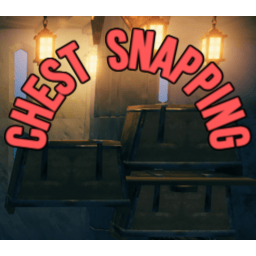
ChestSnapping
Lets chests use Valheim's built-in snap system. Press Q/E while placing to pick one of 14 snap points. Works with modded chests, and the snap points can be adjusted in-game.Chest Snapping
Lets chests and other containers use Valheim's built-in snap system, the same way walls and floors do.
While placing a chest, press Q / E to cycle through its snap points. The normal message in the middle of the screen shows which one is active (for example Snapping: Bottom Front Left). Nothing about input or messages is re-implemented: vanilla already does the cycling and the message for any piece that has snap points. This mod just gives chests snap points.
Client-side only. Other players and servers do not need it (if they do have it, the versions must match).
Install
Requires BepInEx (BepInExPack_Valheim), Jötunn and KydlCore. A mod manager such as Gale installs them for you.
Install with a mod manager, or put ChestSnapping.dll in BepInEx/plugins (Jötunn and KydlCore need to be installed as well).
Snap points (cycle order)
| # | Name |
|---|---|
| 1-4 | Bottom Front Left, Bottom Front Right, Bottom Back Left, Bottom Back Right |
| 5-8 | Top Front Left, Top Front Right, Top Back Left, Top Back Right |
| 9-14 | Bottom Center, Top Center, Back Center, Front Center, Left Center, Right Center |
Points are placed on the chest's real collider bounds, so chests snap flush against each other. Front is the chest's local +Z and Right is +X, from the chest's own point of view. Names are localizable (English is provided, other languages fall back to English).
How to use it: pick a point on the chest you are holding (for example Bottom Back Right), aim near a snap point on another piece (another chest's corner or face center, or a wall/floor corner), and it locks on within vanilla's snap range (0.5 m). Rotation still matters: match the other chest's rotation with the normal rotate controls so the faces line up.
Stacking chests without planks
Vanilla only lets you put a chest on top of another chest when a plank or floor sits between them (a chest does not count as a building support). With [Stacking] Enable (on by default) a chest you aim at another chest is accepted, so you can stack chests directly, with or without a snap point selected. A chest under another chest counts as its support (otherwise the game destroys the top chest after about 30 seconds); a chest still supports nothing else, so floors, walls and the like cannot be built on it. Turn it off in the KY hub (F6) or the config to get vanilla behaviour back.
For mod authors
To let your own storage chest snap and stack, call ChestSnappingApi.RegisterChest("YourPrefabName") (public static class in the ChestSnapping assembly, namespace ChestSnapping; UnregisterChest, IsChest(GameObject), IsStackingOn() and ApiVersion are there too). No reference is needed: Type.GetType("ChestSnapping.ChestSnappingApi, ChestSnapping")?.GetMethod("RegisterChest")?.Invoke(null, new object[] { "YourPrefabName" }). Registering before ChestSnapping loads works. The player's ExcludedPrefabs and the [Prefabs] / [Stacking] switches still decide.
Built-in chests: piece_chest_wood, piece_chest, piece_chest_private, piece_chest_blackmetal, piece_chest_grausten, the wardrobe (piece_chest_warderobe), the barrel (piece_chest_barrel) and the three pots (piece_pot1, piece_pot2, piece_pot3, with their cracked and red variants).
Modded chests (or future vanilla chests)
No recompile needed. Use either way:
Console (F5)
The console commands below exist only while the developer's KydlTools mod is loaded in that world. Without it, use the config file (next section).
| Command | What it does |
|---|---|
chestsnap_list [filter] |
Lists every buildable container prefab and whether it has snap points. |
chestsnap_add <prefab> |
Adds a prefab. Saved to the config, existing chests update immediately. |
chestsnap_remove <prefab> |
Takes a prefab you added back off the list. |
Config file BepInEx/config/com.kydldev.ChestSnapping.cfg
ExtraPrefabs: comma-separated prefab names.ExcludedPrefabs: prefabs that should not get snap points (also works for the built-in ones).AutoDetectContainers(default off): every buildable piece with aContaineron its root (ships and carts excluded) gets snap points automatically. Good for big modpacks, useExcludedPrefabsfor anything it catches that you do not want.
Prefab names are not case-sensitive.
Adjusting the snap points
Some modded chests have an oversized invisible collider or an off-center model, which puts the snap points in the wrong place. Each chest can be tuned separately. All distances are in meters along the chest's own axes (+X right, +Y up, +Z front). Both 0.05 and 0,05 are accepted in the console.
The console commands below exist only while the developer's KydlTools mod is loaded in that world. Without it, use the config file (next section).
| Command | What it does |
|---|---|
chestsnap_show [on|off] |
Draws a sphere on every snap point (yellow = corners, cyan = face centers). Session only. |
chestsnap_info <prefab> |
Prints the measured box, the current adjustments and where each of the 14 points ends up. |
chestsnap_shift <prefab> x y z |
Moves all points together. |
chestsnap_grow <prefab> x y z |
Adds to the box's half-size per axis. 0.05 makes the box 10 cm bigger on that axis, negative values shrink it. |
chestsnap_point <prefab> <point> x y z |
Offsets a single point. <point> is 1-14 (the Q/E order) or a name such as top_front_left. |
chestsnap_reset <prefab> [point] |
Clears the adjustments of a chest, or of just one point. |
Setting a value to 0 0 0 clears it. Changes apply to chests that are already standing, and are saved in the config.
Example for a chest whose collider is 10 cm too wide and deep:
chestsnap_list crate
chestsnap_add MyMod_Crate
chestsnap_show on
chestsnap_grow MyMod_Crate -0.05 0 -0.05
chestsnap_point MyMod_Crate top_center 0 0.02 0
chestsnap_show off
The adjustments are stored in the PrefabAdjustments config entry and can be edited by hand. Entries are separated by ;:
MyMod_Crate: shift=0,0.05,0 grow=-0.05,0,-0.05 p9=0,0.02,0; OtherChest: grow=0.1,0,0
Numbers always use . as the decimal separator in the config file, whatever language your system uses.
Configuration
BepInEx/config/com.kydldev.ChestSnapping.cfg, or the Settings tab of ChestSnapping in the KY hub (F6, KydlCore). Changes apply right away to chests that are already built.
| Section | Setting | Default | What it does |
|---|---|---|---|
| General | Enable Mod | true | Switches the whole mod on / off while playing |
| General | Enable Prefabs | true | Chests get snap points (off removes them) |
| Prefabs | ExtraPrefabs | (empty) | Extra chest prefab names that get snap points |
| Prefabs | ExcludedPrefabs | (empty) | Prefab names that never get snap points |
| Prefabs | AutoDetectContainers | false | Every buildable container gets snap points |
| General | Enable Offsets | true | Apply the saved adjustments below |
| Offsets | PrefabAdjustments | (empty) | Per-prefab shift / grow / point offsets (the console commands write it) |
| DebugLog | Enable | false | Detailed lines in the BepInEx log for bug reports |
Multiplayer
Nothing is synced: snap points are a local help while you place a piece, and the placed chest is a normal vanilla piece. Other players and servers do not need the mod. If both sides have it, the version has to match exactly.
Bug reports
Turn on [DebugLog] Enable, reproduce the problem, and attach BepInEx/LogOutput.log.
How it works
Vanilla snapping (Player.FindClosestSnapPoints / Piece.GetSnapPoints) looks for direct children of a Piece tagged snappoint. A Harmony postfix on Piece.Awake adds 14 such children to matching chests, for placed chests and for the placement ghost. Q/E (m_manualSnapPoint) and the $msg_snapping message are vanilla code and untouched.
Known limitations
- Prefab bounds come from non-trigger colliders (mesh bounds as a fallback). A chest with an oversized invisible collider gets oversized snap points. Use
chestsnap_growto fix that. - Vanilla only snaps the ghost's points to other pieces' snap points, not to terrain.
- Debug spheres from
chestsnap_showare depth-tested, so parts of them can be hidden inside the chest model.
Get help and stay in touch
Questions, bug reports, ideas or mod requests? Come say hi in the KydlDev Discord: https://discord.gg/tX2CcTNC4W Everyone is welcome, and it is the quickest way to reach me. Source code and issues: https://github.com/kydlDev