

You are viewing a potentially older version of this package. View Latest Version
TimeWeatherHud
A Valheim-styled HUD with day, time, weather and a Subnautica-style compass with map markers, plus an in-game settings window (F9 / ESC menu). Uses the game font for every language.TimeWeatherHud
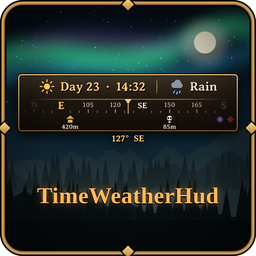
A small, Valheim-styled HUD that shows the world day, the in-game time, the current weather and a Subnautica-style strip compass with map markers — all in one window, with an in-game settings window.
Unofficial mod. Not affiliated with or endorsed by Iron Gate. Free forever — no paywalled features.
☕ Enjoying it? You can support development on Ko-fi — completely optional.
Screenshots


Features
- Day · Time – "Day 23 · 14:32" with a sun or moon icon (24-hour or 12-hour clock).
- Weather – Clear, Cloudy, Mist, Rain, Thunderstorm, Snow, Blizzard, Ash rain, Boss and Indoors, each with its own icon.
- Strip compass – a heading strip that slides as you turn (N in red, numbers every 15°), with the exact heading (e.g.
127° SE) below. - Compass markers – pick map pins (tombstones, boss locations, bed, your own pins) on a world map or in a list and see them on the compass with their distance. Pins outside the view wait at the edge of the strip. Tombstones are on by default.
- In-game settings window – press F9 or choose ESC menu > HUD Settings. Tabs: Markers, HUD, Compass, General; every change shows on the HUD right away.
- Uses the game's own HUD font (Averia Serif plus the game's fallback fonts), so every language looks like the rest of Valheim's UI.
- Press F7 to show / hide. Hides automatically with Ctrl+F3 and while the map, inventory or menu is open.
- Choose the screen position, offset and size. English & Korean (follows your game language).
- Client-side only: install it just for yourself, works in multiplayer.
Settings window
Open it with F9 or ESC menu > HUD Settings.
- Markers – your map pins grouped by type, next to a world map. Click a pin on the map or in the list to show / hide it on the compass; drag to pan, wheel to zoom.
- HUD – what to show, position (6 anchors), offset and size.
- Compass – compass / heading on-off, width, visible degrees, max markers and distance.
- General – language, game font, shortcuts and Reset to defaults.
Config (BepInEx/config/lazly.valheim.timeweatherhud.cfg)
Everything below can also be changed in the settings window (F9).
| Key | Default | Description |
|---|---|---|
General.ToggleKey |
F7 |
Show / hide key |
Layout.Anchor |
TopCenter |
TopCenter / TopLeft / TopRight / BottomLeft / BottomRight / BottomCenter |
Layout.OffsetX, Layout.OffsetY |
0, 12 |
Fine position (pixels at 1080p) |
Layout.Scale |
1 |
Size (0.5 – 3) |
Display.ShowDay / ShowTime / ShowWeather |
true |
Toggle each part |
Display.Use24Hour |
true |
24-hour or 12-hour (AM/PM) clock |
Compass.ShowCompass |
true |
Show the strip compass |
Compass.StripWidth |
320 |
Window width (pixels at 1080p) |
Compass.StripDegrees |
120 |
How many degrees the strip shows at once |
Compass.ShowHeading |
true |
Show the exact heading under the compass |
Markers.ShowMarkers |
true |
Show the picked map pins on the compass |
Markers.MarkerMenuKey |
F9 |
Opens the settings window |
Markers.MaxMarkers |
10 |
Markers shown at once (nearest first) |
Markers.MaxDistance |
0 |
Hide markers farther than this (m), 0 = no limit |
UI.Language |
Auto |
Auto / English / Korean |
UI.UseGameFont |
true |
Use the game HUD font (all languages) |
한국어 안내
게임 화면에 월드 날짜·게임 시각·현재 날씨와 서브노티카 풍 일자형 나침반을 발헤임 풍 창 하나로 보여 주는 HUD 모드입니다.
비공식 모드이며 Iron Gate 와 관련이 없습니다. 모든 기능 무료입니다. 도움이 되셨다면 Ko-fi 에서 커피 한 잔으로 응원해 주세요 (선택).
- 나침반: 고개를 돌리면 방위 띠가 흐르고, 아래에 정확한 방위각(예: 127° SE) 표시
- 게임 HUD 와 같은 글꼴을 써서 모든 언어가 게임 글자와 어울림 (한글은 굵게)
- 나침반 마커: 무덤·보스 위치·침대·내가 찍은 핀을 골라 나침반에 거리와 함께 표시
- 설정창:
F9또는 ESC 메뉴 > HUD 설정 (마커·HUD·나침반·기타 탭, 바꾸면 바로 적용) F7로 켜고 끄기, 위치·크기·12/24시간제 설정 가능- 내 화면에만 나오는 모드라 서버나 다른 플레이어는 설치하지 않아도 됩니다.