
RepairKits
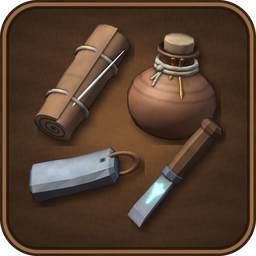
Removes free vanilla repair. Repair gear with 4 craftable repair kits that carry their own durability, spent 1:1. Armor and shield wear is reduced.RepairKits
Removes free vanilla repair and replaces it with 4 craftable repair kits that carry their own durability, spent 1:1 on your gear's lost durability. Armor and shield/block durability loss is also reduced. English/Korean.
Made by MM94.
1. Overview
- Vanilla's free "Repair" button at crafting stations is removed — gear can no longer be repaired for free.
- Instead, craft one of 4 repair kits. Each kit has its own durability pool; repairing gear consumes kit durability 1:1 for every point of durability restored.
- Armor durability lost from being hit, and shield/weapon durability lost from blocking, are both reduced by a configurable multiplier (default: 1/3 of vanilla).
2. The 4 Kits
| Kit | Handles | Recipe (default) | Crafting Station | Max Durability (default) | Weight (default) |
|---|---|---|---|---|---|
| Whetstone (숫돌) | Weapons / Tools / Bows / Crossbows (non-magic) | Stone x5, Flint x2, Resin x2 | Workbench | 3000 | 1.0 |
| Oil Jar (기름 단지) | Shields, metal armor | Resin x10, Coal x5 | Workbench | 10000 | 2.0 |
| Tanning Bundle (무두 꾸러미) | Leather/cloth armor, capes | Leather Scraps x6, Bone Fragments x4, Resin x4 | Workbench | 10000 | 1.5 |
| Rune Chisel (룬 끌) | Magic weapons (staves) | Eitr x3, Yggdrasil Wood x5 | Mage Table (Galdr table) | 3000 | 1.0 |
All recipes, max durability values, and weights above are config defaults and can be changed.
3. Repair Rules
- Repairing consumes 1 point of kit durability for every 1 point of durability restored on the gear.
- If a kit doesn't have enough durability to fully repair an item, it repairs as much as it can (partial repair).
- When a kit's durability reaches 0, it is consumed/removed.
- The kits themselves cannot be repaired (by kits or vanilla repair).
- Repairing does not require being near any crafting station — it works anywhere.
- Every item — from every biome, and from other mods — is automatically classified into the correct kit category (see below); no per-item setup needed.
4. Classification
Items are automatically sorted into one of 4 categories:
- Weapons / Tools / Bows / Crossbows (non-magic) → Whetstone
- Magic weapons (Elemental Magic / Blood Magic skill, i.e. staves) → Rune Chisel
- Shields → Oil Jar
- Armor (helmet/chest/legs/shoulder):
- If its crafting recipe contains a metal resource (Copper, Bronze, Iron, Silver, BlackMetal, Flametal, Needle, matched by name) → Oil Jar
- Otherwise (leather/cloth/etc.) → Tanning Bundle
If an item is misclassified (e.g. a modded item with an unusual recipe), use the ForcedClassification config setting to force it:
ForcedClassification = ArmorChestIronA=OilJar,TrophyX=Whetstone
Format: prefabName=KitKind pairs, comma-separated. Valid kit names: Whetstone, OilJar, TanningBundle, RuneChisel.
5. How to Use
Right-click a kit
Right-clicking a kit in your inventory bulk-repairs every damaged item of the matching category in your inventory, worn/equipped items first, then the rest of your inventory in grid order, until the kit runs out or everything is fully repaired. Can be disabled via EnableRightClickRepair.
Hover a kit and press E
Opens a dedicated repair window: an 8-slot grid to place damaged gear in, a durability cost/remaining display ("required/remaining"), and a [Repair] button (hammer icon).
- Items placed in the window are checked once when you place them — wrong-category or undamaged items are rejected with an on-screen message ("This kit cannot repair that item." / "This item is not damaged."). Once an item passes that check, repairing it further is never rejected even after it becomes fully repaired.
- Clicking [Repair]:
- If everything gets fully repaired → "Repair complete." — repaired gear is returned to your inventory automatically and the window stays open for more.
- If the kit runs out partway through → "The kit ran out. Only part was repaired." — the kit is consumed, the window closes, and everything in the grid (repaired or not) is returned to your inventory.
- If the grid is empty or nothing in it needs repair → "No damaged equipment to repair."
- Closing the window (E, Esc, or opening another kit's window) always returns the grid's contents to your inventory. If your inventory is full, leftover items are dropped on the ground at your feet instead ("Inventory full. Some items were dropped on the ground.") — nothing is ever lost.
- If another container (chest, etc.) is already open, the window won't open — you'll be told to close it first.
- Ctrl + Left-click drag on the durability display/button group moves the whole group anywhere within the panel (without triggering a repair). Its position is remembered (saved to config) across window re-opens and game restarts. The
ResetRepairOverlayPositionconfig setting moves it back to the default spot (below the 8-slot grid) when toggled on, then automatically turns itself back off.
6. Reduced Durability Loss
ArmorDurabilityRate(default 0.33): multiplies durability lost by worn armor pieces when you're hit.ShieldDurabilityRate(default 0.33): multiplies durability lost by whatever you're blocking with — a shield, or a weapon used to block/parry (e.g. a dagger). The same rate applies either way.- Durability lost from regular item use (swinging a weapon, using a tool, firing a bow) is untouched — still vanilla.
7. Vanilla Repair
- The "Repair" button at crafting stations is removed entirely.
- Building repair with the hammer is unaffected — this mod only touches item/gear repair.
- While debugmode + the noCostCheat ("B") are active, vanilla's free repair is restored automatically for testing purposes — it only applies while that cheat is on.
8. Configuration (F1 settings menu)
| Section | Setting | Description |
|---|---|---|
| General | ArmorDurabilityRate |
Durability loss multiplier for armor when hit, vs. vanilla. Default 0.33. |
| General | ShieldDurabilityRate |
Durability loss multiplier for blocking (shield or weapon), vs. vanilla. Default 0.33. |
| General | EnableRightClickRepair |
Enables right-click bulk repair. Default on. |
| General | ForcedClassification |
Manual classification overrides, see section 4. |
| General | OpenRepairWindowKey |
Key to open the repair window while hovering a kit. Default E. |
| General | EnableDiagnosticLogs |
Enables all diagnostic log lines ([RepairKits:검증]/[재질]/[패치순서]/[내구도]/[수리창]) for troubleshooting. Default off. |
| General | DropModelBrightness |
Brightness multiplier (0.3–1.5) for a kit's dropped-on-ground model. Default 1.0. |
| General | RepairOverlayPosition |
Internal — saved position of the repair window's display/button group. Don't edit by hand. |
| General | ResetRepairOverlayPosition |
Turn on to reset the display/button group to its default position (auto turns back off). |
| Whetstone | MaxDurability / Recipe / Weight |
See the kit table above for defaults. |
| OilJar | MaxDurability / Recipe / Weight |
See the kit table above for defaults. |
| TanningBundle | MaxDurability / Recipe / Weight |
See the kit table above for defaults. |
| RuneChisel | MaxDurability / Recipe / Weight |
See the kit table above for defaults. |
Recipe changes take effect on the next game restart; everything else applies immediately.
9. Console Command
rk_kitdur <value>— sets the durability of every repair kit in your inventory to<value>. Cheat-only (requiresdevcommands/debugmode), intended for testing the "kit runs out mid-repair" scenario.
10. Language
Korean and English text are both built in and switch automatically with the game's language setting.
11. Compatibility
- Don't combine with other mods that also remove or change vanilla repair at crafting stations — the two will conflict over the same repair button/behavior.
- Other mods that independently reduce durability loss (e.g. Jewelcrafting gem effects) stack multiplicatively with this mod's rates — both apply together.
💬 Support / Contact
Found a bug or have a suggestion? Please get in touch — attaching your BepInEx log file (BepInEx/LogOutput.log) helps a lot.
- Email: [email protected]
한국어 요약
바닐라의 무료 수리를 제거하고, 자체 내구도를 가진 수리 키트 4종으로 대신 수리합니다. 수리는 키트 내구도를 1:1로 소모하며, 방어구 피격·방패/무기 막기로 잃는 내구도도 완화됩니다. 영어/한국어 내장.
1. 개요
- 제작대의 바닐라 "수리" 버튼이 제거되어 더는 무료로 장비를 고칠 수 없습니다.
- 대신 수리 키트 4종 중 필요한 것을 제작합니다. 각 키트는 자체 내구도를 가지며, 장비 내구도 1을 회복할 때마다 키트 내구도 1이 소모됩니다.
- 방어구가 피격으로 잃는 내구도와 방패·무기로 막기할 때 잃는 내구도 모두 배율(기본 1/3)만큼 줄어듭니다.
2. 키트 4종
| 키트 | 담당 분류 | 레시피(기본값) | 제작대 | 최대 내구도(기본값) | 무게(기본값) |
|---|---|---|---|---|---|
| 숫돌 (Whetstone) | 무기/도구/활/석궁(비마법) | 돌 x5, 플린트 x2, 수지 x2 | 작업대 | 3000 | 1.0 |
| 기름 단지 (Oil Jar) | 방패, 금속 방어구 | 수지 x10, 석탄 x5 | 작업대 | 10000 | 2.0 |
| 무두 꾸러미 (Tanning Bundle) | 가죽/천 방어구, 망토 | 가죽 조각 x6, 뼛조각 x4, 수지 x4 | 작업대 | 10000 | 1.5 |
| 룬 끌 (Rune Chisel) | 마법 무기(지팡이) | 에이트르 x3, 위그드라실 나무 x5 | 갤드르 테이블(마법 제작대) | 3000 | 1.0 |
위 레시피·최대 내구도·무게는 모두 config 기본값이며 변경할 수 있습니다.
3. 수리 규칙
- 장비 내구도 1을 회복할 때마다 키트 내구도 1이 차감됩니다.
- 키트 내구도가 모자라면 가능한 만큼만 수리합니다(부분 수리).
- 키트 내구도가 0이 되면 키트는 소멸(제거)됩니다.
- 키트 자신은 키트로도, 바닐라 수리로도 수리할 수 없습니다.
- 제작대 근처가 아니어도 어디서든 수리할 수 있습니다.
- 모든 바이옴·다른 모드 아이템까지 전부 자동으로 올바른 분류에 배정됩니다 — 개별 설정 불필요.
4. 분류 방식
- 무기/도구/활/석궁(비마법) → 숫돌
- 마법 무기(원소 마법/피의 마법 스킬, 즉 지팡이) → 룬 끌
- 방패 → 기름 단지
- 방어구(투구/상의/하의/망토):
- 제작 레시피에 금속 재료(구리, 청동, 철, 은, 검은금속, 화염금속, 니들 등 이름으로 판별)가 포함되면 → 기름 단지
- 그 외(가죽/천 등) → 무두 꾸러미
분류가 잘못된 경우(예: 특이한 레시피를 쓰는 모드 아이템)엔 ForcedClassification 설정으로 강제 지정할 수 있습니다.
ForcedClassification = ArmorChestIronA=OilJar,TrophyX=Whetstone
형식: 프리팹이름=키트종류 쌍을 쉼표로 구분. 키트종류: Whetstone, OilJar, TanningBundle, RuneChisel.
5. 사용 방법
키트 우클릭: 인벤토리의 키트를 우클릭하면 같은 분류의 손상된 장비를 일괄 수리합니다(장착 중인 장비 먼저, 그다음 인벤토리 칸 순서대로, 키트가 떨어지거나 전부 수리될 때까지). EnableRightClickRepair로 끌 수 있습니다.
키트 위에서 E: 전용 수리창이 열립니다 — 손상된 장비를 올리는 8칸 그리드, 소모량/잔여량 표시, [수리] 버튼(망치 아이콘).
- 칸에 올린 아이템은 올리는 순간 1회 검사합니다 — 분류가 안 맞거나 손상되지 않은 아이템은 안내 문구와 함께 거부됩니다("이 키트로는 수리할 수 없는 장비입니다." / "손상되지 않은 장비입니다."). 한 번 검사를 통과한 아이템은 이후 완전히 수리되어도 다시 거부되지 않습니다.
- [수리] 클릭 시:
- 전부 수리되면 → "수리를 완료했습니다." — 수리된 장비는 자동으로 인벤토리에 반환되고 수리창은 열린 채 유지됩니다.
- 도중에 키트가 떨어지면 → "키트를 다 써서 일부만 수리했습니다." — 키트가 소멸되고, 창이 닫히며 칸의 모든 장비(수리됐든 안 됐든)가 인벤토리로 반환됩니다.
- 칸이 비었거나 손상된 장비가 없으면 → "수리할 손상된 장비가 없습니다."
- 창을 닫으면(E, Esc, 또는 다른 키트의 창을 염) 항상 칸의 내용물이 인벤토리로 반환됩니다. 인벤토리가 가득 차 있으면 남은 장비는 발밑에 떨어집니다("인벤토리가 가득 차서 일부 장비를 바닥에 내려놓았습니다.") — 장비가 사라지는 일은 없습니다.
- 다른 상자(궤짝 등)가 이미 열려 있으면 수리창이 열리지 않고, 먼저 닫아달라는 안내가 뜹니다.
- 소모량 표시·[수리] 버튼 묶음은 Ctrl + 좌클릭 드래그로 패널 안 어디로든 옮길 수 있습니다(드래그 중에는 수리가 실행되지 않음). 옮긴 위치는 config에 저장되어 창을 다시 열거나 게임을 재시작해도 유지됩니다.
ResetRepairOverlayPosition설정을 켜면 기본 위치(8칸 아래)로 되돌리고 자동으로 다시 꺼집니다.
6. 내구도 감소 완화
ArmorDurabilityRate(기본 0.33): 피격 시 착용 방어구가 잃는 내구도에 곱해지는 배율.ShieldDurabilityRate(기본 0.33): 막기에 사용한 것(방패든, 막기/패링용으로 쓴 무기든 — 예: 단검)이 잃는 내구도에 곱해지는 배율. 둘 다 같은 배율이 적용됩니다.- 무기 휘두름·도구 사용·활 발사 등 사용 1회당 소모되는 내구도는 그대로 바닐라입니다.
7. 바닐라 수리
- 제작대의 "수리" 버튼은 완전히 제거됩니다.
- 망치로 건축물을 수리하는 기능은 영향받지 않습니다 — 이 모드는 장비/아이템 수리만 건드립니다.
- debugmode + 노코스트 치트("B")가 켜져 있는 동안에는 테스트 목적으로 바닐라 무료 수리가 자동으로 복구됩니다 — 그 치트가 켜져 있을 때만 적용됩니다.
8. 설정 (F1 설정창)
위 영어 표와 동일한 항목이 들어 있습니다: General 섹션의 ArmorDurabilityRate/ShieldDurabilityRate/EnableRightClickRepair/ForcedClassification/OpenRepairWindowKey/EnableDiagnosticLogs/DropModelBrightness/RepairOverlayPosition(내부 저장용)/ResetRepairOverlayPosition, 그리고 키트별 섹션(Whetstone/OilJar/TanningBundle/RuneChisel)의 MaxDurability/Recipe/Weight. 레시피 변경은 다음 재시작부터 적용되고, 나머지는 즉시 적용됩니다.
9. 콘솔 명령
rk_kitdur <값>— 인벤토리의 모든 수리 키트 내구도를<값>으로 설정합니다. 치트 전용(devcommands/debugmode 필요), "수리 중 키트가 떨어지는" 상황을 테스트하기 위한 명령입니다.
10. 언어
한국어·영어가 모두 내장되어 있으며 게임 언어 설정에 따라 자동으로 전환됩니다.
11. 호환성
- 제작대의 바닐라 수리를 똑같이 바꾸는 다른 수리 모드와는 함께 쓰지 마세요 — 같은 수리 버튼/동작을 두고 서로 충돌합니다.
- 내구도 감소를 독립적으로 줄이는 다른 모드(예: Jewelcrafting의 보석 효과)와는 배율이 곱해져서 함께 적용됩니다.
문의
버그 제보나 건의사항은 이메일로 보내주세요(BepInEx 로그 파일 BepInEx/LogOutput.log 첨부 시 분석에 큰 도움이 됩니다).
- 이메일: [email protected]