

You are viewing a potentially older version of this package. View Latest Version
ChestPreview
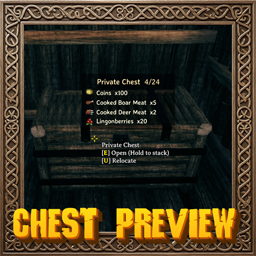
Look at a chest to see a list of everything inside it: item icons, names and combined stack counts, without opening it.🎯 ChestPreview
Look at a chest to see a list of everything inside it: item icons, names and combined stack counts, without opening it.
💶 Donations:
If you enjoy using this Valheim mod, please consider making a small donation to help support its development and future updates.
Even £1 or $1 would be greatly appreciated and would help more than you might think!
Thank you for your support, and happy gaming! ⚔️ ...... (A Paypal account is NOT required!)

⭐ Features:
- A panel lists the contents of the chest you are looking at: item icon, name, stack count and quality level.
- Shows how full the chest is (slots used / total slots) next to its name.
- Identical items are combined into a single row with a total count (can be turned off).
- Sort rows by value, weight or name, ascending or descending, and optionally limit how many rows are shown.
- The panel resizes to fit its contents, and large chests spill into up to 3 columns.
- Clean, semi-transparent black panel using Valheim's own font.
- Only works on chests you are allowed to open, so private chests stay private.
- Hidden while the inventory, menus, console, chat or other text windows are open.
- Only shows player-built chests; world/dungeon loot chests stay a surprise.
🎚️ Configuration:
Settings are in BepInEx/config/MagicMike.ChestPreview.cfg (or edit them in r2modman/Gale/Configuration Manager).
| Section | Setting | Default | Description |
|---|---|---|---|
| General | MaxEntries | -1 | Maximum number of rows to show. -1 = unlimited. Extra rows are summarised as "+N more". |
| General | SortType | Value | Sort rows by Name, Value (total value of the row) or Weight (total weight of the row). Ties are sorted by name. |
| General | SortAscending | false | Sort lowest-to-highest (A-Z for Name) instead of highest-to-lowest. |
| General | CombineStacks | true | Merge identical items into one row with a total count. |
| UI | CapacityFormat | {0}/{1} | Capacity text next to the chest name. {0} = slots used, {1} = total slots. Leave empty to hide. |
| UI | PositionX | 0.72 | Horizontal position of the panel center (0 = left, 1 = right). |
| UI | PositionY | 0.55 | Vertical position of the panel center (0 = bottom, 1 = top). |
| UI | Alpha | 0.92 | Panel opacity (0 = invisible, 1 = fully opaque). |
| UI | BackgroundAlpha | 0.66 | Opacity of the black background behind the text (0 = none, 1 = solid black). |
| UI | ShowItemImages | true | Show item icons next to each row. |
| UI | MinPanelWidth | 300 | Minimum panel width. |
| UI | MaxPanelWidth | 470 | Maximum panel width; longer names are clipped. |
💻 Installation:
Automatic Install
Plugin is created to be installed with r2modman or Gale. For Nexus downloads you will need to install manually.
Manual Install
- Un-zip and drag the
ChestPreviewfolder in yourBepInEx/plugins/folder.
💥 Plugins Created by Magic Mike:
💬 Comments/Suggestions/Help: Nexus.


