
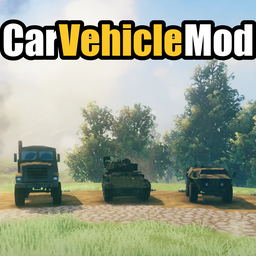
CarVehicleMod
Drivable military vehicles for Valheim: HMMWV, Cougar MRAP, MTVR, MXT-MV, M1117, LAV-AD and M3A3 Bradley. Turrets, trunks, headlights, multiplayer.Car Vehicle Mod
Drivable military vehicles for Valheim. Spawn them from the garage menu, drive with friends, crew the turrets, and keep loot in the trunk.
Also on Nexus Mods: https://www.nexusmods.com/valheim/mods/4762
Vehicles
| Vehicle | Type | Features |
|---|---|---|
| HMMWV M998 | Car | headlights, horn, trunk |
| Cougar H | MRAP | headlights, trunk |
| MTVR MK23 | Heavy truck | cargo bed, trunk |
| MXT-MV | Off-road truck | headlights, trunk |
| M1117 Guardian | Armored car | gunner turret, trunk |
| LAV-AD | Amphibious armored car | waterjets, AA turret, smoke, trunk |
| M3A3 Bradley | Tracked IFV | 25 mm turret, smoke, passengers, trunk |
Features
- Garage menu (F1): search the vehicles, see their stats, then spawn or despawn them. Up to 20 vehicles can be in the world at once.
- Placement preview: aim, press LMB to place, and use the mouse wheel to rotate (hold Shift for fine rotation).
- Seats: driver, passengers, gunner and commander, depending on the vehicle.
- Turrets: aim with the mouse and fire with LMB. Use the scope, switch weapons, and fire smoke grenades on the LAV-AD and the Bradley.
- Trunk: store items in the vehicle. The contents are saved per world.
- Engine, horn, headlights, parking brake, with their own sounds for each vehicle.
- Damage and destruction. The engine floods when the roof goes under water.
- The LAV-AD swims using waterjets.
- Multiplayer: only the player who spawned a vehicle can drive it. Other players can ride as passengers or gunners.
- Debris cleanup (F3, host only): removes dropped wood, stone, berries and similar loot nearby if the world gets laggy.
Controls
| Action | Key |
|---|---|
| Garage menu | F1 |
| Enter / exit / open the trunk (at the rear) | E |
| Drive | WASD |
| Engine on / off | J |
| Horn | H |
| Headlights | L |
| Parking brake | P |
| Turret: aim / fire | Mouse / LMB |
| Turret: scope | Z |
| Turret: switch weapon | C |
| LAV-AD: swim mode (driver) | Z |
| LAV-AD: smoke (gunner) | J (configurable) |
| Dismantle a vehicle | Hammer + E |
| Debris cleanup (host) | F3 |
Installation
With a mod manager (r2modman / Thunderstore Mod Manager): click Install. BepInEx is installed automatically.
Manual: install BepInExPack Valheim, then copy the plugins folder from the archive into Valheim/BepInEx/. You should end up with BepInEx/plugins/Carvehiclemod/CarVehicleMod.dll and the vehicle folders next to it.
In multiplayer, every player and the server need the mod.
Changelog
- 1.0.0: Initial Thunderstore release.