

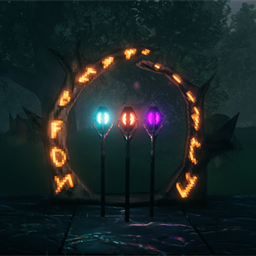
Stavebound
Travel to any portal off the map. What you may carry through is decided by the staves standing at the far end.Stavebound
Valheim will not let you carry ore or metal through a portal. You sail it home instead, and that sail is meant to be the price of the metal.
Letting every portal carry everything throws that away. Still hauling copper by boat long after the Elder is dead is just tedious. Stavebound sits between the two. Kill a biome's boss and you can build its stave; stand one beside a portal and that portal will carry that biome's ore — and only that biome's.
It also drops the pairing. Normally two portals connect by being given the same name; here you interact with a portal and pick where it leads off the map, from every portal in the world. Where it leads belongs to the portal rather than to you, so everyone who walks in arrives at the same place, until somebody points it somewhere else. Walking in still travels, exactly as it always did.
The staves are the part worth having. Build an Elder's Stave beside a portal and that portal will accept copper, tin and bronze. It will still refuse iron — until you go and build a Bonemass's Stave there too, and it says so in as many words:
Iron cannot enter "Copper Mine" — no Bonemass's Stave there.
One end of a trip needs the right stave. By default either end counts, so a portal with a Bonemass's Stave beside it both receives iron from anywhere and sends iron anywhere. Only a trip between two portals that both lack one refuses iron. Which end has to have the stave is the setting most worth knowing about; see Which end counts.
A portal tells you before you step through it. Standing next to one, its runes go dark if you are carrying something it will not take. Open your inventory there and the stacks it will not take are marked. Walk in anyway and it tells you which resource stopped you, and which stave would have carried it.
Installing
Built for Valheim 1.0 and needs Jotunn 2.30.0 or newer — earlier Jotunn predates the game's
1.0 release. With a mod manager both it and BepInEx arrive as dependencies and there is nothing else
to do; by hand, drop Stavebound.dll into BepInEx/plugins.
Install it on the server and in every player's game. The server works out what each portal accepts; each player's game needs it for the map and the check when you travel. The rules come from the server, so no one player can loosen them for themselves.
Removing the mod removes its pieces, so any staves you built will vanish — normal for any mod that adds buildables. The extra data it writes is harmless to an unmodded game.
The staves
Each is built from that biome boss's trophy plus a little of what the biome gives you. Stand one within ten metres of a portal and it starts working on that portal. Nothing to connect or configure.
| Stave | Costs | Lets through |
|---|---|---|
| Elder's | The Elder trophy · 10 copper · 20 stone | Copper, tin, bronze |
| Bonemass's | Bonemass trophy · 10 iron · 20 stone | Iron and scrap iron |
| Moder's | Moder trophy · 10 silver · 20 stone | Silver, dragon eggs |
| Yagluth's | Yagluth trophy · 10 black metal · 20 stone | Black metal |
| Queen's | The Queen trophy · 3 dvergr extractors · 20 stone | Dvergr extractors, mechanical springs |
| Ashen | Fader trophy · 10 flametal · 20 stone | Flametal and the Ashlands' spoils |
Each stave works on its own, so a portal with Moder's Stave beside it takes silver while still refusing iron. Nothing makes you build them in order.
While you are holding a stave, a beam shows which portal it would work on, and if none is close enough, a circle shows how far it would reach.
Which end counts
Every trip has two portals: the one you step into, and the one you come out of. MaterialFlow, under
2 - Clearance, decides which of them needs the stave. It is one rule for the whole world, set on the
server, and it changes how the mod feels more than anything else here — so it is worth settling before
you start a world.
| Which portal needs the stave | What that gives you | |
|---|---|---|
Both (default) |
Either one | A stave covers arriving and leaving, so ore moves freely between that portal and anywhere else. Only a trip between two portals that both lack the stave is refused. The most forgiving: a stave you forgot to build leaves nothing stranded |
Receive |
The one you come out of | The strictest, and what the mod was designed around. A mining camp with no staves can send ore home forever and never receive any back. Ore only moves towards the places you have built staves, and a camp stays cheap and one-way |
Deliver |
The one you step into | Receive reversed. A well-equipped base can supply a bare camp with anything, but that camp cannot send its own ore home until it has staves of its own |
Under all three, ore that neither portal has a stave for never moves. None of these lets you carry something you have not earned; they only decide which end has to have earned it.
One thing to know about Both, since it is the default: with a base that has every stave, ore can
reach anywhere in two trips — camp to base, then base to another camp. A direct trip between two camps
still needs a stave at one of them. If that feels too loose once you have played it, switching to
Receive restores the stricter rule.
Controls
| E at a portal | Open the list of destinations |
| Shift+E at a portal | Rename the portal, as the base game does |
| ← → | Move through the list |
| P | Confirm |
| Escape | Cancel |
| O | Sort by distance or name |
| K | Show only destinations that accept what you are carrying |
Every one of these can be changed under 5 - Selector keys, and each has a gamepad button beside it.
The whole list is playable on a controller.
Or use the mouse. The keys move through the list and P picks; a click picks straight away.
| Click a destination, or pick one from the dropdown | Choose it |
| Click a portal's pin on the map | Choose it and close the map |
| Mouse wheel over the list | Move the highlight — the map does not zoom |
| Hover a destination | Show it on the map without choosing it |
| The buttons along the bottom | Do the same as their keys |
The portal nearest your bed is drawn in light blue, and every other destination's pin is orange while
you are choosing. Every mouse behaviour above, and both colours, can be switched off under
8 - Selector.
Settings worth knowing
| Setting | Does |
|---|---|
ReaimPermission |
Who may change where a portal leads — anyone, only players a ward permits, or admins |
MaterialFlow |
Which end of a trip needs the stave. Both by default — either end. Receive: only where you arrive, so mining camps are one-way. Deliver: only where you set out |
StaveRadius |
How close a stave has to be to the portal it works on. Ten metres by default |
PortalBinding |
Whether a stave works on only the nearest portal, or on every portal in range |
StrictLadder |
Off by default. On, a portal stops at the first stave you have not built there: with Moder's but no Bonemass's, it takes copper and refuses both iron and silver |
SealedItems |
Resources no stave ever carries. Bloodgold and Petrified Tissue by default |
SeamlessTransit |
Off by default. Ends the loading screen as soon as the far side is ready, instead of always waiting eight seconds. Somewhere your game has loaded recently skips the screen altogether |
ShowBlockedCargoOverlay |
Marks the stacks a nearby portal will refuse, when you open your inventory beside it |
HidePortalNames |
Hides portal names in the list, if you would rather find places on the map |
PortalNameLength |
How long a portal's name may be. 32 by default, where the base game allows 10, and the list widens to suit. Set it to 10 to keep the base game's limit |
ClearLeftBehindBodies |
On by default. Removes the copy of another player left standing at a portal after they travel. The game stops telling you where they went, so your game asks for them |
ClickPicksPortal |
On by default. Clicking a destination in the list or dropdown picks it at once; off, a click only highlights and the confirm key picks |
MapClickPicksPortal |
On by default. Clicking a portal's pin on the map picks it and closes the map; off, it only highlights |
ColourHomePortal |
On by default. The portal nearest your bed is drawn in its own colour |
ColourPortalPins |
On by default. Destination pins on the map are orange while choosing, so they stand out from your own pins |
HoverPreviewsOnMap |
On by default. Hovering a destination shows it on the map |
WheelScrollsList |
On by default. The mouse wheel over the list moves the highlight instead of zooming the map |
Two resources are sealed: the Deep North's Bloodgold and Petrified Tissue. No stave carries them
and none ever will — the base game moves those by stone portal and nothing else, and this mod leaves
that alone rather than selling them back to you for a trophy. If you disagree, SealedItems is the
list of what counts as sealed.
Which resource belongs to which stave can be changed too, under 2 - Clearance. The list of
resources portals refuse is never written by hand — the mod reads it from the game at startup, so an
update that adds a new ore cannot break it. Anything the mod does not recognise needs the last stave,
the Ashen — and is named in the log, so you can move it somewhere more sensible.
LogNetworkSync is off by default. Turn it on before reporting two players' games disagreeing
about a portal: it writes down everything the mod sends and receives, which is the first thing anyone
will ask you for.
A changed default only reaches a config file that has not been written yet. If you have played an
earlier build, your com.recognizerhd.stavebound.cfg keeps the values it already has — edit it, or
delete it and let the game write a fresh one.
Console commands
Type help in the F5 console for the full list. The useful ones:
stave_portals— every portal this game knows of, where it leads, and which staves stand beside itstave_items— every resource the game will not teleport, and which stave carries itstave_net— whether your game and the server agree about portals. Run it on both and comparestave_players— where each player is, according to your game and according to the server. For working out why a player looks like they are still standing at a portal after travelling
None of these need devcommands — only the console, which you can switch on in the game's settings.
A note on cheating
What you are carrying is checked by your own game, because that is the only place your inventory exists. Someone determined could get around it. This is a rule for playing with people you like, not anti-cheat — the server decides what each portal accepts, never what is in your pockets.
Licensing
Code: MIT — see LICENSE.
Valheim and its assets are the property of Iron Gate Studio. No game files are redistributed here. The mod builds its pieces by recolouring one that already exists in the game rather than shipping any art of its own.


