
ValheimDryDock
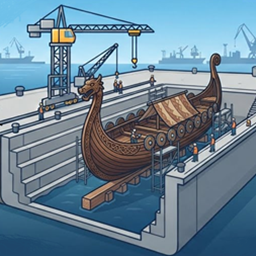
Client-side tool to dry-dock your ships, use Y, H. Raises Longships and Drakkars above tides and generates a vanilla timber cradle. Server-safe!Valheim Dry Dock Mod
A purely client-side structural utility mod for Valheim built on the net48 runtime.
This mod allows players to dynamically dry-dock their ships to protect them from high-amplitude storm swells, structural degradation, high tides, or random shore-line damage.
Pure Client-Side Architecture (Server-Safe)
- Zero Server Requirements: This mod runs completely on your machine. You do not need to install it on the server, and you can connect to completely unmodified vanilla Valheim dedicated servers.
- Vanilla Parity Replication: The virtual timber cradle is built entirely out of vanilla building pieces. Because the mod executes placement parameters through standard network routing channels, the support cradles are fully replicated to all other players in your network, even if they don't have the mod installed.
- Anti-Griefing Built In: Full compatibility with vanilla Wards (
PrivateArea). The mod respects regional permissions and will safely block construction if you lack building access in the targeted area.
Core Features
- Dynamic Hull Diagnostics: Automatically calculates ship length, beam width, and hull curvature values from collider bounds at runtime rather than hardcoding static data matrices. Full out-of-the-box support for Longships, Drakkars, and modded hulls.
- Dynamic Tide Profiling: Queries global wave-displacement metrics (
Floating.GetLiquidLevel) to dynamically calculate lift thresholds, keeping your keel fully clear of the highest local storm crests. - Persistent State Tracking: Saves original position vectors and structural signatures directly into decentralized network data blocks (
ZDO). Your tracking states persist perfectly across world sync intervals and game restarts. - Orchestrated Restoration Layer: Pressing the undock hotkey instantly fires server-synchronized deletion protocols to remove the generated supports and safely return your ship to sea level with its rigid-body physics fully awake.
How To Use
- Sail your ship into a harbor, shallow beaching zone, or prepared docking area.
- Step off the steering wheel, look directly at the hull of the ship, and use your hotkeys:
Y(Default Lift Key): Claims authoritative network ownership, freezes rigid-body drift vectors, lifts the hull above high water marks, and builds the cradle framework.H(Default Lower Key): Scans a 12m allocation cylinder around the keel, demolishes the support pieces cleanly, and drops the vehicle back into the water line.
Configuration Settings
After launching the game with this mod installed for the first time, a full configuration file will be auto-generated inside your profile directory at BepInEx/config/com.github.seniormodder.valheimdrydock.cfg.
From this configuration file, you can easily adjust:
- Hotkeys: Rebind the Dock and Undock inputs to any valid Unity
KeyCode. - Safety Buffer Clearance: Adjust the vertical clearance meter margin added on top of local wave crests.
- Targeting Distance: Increase or decrease the maximum length of your crosshair raycast scan vector.
- Cradle Materials: Swap out the default vanilla prefabs used for construction (
wood_pole2andwood_beam2_26) for other building components like darkwood or core wood poles.
Installation Guide
Via Mod Manager (Recommended)
- Open your Thunderstore Mod Manager or r2modman.
- Select your active profile.
- Click Online on the left menu sidebar and search for
ValheimDryDock. - Click Download to install it along with its required dependencies with a single click.
Manual Installation
- Download the mod package archive
.zipfile. - Extract the archive contents into a temporary staging workspace.
- Move the
ValheimDryDock.dllfile directly into your profile's plugin folder directory layout:...\BepInEx\plugins\ - Launch your game executable using your mod manager's modded framework execution engine.