

OreFinder
Points you to ore veins near you: a screen arrow with name and distance and a light beam on the vein, once per vein. Hotkey toggle, configurable radius and ore list. Client-side, Valheim 1.0.Ore Finder
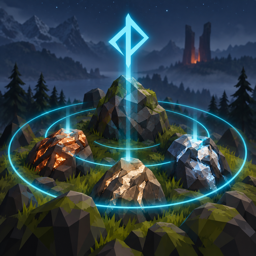
Points you to the ore veins around you in Valheim 1.0. Every second the mod looks for ore within a configurable radius (20 m by default). The first time a vein comes into range it gets a screen arrow with its name and distance, a coloured light, a vertical beam and a glow, for 10 seconds by default. Each vein is shown once, so walking past a deposit you already know does not nag you.
Only real ore counts: copper and tin deposits, silver veins, iron scrap piles, flametal. Plain rocks, obsidian and black marble are ignored unless you list them. Press F9 to turn the finder on and off.
Client-side: install it on every player's game that should use it. Nothing is needed on the server, and players without the mod can play on the same server.
Source, issues and releases: github.com/egor-muindor/ValheimMods.
Features
- Screen arrow: an arrow with the ore name and distance is drawn over the vein while it is in view. When the vein is behind you or outside the screen, the arrow sits at the screen edge and points towards it.
- Vein highlight: a pulsing point light in the ore's colour (orange for copper, blue-grey for tin, white for silver, rust for iron, red for flametal), a 30 m vertical beam and an emissive tint on the vein itself. Everything fades out at the end of the highlight.
- Once per vein: a vein is highlighted the first time it enters the radius
and not again, until you leave the world or run
orefinder reset. - Ore list: look for every ore, or only the ones you name.
- Map pin: a dot pin named after the ore, saved with your map, for every found vein. Nothing is added when another pin is already nearby, so your own pins and re-found veins do not pile up.
- Toggle key: F9 by default, configurable, with modifiers if you like. The state is saved to the config file.
Installation
Requires BepInEx 5.
- With a mod manager (r2modman, Thunderstore Mod Manager): install as usual.
- By hand: unzip the release and copy the
plugins/OreFinderfolder intoBepInEx/plugins, so the mod ends up atBepInEx/plugins/OreFinder/OreFinder.dll.
The config file BepInEx/config/muindor.OreFinder.cfg is created on first launch.
Configuration
General
| Key | Default | Description |
|---|---|---|
Enabled |
true |
Enable the finder. The toggle key flips this setting in game and saves it. |
ToggleKey |
F9 |
Key that turns the finder on and off in game. Modifiers are allowed, e.g. F9 + LeftControl. Ignored while typing in the chat or the console. |
IsDebug |
false |
Log every vein that is found, with its prefab and the item that made it count as ore. |
Detection
| Key | Default | Description |
|---|---|---|
Radius |
20 |
Search radius in metres around the player, 1 to 200. |
ScanInterval |
1 |
Seconds between two scans, 0.1 to 30. |
Ores |
empty | Which ores to look for, comma-separated. Empty = every ore. Otherwise item names (CopperOre, TinOre, SilverOre, IronScrap, FlametalOre, FlametalOreNew) or object prefab names (rock4_copper, silvervein, MineRock_Obsidian). |
Highlight
| Key | Default | Description |
|---|---|---|
Duration |
10 |
Seconds a newly found vein stays highlighted, 1 to 120. |
ScreenMarker |
true |
Draw the arrow with the ore name and distance. |
Beam |
true |
Draw the vertical beam above the vein. |
Light |
true |
Light up the vein and the ground around it with a coloured, pulsing light. |
Glow |
true |
Tint the vein's own material with an emissive glow. Only works for materials whose shader has an emission colour. |
Message |
true |
Show a top-left message with the ore name and distance when a vein is found. |
Map
| Key | Default | Description |
|---|---|---|
MapPin |
true |
Add a dot pin named after the ore to the map when a vein is found. The pin is saved with your map like one you placed yourself. |
MapPinSpacing |
10 |
Do not add a pin when any other pin (yours, the mod's, a death marker, ...) is within this many metres, 0 to 100. 0 = always add. Moving or momentary pins (players, shouts, pings, events) do not count. |
What counts as ore
With an empty Ores list, a mineable object is ore when one of the items it
drops has the word Ore or Scrap in its name: CopperOre, TinOre,
SilverOre, IronScrap, FlametalOre, FlametalOreNew. Anything a game
update adds with such a name is picked up automatically. LeatherScraps and
ShieldCore do not qualify, and neither do Stone, Obsidian, BlackMarble
or Softtissue.
With a list, an object is ore when one of its drops or its own prefab name is
in the list. Names are case-insensitive and $item_ localisation keys are
accepted. The list replaces the rule: to get every ore plus obsidian, list all
of them:
Ores = CopperOre, TinOre, SilverOre, IronScrap, FlametalOre, FlametalOreNew, Obsidian
Console command
orefinder status   # show the active settings and counters
orefinder on       # turn the finder on (same as the toggle key)
orefinder off      # turn it off
orefinder reset    # forget the veins already shown, so they are highlighted again
orefinder reload   # re-read the config file
How it works
Once per ScanInterval the mod walks the objects the game has loaded around
the player (ZNetScene's instance table) and keeps the ones within Radius.
Each object's prefab is classified once, through its drop table: MineRock5
(copper, silver, flametal), MineRock (tin, obsidian) and DropOnDestroyed
(scrap piles). An untouched copper or silver deposit is a plain Destructible
that turns into the mineable MineRock5 on the first hit, so the finder also
looks at what a destructible spawns when destroyed. Veins are remembered by
their network id and position: a partly mined deposit is still the same vein,
and so is the rock that replaces an intact deposit after the first hit.
The highlight does not touch the vein's game object: the light and beam are
separate objects, and the glow is a material property block that is cleared
when the highlight ends. Map pins go through Minimap.AddPin like your own
pins and are saved with the map. The screen markers are drawn with IMGUI, so no canvas
or font asset is needed. The only Harmony patch is Terminal.InitTerminal, for
the console command.
Compatibility
- Works alongside any mod: nothing of the game is patched except the console command registration.
- Modded ores are found when their ore item's prefab name contains the word
Ore or Scrap; otherwise add them to
Ores. - The toggle key is checked through the game's input layer (
ZInput), so it works with the same keys the game accepts.
License
MIT


