

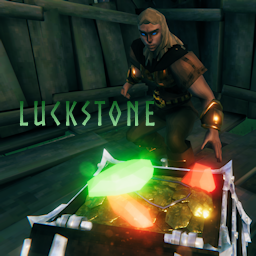
Luckstone
Got Luck? Find a Luckstone and get lucky! If you're fortunate enough to find one, a Luckstone can tilt the odds your way in almost everything you do.Luckstone
Got Luck? Find a Luckstone and get lucky!
If you're fortunate enough to find one, a Luckstone can tilt the odds your way in almost everything you do.
Luckstones can be found in world chests or dropped by starred creatures. Keep one in your inventory and you’ll gain a chance to influence gathering resources, crafting, food preparation, reducing incoming damage and adding attack damage.
But luck never lasts forever. A Luckstone slowly wears out and will eventually crumble to dust, so keep an eye on your inventory and stay on the lookout for the next one.
New
- Updated for Valheim 1.0
Configuration
Luck
- Luck Magnitude: The maximum amount of 'luck advantage' to apply to non-Combat Luck Events. This is a multiplier applied to Valheim's random values. @
- Luck Magnitude-Combat: The maximum amount of 'luck advantage' to apply to combat Luck Events. This is a multiplier applied to Valheim's existing multipliers. @
- Luck Chance: The percentage chance of you getting lucky. This chance is applied to every configured Luck Event. @
- Luck Drain: The amount of 'luck' drained from the Luckstone when 'lucky'. @
- Luck Recharge Time: The amount of time a Luckstone takes to recover before it can apply luck again (in seconds). @
Luckstone
- Drop Chance: The chance of getting a Luckstone dropped by starred creatures. @
- Drops Scale: If enabled, drop chance scales by the number of creature stars. @
- Boss Drop Chance: The chance of getting a Luckstone dropped by a Boss. @
- Chest Chance: The chance of finding a Luckstone in a world container. @
Luck Events
- Mining: Apply luck when mining ores and other pickaxe use. @
- Woodcutting: Apply luck when chopping trees. @
- Picking: Apply luck when picking treasure, gathering, harvesting and other things that 'pop'. @
- Looting: Apply luck to loot drops from creatures. @
- Fishing: Apply luck to extra drops when fishing. @
- Crafting Output: Apply luck to crafting output for stackable items. @
- Food Creation: Apply luck to recipe-based, stackable food creation. @
- Combat Defense: Apply luck to reduce combat damage (not PvP). @
- Combat Offense: Apply luck to add combat damage to attacks (not PvP). @
Notification
- Show Luck Status: Display the lucky symbol in the status bar when a Luckstone is in your inventory.
- Display Luck Message: Display a message in the notification area when you get lucky.
- Show Luck Aura: Show a brief luck 'aura' effect when first adding a Luckstone to your inventory.
- Play Luck Ding: Play a 'ding' sound when you get lucky.
- Show Luck Bonus: Show the amount of luck bonus in the active area.
Utility
- LogLevel: Controls the level of information contained in the log.
Settings with '@' are server authoritative.
In-game reconfiguration
You can use Configuration Manager (or similar) mod to change the configuration without exiting the game. You can also force a full configuration update by editing the config file.
How Luck is applied
- If a configured Luck Event occurs, you have a chance of being lucky based on your Luck Chance
- If you are lucky, Luck Magnitude and Luck Magnitude-Combat are used to calculate the applied luck.
- Luck Magnitude and Luck Magnitude-Combat are not fixed multipliers. The actual applied luck is a random number between 1x and your current configured setting (max 2x).
- This means even the amount of luck is random; i.e. you can be a little more or less lucky on every successful chance.
- If you are lucky for a Luck Event that has drops, the minimum amount of 'extra' will be 1; you'll never get lucky but not receive any benefit.
- In addition, you have a greater chance of getting the rarer items that the item normally drops.
- For combat-related Luck Events, the applied luck is multiplied with Valheim's exiting attack or damage modifiers, giving you some (more or less) advantage in dealing or avoiding damage.
- In multiplayer, only one player can get lucky for any single potential event. Think of this like playing a hand in poker - everybody can get lucky with the draw, but only one person ultimately wins the hand.
- The Luckstone is not equipped or handled by the Trinket or Accessory systems:
- This means it doesn't take up a trinket or accessory 'slot' and will always be active while it's in inventory.
- While it doesn't need to be equipped to be active, that also means it cannot be unequipped. If you want to preserve it's power, you need to remove it from inventory.
- Every time luck is applied the Luckstone requires a short period to recover as controlled by the Luck Recharge Time
- Luckstone defaults are designed to add a modest amount of luck infrequently. Tweaking parameters can provide a completely different experience:
- Setting Luck Magnitude = 2x, Luck_Chance = 100%,and Luck Drain = 10 while reducing drop chances to 1% would allow 20 intense luck effects over a short period, but could leave the player without a luckstone for long time.
- Balance Luck Chance with Luck Recharge Time for additional control over how often luck gets applied.
Notes
- NOTE: Haldor happily accepts Luckstones for exchange - so be careful before trading!
- Luck doesn't stack; having more than one Luckstone in your inventory does not increase your luck chance.
- Luck Magnitude and Luck Magnitude-Combat are capped at 2x. Values above this dramatically skew drops or combat and alter game balance. A value of 1.25x - 1.5x provides a "lucky" feel within the Valheim experience.
- Set Drop Chance and Boss Drop Chance to 0 if you don't want creatures to drop Luckstones.
- The Luckstone only modifies player initiated actions; not anonymous automatic production like beehives, smelters, windmills, etc.
- Only world containers will have a chance for a Luckstone, as determined by the Chest Chance.
- The Luck Aura is only triggered if you don't already have a luckstone in your inventory.
- Use Luck Drain to control the amount of luck consumed (when lucky) per luck event. Luckstones start with 200 durability. Setting Luck Drain to 10 would allow 20 successful luck events before the Luckstone disintegrates.
- Changing max durability would cause issues.
- The Luck Event Food Creation applies to directly produced recipes from the Cauldron, Mead Ketill and Food Preparation Table. Food cooked on racks or in ovens is not included.
- The Luck Event Resourcing applies to items obtained from mining, chopping down trees (not cutting logs), and gathering 'pickable' items. i.e. things that 'pop' (not ground drops)
- If enabled, Show Luck Bonus displays a number trailing up from the luck event (the same as skill bonuses). This number will have two plus signs, e.g. "++1", to indicate is was a lucky bonus.
- If you want to conserve a Luckstone's luck, you need to remove it from your inventory. You can pick it up with the same remaining luck as when you dropped it.
- Alternatively if you use a backpack mod or SeidrChest, you can transfer the Luckstone to and from your backpack or chest.
Compatibility issues & defects
- If you have a bug or compatibility issue please report it on Nexus Mods or (preferably) on Discord in #mod-help. If you do post a bug report, please make sure to include the following:
- What you were doing, or attempting to do when it happened
- If it's repeatable - i.e., can you duplicate it?
- The exact behavior you observed (or didn't observe)
- If possible, attach your player log file with errors (errors always begin with this mod's name) on Discord in #mod-help
You can find all Neobotics released mods on:
- Thunderstore: https://tinyurl.com/NeoboticsOnThunderstore
- Nexus Mods: https://tinyurl.com/NeoboticsOnNexus
Your comments and feedback are always welcome. Post on NexusMods or Discord: https://tinyurl.com/NeoboticsOnDiscord