

BubbleGauge
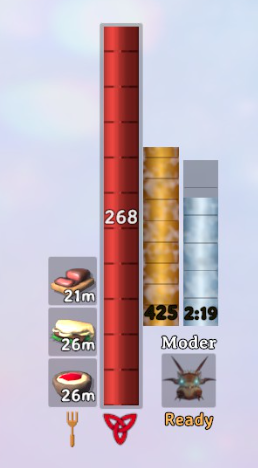
Shows your Staff of Protection barrier beside the health bar: a gold gauge for the HP it can still absorb and a frost-blue tube for the time left. Tick marks, end pulse, optional warnings and refill on recast. Client-side.BubbleGauge
See your Staff of Protection barrier at a glance. While a magic barrier is on you, two gauges appear next to your health bar:
- Bubble Bar (gold): how much damage the barrier can still absorb. Like the health bar, it's taller for a stronger barrier, so you can see whether it came from a skilled caster.
- Mercury Tube (frost blue): how much time the barrier has left.
Both drain from the top as the barrier takes damage and runs down, with tick marks and the numbers at the bottom. In the last few seconds the Mercury Tube pulses. When the barrier breaks or runs out, the gauges pulse and fade away.
It works whoever casts the barrier on you: yourself, a friend, anyone.
Install
With a mod manager (Gale, r2modman or Thunderstore Mod Manager): install BubbleGauge. It needs BepInExPack_Valheim, which the mod manager installs for you.
By hand: install BepInExPack_Valheim, then put BubbleGauge.dll in BepInEx/plugins/BubbleGauge/.
The mod is client-side. Other players don't need it, and servers don't need it.
Settings
Change settings in game with a Configuration Manager mod (press F1), or edit
BepInEx/config/nerdosapiens.BubbleGauge.cfg. Changes apply immediately.
Out of the box everything behaves like vanilla: the only change is that you can see your barrier.
| Setting | Default | What it does |
|---|---|---|
| General | ||
| Enabled | On | Turns the whole mod on or off. |
| RefillOnRecast | Off | Recasting on an active barrier also restores its HP, not just its timer. See Multiplayer. |
| DebugLogging | Off | Writes barrier details to the BepInEx log. Only needed for bug reports. |
| Layout | ||
| BarSize | Grow | Grow: the Bubble Bar gets taller with a stronger barrier, like the health bar with better food. Fixed: always the same height; a stronger barrier shows more tick marks. |
| BubbleBarHeightPer100Hp | 38 | Grow mode: how tall the Bubble Bar is per 100 barrier HP. 128 matches the health bar's own scale. The bar never grows past the top of the screen. |
| HpPerTick | 50 | Grow mode: barrier HP between tick marks. |
| OffsetX, OffsetY | 0 | Move the gauges, for example to make room for another HUD mod. |
| Scale | 1.0 | Overall size of the gauges. |
| Display | ||
| LiquidAnimation | On | The liquid in the gauges gently swirls. |
| ShowHpNumbers, ShowTimeNumber | On | Show the numbers in the gauges. |
| BubbleColor, MercuryColor | gold, frost blue | Colours, as hex codes such as #FFC24A. |
| Pulse | ||
| PulseStyle | Dim | How the gauges pulse: Dim (briefly fade) or Flash (briefly flash white). |
| EndPulses | 2 | Pulses when the barrier ends, before the gauges fade. 0 = just fade. |
| WarnSeconds | 5 | The Mercury Tube pulses when this many seconds are left. 0 = never. |
| BlinkSpeed | 2 | Pulses per second while time is running out. |
| Messages | ||
| TimeWarning | Off | On-screen message as the barrier runs out: Once (at TimeWarningSeconds) or EveryTick (at each tick mark). |
| TimeWarningSeconds | 10 | When TimeWarning is Once. |
| HpWarning | Off | On-screen message as the barrier takes damage: Once (at HpWarningPercent) or EveryTick. |
| HpWarningPercent | 25 | When HpWarning is Once. |
| MessagePosition | Center | Center: the game's large centre text, smaller and green so it isn't mistaken for a boss or raid alert. TopLeft: the game's small messages. |
| MessageColor, MessageSize | green, 80 | Look of centre messages. |
Messages never cover the game's own centre messages (boss and raid alerts). They wait until those fade.
How the barrier works
The strength of a barrier is fixed when it is cast: 200 HP plus 5 per Blood Magic level of the caster, plus a bonus on a raised world level. It lasts 60 seconds per level of the staff. Skill gains during a barrier only show up on the next cast.
Multiplayer
The gauges only read your own barrier, so they work whoever cast it and need nothing from other players.
RefillOnRecast changes gameplay, so it's off by default. A barrier's HP is tracked by the game of the player wearing it, so the setting only affects your own barrier: with it on, any recast on you (yours or a friend's) restores your barrier to full. It never changes anyone else's barrier. Players without the mod keep vanilla behaviour.
Compatibility
- Built for Valheim 1.0.20 with BepInExPack_Valheim 5.4.2351.
- Steam PC. Mods don't run on consoles.
- If another HUD mod moves things around, use OffsetX, OffsetY and Scale.
Notes
Made by Nerdosapiens. The code was written with AI assistance (Claude), designed and play-tested by hand.
Licence: MIT.
This is an unofficial mod. It is not made by, endorsed by or affiliated with Iron Gate AB.