

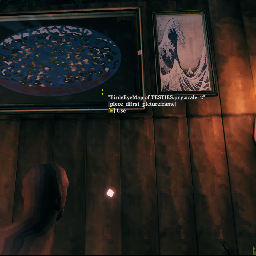
MapToPictureFrame
Interact with Cartography Table to print map directly to picture frame.Download and endorse the original uploads for the mods used in this pack on Nexus Mods to show support. All credits goes to firstD and ASpy91.
.'~-~'. >>>Valheim Picture Frame Nexus Page<<<.'~-~'.>>>Map Printer Nexus Page<<< .'~-~'.
These are compiled edited configs with dependencies to mods long previously uploaded to the Thunderstore.
I have tested these mods myself and they work fine with the latest Hildirs request patch.
Always create backups when trying out new mods on existing worlds.
Description
Read the Cartography Table to update and upload you're world map to the picture frames.
Designed to GREATLY enhance no-map playthroughs by drawing a static map for players to look at that shows their exploration progress without the spoilers of live updates.
Works as a companion to a no-map playthrough to give Cartography Tables a fresh purpose, or as a standalone just to get an alternate map style.
Use it however you want! I don't judge.
Basic Use
Place the picture frame in the game, interact with it with the E key, and enter the name of the image file you want to display, such as "sample-1.jpg".
Map File prefix's typed into picture frames are
- BirdsEyeMap of
world name.png - TopoMap of
world name.png - Chart of
world name.png - OldChart of
world name.png

You can also specify a folder to play the images inside continuously. The default interval is 5 seconds.
For the more advanced features like resizing/adjusting axis for the Picture Frame please refer to the Nexus Page
>>>Valheim Picture Frame Nexus Page<<<
Installation
Not everyone will have the exact same folder path to BepInEx, because of this you will have to manually copy and paste the file path into the config for MapPrinter as described below. Everything else is good to go.
- After installation find and copy the entire folder path of
"...\BepInEx\plugins\ValheimPictureFrame\Assets\Images\"
It'll be something like
"C:\Users\admin\AppData\Roaming\Valheim\BepInEx\plugins\ValheimPictureFrame\Assets\Images\"
- Paste into the File Path.

- It will look similar to this

- Or this inside of a R2MM or Thunderstore Mod Manager config settings

You will need BepInEx, Map Printer by ASpy91, and Valheim Picture Frame by firstD.
ThisGoesHere by ASharpPen should automatically move the files on starting the game, but if for some reason it doesnt for you. To install manually, place the .../ValheimPictureFrame/ folder containing .../Assets/Images/ into the .../BepInEx/plugins folder.
You may disable or uninstall ThisGoesHere mod after game startup, as it will no longer be needed.
Compiled configs to Thunderstore for my own modpack.


