

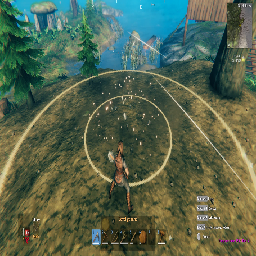
aedenthorn HoeRadius
NEXUS REUPLOAD-Lets you adjust the hoe radius using the scroll wheel or custom hotkeys.Download and endorse this mod in Nexus. All credits goes to aedenthorn.
About This Mod
Lets you adjust the hoe radius using the scroll wheel or custom hotkeys.
Description
This mod allows you to modify the size of land affected by the hoe by holding down an optional modifier key (default left alt) and scrolling with the mouse, or pressing one of two customizable hotkeys (default disabled).
You can also adjust the increment values and hotkeys in the config file.
Config
A config file BepInEx/config/aedenthorn.HoeRadius.cfg is created after running the game once with this mod).
You can adjust the config values by editing this file using a text editor or in-game using the Config Manager.
To reload the config from the config file, type hoeradius reset into the game's console (F5).
Technical
To install manually, place the dll file in the BepInEx/plugins folder. You will need BepInEx.
Code is at https://github.com/aedenthorn/ValheimMods.
If you want to complain or ask for help or help aedenthorn test her mods, you can visit her Discord server.
Click here for a list of all aedenthorn's mods for Valheim.
Uploaded to Thunderstore for my own modpack.
`` Changelog
Version 0.4.0 Disable zoom when scrolling Hold keys to change Switch to KeyCode ``