

AlweStats
Valheim Mod to easily see fps, ping, clock, ship health and speed, wind speed and direction, days passed and time playedAlweStats
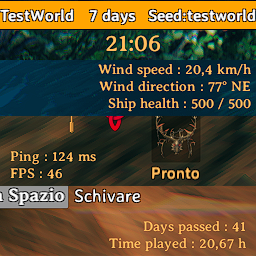
Valheim Mod to easily see "FPS", "Ping", "Clock", "Ship health", "Ship speed", "Wind speed", "Wind direction", "Days passed" and "Time played".
YOU HAVE TO DELETE YOUR CONFIG FILE IF YOU HAVE A VERSION BEFORE 2.0.0
The UI is separated in three blocks :
- GameStats, that contains "FPS" and "Ping"
- WorldStats, that contains "Days passed" and "Time played"
- WorldClock, that contains "Clock"
- ShipStats, that contains "Ship health", "Ship speed", "Wind speed", "Wind direction"
For each block you can enable or disable it and you can also set :
- Position
- Margin
- Text color
- Text size
- Text alignment (not for the Clock)
In "WorldClock" you can also set if the time should be showed in 12h or 24h format.
Since 2.2.0, you can see the ship speed. As I don't know the proportions that the game uses, I have established that the maximum ship speed is equal to 15 kts (highest speed of old vikings ships), so the values are proportioned according to this.
If you have any suggestion regarding this, feel free to create an issue on the GitHub repository !
Since 2.1.0, you can see the wind speed. As I don't know the proportions that the game uses, I have established that the maximum wind speed is equal to 100 km/h (highest speed in nordic countries), so the values are proportioned according to this.
If you have any suggestion regarding this, feel free to create an issue on the GitHub repository !
Since 2.0.0, you can move the blocks in game with your mouse ! To enable the editing mode you just have to click the button chose in the config file (default: F9) and move the blocks where you prefer ! To save your changes, you need to restart the game. You can also reset all the positions and margins of the blocks with the button in the pause menu.
Since 1.1.0, you can add a "Days passed" counter in the world selection panel. Since the default day length declared in Valheim doesn't match the real one, to make the mod works fine, you need to join in the world at least one time, so that it can get the day length in that world and save it in the "Alwe.stats" file (you have to do it for each world).
Changelog
2.2.0
- Added "Ship speed" in the ShipStats block
- Optimized the check if the player is on board or not (ShipStats)
2.1.1
- Added the ShipStats block in the editing mode
- Overall adjustments
2.1.0
- Added the ShipStats block, to see ship health, wind speed and wind direction
- Added new config values to match the new additions
2.0.1
- Overall fixes and optimization
2.0.0
- Optimized the code and made it cleaner to read
- Added an editing mode
- Added new config values to match the new addition
1.2.0
- Fixed "Text color", "Position" and "Margin" values to be culture invariant (so now you can set decimal values with the dot)
- Added a customizable in-game clock, separated from WorldStats
1.1.1
- Commented out the "OnDestroy" method (it is for development only)
- Removed commented code
1.1.0
- Added a "Days passed" string in the world selection panel
- Added the chance to disable it in the config file
1.0.0
- Added GameStats, that contains "FPS" and "Ping"
- Added WorldStats, that contains "Days passed" and "Time played"


