

AlweStats
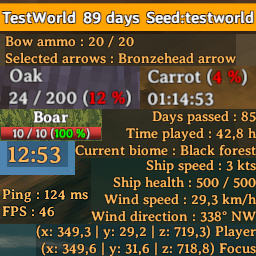
Easily see stats about entities, fps, ping, clock, ship, wind, world, bow, map, player, environment and coordinatesAlweStats
Give a thumbs up if you like the mod and you have a GitHub account !
You may encounter incompatibilities in case there are other mods that modify the UI, be sure to enable either one or the other equivalent section so they don't conflict in the same function
If you have an idea for something to add or any suggestion regarding the implemented features, feel free to create an issue on the GitHub repository !
The UI is separated in 6 blocks :
- GameStats, that contains "FPS", "Ping" and "Total players"
- WorldStats, that contains "Days passed", "Time played" and "Current biome"
- WorldClock, that contains "Clock"
- ShipStats, that contains "Ship health", "Ship speed", "Wind speed", "Wind direction"
- BowStats, that contains "Selected arrows" and "Bow ammo"
- MapStats, that contains "Player coordinates" and "Focus coordinates"
For each block you can enable or disable it and you can also set :
- Position
- Margin
- Text color
- Text size (also for the cursor coordinates and the explored percentage)
- Text alignment (not for WorldClock)
Each block is also movable with your mouse while in game thanks to the integrated editing mode (default key : F8).
You can reload the configuration file (default key : F9) while in game to see changes.
There are also "EntityStats", "EnvStats" and "PlayerStats" which aren't UI blocks but can let you choose different things.
In the config file you can also :
- Change key for plugin reload and editing mode
- Set background color for all the blocks
- Set padding for all the blocks
- Toggle each section (blocks and not)
- Toggle a "Days" counter in the world selection panel
- Toggle the player stats in the character selection
- Toggle a reset button in the pause menu to reset the positions of all the blocks with their default values
- Choose the clock format (12h or 24h)
- Toggle the current biome text in the WorldStats block instead of the top-left corner in minimap
- Set the string format for the health of environment elements, construction pieces and entities
- Set the string format for the process status of bushes, plants, fireplaces, beehives and fermenters
- Set the string format for the player and focus coordinates string
- Set the string format for the cursor coordinates string
- Toggle the hover status separately for rock, trees, bushes, plants, beehives, fireplaces, fermenters and containers
- Toggle the cursor coordinates and the explored percentage in the large map
- Toggle the rotation of the minimap that follows the player camera rotation
- Toggle the distance and direction from claimed bed, closer portal and closer ship shown as elements in the status effects list
- Toggle the custom bow charge bar instead of the vanilla circle that shrinks
- Toggle pins for ships, dungeons (troll caves, crypts and fire holes), carts and portals
- Toggle the title of the custom pins
- Set the color of the bow charge bar when fully charged
For reasons inherent to the optimal functioning of the mod, everything related to the pins and elements in the status effects list (BedStatus, PortalStatus and ShipStatus) could cause game freezes if the computer running the game is not very powerful.
As I don't know the proportions that the game uses, I have established that the maximum ship speed is equal to 30 kts and the maximum wind speed is equal to 100 km/h, so the values are proportioned according to this.
Since the default day length declared in Valheim doesn't match the real one, to successfully use the "Days passed" counter in the world selection panel you need to join in a world at least one time, The mod will then get the day length in that world and save it in the "Alwe.stats" file (you have to do it for each world).
Things I want to do as soon as possible
- Optimize the movement of blocks with the editing mode
- Add detailed item informations
- Add a compass
- Add a custom minimap
- Fix the known issues
Known issues
- Health starts showing from second hit for rocks and minerocks
- Name doesn't show for small environment elements
- Remaining time doesn't work properly for beehives
Changelog
3.7.0
- Updated game version reference to 0.207.20
- You can change the color of the health bar for tamed animals
- Added player stats when choosing the character (kills, deaths, crafts, builds)
- Fixed world days text in world selection panel not showing when changing tab
- Fixed position of closer portal element showing too much spaced from others status effects when a bed wasn't claimed
- Added direction and distance from closer ship as element in the status effect list
- Now the distance calculation for closer portal, closer ship and claimed bed ignores the height
- You can see the distance between you and the entity you are hovering, below the health bar
- Toggle pins for portals, ships, carts and dungeons (troll caves, crypts and fire holes)
- Toggle the title for the custom pins
- You can set the scale of the player marker icon
- You can choose to double or not the size of the custom pins
- Added new config values to match the new additions
3.6.0
- Added direction and distance from closer portal as element in the status effect list
- Added direction and distance from claimed bed as element in the status effect list
- Fixed the percentage color
- Centered the mouse position when moving block while in editing mode
- Added new config values to match the new additions
3.5.0
- Added the possibility to enable a rotating minimap that follows the player camera rotation
- Added remaining time and percentage for fireplaces
- Added explored percentage in the top-left corner on the large map
- Fixed remaining time for bushes
- Reduced the text length for the WorldStats block
- Added new config values to match the new additions
- Added config setting for the font size of the cursor coordinates and explored percentage text in the large map
3.4.0
- Added a new config value regarding the padding for all the blocks
- Fixed the flicker when the value of blocks change
- Now the environment element name will be shown even if you hit an element without aiming at it.
- Now the health bar color of construction pieces is based on the health percentage
- Moved the position of the health text and bar for construction pieces
- Added outline to the text of all the blocks
- Now you can reload the config file also in the main menu
- Added a string in the MapStats block that shows the world coordinates of where the crosshair is pointing at
- Added a new config value regarding the text alignment for the MapStats block
- Removed the "ShowPlayerCoordinates" config value
- Renamed the config value "ShowCursorCoordinates" to "ShowCursorCoordinatesInMap"
- Renamed the config value "HealthStringFormat" to "HealthFormat"
- Renamed the config value "ProcessStringFormat" to "ProcessFormat"
- Renamed the config value "PlayerCoordinatesStringFormat" to "WorldCoordinatesFormat"
- Renamed the config value "CursorCoordinatesStringFormat" to "MapCoordinatesFormat"
3.3.0
- Added a new config value regarding the text alignment for the BowStats block
- Added a new config value regarding the background color for all the blocks (under General > BlocksBackgroundColor)
- Fixed an error showed when deleting a construction piece
- Fixed an error that didn't make editing mode work best
- Moved "HealthStringFormat" and "ProcessStringFormat" to the "General" section
- Added a new block called EntityStats that shows health as text in the healthbar when hovering living entities
- Added a new block called MapStats that shows coordinates of player
- Added a text that show the world coordinates of where the cursor is pointing on the large map
- Added new config values to match the new additions
- Moved the position of the health text for construction pieces
3.2.2
- Fixed an error showed when you had no arrows in the inventory
- Added total players string in GameStats block when there is more than 1
- Overall adjustments
3.2.1
- Fixed a bug that kept showing the ShipStats block even after the ship was demolished
- Adjusted the text displayed when having the max honey in a beehive
3.2.0
- Fixed bug that didn't let show the ShipStats block
- Now percentages are decimal values with eventually one decimal digit
- Added status for construction pieces when hovering it
- Added a new config value to match the new addition
3.1.0
- Renamed the config value "GrowStringFormat" to "ProcessStringFormat"
- Splitted the config value "BushAndPlantStatus" in "BushStatus" and "PlantStatus" to separate bushes and plants
- Added status about fermenter when hovering it
- Added status about beehive when hovering it
- Added status about container when hovering it
- Added the possibility to see remaining time in the "ProcessStringFormat" config value
- Added new config values to match the new additions
3.0.0
- Added bushes and plants grow string in the EnvStats section
- Fixed all values that could be rounded to integer when having 0 as digit after the decimal point
- Added a new config value to match the new addition ("GrowStringFormat")
- Renamed the config value "StringFormat" to "HealthStringFormat"
- Renamed the config value "DaysInWorldList" to "DaysInWorldsList"
- Renamed the config value "BushStatus" to "BushAndPlantStatus"
- Now you will see the growth for bushes and not the health
- Added the possibility to color the text based on the health/grow percentage in "HealthStringFormat" and "GrowStringFormat"
2.6.0
- Added a new block regarding the bow ammo and selected arrows
- Added the possibility to show a bow charge bar instead of the vanilla one
- Added new config values to match the new additions
2.5.0
- Added an health string for every environment element (rocks, minerocks, trees, bushes, ecc...)
- Added new config values to match the new additions
- Added a key to reload the plugin's config file while in game
2.4.2
- Fixed the ship speed that was showing 0 when revesing
2.4.1
- Fixed the check if the player in on a ship or not
- Fixed the ship speed with more credible values (in order to better respect the true speeds of Viking ships)
2.4.0
- Fixed error when exiting server
- Added possibility to remove biome from minimap top-left corner and set it in the WorldStats block
2.3.0
- Optimized the editing mode
- Now you don't need to close and open again the game to save your changes
- Optimized all the blocks for better readability
2.2.0
- Added "Ship speed" in the ShipStats block
- Optimized the check if the player is on board or not (ShipStats)
2.1.1
- Added the ShipStats block in the editing mode
- Overall adjustments
2.1.0
- Added the ShipStats block, to see ship health, wind speed and wind direction
- Added new config values to match the new additions
2.0.1
- Overall fixes and optimization
2.0.0
- Optimized the code and made it cleaner to read
- Added an editing mode
- Added new config values to match the new additions
1.2.0
- Fixed "Text color", "Position" and "Margin" values to be culture invariant (so now you can set decimal values with the point)
- Added a customizable in-game clock, separated from WorldStats
1.1.1
- Commented out the "OnDestroy" method (it is for development only)
- Removed commented code
1.1.0
- Added a "Days passed" string in the world selection panel
- Added the chance to disable it in the config file
1.0.0
- Added GameStats, that contains "FPS" and "Ping"
- Added WorldStats, that contains "Days passed" and "Time played"


