


ValheimSagas
Every Viking has a story. Standalone server website with player statistics, a 2D world atlas, character armory, leaderboards and evolving sagas.Valheim Sagas
Every Viking has a story.
Your adventures, remembered: a standalone Valheim mod with a server-hosted website, a living 2D atlas, character armories, leaderboards and optional AI-written sagas.
Explore your fellowship
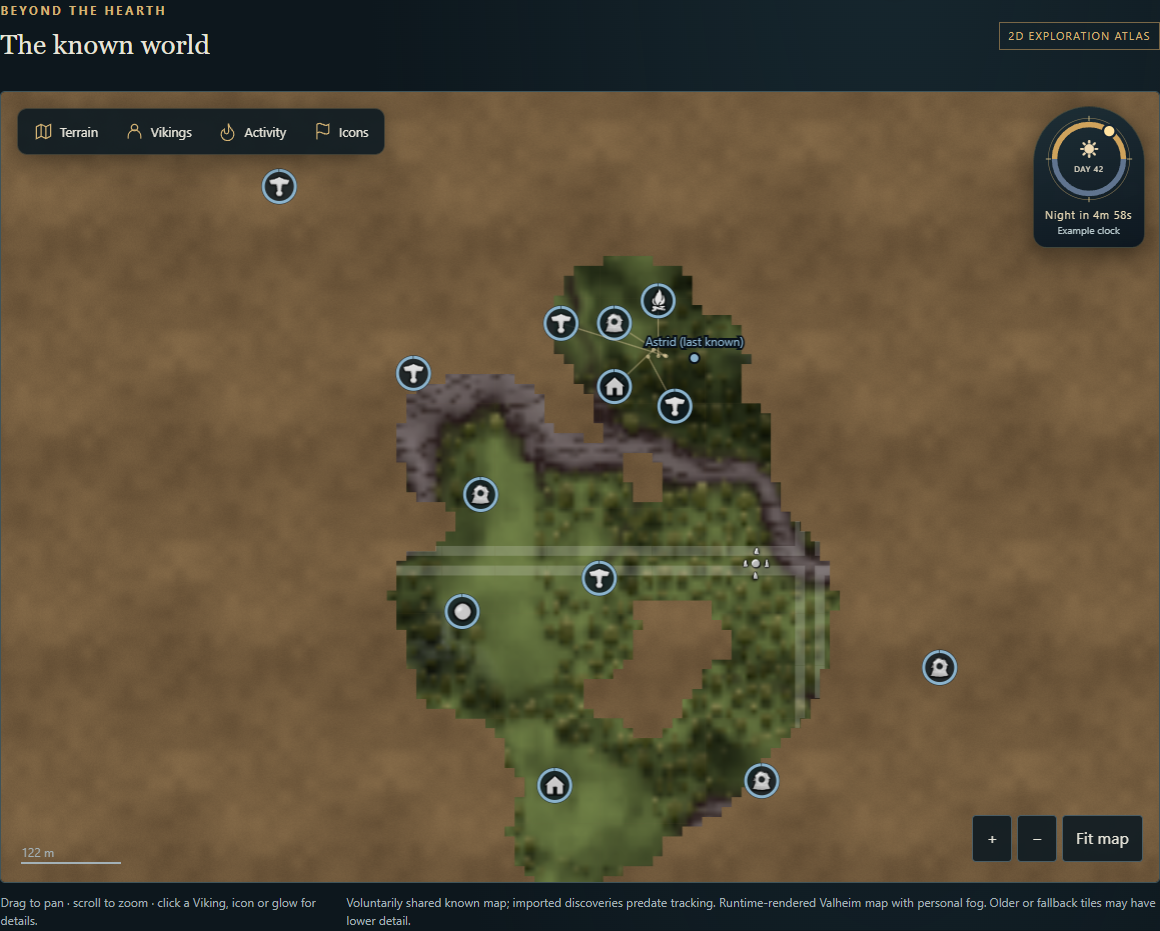
- World Atlas: Valheim terrain captured at runtime, textured brown fog of war, personal or combined exploration, named player markers, online/offline filters and separate kill/loot heat maps.
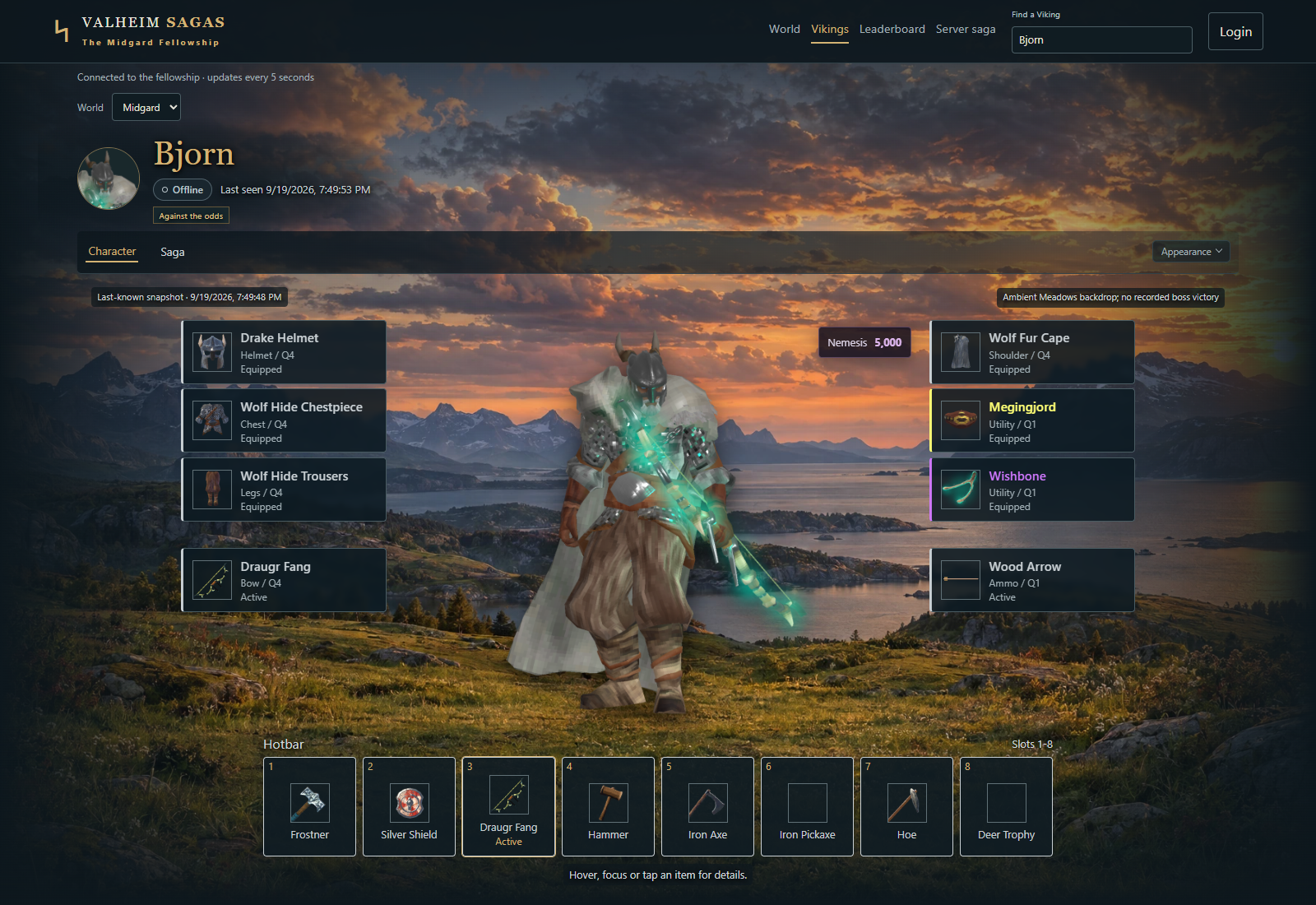
- Vikings: persisted equipped-character portraits, game item icons, detailed hover/focus/tap tooltips, resistances, gear effects and personal statistics. Shared portraits and equipment remain available after logout while the host website is running.
- Leaderboards: boss progression and credited teams, observed fight times, kills and stars, rarity discoveries, carried gold and optional Epic Loot bounties.
- Optional SLS enhancements: host-colored zone squares that follow SLS fog settings, hover levels above 1, current Nemesis scores and distinct Nemesis boss-kill rankings.
- Sagas: persistent personal and server stories with a separate recorded-facts ledger. The host must configure OpenRouter first; no template stories are generated.
- Make it yours: boxed, full-screen or full-screen scrolling scenery. Your personal login can select backgrounds up to your recorded boss progression; everyone sees the saved selection. New browsers default to full-screen scroll.
Statistics support all history, 30 minutes, 1/6/12 hours, 1/3/7 days and custom dates. Live presence and last-known equipment are independent of the selected time window. Drops, verified earned collections and unknown pickups remain distinct; repeat pickups and bonus loot rolls cannot create extra kills.
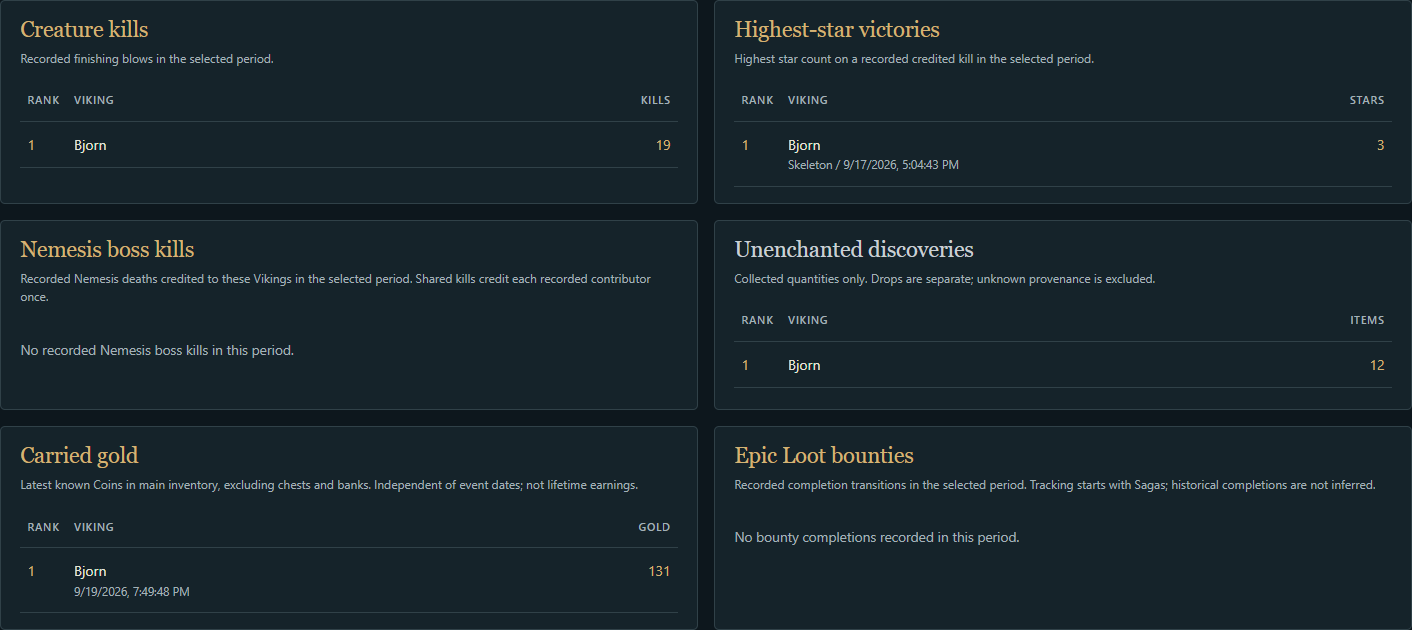
Screenshots show an isolated copy of recorded playtest data, with display names replaced for publication. The atlas shows saved playtest exploration, a last-known Viking marker, colored personal icons and a fanned group connected to its true locations. One Viking owns these pins, so they share that Viking's color. The day/night dial uses a labeled example day/countdown because the offline snapshot has no live world clock. The Nemesis leaderboard is shown honestly with no recorded victories yet. These are website captures, not evidence that every multiplayer integration has been verified.
Install and open
- Install BepInEx 5 and Valheim Sagas on the host and every participating client. Use the same release on each. In a mod manager, install the package; manually, extract its
BepInExfolder into your profile/game installation. Keep the four plugin DLLs andwebfolder together. - Start a world. A dedicated server is optional: a normal hosted or solo world starts the website on that computer. The website stops when the host closes the world/game.
- On the host computer, open http://127.0.0.1:8877/. New configurations allow public viewing without a viewer token. This does not expose a public internet port: the default binding remains loopback.
- Settings are in
BepInEx/config/org.valheimsagas.collector.cfg. Existing saved settings are preserved on upgrade. Restart the host after changing server settings. - For a dedicated host, use its allocated website TCP port and the wildcard listener described below. Visitors open
http://SERVER-IP:PORT/. An HTTPS reverse proxy is optional for a domain and encrypted access; no separate website installation is required.
All participating players need Sagas for full telemetry, portraits and exploration. Epic Loot, Jewelcrafting and Star Level System are optional. Game/Unity assemblies and runtime game assets are not bundled. Biome backgrounds are bundled as responsive WebP images for offline use; unused original PNG artwork is excluded from releases.
Dedicated servers: IP and allocated port
Stop the server and edit the existing [Server] entries in BepInEx/config/org.valheimsagas.collector.cfg. For a hosting panel that allocates port 19908:
[Server]
EnableWebsite = true
ListenPrefix = http://*:19908/
RequireViewerToken = false
DisplayName =
AdvertisedAddress =
Restart the server, then open http://YOUR-SERVER-IP:19908/. Replace 19908 with your allocated website port. Keep the http:// and trailing /; the wildcard * belongs in the configuration, not the browser address. 127.0.0.1 only accepts local requests and will not make the website accessible to remote players. The host must allow TCP on the chosen port; keep the Valheim game/query ports unchanged. You do not need to create a panel reverse proxy for direct IP access.
With DisplayName blank, 0.3.9 reads the host's configured Valheim server name, falling back to its world name. Set DisplayName = Your Fellowship to override it. Set AdvertisedAddress = YOUR-SERVER-IP:GAME-PORT if you want the website to display the address players use to join Valheim. This display-only field does not configure the website listener; the game and website ports are usually different. Neither your public IP nor a panel hostname is discovered automatically. Restart after changing these settings.
Public viewing is enabled by RequireViewerToken = false; existing configurations are preserved on upgrade. For personal login and OpenRouter key submission over the internet, use an HTTPS reverse proxy so credentials are encrypted in transit.
Missing players or stale map positions
A congested game connection can delay player snapshots, exploration and portraits even while the website itself opens normally. Upgrade the host and every Sagas client to 0.3.9 or later and restart their connections. A server name comes from host configuration, so a wrong name is a separate issue from delayed player uploads. If all website data is blank, check the website/API error and server logs too.
For a live marker, the player needs Sagas installed, [Privacy] SharePosition = true, and Visible to other players enabled on Valheim's in-game map. The website's Online Vikings layer must be enabled and its player selection must include that player. Offline positions require the separate Offline - last known layer. Terrain additionally requires ShareMap = true. Upload pacing cannot override these privacy settings.
Multiplayer upload pacing (0.3.9 and later)
Upgrade both the host and every participating client to the same current release, then restart their Valheim processes. Version 0.3.9 addresses a reported three-second multiplayer stall with Steam k_EResultLimitExceeded log spam: background transfers now yield to the game send queue, use separate byte allowances and wait 30 seconds before retrying unacknowledged data. Older clients still send bursts, so updating only the host is insufficient.
Maps import gradually and a first high-resolution portrait can take several minutes on a busy connection. Existing saved portraits remain visible while a replacement uploads. The collector logs Sagas uploads paused when the game queue is busy and Sagas slow stage for work exceeding 50 ms, with repeated warnings limited to once per minute. These diagnostics contain timings/queue sizes, not credentials or coordinates. The multiplayer incident still requires an operator retest; automated transport checks are not in-game verification.
Find a Viking
Vikings always opens a search directory, including when you are signed in. Three featured shared profiles appear below the search, ordered by furthest recorded boss progression and then most recent retained boss victory. Search by name to find more Vikings. Cards lead with a saved head portrait (initials when unavailable), name and the same online/syncing/offline badge used on World and character pages. Their saved saga or biography excerpt is the main body, labelled AI fiction; no story is invented when none exists. The supporting boss tracker shows actual distinct recorded victories as 0/1 or 1/1 per boss and a total out of eight, without assuming earlier bosses were defeated. Direct character links still open that character, and the header search also includes avatar previews. Private profiles are excluded. Recommendations use lifetime progression independently of World statistics filters; pruned achievements cannot supply a recent date.
The boss leaderboard includes Kall Fimbulbringer as the eighth progression tier. Only the installed FrozenKing_p3 final phase counts as his victory; the earlier FrozenKing and FrozenKing_p2 phases are excluded from boss leaderboards and progression. His listed team contains recorded final-phase contributors, not inferred earlier-phase participants. Current telemetry cannot time the entire multi-phase encounter, so Kall is excluded from fastest-fight rankings. Retained old final-phase records are backfilled into permanent progression receipts on upgrade. His victory retains the Deep North scenery.
Map controls and configuration ownership
The full-width atlas opens with its controls tucked away. Use Terrain, Vikings, Activity or Icons to open one compact tray; close it to return to the whole map. Opening a tray preserves your map position and zoom. Statistics & heat maps, below the map, filters event totals, recent activity and heat layers by Viking and date. It does not filter live player positions or icon ownership. Explored terrain is independent unless you explicitly link it to statistics in the Terrain tray.
In Shudnal ConfigurationManager, S marks host-owned [Server] and [Lore] settings; C marks personal privacy and website-login shortcuts. Host settings are read-only while connected to somebody else's server. They show this computer's local hosting configuration, not the remote host's values. The actual host reads its own config; credentials, tokens and paths are never sent to clients. Configure hosting at the main menu or on the host itself, and restart the hosted world after changes. Ownership descriptions remain available without the optional manager. Personal Saga Profiles are configured through website login, separately from the host's Lore settings.
Both [Server] RetentionDays and StatisticsRetentionDays default to 0 (unlimited history). Existing saved values are preserved on upgrade. To remove a previously configured seven-day limit, explicitly change both values to 0 on the host. This preserves remaining records; it cannot restore already-pruned history.
Privacy and personal login
[Server] RequireViewerToken = false is the public-viewing default. Set it to true to require the shared ViewerToken for viewing. Public viewers still only receive data permitted by each player's sharing settings.
Portraits update after equipment or appearance changes settle, with a two-second debounce and a ten-second minimum capture cooldown. Unchanged appearances do not trigger periodic captures. Sitting or attached poses defer a new capture until you stand and settle; the last shared portrait remains visible. Preparation spans multiple frames, GPU readback is asynchronous, and image processing runs in the background. Portraits require a client graphics device supporting asynchronous readback; dedicated servers receive the images from clients. Initial host storage/website startup runs in the background. Map pixels arrive through bounded asynchronous strips, and uncached item icons are queued one per frame; the website and artwork may take slightly longer to become ready. The Sagas staged portrait log reports the maximum main-thread capture work in a frame. Actual rendering still runs on the game thread, so playtesting is required to measure the remaining frame cost.
The atlas has separate Discovered game icons (on) and Player-added icons (off) layers. Game locations, boss markers, beds and death/event markers come from each client's existing map, only on personally explored, shared terrain. They do not reveal undiscovered locations. Enable [Privacy] SharePlayerPins = true in your own Sagas config to publish your manually placed pins; this is off by default and also requires ShareMap. Shared personal pins render above fog, including annotations placed on unexplored ground. Automatic game/mod locations remain exploration-gated. Imported pins owned by another Viking are excluded. The browser's player-icon switch controls display, not sharing consent. Hover/tap an icon for its name, or use Browse visible icons to locate one.
Enable Color by Viking to match player-added pin rings, Viking markers and names. Automatic game icons retain their original colors. Each Viking gets a server-assigned color on first observation in that world, retained through renames, reconnects and restarts. New colors are selected randomly among the most perceptually separated available choices; existing Vikings never change color when someone joins. Large rosters inevitably have closer colors, so names and filters remain available. Shared game locations list their sharing Vikings in the tooltip without adding owner-colored rings. Icons by Viking toggles each person's icons independently of terrain, heat maps and live-position filters, with Show all/Hide all shortcuts. Preferences are saved per browser/world. Game icons are enlarged from 28 to 36 CSS pixels.
Mods using Valheim's regular map pins and runtime sprites are supported, including inspected Epic Loot bounty/treasure pin types. Unknown saved custom pins conservatively require personal-pin consent. Custom texture overlays (such as Jotunn map drawings) are not individual pins and need a dedicated adapter; SLS zones retain their existing integration. No Epic Loot/Jotunn dependency is added.
Icons load separately from terrain and statistics; their runtime sprites are cached, never bundled as copied game assets. Scans examine at most 16 pins per frame, bounded to 2,048 exported pins per character. Changed snapshots upload in paced 32-pin batches; unchanged snapshots only resync every two minutes for recovery. First icons may take 15-30 seconds plus queued upload time to appear, and partially imported terrain can keep automatic locations fog-hidden longer. Pin edits/removals replace the prior set only after every part arrives. The last shared pins remain available offline.
Choose Sun & moon dial, Horizon, or None in the Icons map tray. The readout estimates real minutes/seconds until day or night using the host's world time, day length and time scale. It updates each second without reloading terrain, resyncs with the host, and reports pauses, time skips and overdue updates instead of continuing a misleading countdown. Browser preferences are saved locally; unavailable/stale clock data is labelled. No new mod dependency, external service or port is required. Install the matching update on the host and participating clients.
Map sharing defaults on for new configurations. Profile, portrait and position sharing remain configurable. Live position also follows Valheim's Visible to other players map setting. The atlas only receives permitted exploration; fog is not a client-side substitute for access control.
The header shows Login when signed out. After login, it shows your saved Viking portrait (or an initial when no portrait is available). Click the icon for Saga Settings or Log out. Shared server tokens show a read-only account; Saga Settings explains how to switch to a personal login.
While playing, press Left Ctrl + Insert to copy a personal login token, then paste it into the website's Login dialog. This replaces the previous token for that character/world. Left Ctrl + End revokes it. A personal login enables owner-only scenery and storyteller settings; the shared viewer token does not grant ownership. Tokens are stored in the browser tab session and sent in Authorization headers, never in profile URLs.
Scenery progression follows recorded credit: Meadows initially; Eikthyr unlocks Black Forest, Elder unlocks Swamp, Bonemass unlocks Mountains, Moder unlocks Plains, Yagluth unlocks Mistlands, Queen unlocks Ashlands, and Fader unlocks Deep North. Tracking cannot reconstruct unrecorded boss kills from before installation.
Optional SLS, Epic Loot and Jewelcrafting
None of these mods is required. Without them, statistics, vanilla gear/tooltips, portraits, maps, leaderboards and sagas continue to work. SLS, Epic Loot and Jewelcrafting are independently detected; installing one does not require the others.
When SLS is installed on the host, the atlas mirrors its enabled zone overlay, resolved level palette and above/below-fog setting. Website outlines are capped at 20% opacity (lower host values are preserved), applied once so overlapping borders do not become darker. The website adds a zone-level tooltip only above level 1. Below-fog outlines and tooltips follow the selected shared exploration; above-fog mode reveals the zone grid without revealing terrain. Host zone settings refresh about every 15 seconds. The website also offers a local SLS-layer visibility toggle.
With the SLS Nemesis system enabled, a received score appears on the Viking's portrait and map tooltip. It is the latest host-observed replicated score, not a lifetime total; missing scores remain unknown. Profile privacy still applies. Nemesis boss defeats have separate filtered player metrics and a team-credit leaderboard, and can inform saga evidence. Repeated death reports count once. These encounters do not unlock ordinary boss progression/scenery or enter normal boss-speed rankings. Older events lacking the Nemesis flag cannot safely be backfilled.
Epic Loot independently enhances rarity colors, gear effects, bounty tracking and loot presentation. It is never required for SLS features or basic website operation. See integration details.
Jewelcrafting (Smoothbrain) adds a separate socket section to equipment and hotbar tooltips: filled/empty slots, gem names, cached runtime gem icons and configured effect power ranges. Sagas also reads equipped extra ring/necklace slots and the mod's upgradeable jewelry armor. Socketed gear inherits Jewelcrafting's item color; an Epic Loot rarity color takes precedence when both are present, while both sets of metadata remain visible. Last-known socket information and icons remain available offline under profile-sharing permissions.
Recorded socketed drops/collections and their map details retain gem names; generated sagas may use those recorded facts. Sagas loot notifications are always enabled for earned enchanted/socketed pickups, with duplicate protection and rate limits. Jewelcrafting's special creature equipment spawns use the same actual-drop provenance and deduplication path as other loot. Loose gems in ordinary creature drops are tracked by their game names; gem bags, fusion-box inventories, socket crafting/destruction history and synergy totals are not exported. Socket count is not invented as an Epic Loot rarity or added to its rarity rankings.
Inspected against Jewelcrafting 2.0.10. Its public gem API exposes configured power ranges, not the seeded roll or effective combined total; tooltips label that distinction. No new effective-stat arithmetic is inferred. No Jewelcrafting DLL/assets are bundled and the website/Core never load it. Either mod, both mods, or neither may be used. Real in-game validation with this mod is still required; see integration details.
Enable sagas
On the host, set [Lore] OpenRouterKey or the host process's OPENROUTER_API_KEY environment variable. EnableOpenRouter must be true. An OpenRouter account/key is required, even for free routing; Sagas never accesses an existing browser account automatically.
The host default is openrouter/free, with AllowPaidModels = false, a 20-attempt daily budget and no paid fallback. Without a host key, stats, maps, portraits and leaderboards work normally; saga prose waits. Old template chapters are hidden and preserved locally rather than displayed as generated stories.
Host-funded models and OpenRouter presets
In 0.3.10 or later, the host can pay for everyone's default Viking sagas and the server saga using one OpenRouter key. Configure the host's [Lore] section, then restart:
[Lore]
EnableOpenRouter = true
OpenRouterKey = YOUR_OPENROUTER_KEY
Model = @preset/your-saga-preset
AllowPaidModels = true
DailyBudget = 20
Create the preset in the OpenRouter account that owns the key. Manage model selection, provider routing and price limits in that OpenRouter preset. Sagas does not send a provider/pricing override for paid host requests. There is no second host price ceiling to configure in Sagas. If the preset has no price restriction, Sagas does not add one. A direct model ID also works (for example deepseek/deepseek-v4-flash-0731); its normal OpenRouter/account pricing applies.
DailyBudget limits HTTP attempts per UTC day, including retries, shared across host-funded Viking and server sagas. It is a request count, not a dollar budget. Set monetary controls in OpenRouter. Sagas still controls the factual narrative prompt, structured output request, maximum output length and disabled tools/plugins; a preset does not replace those application requirements. Existing chapters remain cached and are not rewritten when the model changes.
New installations keep Model = openrouter/free and AllowPaidModels = false. With paid routing disabled, Sagas rejects paid direct models and imposes zero token-price limits on presets. Players can keep Host default without adding their own keys; personal paid overrides retain their separate personal key and explicit limits.
After signing in, click your profile icon -> Saga Settings. Choose Server storyteller to use the host's setup, or My own storyteller to enter your own OpenRouter key and model/preset. Create up to eight Saga Profiles, each with its own saved OpenRouter key and model/preset. Select a profile and save to switch both together. Request limits and profile/key removal are under Advanced options. A preset can select a model or an OpenRouter @preset/name. Paid routing requires the player's explicit checkbox, a per-million-token price ceiling and a daily attempt limit. The host key must still be configured. Personal keys are encrypted on the host and never returned to viewers, but the host administrator controls that machine: only entrust a key to a host you trust. HTTPS is required for remote browser key submission. Host-paid routing is described above.
Story prompts use relevant recorded events, career totals, bosses and credited teammates, notable loot, current equipment/effects, resistances, bounties and shared exploration summaries. Context is bounded and respects sharing consent; it does not transmit raw account/world IDs, precise coordinates or API keys as story content. Fiction is labeled separately from facts. See lore details.
Data and release status
Back up BepInEx/config/ValheimSagas with the host stopped, including sagas.db and personal-lore.key if present. The key file is required to decrypt saved personal OpenRouter credentials. Do not share backups, configs or tokens publicly. Uninstalling the plugin does not delete recorded history.
0.3.27 is a preview release verified with automated checks. It includes performance fixes for SLS/gear snapshots and staged, change-triggered portrait capture with asynchronous GPU readback and background image processing; fresh local and dedicated-server playtests must confirm frame-time improvements. Automated tests use labeled synthetic fixtures; real credentialed OpenRouter generation, two-client multiplayer acceptance and Linux hosting still require testing. Unresolved attackers and uncertain loot provenance stay unattributed rather than being guessed. Fight durations are observed telemetry, and carried gold is a snapshot, not a lifetime earnings counter.
License
Valheim Sagas is released under the MIT License, copyright 2026 Pendulumgames and Valheim Sagas contributors. The license is included in every distribution.
Third-party dependencies retain their own copyrights and license terms; see third-party notices. The Sagas license does not grant rights to Valheim assets or other third-party content shown in runtime captures or screenshots. Valheim belongs to Iron Gate AB. This is an independent community mod.
Appearance: On a Viking page, open Appearance to choose Boxed, Full Screen, or Full Screen Scroll for your own browser. When viewing your own Viking while logged in, the same popover lets you save unlocked scenery visible to everyone.
Open Sagas inside Valheim
Press Ctrl+Home while playing to open the website in the Steam overlay. Enable Steam Overlay for Valheim and launch the game through Steam (including Gale's usual Steam launch). Change or disable Website Login / OpenWebsite in F1. This uses Steam's browser; it does not embed a new browser or pause multiplayer. Close the overlay with your Steam overlay shortcut (normally Shift+Tab).
Local hosts automatically use their ListenPrefix address/port (wildcard HTTP bindings become loopback for this shortcut). For dedicated servers, set Server / WebsiteUrl to the reachable website address, such as http://example.com:19908/ or your HTTPS reverse-proxy URL. Keep ListenPrefix = http://*:19908/ for a wildcard listener when appropriate; the public URL setting does not change binding or open ports. AdvertisedAddress is the displayed game-server address and is not assumed to be the web address. A player may set Website Login / WebsiteUrlOverride instead. Use a plain HTTP(S) address without credentials, query or fragment. The host sends only that public URL, on an authenticated, rate-limited hotkey request. No background URL polling.
Website login is separate in Steam's browser: use the Login button, and Ctrl+Insert to copy your personal login when needed. The shortcut never includes a viewer token or key in the URL and does not automatically log you in. If Steam Overlay is unavailable, Sagas displays an explanation; your ordinary browser remains available. Actual overlay operation needs an in-game test on your installation.
Map locations and page layout
The atlas leads the World page, followed by Online Vikings and event statistics; Recorded Vikings is at the bottom. Nearby visible map icons become a numbered cluster. Click/tap a cluster to browse its locations, then choose a pin to center its exact coordinates, marked with a crosshair. Zooming separates pins where space permits; coincident pins stay accessible through the picker. The Icons tray's Browse visible icons also supports keyboard selection. Clusters respect the existing discovery, personal-sharing, owner and layer filters. Clustering runs in the browser over the separate cached icon feed; it adds no game capture or network traffic.
Map icons and optional-mod statistics
Click a nearby-pin group to spread up to 12 icons and browse its locations. Double-click it, or use Zoom into group, to zoom closer. Zoom stops at 20 m on the scale bar. Close pins fan out around 40 m when space permits and gather again around 50 m when zooming out; fine lines connect them to their real coordinates. Zoom out to gather them again. Larger or crowded groups keep a scrollable picker. Selecting an individual location briefly highlights its true position, then fades. Game icons retain their original colors; Color by Viking applies only to personal pins and Viking markers.
Statistics use the latest shared profiles to detect Epic Loot and Jewelcrafting, including offline snapshots. Epic Loot adds rarity discoveries and bounty completions. Jewelcrafting adds equipped gems and total equipped socket capacity, including empty sockets. These loadout counts are independent of the time filter, exclude hotbar duplicates and containers, and do not measure combat power. SLS Nemesis statistics follow the host's installed/enabled integration. No optional mod is required.
On first launch after this update, the original Ctrl+F8/F9/F10 defaults migrate to Ctrl+Insert/End/Home respectively; custom shortcuts are preserved. You can change them again in F1. Loot notifications no longer have a configuration toggle.
Dedicated multiplayer update (0.3.27)
Update both the dedicated server and every Sagas client to 0.3.27. This update introduces small, paced transport fragments; older servers cannot receive the new upload format. Restart each game/server after replacing plugin files. Existing configuration and recorded data are preserved.
Dedicated-server character identity now comes from the connected player's owned, replicated character object. Ctrl+Insert reports a specific server identity/service/storage problem when possible; shortcut notices also appear in the BepInEx log without credentials. Ctrl+Home can obtain the host URL without waiting for character metadata. Set Server / WebsiteUrl to the public browser address (for example http://your-host:19908/); the HTTP bind prefix can remain http://*:19908/ on a dedicated host. A wildcard is a listening address, not a browser URL.
Sagas uploads are fragmented into less than 4 KiB of encoded RPC payload plus the accounted framing allowance, with a global minimum 250 ms send spacing and independent event/profile/map/artwork allowances. Steam checks separate unsent data from unacknowledged data, reserving queue headroom and retaining a total backlog ceiling. Other transports retain conservative queue gating. Logs report pressure and recovery; a brief pause is expected, while persistent pauses need the client and server logs. Portrait/map synchronization may take longer on busy connections. These changes have automated coverage; dedicated multiplayer and crossplay performance still require playtesting.


