
RecipeBrowser
JEI-style recipe browser next to the inventory: search with tags, recipes, usages, sources and biomes for every item, bookmarks, R/U/A keys over any item. Works with modded items. Client only.RecipeBrowser
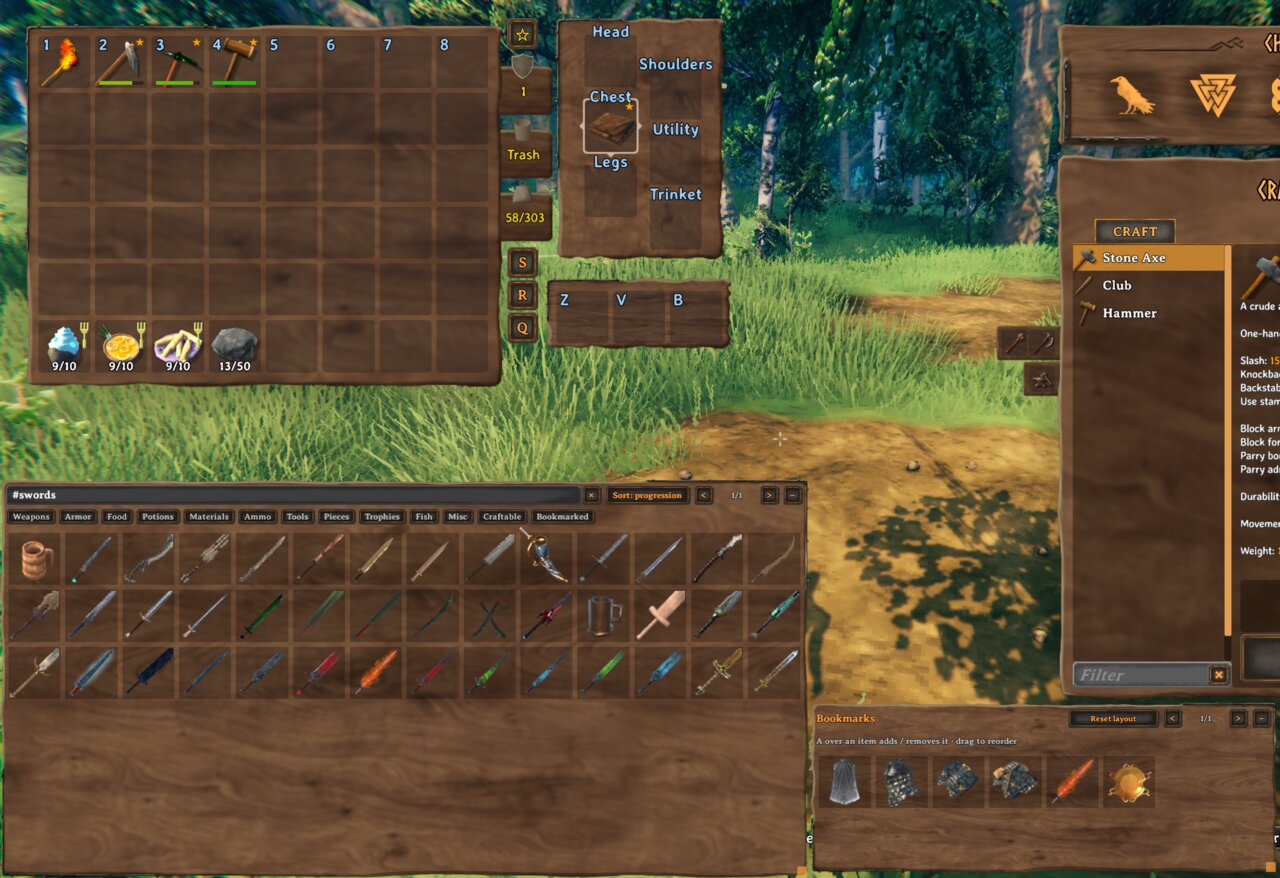
JEI-style recipe browser for Valheim. While the inventory is open, two panels sit at the bottom of the screen: results with search on the left, bookmarks on the right. Slots are the same size as inventory slots. The recipe window opens above the panels.
Requirements
- BepInEx and Jotunn.
- Client only: nothing changes in the world, the server does not need the mod.
Search
Space-separated tokens, all of them must match:
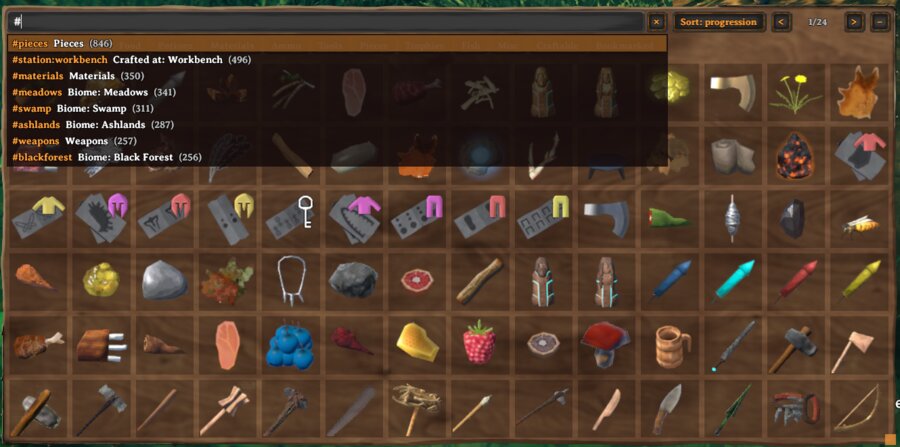
wordin the item name or prefab,@modby mod (@Therzie, vanilla is@Valheim).#tagby tag, a colon means "and" (#weapons:plains,#food:stamina). An unambiguous prefix is enough (#swo).-in front of anything excludes it (-@Therzie,-#pieces,-leather),^namefinds what the item is an ingredient of (^Wood),|means "or" (#swords|#axes).- While typing
#,@or^, suggestions with a description and result count appear below the field, Tab takes the first one. The "×" button next to the field clears the search. - Below the field are chips (Weapons, Armor, Food, Potions, Materials, Ammo, Tools, Pieces, Trophies, Fish, Misc,
Craftable, Bookmarked). Categories behave like tabs: click replaces the previous category, Ctrl+click adds it
as "or" (
#weapons|#armor). Craftable and Bookmarked are added to the filter. Right click excludes the tag (-#tag).
Tags
- categories
#materials #food #potions #weapons #armor #ammo #tools #pieces #trophies #fish #misc; - weapons
#swords #axes #battleaxes #clubs #sledges #spears #polearms #knives #fists #bows #crossbows #staffs #pickaxes #shields #tower #buckler #1h #2h; - armor
#helmet #chest #legs #cape #gloves #utility #trinket, sets#set:<name>; - food
#health #stamina #eitr #balanced #meads #drinks #feasts, pieces#crafting #building #stone #furniture #seeds; - biomes
#meadows #blackforest #swamp #ocean #mountains #plains #mistlands #ashlands #deepnorth #unknown; - state
#craftable(can be crafted right now from what you have, at a station in range),#bookmarked,#station:<station>.
Sorting
The button next to the search field switches between progression (biome → category → subcategory → station level → name), name and mod. The biome is derived from vegetation, spawns, drops and recipes (cheapest path). Anything that cannot be derived is "Unknown" and sorts last.
Keys
Over an item anywhere (panel, inventory, chest, crafting list):
- R recipes, U usages, A bookmark (removes it when used in the bookmarks panel).
- While the cursor is over an item, these keys do not move your character.
- In the panels and in the recipe window: left click = recipes, right click = usages.
- Backspace back, Esc closes the recipe window first.
- The "–" button in a panel header collapses just that panel (results or bookmarks) into a small bar, "Expand" restores it.
- Y collapses both panels if either is expanded, otherwise expands both (only with the inventory open).
- R and U work even with the panels collapsed.
Recipe window
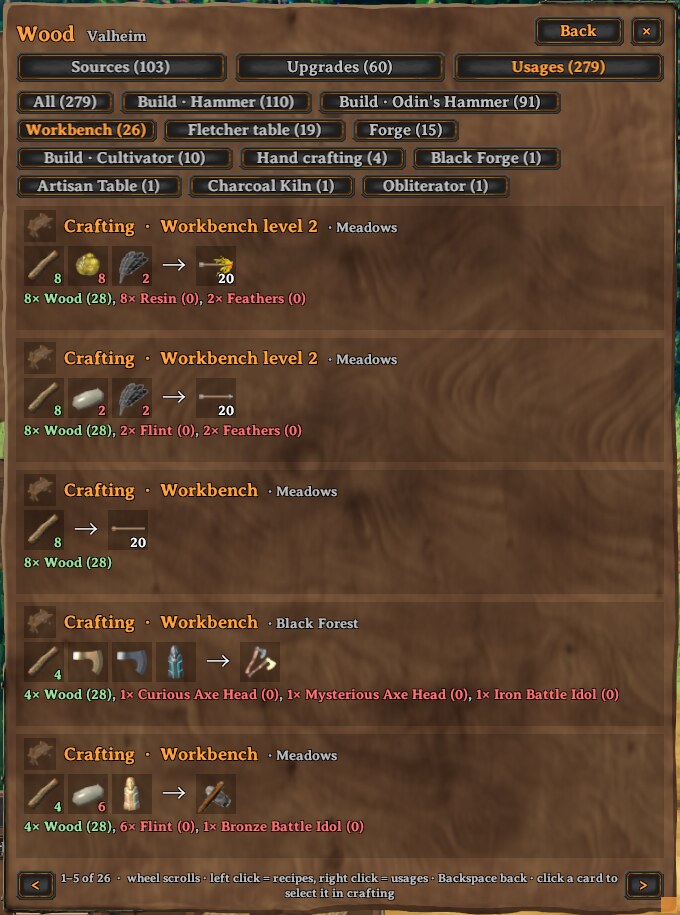
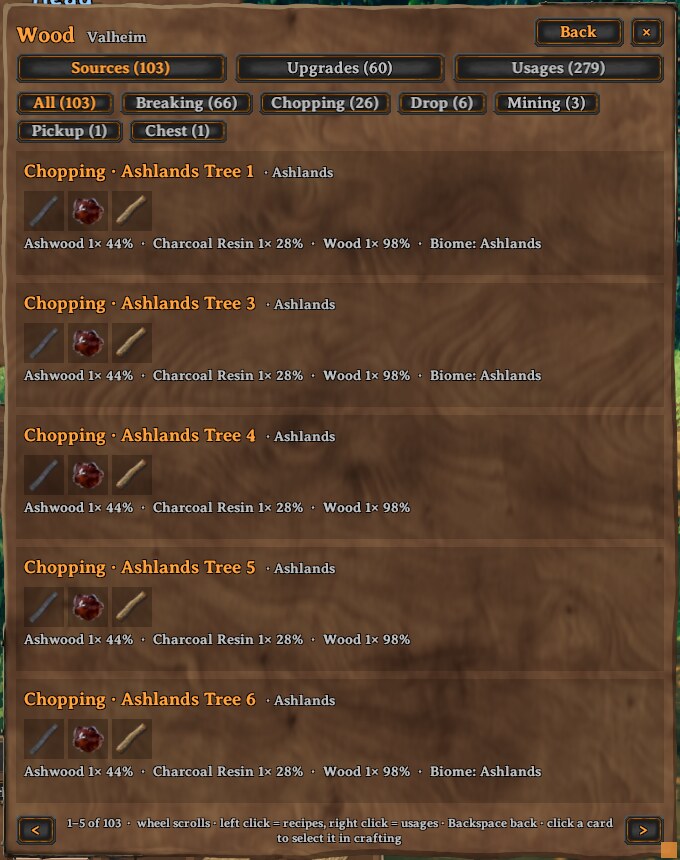
Tabs "Recipes", "Sources" (creature drop with chance, pickup, mining with pickaxe tier, chopping, chest, trader with price and condition, fishing), "Upgrades" and "Usages". Empty tabs are hidden. Below them are groups by station or action, wrapping onto multiple rows. A card shows the station and level, biome, ingredients with amounts (green = you have enough, red = missing, in brackets how many you have) and notes. When you stand at the right station, clicking a card selects the recipe in the vanilla crafting or upgrade list.
Layout
Panels and the recipe window can be dragged by their header and resized by the orange corner. The grid snaps to whole
slots, the window to whole cards. The mouse wheel scrolls by rows (by cards), < > by pages. Positions are saved
as a fraction of the screen, so they survive resolution changes. The "Reset layout" button in the bookmarks header
moves them back to the bottom strip. Bookmarks can be reordered by dragging.
Configuration
BepInEx/config/PetyM.RecipeBrowser.cfg (also in Configuration Manager):
Keys: Recipes, Usages, Bookmark, Back, Collapse.Display: Rows (height of the default strip), Sort, Collapse results, Collapse bookmarks, Biome separators (when sorting by progression, a row with the biome name before each group, off by default).Layout: saved positions (Results, Bookmarks, Recipe window) and Reset layout.Catalog: Hide unobtainable (items with no source or use, on by default), Ignore list (prefabs: exact name,*suffix,prefix*), Log filter (logs every hidden item with the reason).Biomes: Biome overrides (manual biome, e.g.Chitin=ocean, MyModOre=plains), Scan locations.Counts: Nearby chests (Auto = only when CraftFromContainers or a similar mod is running, Always, Never) and Chest range.- Bookmarks are stored in
BepInEx/config/PetyM.RecipeBrowser.bookmarks.txt.
Catalog
The catalog is built the first time you open the inventory in a world, and rebuilt when the number of recipes or items
changes (server sync), when spawn lists change (including modded ones) or when catalog settings change. Locations
and dungeon rooms are loaded in the background after entering the world (asset bundles in batches); once done,
the catalog is rebuilt once and chests, pickups, traders and creatures from locations get the location's biome.
Until then, chests only have a biome guessed from the prefab name. The result does not depend on the world, so it is
cached in BepInEx/cache/PetyM.RecipeBrowser.locations.txt and the scan only runs again after a game or mod update
(or when the set of locations changes). A summary (counts, time, hidden items by reason,
locations) is logged under RecipeBrowser.Data.
Installation
Install with r2modman or Thunderstore Mod Manager (BepInEx and Jotunn are installed as dependencies).
Manually: put RecipeBrowser.dll into BepInEx/plugins/. Only the players who want it need the mod, the server does not.
Source and issues
Source code, bug reports and suggestions: https://github.com/PetyM/valheim-mods. Licence MIT.