
ChestNetwork
Craft, build and refuel smelters from your chests across your whole base, not a radius: overlapping workbenches link every chest into one network. Shift+E quick stacks loot. Server-kept chests, no duplication. Server + all clients.ChestNetwork
Your chests, everywhere in your base. Build, craft and refuel your machines straight from your chests: no more running back and forth to empty them into your inventory. Your whole base, not a radius: workbenches whose zones overlap link every chest into one network. Made for servers: no item duplication.


Website: chest-network.roims.tech (demo video, how the network works, FAQ, comparison with other mods), also in French.
Got an idea, a suggestion or a bug? Come and tell us on Discord: the mod grows with your feedback.
Privacy: ChestNetwork asks once whether you agree to share anonymous usage statistics, and shares nothing unless you say yes. No personal data, ever. See Privacy and telemetry.
Why ChestNetwork?
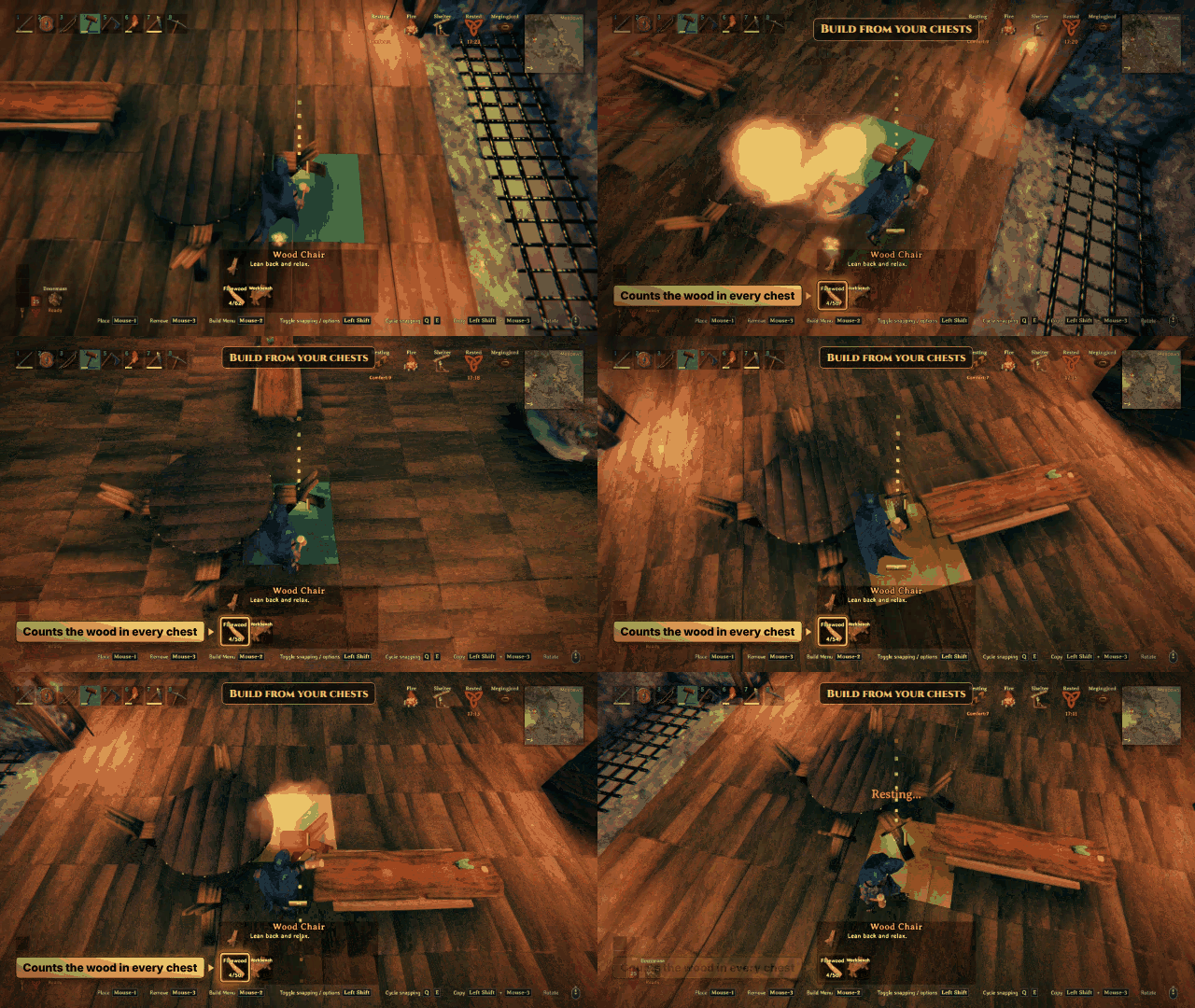
- Stop juggling materials. Pick a piece or a recipe: the wood, stone and metal stored in your chests count as if they were in your pockets.
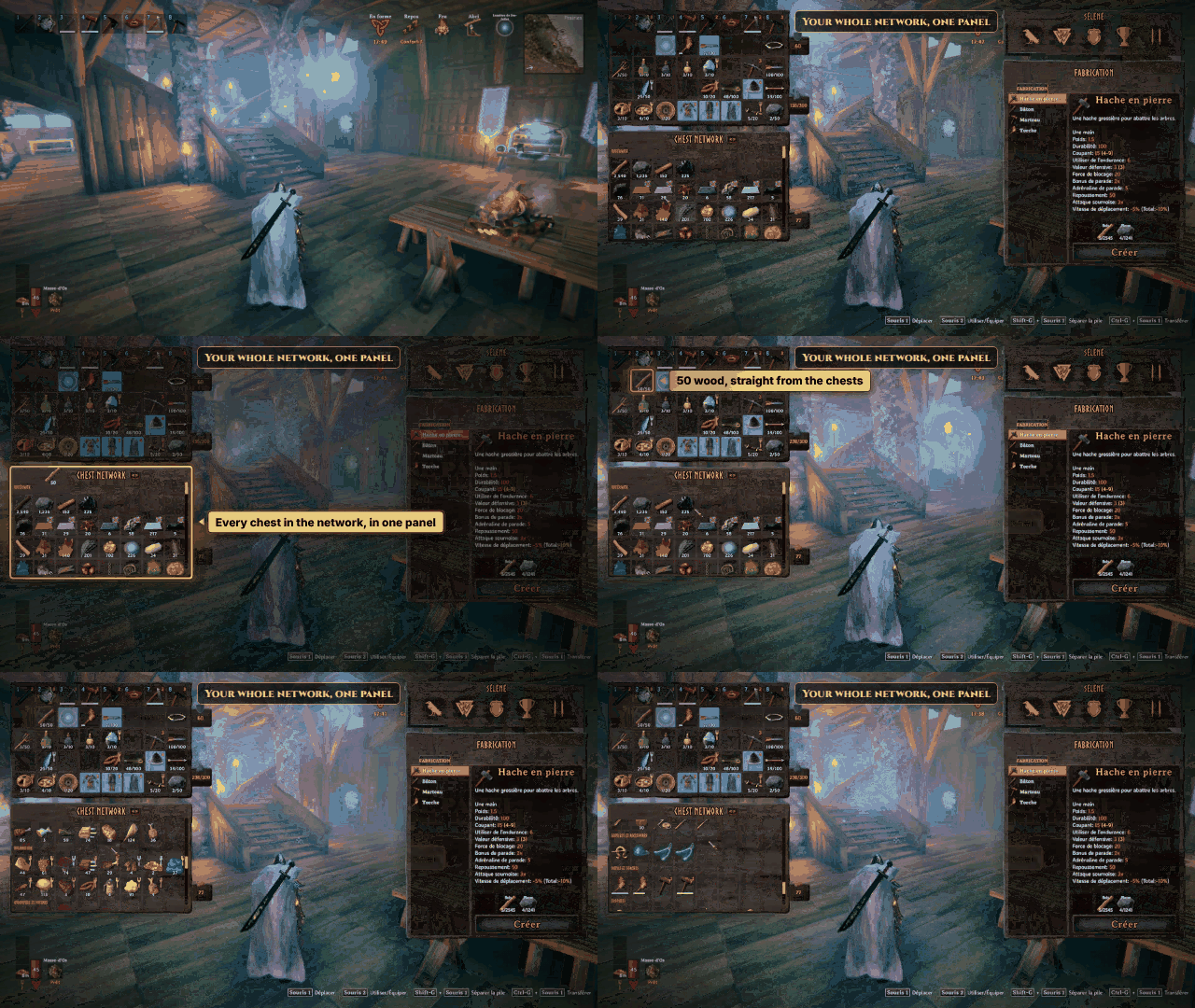
- Every chest in one panel. Open your inventory in the network: the Chest Network panel shows what all your chests hold, so you take and store without opening a single chest.
- One base, one network. Crafting stations whose zones overlap link up, so a big base works as a single network, workbench to forge to cauldron.
- Shift + E does the chores. Refuel a smelter, an oven or a fire, sort your loot into the right chests, dress an armor stand: one key, done.
- Built for multiplayer. No more locks between players: the server takes from the chests for each of you, so everyone builds, crafts and refuels from the same chests at the same time, even from a single chest. No waiting, no duplicated items.
See it in action
One network for the whole base: stations whose zones overlap link up, and every chest in their zones counts.

The network panel: open your inventory in the network and every chest shows up in one panel. Take what you need, drop an item on it to store it.
Build with the materials stored in your chests.
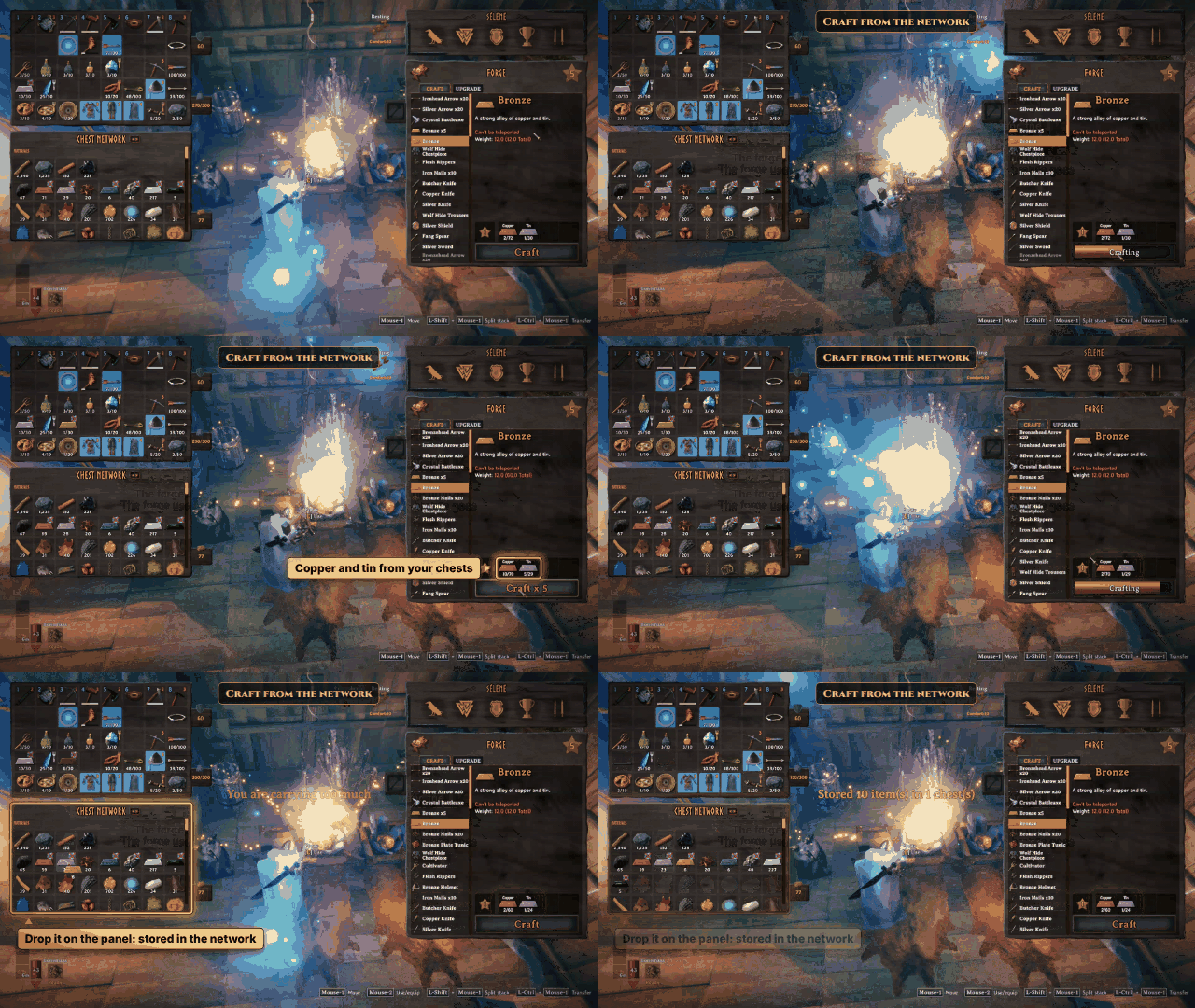
Craft at the forge with the copper and tin of your chests, then drop the bronze on the panel to store it.
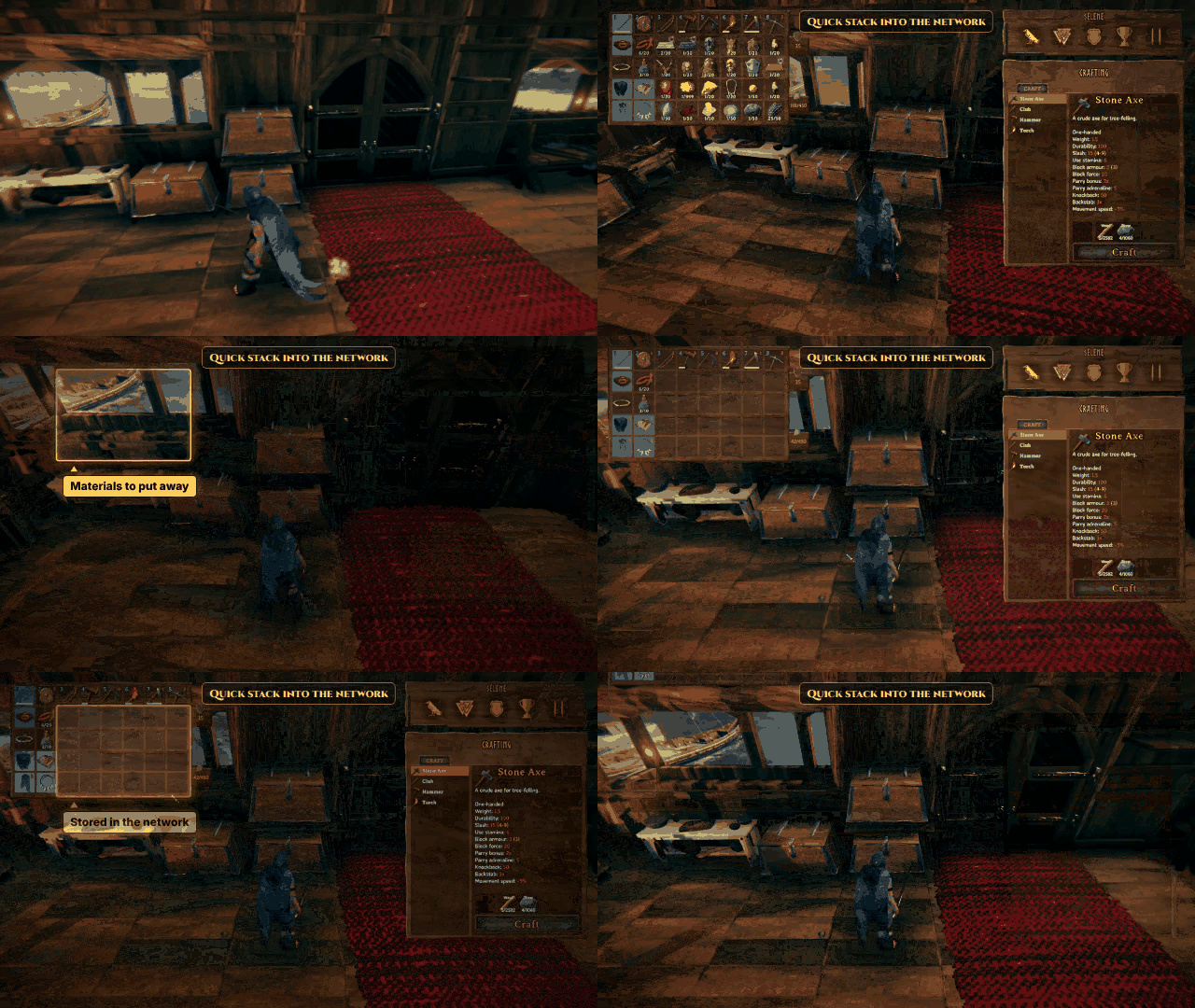
Shift + E on a chest sorts your loot into the chests that already hold it: only materials go, gear and food stay.
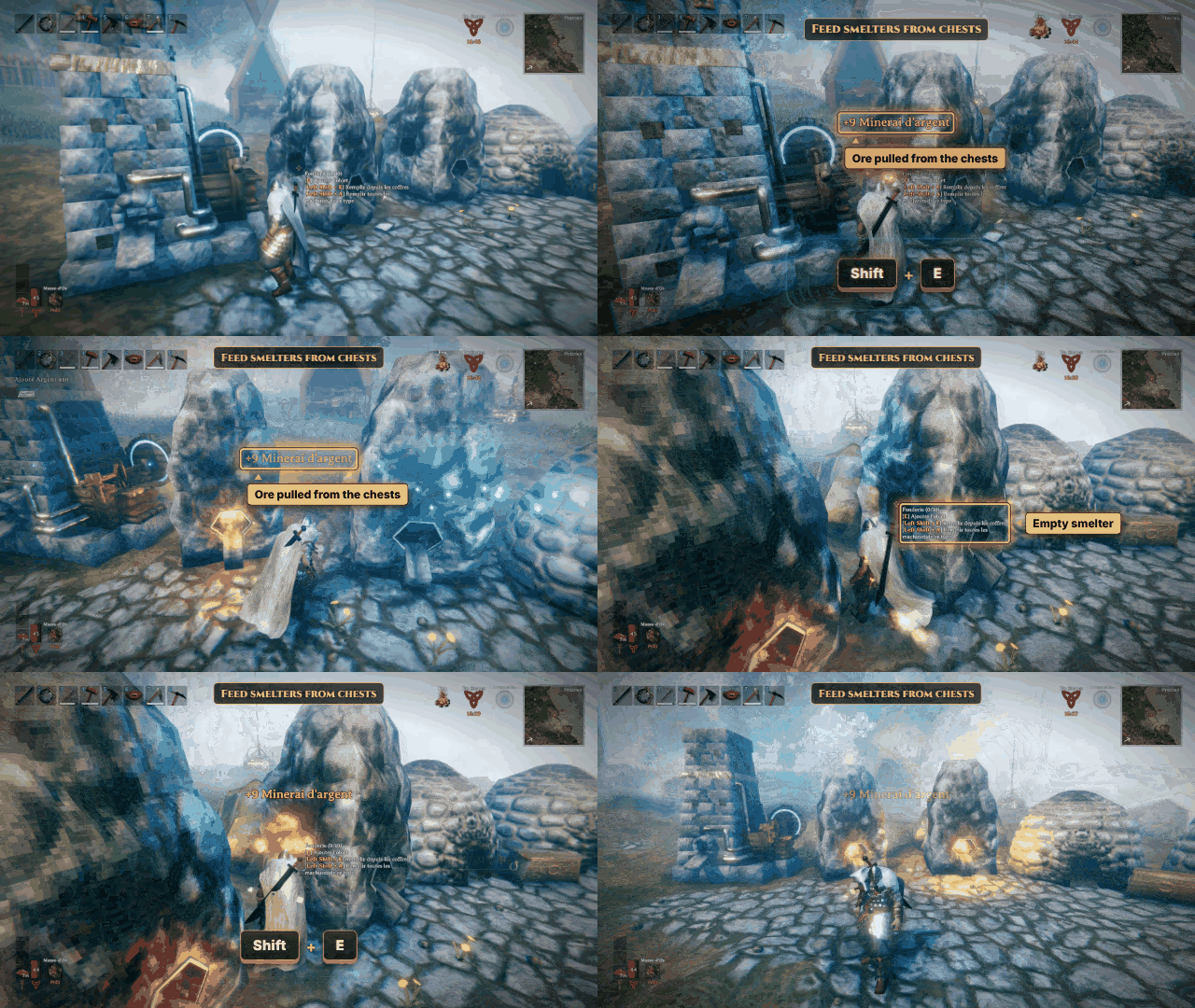
Shift + E on a smelter or a fire fills it up from the network.
Shift + A does it for every machine of the network that uses the same fuel: all the fires, all the torches, all the smelters.
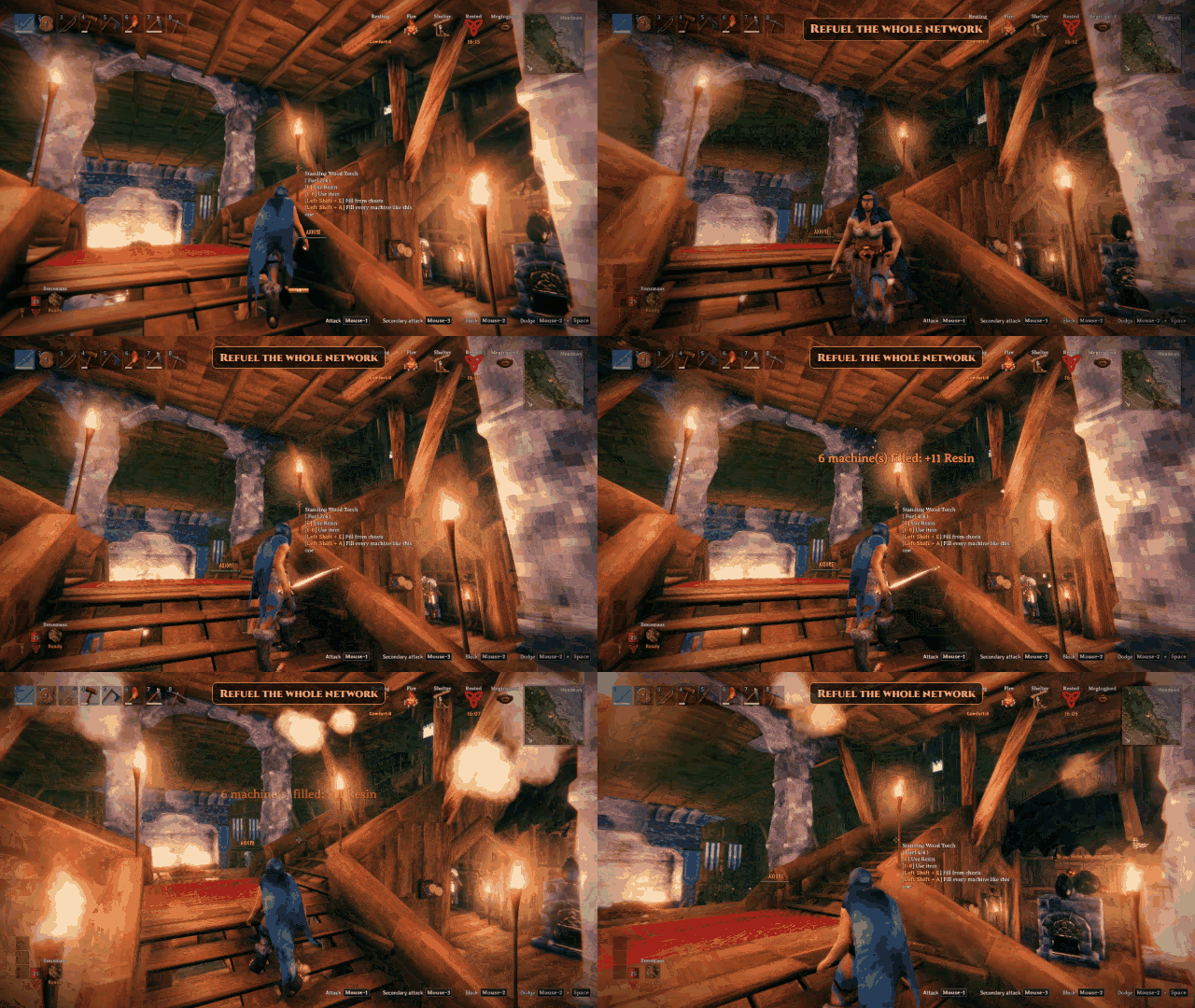
Automatic refuel: when a machine burns a unit of fuel, the server refills it from the chests of its network.

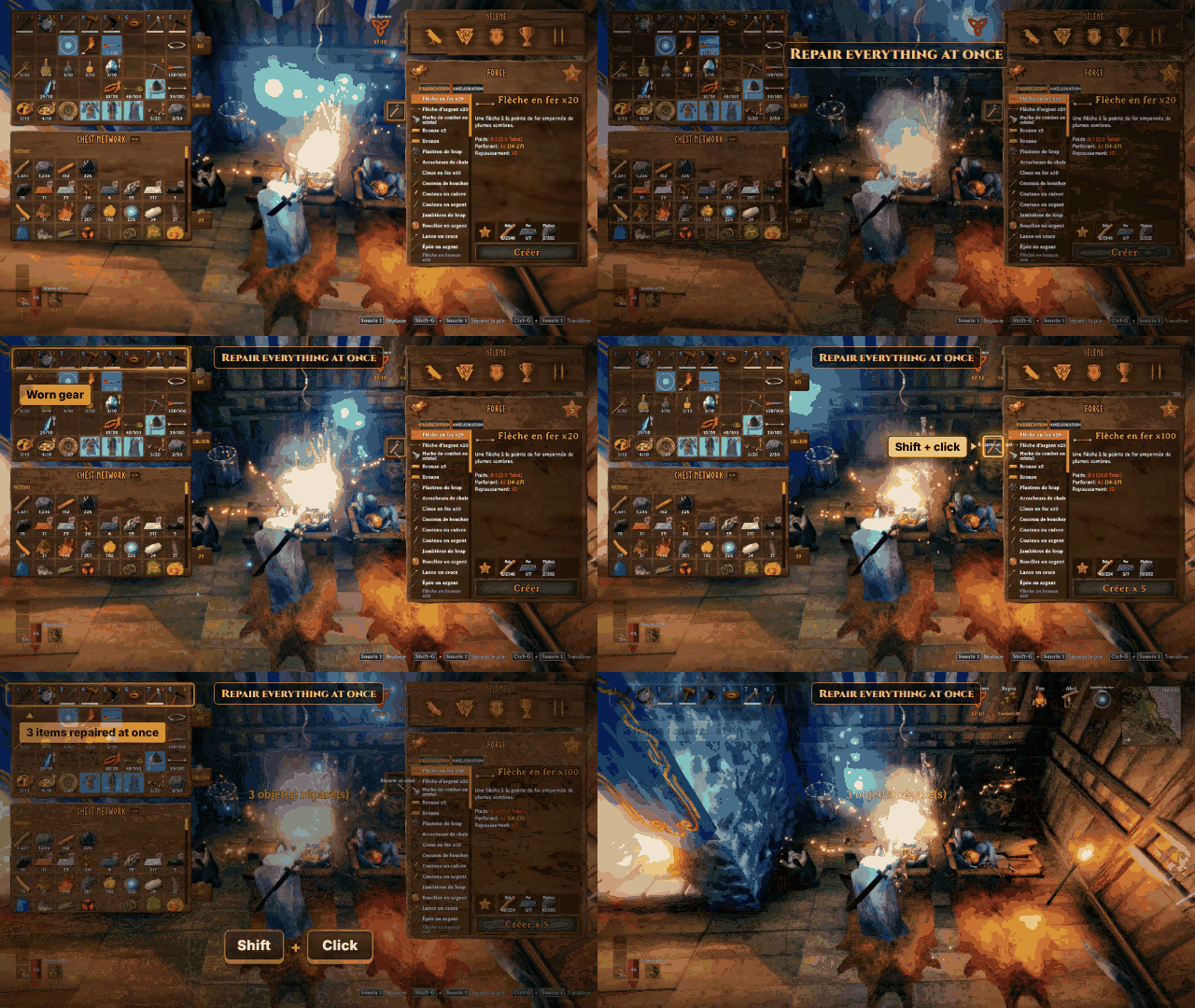
Shift + click on the repair button of a workbench or a forge repairs all your items at once.
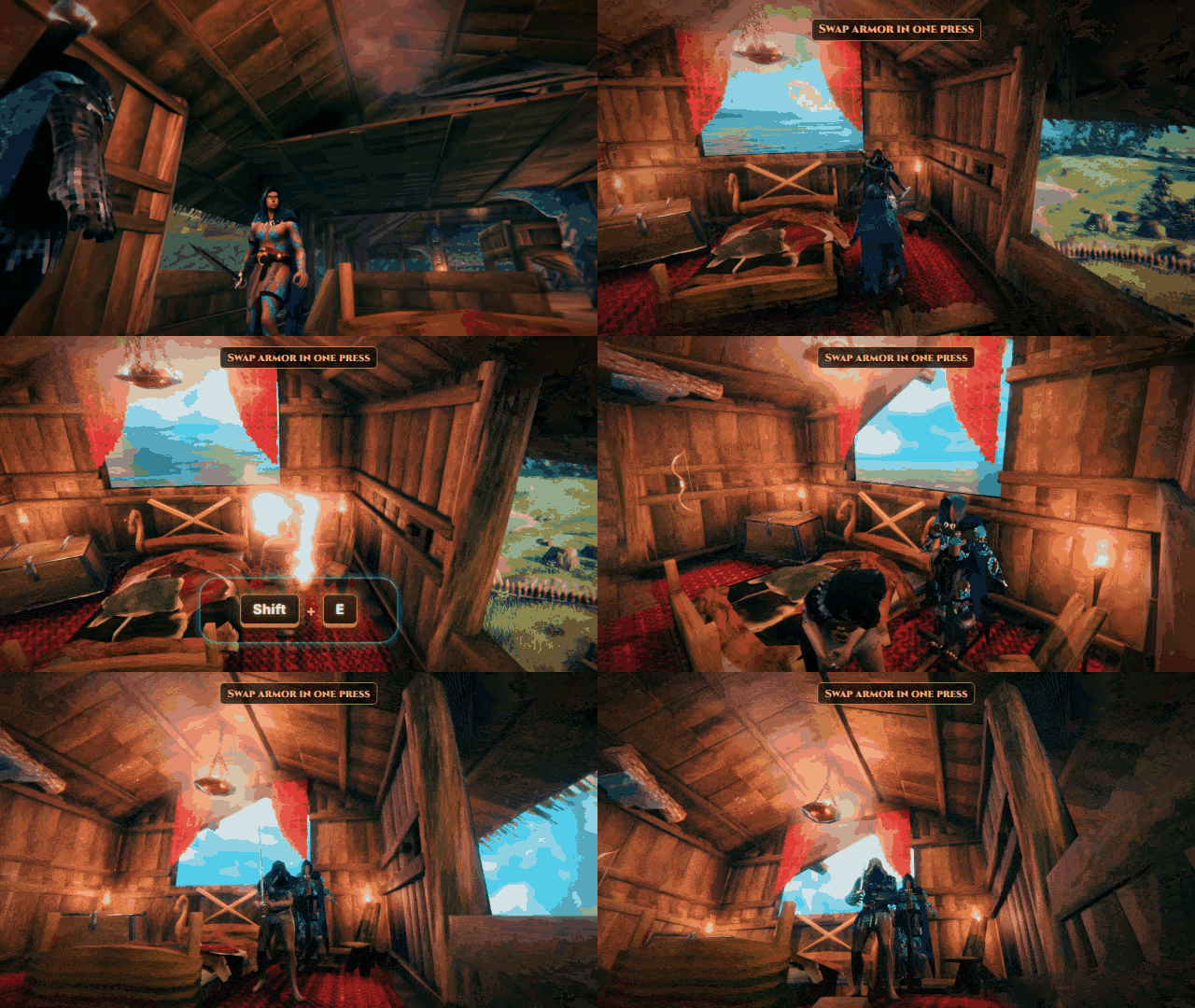
Shift + E on an armor stand dresses it, or swaps your armor with it.
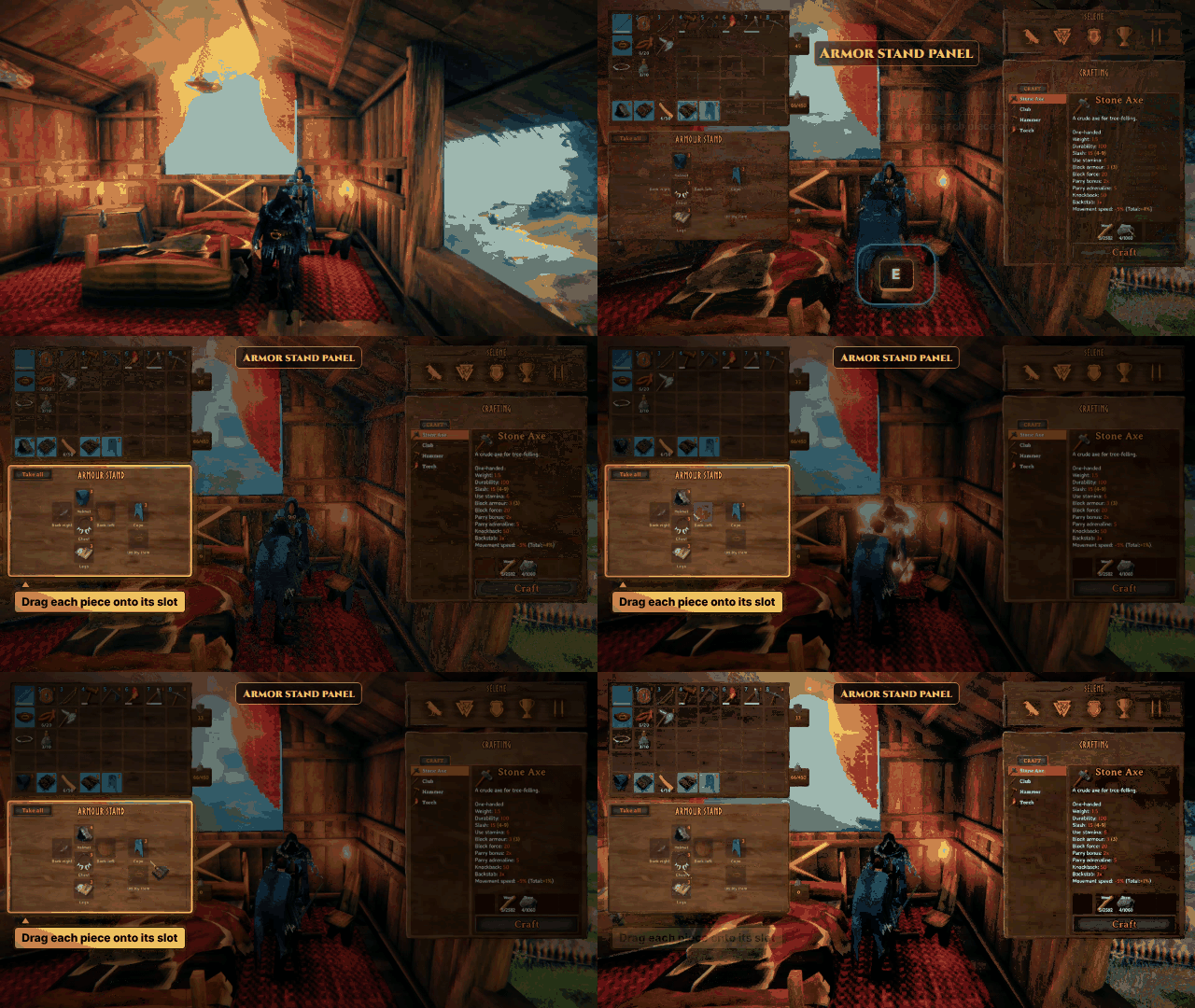
E on an armor stand opens it like a chest: drag each piece onto its slot.
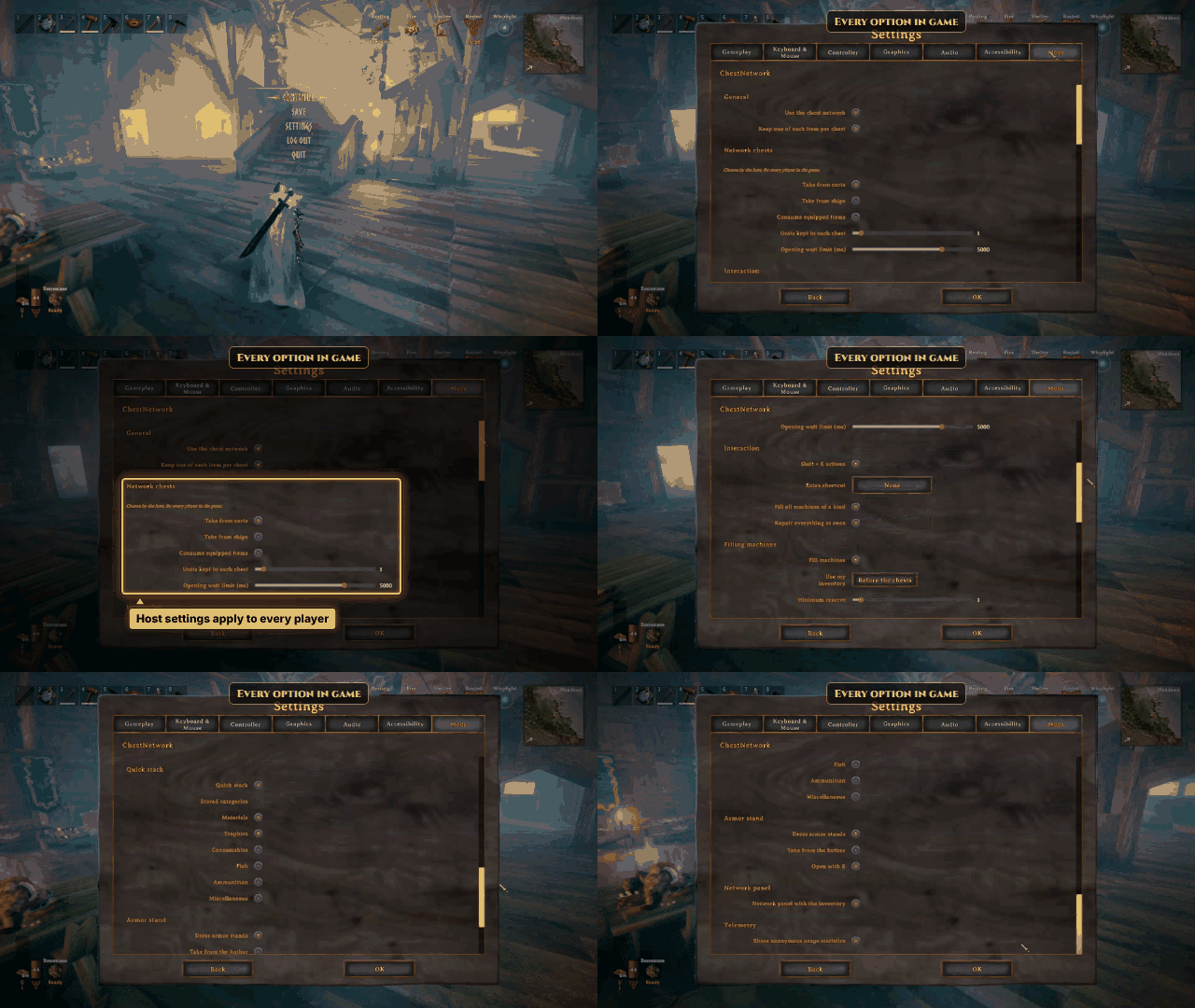
Every option in game, in Settings > Mods: the host's settings apply to every player.
Features
- Building and crafting from the network. Resources are taken from your inventory first, then from the nearest
chests. Requirement lists show
needed/available, chests included. - Crafting station network. Stations whose zones overlap form one network. Standing in the zone of any of them, you can use the chests located in the zone of every station of the network.
- Refuel machines. Aim at a smelter slot (ore or fuel), a stone oven (fuel only), a windmill, a spinning wheel or a fire and press Shift + E (your AltPlace + Use keys, gamepad included): it is filled up from your inventory, then from the network. Shift + A (the key typing A, QWERTY or AZERTY) does the same on every machine of the network that uses the same fuel (all the torches, all the smelters...), nearest first.
- Automatic refuel. Fires, torches, smelters and stone ovens refill their fuel by themselves: each time one burns
a unit, it takes fuel from the chests of its own network (the stations around the machine, wherever the players
are), up to its capacity. Silent, never from a player's inventory, never ore. The server decides
(
[AutoRefuel]). Machines only burn and refill while a player is near enough for them to be loaded. - Quick stack into the network. Aim at a chest of the network and press Shift + E: instead of opening it, your items go into the network chests that already hold them (partial stacks first, then the chest holding the most). The hotbar row and equipped items never move; by default only materials and trophies do.
- Network panel. In the network, the inventory key also opens a Chest Network panel under your inventory: everything your chests hold, one cell per item (and quality) with the exact total, by category, in the order of the game's progression (wood first); materials are sorted by theme (building, metals from ore to ingot, loot, components, cooking, seeds, treasures), each theme on its own rows. Click an item to pick up a whole stack (or what the network holds, if less) and drop it in your inventory, Ctrl + click to take it at once, or Shift + click (left trigger + A on a gamepad) to choose the amount in the game's split window; drop an item of your inventory on the panel to store it in the chests that already hold it. Weapons, tools and armor are shown piece by piece with their real wear. The button next to the title widens the panel up to the crafting menu.
- Repair everything. At a workbench, forge or any station that repairs, Shift + click on the repair button repairs every item that station can repair at once.
- Chests keep their items. Every chest of the network always keeps one unit of each item it holds
(
[Containers] ChestReserve, set by the server), so quick stack still knows where each item goes. - Armor stands. Shift + E on an empty stand dresses it with your best set (inventory, then network chests); on a dressed stand, it swaps your armor with the stand's. E opens the stand like a chest: one cell per slot, the helmet, chest, legs and weapons drawn in the shape of the stand, the cape and the utility item (Megingjord, wishbone, wisp...) beside it. Drag a piece in to hang it, out to take it back; nothing falls to the ground any more (unless you drag it out of the window).
- Multiplayer-safe. The server keeps the chests of the network (1.0): it sets aside what a player is about to use
and takes it out of the chests itself, so items are never duplicated, even when the server stops. If a player's
connection drops (or the game crashes) in the middle of an action, at most that one action is lost: a piece that
never arrives, or the items of a quick stack in flight. One rare case keeps an item twice: a player whose game stops
answering for more than
OpeningSafetyDelaywhile another empties the chest behind their credit (logged). It keeps its own copy of the chests near the players, so opening, hitting, removing or repairing a chest works as in the normal game. A machine or an armor stand is only changed by the player who owns it, handed over first. - Translated into English, French, German, Spanish, Brazilian Portuguese, Polish, Russian and Simplified Chinese.
Installation
Install with r2modman or the Thunderstore Mod Manager: BepInEx is installed automatically.
Multiplayer: every player and the server (or the host) need ChestNetwork, in the same version (1.0 refuses 0.7 players). Players without it, or with an incompatible version, are refused when connecting; on a server without the mod, or with the mod turned off, the mod stays off. The server's network and container settings apply to everyone.
Other mods: the server now owns the network's chests. A mod that takes ownership of chests, or patches chests or
their wear (Container, WearNTear), may behave differently: its changes to the chests now run on the server.
FAQ
Which Valheim mod lets me craft and build from my chests across my whole base?
ChestNetwork has no fixed radius: workbenches whose zones overlap form one network, and every chest inside the zone of a workbench of the network counts as your inventory, as long as you stand in one of those zones.
Is it safe on a multiplayer server? Any item duplication?
Yes. The server keeps the chests and hands out what each player uses, so items are never duplicated, even when several
players build from the same chests at the same time, or when the server stops in the middle. The only loss left is
the action in flight when a player's connection drops or the game crashes: at most one piece, or one quick stack.
In one rare case a player keeps what they used: their game stopped answering for more than OpeningSafetyDelay while
another player emptied the chest behind it (logged on the server).
How do I refuel smelters, kilns and fires from my chests?
Aim at the ore or fuel slot and press Shift + E: it fills from the network. Shift + A fills every machine of the network that uses the same fuel. Fires, torches, smelters and stone ovens also refill their fuel by themselves.
How do I quick stack my loot into nearby chests?
Press Shift + E on any chest of the network: each item goes to the chests that already hold it. The hotbar row and equipped items never move.
How do I see everything my chests hold?
Open your inventory in the network: the Chest Network panel shows the content of every chest, one cell per item with the exact total. Click to take, drop an item on the panel to store it in the chests that already hold it.
Can the mod empty my hotbar or my gear?
No. By default, ChestNetwork takes nothing from your hotbar, quick stacking never moves your hotbar or your gear, and every chest keeps one of each item, so that quick stacking keeps working.
Do I need it on the server?
Yes: the server (or the host) and every player need ChestNetwork, in the same version. The server keeps the chests of the network: without the mod on the server, the mod stays off.
Does it make the game easier?
No. It creates no resource and changes neither recipes nor costs: it only removes the back and forth between chests, inventory and machines.
Is it free?
Yes, ChestNetwork is free.
ChestNetwork vs other craft-from-chests mods
Playing solo and just want to craft near a chest? A client-side radius mod is enough. On a server with a growing base, ChestNetwork connects your whole base and stays consistent with several players.
| Feature | ChestNetwork | Craft From Chests | AzuCraftyBoxes | InventoryLink | CraftFromChestsPlus |
|---|---|---|---|---|---|
| Range | Whole base, workbench network | 40 m (1 to 100) | 20 m by default, configurable | 50 m | Totem zone, 50 m by default (5 to 200) |
| Craft and build from chests | ✓ | ✓ | ✓ | ✓ | ✓ |
| Fill a machine from chests | ✓ | 1 unit per press | ✓ | ✗ | ✓ |
| Fill every machine at once | ✓ | ✗ | ✗ | ✗ | ✗ |
| Automatic refuel | ✓ | ✗ | ✗ (manual) | ✗ | ✗ |
| Quick stack to chests | ✓ | ✗ | ✗ | ✗ (sorting only) | ✗ |
| Armor stand | ✓ | ✗ | ✗ | ✗ | ✗ |
| Install | Server + clients, no duplication | Client only | Client, server config (ServerSync) | Client only | Server + clients, Jotunn |
Checked on the Thunderstore and Nexus pages on 15 October 2026.
Configuration
In the game: Settings > Mods. The everyday settings are there, with the game's own controls (gamepad included) and in your language. Changes apply on OK, Back drops them. When you are connected to a server, the settings it imposes are hidden. ConfigurationManager (F1) shows the same settings.
Every setting, including the expert ones, is in BepInEx/config/jordan.chestnetwork.cfg, created at the first launch.
| Section | Setting | Default | Notes |
|---|---|---|---|
| General | KeepOnePerChest | true | Machine fills (Shift + E, Shift + A) leave one unit of each item per chest while possible (per player); building and crafting follow ChestReserve |
| Network | ConnectionRule | OverlappingZones | Or StationInsideZone |
| Network | InclusiveBoundaries | true | |
| Network | AllowedStationTypes | (all) | e.g. $piece_workbench,$piece_forge |
| Containers | UseCarts / UseShips | false | No effect since 1.0: only chests are part of the network, never carts or ships |
| Containers | AllowEquippedItems | false | Equipped items are never consumed |
| Containers | ChestReserve | 1 | Units of each item every chest always keeps, never used (strict) |
| Containers | OpeningSafetyDelay | 5000 | Milliseconds a chest's menu waits at most for the players whose credits stand on it |
| Containers | ActionCreditMinimum / ActionCreditMaximum | 50 / 1000 | Server only: bounds of what a machine fill (Shift + E, Shift + A) may set aside at once |
| Display | ShowAvailableAmount | true | {0}/{1} format |
| Filling | InventoryUse | First | Or Never / Last |
| Filling | MinimumReserve / ReserveScope | 0 / Network | Units always left in chests |
| Filling | MaxPerAction | 0 (no limit) | |
| Filling | ForbiddenItems | (none) | e.g. $item_finewood |
| Filling | OrePriority | QueuedFirst | Or MachineOrder |
| Filling | NetworkOrigin | Player | Or Machine |
| AutoRefuel | Enabled | true | Machines refill their fuel from their network (imposed by the server) |
| AutoRefuel | MinimumReserve / ReserveScope | 0 / Network | Units of fuel always left in chests (imposed by the server) |
| AutoRefuel | MaxPerAction | 0 (no limit) | Imposed by the server |
| AutoRefuel | ForbiddenItems | (none) | Imposed by the server |
| Interaction | UseAltInteract | true | Shift + E actions (fill, quick stack) |
| Interaction | Shortcut | (none) | Extra key for the same actions |
| Interaction | FillAll | true | Shift + A: fill every machine with the same fuel |
| Interaction | RepairAll | true | Shift + click on the repair button repairs every item at once |
| QuickStack | Enabled | true | |
| QuickStack | IncludedCategories | Material,Trophy | Game item types |
| QuickStack | ForcedItems / ExcludedItems | (none) | e.g. $item_raspberries / $item_finewood |
| ArmorStand | Enabled | true | |
| ArmorStand | TakeFromHotbar | false | Dressing may take armor from the hotbar row |
| ArmorStand | OpenOnUse | true | E opens the stand's panel; false: E drops the piece, as in the game |
| ArmorStand | SetWeight / TierWeight / QualityWeight | 100 / 10 / 1 | How close to the chosen set a piece must be |
| ArmorStand | Sets | vanilla sets | set:tier:prefab,prefab;... for armors of other mods |
| NetworkPanel | Enabled | true | The inventory key also opens the Network panel in the chest network |
| NetworkPanel | Wide | false | The panel is widened up to the crafting menu (its header button, remembered) |
| Telemetry | Enabled | false | Anonymous usage statistics, see below |
| Telemetry | ConsentAsked | false | Set once you answered; false asks again at the next launch (not in the Nexus Mods download, which never asks) |
The Network, Containers and AutoRefuel sections are imposed by the server; the other sections are per player.
Other game languages fall back to English. Only the English and French texts were written by a native speaker: corrections of the other languages are welcome.
Privacy and telemetry
At the first launch, ChestNetwork asks whether you agree to share anonymous usage statistics: which features are
used, how often, and the errors met, to know what to improve. It is off unless you say yes, and you can change your
mind at any time in Settings > Mods (or [Telemetry] Enabled in the .cfg file). The Nexus Mods download never asks:
telemetry stays off unless you turn it on yourself.
- Collected (only if you said yes): how often each feature is used and how it ends (built, crafted, filled, stored, dressed, or why not), counts and durations (items moved, chests used, network size, wait for another player's chest), errors by type, the mod's on/off settings, and a rough context: mod, game and BepInEx versions, operating system, game language, solo, host, client or dedicated server, number of players and of other mods as ranges. Each category and why it is collected: privacy page of the website.
- Never collected: Steam ID, player or character name, world name or seed, positions, server name or address, item names, other mods' names, error messages. Each launch draws a new random identifier, kept in memory only: two launches are never linked.
- Your IP address is seen by the server receiving the statistics, as by any website, but it is neither stored nor attached to them.
- Sent every minute and when the game closes, in the background: it never slows the game. If the server cannot be reached, the statistics are dropped and, after three failures, the mod stops trying until the next launch.
- Your answer is stored in the mod's
.cfgfile only, never in the game's settings. Turning it off stops at once and drops what was not sent yet (a request already on its way, if any, still completes).
Feedback and bug reports
Suggestions, feature requests and bug reports are all welcome on Discord.
To report a multiplayer problem, please attach BepInEx/LogOutput.log from each player (host included), taken
right after the problem, and the server's log: ChestNetwork logs the debts, chest openings and refuels on the server,
and every hand-over of a machine or an armor stand between players (Ownership of ... lines).