

ChestLabels
Adds labels to chests on the; Front, Left, Right and Back Config file for default color and size range. Font size will auto adjust to fit within the size range. Single Player only🛡️ ChestLabels!
This mod is a transfer from original nexus
Adds labels to chests on the; Front, Left, Right and Back Config file for default color and size range. Font size will auto adjust to fit within the size range. Only for single‑player and cooperative play..
---
Valheim 1.0 compatible - built and tested on 1.0.
---
⚔️ CHEST LABEL:
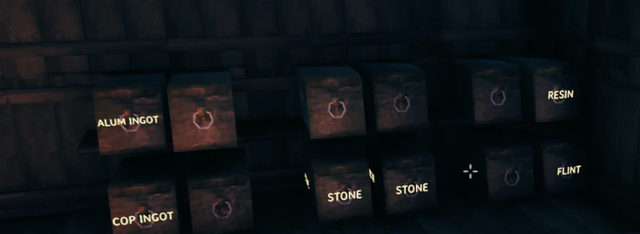
Press Ctrl + E on any chest to give it a name, using the game's
own sign text panel. The label:
- Renders as 3D text on the chest itself (Front, Left, Right and Back sides)
- Replaces "Chest" in the hover text when you look at it
- Auto-sizes to fit any chest type (wood, reinforced, blackmetal...)
Ctrl + E again to edit a label. Save it empty to remove it.
Labels are stored in the world save itself - no extra files, they persist forever, and removing the mod later just leaves plain chests (nothing breaks).
CONFIG (BepInEx\config\ChamberLand.chest_label.cfg, created on first run):
- Text color (RGBA 0-255, one color for all labels - sliders if you use ConfigurationManager)
- Max text size, per-side show/hide toggles
- Modifier key (default Left Ctrl)
- Max label length
---
MULTIPLAYER
Built for Single Player. Should work in co-op if every player installs it (labels are shared world data); players without the mod simply see normal chests. Untested - reports welcome.
Compatibility:
🌐 Available Translations
🇺🇸 English (Default)
ru Russian
Tested in English/Russian. Other languages should work if the game's font has the characters (the mod borrows Valheim's own font so labels match the game's look).
---
📥 Installation
Mod Manager (Recommended)
- Install via R2ModMan or Thunderstore Mod Manager/Gale.
- Dependencies (
BepInExPack) are installed automatically.
Manual Installation
- Copy
chamberland_chest_label.dllto yourValheim/BepInEx/pluginsdirectory.
👨💻 Created
Author: ChamberLand
Transfer to Thunderstore: loyz
Community & Support: PostsNexus
Contact me: @vmrkl on Discord