
ValeriusItemStandMenu
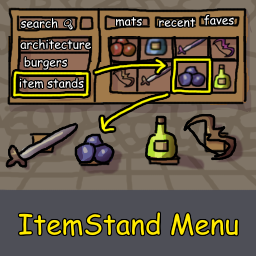
Adds a client-side visual catalogue to Valheim's Hammer for placing item stands with an item already attached.Valerius Item Stand Menu
Adds a client-side visual catalogue to Valheim's Hammer for placing item stands with an item already attached.
Functionality
Automatic item discovery
Compatible vanilla and modded items get automatically detected when Valheim launches, supporting most content and building mods. Item Stand All Items by JereKuusela is recommended for expanded item support.
Menu location
Find the pre-attached item stands by opening the Hammer's Categories tab and scrolling to Item Stands to access the catalogue, which has been optimized large item collections.
Search
Pre-attached item stands are excluded from regular Hammer searches. They can only be searched while the Item Stands side tab is open using the following combinable term types:
- Item names and Prefab names
- Item categories
- Mod names
- Orientation:
horizontalorvertical
Placement
- Placed stands function normally, including item removal, replacement and dismantling.
- Horizontal stands show a temporary direction arrow while building to assist with orientation when an item lacks a placement preview.
- Recipes include the normal stand materials plus one of the selected item, with no materials consumed in no-cost building mode.
Requirements & installation
Mod managers
Install through Gale, r2modman or Thunderstore Mod Manager. Required dependencies should be installed automatically.
Manual installation
- Install BepInExPack Valheim and Jötunn.
- Place
ValeriusItemStandMenu.dllinBepInEx/plugins/.
Source code & issues
Repository: SevDevonne/valheim-ItemStandMenu
Bug reports and suggestions: GitHub Issues
Changelog
1.0.0
- Initial release.
AI declaration
Artificial intelligence was used to assist in developing this mod⸻suggestions and generated code were reviewed and tested by a questionably competent human.