
Valerius Prefab Baker
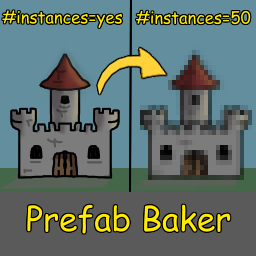
Allows blueprints to be baked to a smaller instance count.Valerius Prefab Baker
A Valheim mod that converts large PlanBuild blueprints into optimized, lower-instance-count prefabs.
Designed for large dungeons, structures, and environments by combining static geometry while preserving configured interactive objects, vegetation, and collisions.
Early Access: This mod is still under development. Some vanilla and modded prefabs require manual CFG classification. Back up your files and test in disposable worlds.
Features
- Blueprint baking: Converts PlanBuild
.blueprintfiles into reusable.flexprefabs. - Mesh optimization: Combines compatible geometry while preserving materials, collisions, and selected original objects.
- Configurable rules: Customize baking, exclusions, protection, and prefab preservation.
- PlanBuild integration: Automatically generates single-prefab placement blueprints.
- Batch baking: Process all source blueprints using
bake.
Requirements
- BepInExPack Valheim
- Jötunn
- PlanBuild — for creating blueprints
Mods supplying custom prefabs used in your blueprints must also be installed.
Installation
- Install BepInEx and Jötunn.
- Place
ValeriusPrefabBaker.dllinBepInEx/plugins/. - Launch Valheim to generate
BepInEx/config/PrefabBaker.cfg. - Review the prefab classifications before baking.
Mod managers such as Gale and r2modman use profile-specific BepInEx directories.
Usage
1. Create a blueprint
Save your structure using PlanBuild, for example:
BepInEx/config/PlanBuild/ExampleBuild.blueprint
2. Bake
Enter a Valheim world, open the console, and run:
bake ExampleBuild
Or bake all source blueprints:
bake
Generated BakedBluePrint_ wrappers are automatically excluded from batch baking.
3. Restart Valheim
Restart after baking to register the generated prefab.
For ExampleBuild, the mod creates:
| File | Location |
|---|---|
| Baked data | BepInEx/PrefabBakerBakes/BakedPrefab_ExampleBuild.flex |
| Bake report | BepInEx/PrefabBakerBakes/BakedPrefab_ExampleBuild_report.txt |
| PlanBuild wrapper | BepInEx/config/PlanBuild/BakedBluePrint_ExampleBuild.blueprint |
4. Place your prefab
Use the console:
spawn BakedPrefab_ExampleBuild
Alternatively, place BakedBluePrint_ExampleBuild through PlanBuild or use the wrapper with compatible tools such as Expand World Data.
Multiplayer: The baker, relevant .flex files, and required prefab dependencies must be available to clients and servers that need to load the structure.
Configuration
Configuration file: BepInEx/config/PrefabBaker.cfg
| Setting | Purpose |
|---|---|
BakeStructures, BakeRocks, BakeVegetation, BakeInteractibles |
Control which object categories become static geometry. |
InteractivePrefabs |
Preserve functional doors, chests, lights, and similar objects. |
PreserveOriginalPrefabs |
Preserve objects requiring original animations, effects, or rendering. |
SeparateVegetation |
Preserve trees, roots, shrubs, and vines. |
LockedVegetation |
Prevent specified vegetation from falling or shifting due to physics. |
ProtectedPrefabs |
Protect selected dungeon objects from structural wear. |
NeverInclude |
Exclude specified objects completely. |
AlwaysBake, NeverBake |
Override normal baking classifications. |
BoundaryPrefabs |
Preserve collision-only boundary objects. |
Aliases |
Map prefab names to registered replacements. |
EnableOverheadCheck |
BETA: Experimental overhead-shelter snow detection. |
DisableAllSnow |
BETA: Attempt to suppress snow on supported objects. |
Prefab classifications are incomplete. Missing vanilla or modded prefabs may cause rendering, collision, or physics issues; append their exact internal names to the appropriate comma-separated CFG lists without removing existing entries.
When to restart:
- CFG changes: Restart Valheim. If you changed how objects are baked or preserved, rebake the affected blueprints and restart again.
- After baking: Restart Valheim once to load the updated
.flexfiles. - After updating the mod: Review your CFG lists, as existing values are preserved and may not include newly added defaults.
Troubleshooting
| Problem | What to check |
|---|---|
| Blueprint not found | Confirm the filename and BepInEx/config/PlanBuild/ location. |
| Objects missing or behaving incorrectly | Check prefab classifications, required mods, and the bake report. |
| Vegetation falling or moving | Add the exact prefab name to LockedVegetation if physics settling is the cause. |
| Snow remains on objects | Snow management is experimental and does not support every shader. |
| Changes not appearing | Confirm the latest bake completed and restart Valheim. |
| Multiplayer objects missing | Confirm matching mod dependencies and required .flex files are available. |
Check BepInEx/LogOutput.log for errors and the generated bake report for skipped or missing objects.
Performance and limitations
Mesh batching reduces object overhead, but not polygon counts or collision costs. Performance depends on geometry, materials, collisions, and separately preserved objects.
Known limitations: Prefab support is incomplete, and some objects may have positioning, physics, or rendering issues. Snow management remains experimental, particularly on vegetation and specialty materials.
Test large structures and multiplayer installations in disposable worlds before deployment.
Compatibility
| Mod | Tested version |
|---|---|
| Jötunn | 2.30.2 |
| PlanBuild | 0.20.0 |
| InfinityHammer | 1.89.0 |
The baker uses the FLX1 format. Legacy .vdb files are not supported.
Changelog
1.0.0
- Initial early-access release.
Source code and issues
Repository: SevDevonne/valheim-prefab-baker
Bug reports and suggestions: GitHub Issues
Please include relevant logs and reproduction steps when reporting bugs. For missing prefab classifications, provide the exact internal prefab name and suggested CFG category.
AI declaration
Artificial intelligence was used to assist in developing this mod. Suggestions and generated code were reviewed and tested by a questionably competent human.
Acknowledgements
Special thanks to Fires / VerdantsAscent, creator of FiresAdminPrefabs and FiresUnifiedCore, whose earlier work in Valheim prefab modding helped inspire this independently developed project.