
PingHud
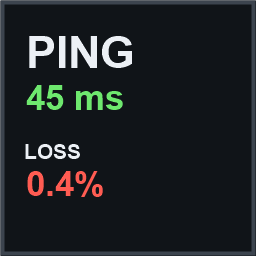
Shows server latency and packet loss on the HUD.Valheim PingHud
Shows the current server's latency and packet loss on the HUD.
Features
- Ping and packet loss, colour-coded green / yellow / red against thresholds you set
- Optional extra rows: jitter, connection quality, and up/down bandwidth
- Sits below the minimap and moves itself aside if another HUD panel is already there, so it never covers anything
- Position: below or above the minimap, or any of the four screen corners
- Appearance: size, font, font size and colour, text outline, background
- Language: English, Simplified Chinese and Traditional Chinese; any other game language falls back to English
- F8 toggles the panel
- Hides itself in single player and whenever the HUD is hidden
One thing to know about packet loss
Valheim only reports real latency and loss on Steam P2P connections - join by Steam friend invite or the server browser, with Crossplay off.
On Crossplay and direct IP / LAN connections the game itself provides no loss figure, so the
panel shows N/A instead of inventing one. N/A means "this connection type does not provide it";
-- means "no reading yet".
When you are hosting, the figure is the average across all connected players.