
You are viewing a potentially older version of this package. View Latest Version
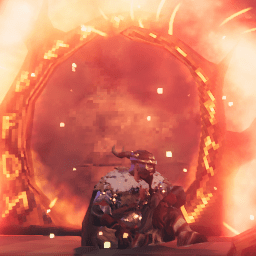
An AnyPortal revamp.
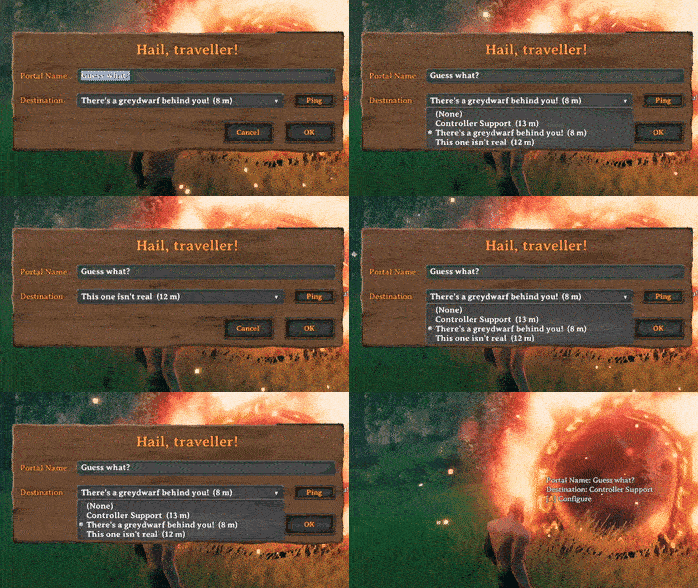
XPortal lets you select a portal destination from a list of existing portals.
No more tag pairing, and no more portal hubs!
When interacting with a portal, instead of entering a tag which has to match another portal's, XPortal lets you choose the portal's destination from a list. For your convenience, this list also shows you how far away the portals are.
XPortal completely removes the character length restriction on portal names, so that you can give your portals clear and descriptive titles.
Forgot where you put your portal? You don't need to teleport to it to find out. Just click the Ping button next to the list, and XPortal will show the selected portal on your map, while also pinging its location to all players on the server.
If you prefer to play without a map, this button can be hidden, either by using the nomap global key, or by setting PingMapDisabled to True.
XPortal has been built with multiplayer support at its core. All players must run the same version of XPortal. If you play on a dedicated server, that too needs to have same version of XPortal installed.
The XPortal UI will respond to gamepad input when configuring your portal. As of v1.2.10 it even shows you the gamepad keyhints!
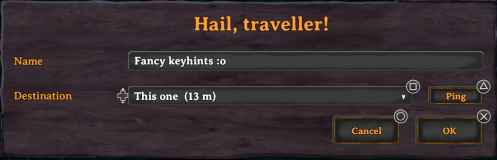
The controls are as follows:
A / Cross - Submit (i.e. press the OK button)B/ Circle - CancelY / Triangle - Ping the selected portalX / Square - Show/hide the contents of the dropdownD-Pad Up / D-Pad Down - Select the previous / next item in the dropdownXPortal has been made fully compatible with the following mods:
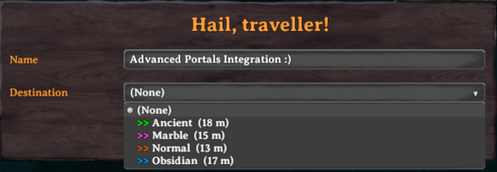
Furthermore, XPortal has a configuration option to fully integrate with Advanced Portals. If you set DisplayPortalColour to True, each portal in XPortal's dropdown list will be prepended by a ">>" tag that has the same colour as the light that the portal emits. As of v1.2.10, Stone Portals also get their own colour!
XPortal is known to be fully incompatible with:
XPortal's config file, which can be found at Valheim\BepInEx\config\yay.spikehimself.xportal.cfg, contains the following settings:
PingMapDisabled
Disable the Ping Map button completely. For players who wish to play without a map. This setting is enforced (but not overwritten) by the server.
DisplayPortalColour
Show a coloured ">>" tag in the list of portals to indicate the portal type (integration with Advanced Portals and Stone Portal).
DoublePortalCosts
Since XPortal is essentially a cheat, in that you only need half the amount of portals now, this setting allows you to compensate for that by doubling portal costs. This setting is enforced (but not overwritten) by the server.
XPortal is a BepInEx plugin. As such, you must have BepInEx installed. Most other Valheim mods are also BepInEx plugins, so chances are you already have this.
XPortal makes use of the Jotunn library, so you must install that before installing XPortal. If you do not install Jotunn, XPortal will simply not be loaded by your game and it will not work.
I very strongly recommend using a mod manager such as Vortex or r2modman. They will take care of everything for you and you don't have to worry about which files go where. I recommend against manual installation.
To install XPortal on a dedicated server, copy all of the contents of the plugins\ directory found inside the .zip file download to the Valheim\BepInEx\plugins\ directory on your server.
First of all, before you report a bug, please make sure that the problem you are experiencing is actually caused by XPortal. If you are running other mods, disable those, and see if the problem goes away. Or the other way around: disable XPortal, and see if that makes the problem go away. If you discover that XPortal is incompatible with another mod, please do report that, because I might be able to create work-arounds for that. If you are not sure, or you are struggling with these steps, then just report the problem, and we'll go from there.
It is important to me that I can make XPortal as bug-free as possible, but please bear in mind that without your LogOutput.log, I will not be able to debug your issue at all. Just showing me a screenshot of an error is not enough for me to discover the cause of that error.
To report a bug, please navigate to the Issues page, click New issue, choose Bug report, and fill out the template.
For feature requests, choose Feature request on the New issue page.
To add a translation to XPortal, choose Translation when submitting a New issue.
Please have a look at my other mod too! XStorage lets you open multiple chests at once, rename them, and move items/stacks to the most suitable chest.
My mods are free and will remain free, for everyone to use, edit or learn from. I lovingly poured many hours of hard work into these projects. If you enjoy my mods and want to support my work, don't forget to click the Like button, and please consider buying me a coffee :)

