
You are viewing a potentially older version of this package. View Latest Version

An AnyPortal revamp.
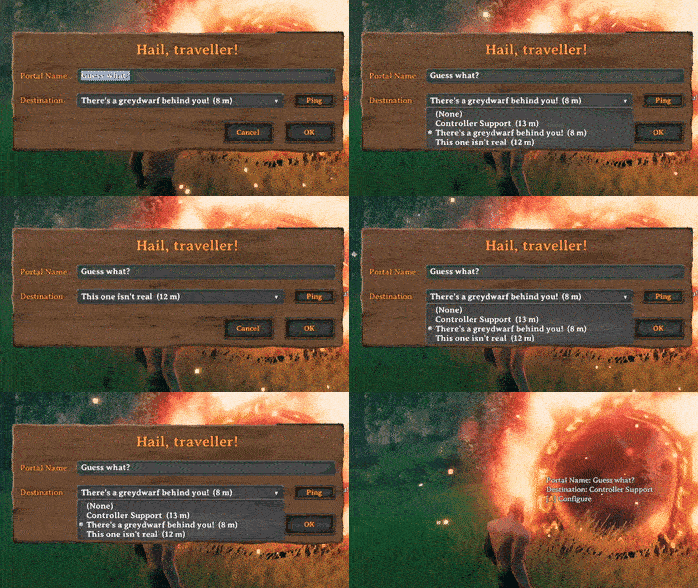
XPortal lets you select a portal destination from a list of existing portals.
No more tag pairing, and no more portal hubs!
When interacting with a portal, instead of entering a tag which has to match another portal's, XPortal lets you choose the portal's destination from a list.
The "edit tag" window has been replaced by XPortal's own configuration window. You can now enter a Name and choose a Destination. Portal connections can now be one-way. In other words, you can go from portal A to portal B, all while portal B might be connected to portal C, or not even connected at all!
For your convenience, the list also shows you how far away the portals are.
XPortal completely removes the character length restriction on portal names, so that you can give your portals clear and descriptive titles.
Forgot where you put your portal? You don't need to go through it to find out. Just press the Ping button next to the list, and XPortal will show the selected portal on your map, while also pinging its location to all players on the server.
As of v1.2.4, a configuration option exists which disables this functionality. If you want to play without a map or just don't want to be able to ping your portals, XPortal now lets you do so. The option can be found in XPortal's config file, and is called PingMapDisabled. By default the Ping Map button is enabled!
XPortal has been built with multiplayer support at its core. This does require all players on the server to run the same version of XPortal. If you play on a dedicated server, that too needs to have same version of XPortal installed.
As of v1.1.0, XPortal will respond to controller input when configuring your portal. It's not as neat as the rest of the Valheim UI - it won't show you the keyhints on the screen - but it does work somewhat intuitively.
A / Cross - Submit (i.e. press the Okay button)
B / Circle - Cancel
Y / Triangle - Ping the selected portal
X / Square - Show the contents of the dropdown
D-Pad Up / D-Pad Down - Select the previous / next item in the dropdown
The easiest method to install XPortal is by using a mod manager such as Vortex or r2modman. You can download XPortal on Nexus Mods or Thunderstore and let your mod manager handle the rest.
If you prefer to install manually, download the latest release from one of the links mentioned above, or on GitHub, and copy the contents of the plugins directory into Steam\steamapps\common\Valheim\BepInEx\plugins\, so that XPortal.dll and the Translations directory land in Steam\steamapps\common\Valheim\BepInEx\plugins\XPortal\.
To report a bug, please navigate to the Issues page, click New issue, choose Bug report, and fill out the template.
For feature requests, choose Feature request on the New issue page.
To add a translation to XPortal, choose Translation when submitting a New issue.
As mentioned earlier, XPortal is a rewrite of the popular AnyPortal mod. Most players won't necessarily notice much difference, bar a few bugfixes. Under the hood, though, XPortal takes a completely different approach to portal management. Also, the UI was completely overhauled.
Here are the most prominent changes:
New UI: AnyPortal built its UI incorporating the existing "edit tag" window. XPortal doesn't use the original "edit tag" window at all.
Robust network synchronisation: AnyPortal updates the information on your screen when you interact with a portal. XPortal updates all portal information at the very moment that any portal is changed, even when someone else does it.
Smaller file: XPortal uses Jötunn's UI elements, so it no longer needs its own Unity assets.
Code optimisation: The way AnyPortal dealt with portal tags and targets has been overhauled. XPortal keeps its own list and keeps that updated whenever any portal change happens. Because of this, it will not have to query game data every time you interact with a portal. If you run Valheim as host, you will no longer experience a harsh performance hit while others are in your game.
Scalability: You won't notice this in your game, but the way XPortal's code is organised should make it much easier to maintain. So when a Valheim update breaks everything, it shouldn't be too hard for me to get things up and running again. XPortal is also ready to deal with any feature requests that you might have. If you are interested in XPortal's code, you are welcome to visit the project's GitHub page!
sweetgiorni for creating AnyPortal
kaiqueknup for translating to Brazillian Portuguese
makou for translating to French, Spanish
Smok3y97 for translating to German
MexExe for translating to Polish, Russian
hanawa07 for translating to Korean
v1.2.4 (2023-02-13)
Add translation to Korean
Items in the dropdown no longer overlap each other
Items in the dropdown are now highlighted when you hover over them
Added configuration option PingMapDisabled which disables the ability to ping portals in the list. By default the Ping Map button remains enabled.
Various code optimisations
v1.2.3 (2023-02-09)
Add support for Nexus Update Check
Minor UI modifications to accomodate longer translations
Added translations for Polish and Russian
Updated description/readme
Code cleanup and minor bugfixes
v1.2.2 (2023-02-06)
Fixed "Fetching portal info.." bug
Non-placeable world items (such as wild beehives) can now be destroyed again
It is no longer possible to configure a portal that is being protected by someone else's ward
v1.2.1 (2023-02-05)
Translation added for Spanish
Added BepInEx dependency, updated Jotunn dependency to 2.10.4
Detect portal placement and destruction
Optimise portal hovering event, UI interaction, and resyncs
Update console log messages
Some bugfixes
v1.2.0 (2023-02-03)
Fix portals disappearing from the dropdown
Fix portals sometimes duplicating
v1.1.0 (2023-02-03)
Controller support!
Translations added for French, Portuguese (BR), German
v1.0.1 (2023-02-01)
Improvements for dedicated servers
Fix a bug that stopped XPortal showing the UI after destroying a portal
v1.0.0 (2023-02-01)
XPortal is free and will remain free, for everyone to use, edit or learn from. If you enjoy XPortal and want to support my work, please consider buying me a coffee:

