
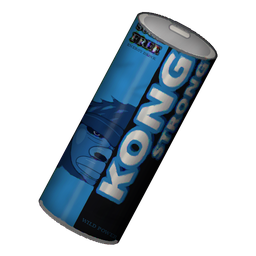
KongStrongEnergy
Kong Strong energy drinks for Valheim: Sugar Free, Urban Classic, Skyr, XXL and Frost/Toxic/Eitr editions with own models, empties, a deposit machine, fridge and tap.Kong Strong Energy for Valheim
English · Deutsch


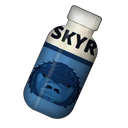




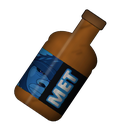

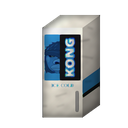

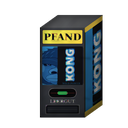
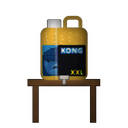
A Valheim mod with energy drinks in the style of Kong Strong: more stamina, more speed, protection from fire, frost and poison, plus own models, empties with a deposit machine and build pieces like a fridge and a tap.
The drinks
| Drink | Duration | Effect |
|---|---|---|
| Kong Strong Sugar Free (blue) | 5 min | +40 instant stamina, +50 % stamina regeneration, +10 % speed, −25 % stamina use while running and jumping |
| Kong Strong Urban Classic (red, with sugar) | 3 min | +80 instant stamina, +75 % stamina regeneration, +15 % speed, −25 % while running and jumping. Then a 1 min sugar crash: −25 % stamina regeneration, −5 % speed |
| Skyr Energy (protein drink) | 10 min | +20 instant stamina, +50 carry weight, +25 % health and stamina regeneration |
| Kong Strong XXL (18.9 L canister) | 20 min | Like Sugar Free, plus fire resistance (half fire damage). Weighs 19 kg, does not stack |
| Frost Edition (ice blue) | 10 min | +30 instant stamina, +25 % stamina regeneration, +5 % speed, −15 % while running and jumping, half frost damage (like the frost resistance mead) |
| Toxic Edition (green) | 10 min | Like Frost, but half poison damage |
| Eitr Edition (purple) | 10 min | +20 instant stamina, +25 instant eitr, +25 % stamina and +50 % eitr regeneration |
| Kong Mead Bomb | 5 min | +50 health over 10 seconds, +50 % stamina regeneration, +10 % speed, −25 % while running and jumping |
| Skyr cup (food) | 30 min | Normal food for one of the three food slots: +50 health, +20 stamina, health regeneration |
Only one Kong drink works at a time, and you cannot drink a new one during the sugar crash. You can combine all drinks with mead.
Around the drinks
- Power animation: Drinking raises your arms like activating a Forsaken power, with Eikthyr's glow but without its sound. Your real power and its cooldown stay untouched.
- Caffeine tolerance: Several drinks within 15 minutes work weaker (the second at 50 %, every further one at 25 %). From the third on you get 2 minutes of heart racing with slower regeneration.
- Too awake to sleep: With an active Kong buff your bed refuses to let you sleep.
- Empties: Cans and bottles leave intact empties (not crushed, or the deposit machine could not scan them). Build a can pyramid from them, or trade them for coins at the deposit machine.
- Own models: Cans, bottles, canister, cup and keg are own models. Set
CustomModels = falsein the config to fall back to the game's mead bottles. - "D K!" shout: After the Kong Strong cans an own shout can play (
[Sound] Shout, on by default). The mod ships no sound: put your own WAV file (16 bit PCM) atBepInEx/config/KongStrong/shout.wav, it stays on your PC. Without the file it stays silent.ShoutBoostmakes the sound louder.
Crafting
All drinks are brewed at the cauldron. You can build the cauldron once you have tin from the Black Forest, and it needs a fire underneath.
| Drink | Ingredients | Makes | From biome |
|---|---|---|---|
| Sugar Free | 3 Blueberries, 1 Thistle, 1 Yellow Mushroom | 2 | Black Forest |
| Urban Classic | 2 Honey, 3 Raspberries, 1 Bloodbag, 1 Yellow Mushroom | 2 | Swamp |
| Skyr Energy | 1 Egg, 1 Honey, 2 Blueberries | 2 | Plains |
| XXL | 6 Vineberries, 3 Smoke Puffs, 3 Yellow Mushrooms | 1 | Ashlands |
| Frost Edition | 3 Blueberries, 1 Freeze Gland, 1 Yellow Mushroom | 2 | Deep North |
| Toxic Edition | 2 Blueberries, 1 Ooze, 1 Thistle, 1 Yellow Mushroom | 2 | Swamp |
| Eitr Edition | 1 Sap, 1 Magecap, 1 Yellow Mushroom, 2 Blueberries | 2 | Mistlands |
| Skyr cup | 2 Eggs, 2 Cloudberries, 1 Honey | 2 | Plains |
| Mead Bomb | Base at the cauldron: 5 Honey, 2 Sugar Free, 5 Raspberries, then ferment it | 6 | Ashlands / Swamp |
Sugar Free needs no honey, it is sugar free after all.
Build pieces (hammer)
| Piece | Station | Ingredients | Notes |
|---|---|---|---|
| Kong fridge | Workbench | 6 Fine Wood, 2 Bronze, 1 Freeze Gland | 16 slots, the door opens |
| Can pyramid | – | 10 Kong empties | a little comfort |
| Deposit machine | Workbench | 8 Fine Wood, 3 Bronze | 1 coin per empty |
| Kong tap | Workbench | 1 XXL canister, 6 Wood | 38 drinks shared by all players, refill with right click and another XXL |
All values, recipes and stations can be changed in the config (see Configuration).
Requirements
- BepInExPack_Valheim 5.4.2333 or newer
- Jotunn 2.30.2 or newer
In multiplayer all players and the server need the same version of the mod, or Jotunn refuses the connection.
Installation
The finished mod is on the release page as KongStrongEnergy-<version>.zip. It contains plugins/KongStrong.dll plus manifest.json and icon.png for mod managers.
With a mod manager (Windows and Linux)
- Create a Valheim profile and install BepInExPack_Valheim and Jotunn in it.
- Import the zip with the import function for local mods (in r2modman: Settings → Import local mod), or install the package from Thunderstore.
- Start Valheim through the mod manager (in r2modman: Start modded).
Manually on Windows
- Open the Valheim folder: in Steam right click Valheim → Manage → Browse local files.
- Download BepInExPack_Valheim and copy the contents of its
BepInExPack_Valheimfolder directly into the Valheim folder. AfterwardsBepInEx\,winhttp.dllanddoorstop_config.inisit next tovalheim.exe. - Download Jotunn and copy
plugins\Jotunn.dlltoBepInEx\plugins\. - Create the folder
BepInEx\plugins\KongStrong\and copyKongStrong.dllinto it. - Start Valheim normally through Steam. No launch options are needed on Windows.
Manually on Linux (native Steam version)
- Open the Valheim folder, usually
~/.local/share/Steam/steamapps/common/Valheim. - Copy the contents of
BepInExPack_Valheimfrom the zip into this folder and make the start script executable:chmod +x start_game_bepinex.sh - Put Jotunn and
KongStrong.dllin place like on Windows:BepInEx/plugins/Jotunn.dllandBepInEx/plugins/KongStrong/KongStrong.dll. - In Steam right click Valheim → Properties → Launch options:
./start_game_bepinex.sh %command% - Start Valheim through Steam.
Linux with Proton: If you run Valheim through Proton (compatibility forced), install the files like on Windows and use WINEDLLOVERRIDES="winhttp=n,b" %command% as launch option instead.
Dedicated server
Put BepInExPack_Valheim, Jotunn.dll and KongStrong/KongStrong.dll on the server the same way. On Linux start the server with start_server_bepinex.sh, on Windows as usual.
Does it work?
BepInEx/LogOutput.logcontains lines likeAdded KongStrongSugarFree.- The drinks show up in the recipe list at the cauldron.
- For testing, use the console (F5): first
devcommands, then for examplespawn KongStrongSugarFree 5. The prefab names areKongStrongSugarFree,KongStrongClassic,KongSkyrEnergy,KongStrongXXL,KongStrongFrost,KongStrongToxic,KongStrongEitr,KongMetBombe,KongSkyrCupandKongLeergut(the empty).
Configuration
After the first start with the mod, the file BepInEx/config/felix.kongstrong.cfg is in your Valheim folder. Changes take effect after restarting the game.
The drink sections [SugarFree], [Classic], [Skyr], [XXL], [Frost], [Toxic], [Eitr] and [MetBombe] all have the same keys:
| Key | Meaning |
|---|---|
Enabled |
Turn the drink on or off |
DurationSeconds |
Duration of the buff in seconds |
InstantStamina |
Stamina restored immediately |
StaminaRegenBonusPercent |
Faster stamina regeneration in % |
HealthRegenBonusPercent |
Faster health regeneration in % |
MoveSpeedBonusPercent |
Faster movement in % |
RunStaminaReductionPercent |
Less stamina use while running in % |
JumpStaminaReductionPercent |
Less stamina use while jumping in % |
CarryWeightBonus |
Extra carry weight |
InstantEitr, EitrRegenBonusPercent, HealOverTime |
Instant eitr, faster eitr regeneration, healing over 10 seconds |
FireResistance, FrostResistance, PoisonResistance |
Damage while the buff is active: Normal, SlightlyResistant, Resistant (half damage), VeryResistant or Immune |
ReturnsEmpty |
Drinking leaves an empty |
CraftingStation |
Where it is made, default Cauldron, e.g. also Workbench or Forge |
Ingredients |
Ingredients as Prefab:Amount, comma separated, e.g. Blueberries:3,Thistle:1. Unknown names end up as a warning in the log |
Amount |
Drinks per craft |
More sections: [SugarCrash], [CaffeineTolerance], [HeartRacing], [SkyrCup], [General] (sleep block, empties, models, animation), [Sound] and one per build piece: [Fridge], [CanPyramid], [DepositMachine], [Tap].
Updates: Recipes (Ingredients) and crafting station (CraftingStation) that still hold the default of an older version are set to the new default automatically at startup. Values you changed yourself stay as they are, so you do not have to delete the config.
The prefab names of ingredients are in the Jotunn item list.
Building it yourself
You need:
- the .NET SDK 8 or newer
- Windows: installer from the Microsoft page or
winget install Microsoft.DotNet.SDK.10 - Arch/CachyOS:
sudo pacman -S dotnet-sdk
- Windows: installer from the Microsoft page or
- Valheim with BepInExPack and Jotunn installed. The build uses the DLLs straight from the game folder. No NuGet packages are downloaded.
git clone https://github.com/Stanni97/valheim-kong-strong.git
cd valheim-kong-strong
dotnet build -c Release
The build copies KongStrong.dll to BepInEx/plugins/KongStrong/ automatically and puts the release zip in dist/.
If Valheim is not in the default Steam folder, pass the path:
dotnet build -c Release -p:ValheimDir="D:\SteamLibrary\steamapps\common\Valheim"
Turn off the automatic copy into the game with -p:InstallToGame=false.
For a new version raise the version number in two places: <Version> in KongStrong.csproj and PluginVersion in src/KongStrongPlugin.cs.
Icons and model textures are made with Python 3 (Pillow): tools/make_icons.py (icons; --classic gives the first, clean style, which is also kept as finished files in Assets/backup-v1) and tools/make_textures.py (textures of the models). The gorilla comes from tools/gorilla.py, the meshes are built in code by src/Models.cs. The default fonts are Noto Sans Black and DejaVu Serif Bold; set other paths with the environment variables KONG_FONT_HEAVY and KONG_FONT_SLAB.
python3 tools/make_icons.py Assets 128
python3 tools/make_textures.py Assets
python3 tools/make_icons.py /tmp/icons256 256   # then copy sugarfree.png to Thunderstore/icon.png
Updates
- With a mod manager (recommended): r2modman and Gale show new versions from Thunderstore and install them. In multiplayer, update the server and all players together, they need the same version.
- Manual install from GitHub: If you installed the mod by hand, the optional Bifrost Updater can keep it current from the GitHub releases. It is a separate tool and not part of this package. Don't use it on a mod manager profile, the mod manager would then show the wrong version.
The mod itself never downloads anything and never updates itself.
Notice
This is an unofficial fan mod with no connection to Lidl, Milbona or the Kong Strong brand. Icons, models and textures are own work in the style of the cans.
License
Code and icons are under the MIT license. The license grants no rights to the Kong Strong, Milbona and Lidl trademarks, those stay with their owners.