


ItemUpgrader
Client-side upgrade roulette: favorites, 20-attempt history, biome filters, value tooltips, quick picks and quantity sliders. In-game UI/sound settings, character progression, one-stack rewards, 90% default chance cap. English/Russian.Item Upgrader
Choose your reward. See the odds. Take the risk.
Turn spare resources and equipment into a chance to obtain the item you want. Set your stake, pick a reward and its quantity, then watch the wheel spin. A win gives you the selected reward; a loss consumes your stake.
Version 0.7.1 · Valheim 1.0 · Client-side · F8 menu · English / Русский
In-game screenshots
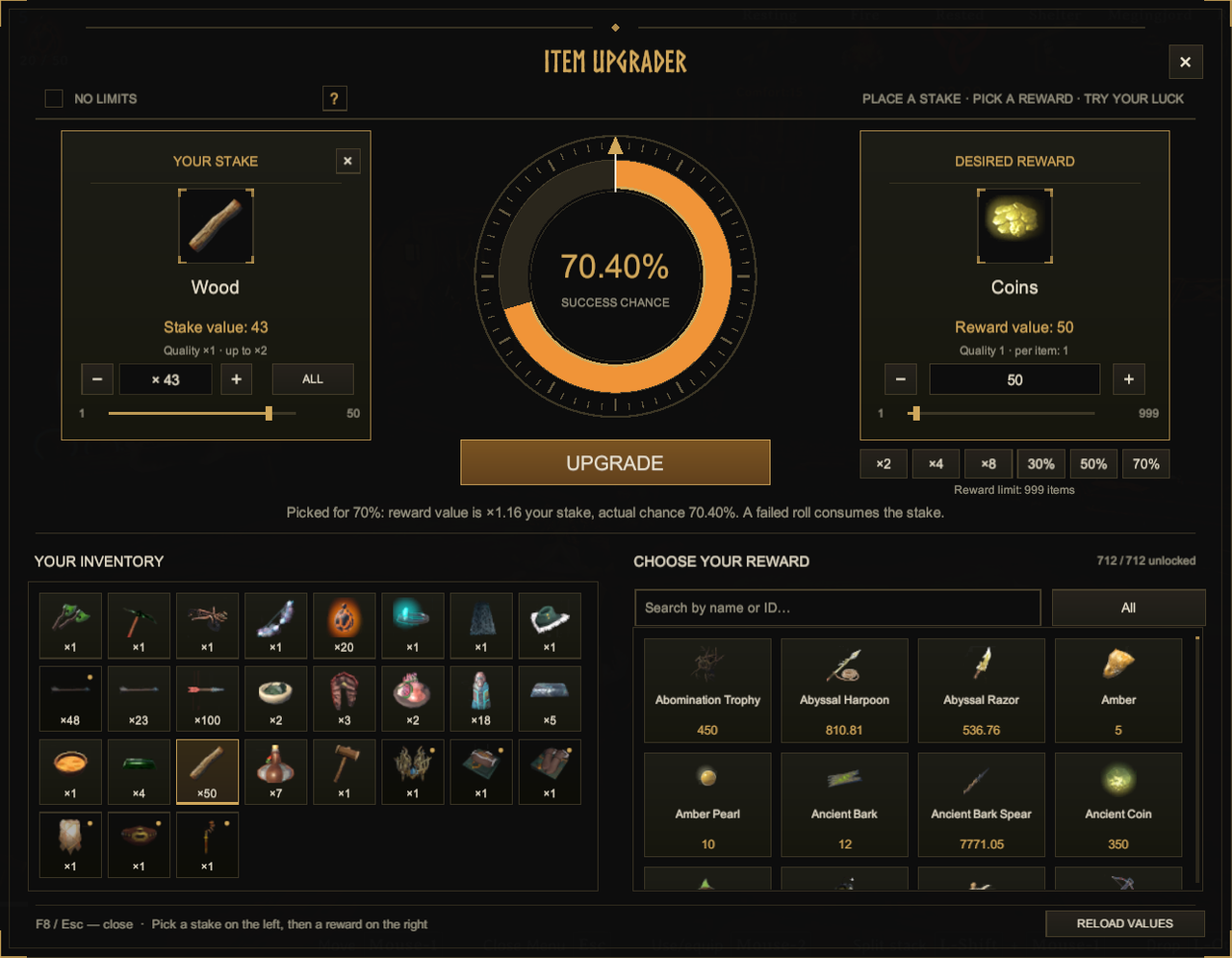
1. English interface
2. Russian interface
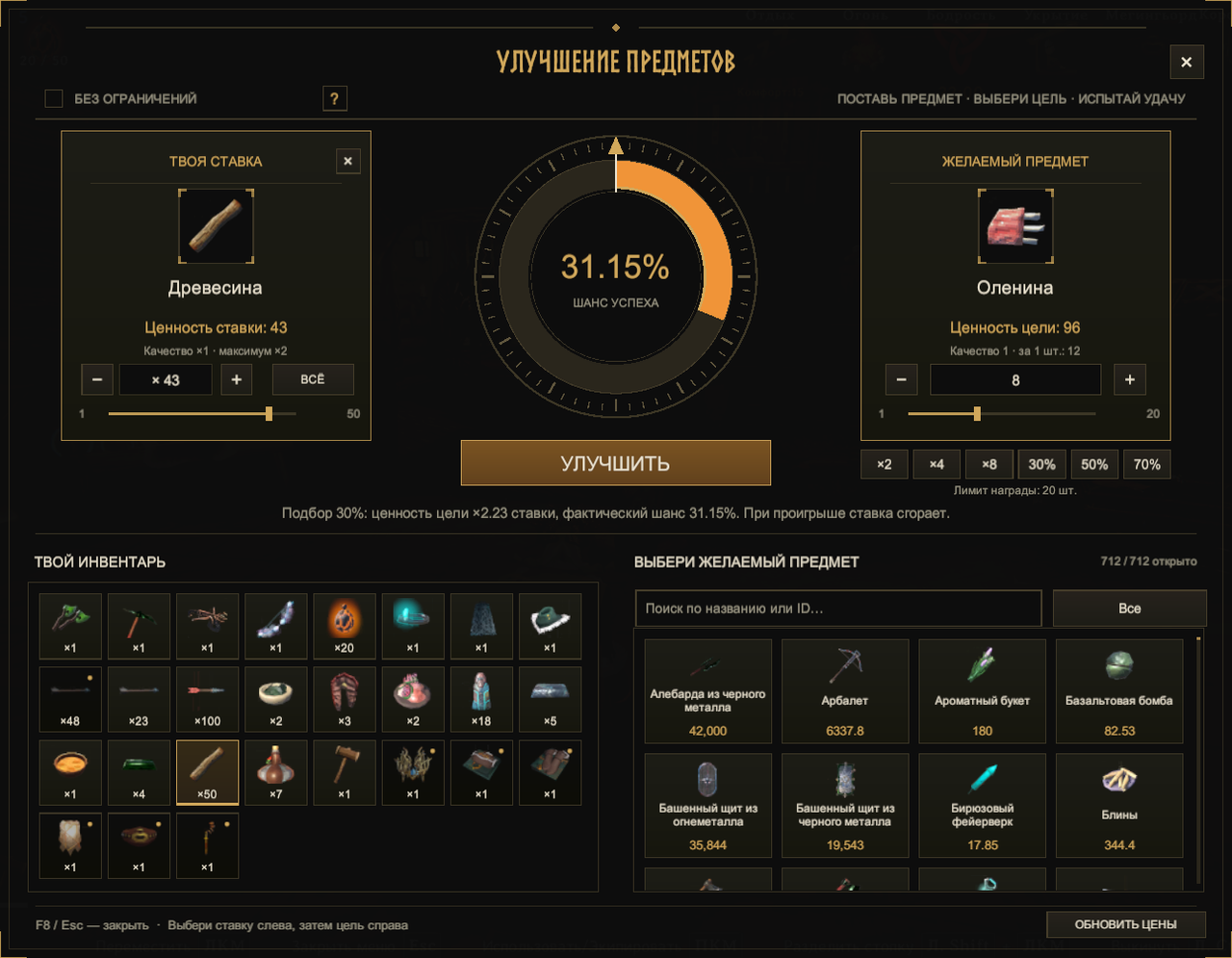
Actual in-game screenshots from 0.6.4, with English first. Versions 0.7.x add catalog filters, history and settings windows. In 0.7.1, NO LIMITS and RELOAD VALUES are inside SETTINGS. Available items, values and odds depend on your character and configuration.
What you can do
| Feature | How it works |
|---|---|
| Upgrade roulette | The orange sector shows your success chance. Enjoy a smooth five-second spin, then claim a win. |
| Quick value picks | ×2 / ×4 / ×8 pick a random eligible reward near the requested multiple of your total stake value. |
| Quick odds picks | 30% / 50% / 70% find a random reward with nearby calculated odds. The menu shows the actual chance. |
| Two quantity sliders | Adjust how much to spend and how many items to receive. Sliders, buttons and the reward number field stay in sync. |
| Character progression | Rewards become available as you discover items or learn recipes. Existing discoveries count too. |
| Balanced defaults | Rewards are limited to one actual stack of the selected item. The default success cap is 90%. |
| Valheim-style menu | Dark surfaces, warm gold details, a clear central wheel, search, categories and fast scrolling. |
| Automatic language | Russian and English follow the game language. Other languages use English UI text with native item names. |
| Favorites | Star reward cards and use the ★ filter. Favorites belong to the current character. |
| Upgrade history | Last 20 attempts with items, quantities, chance, result and time. Current outcomes stay hidden until the wheel stops. |
| Catalog filters | Cycle name, ascending/descending value and near-stake sorting; filter by biome/progression tier. |
| Value breakdown | Hover cards for base value, quality, wear, totals, acquisition estimate and stack size. |
| Remembered reward | Restore the last target and quantity when eligible and within the active limit. |
| Interface settings | Text/menu size, scrolling, spin duration, volume, sounds and rune effects in the menu. |
Your first upgrade
- Press F8 and select an unequipped inventory item.
- Set your stake quantity with the left slider or − / + / ALL.
- Choose a reward from the catalog, or use a quick pick. Adjust its quantity on the right.
- Check the actual success chance and press UPGRADE.
- After the spin, press CLAIM if you win.
The selected stake is spent on every attempt. Rewards arrive at quality 1 with full durability. If your inventory is full, claim what fits and collect the remainder after making space. Esc closes a history/settings window first; F8 / Esc closes the main menu. Closing it does not cancel a spin already started.
Quick picks: a shortcut to a new target
The value buttons use the total selected stake, including quantity, quality and wear. If your stake is worth 100, ×2 looks for a reward total near 200. The mod chooses both an eligible item and its legal integer quantity.
Percentage buttons use your current chance settings. Exact matches are not always possible because of item prices, discoveries and stack limits. Repeat a button for a new random choice among nearby options, or adjust a slider afterward. A quick pick only selects a target; UPGRADE starts the attempt.
Picks use the full eligible catalog, independently of search, category, favorites and biome filters. The configured quantity ceiling and chance cap still apply.
NO LIMITS
Recommended: keep NO LIMITS off to preserve upgrade balance and progression.
Find the switch inside SETTINGS. It is off by default and takes effect immediately. Normal mode follows your character's discoveries and allows at most one stack of the chosen reward. The stack size comes directly from the game's item data, including changes from other mods.
Turning NO LIMITS on opens the full obtainable catalog and permits multiple reward stacks, up to MaximumRewardAmount. Test, obsolete, NPC-only and exchange-disabled items stay hidden. Prices, the chance formula and the configured chance cap remain active.
Hover ? for detailed help and a red balance recommendation. The mode resets on world/character entry and is locked during spins or while a reward awaits collection. Previously earned rewards are preserved in full.
Your personal catalog
Click ☆ on a reward card to add it to this character's favorites; click ★ again to remove it. The ★ toolbar button shows favorite rewards. Favorites still follow discoveries, categories, biome and search filters.
The sorting button cycles Name → Value ↑ → Value ↓ → Near stake. Near stake compares one reward unit with your total selected stake, using proportional distance; without a stake it falls back to names. The biome button cycles acquisition/progression tiers. Mixed recipes use their latest ingredient tier, with explicit ocean items grouped separately. It describes progression, not an exact map-location lookup.
Hover a card for its value breakdown. Inventory cards use actual quality and durability; rewards use quality 1. The tooltip shows the selected quantity for the selected item, or one unit for other cards. Acquisition cost and exchange value are separate.
HISTORY opens this character's last 20 attempts, with quantities, chance at the time, values, outcome and local date/time. Earlier attempts are not reconstructed from logs. The current attempt displays SPINNING until completion. History is a record; it cannot claim a prize again.
Favorites, history and the last selected reward are saved in the character's custom data through normal game saving. The remembered reward is restored only when eligible, and its quantity follows the active limit. Earned rewards keep their existing claim behavior.
Comfort settings
Open SETTINGS at the bottom left. Adjust text size (85–125%), menu size (80–125%, fitted to the screen), scroll speed (0.5–6 rows), spin duration (1–10 seconds) and mod volume (0–100%). Wheel/result sounds and the brief success rune glow have separate switches. Volume defaults to 35%.
APPLY saves visual preferences together. DEFAULTS fills standard visual values without applying them; CLOSE / Esc discards that draft. NO LIMITS and RELOAD VALUES, in the immediate-actions block below, take effect when used and do not require Apply. Settings apply to all characters, are unavailable during a spin, and do not alter prices or probabilities. There is no looping audio or background animation.
Installation and updates
Install with your Thunderstore-compatible mod manager; BepInEx is declared as a dependency. For manual installation, put the included DLL here:
Valheim/BepInEx/plugins/ItemUpgrader/ItemUpgrader.dll
Start Valheim with BepInEx, enter a world and press F8. No server installation is required: the menu, calculations and outcomes run locally.
When updating, close the game, replace the old DLL and keep only one copy. Preserve your cfg, ItemValues.json and AutomaticValues.json.
Compatibility
The 0.7.1 DLL compiles against the supplied Valheim 1.0.16 and BepInEx 5.4.23.5 assemblies. It is intended for patch 1.0.17; an actual 1.0.17 in-game test is still pending. Compilation and automated checks do not replace a game test.
Settings and item values
Settings: BepInEx/config/valheim.itemupgrader.cfg
Item values: BepInEx/config/ItemUpgrader/ItemValues.json
| Setting | Default | Purpose |
|---|---|---|
| OpenKey | F8 | Open/close the menu |
| SpinSeconds | 5 | Wheel animation duration |
| ScrollRowsPerNotch | 2 | Rows moved per mouse-wheel notch |
| TextScale / MenuScale | 1 / 1 | Text/menu size; the menu fits the screen |
| SoundVolume | 0.35 | Local UI sound volume |
| SoundsEnabled / EffectsEnabled | true / true | Wheel/result sounds and success rune glow |
| MaximumChance | 0.90 | Success chance cap in both modes |
| MaximumRewardAmount | 1000 | Absolute reward ceiling; normal mode also applies the item's stack size |
| ReturnRate | 0.85 | Base probability multiplier |
| UpgradeChanceExponent | 1.25 | Extra risk for rewards worth more than the stake |
Automatic values account for resources, biome progression, recipes, processing chains and acquisition difficulty, including metals and Deep North items. Higher equipment quality adds at most ×2 base value; wear lowers stake value. More reward items increase total reward value and lower the chance for the same stake.
Edit BepInEx/config/ItemUpgrader/ItemValues.json, save the file, then open SETTINGS → RELOAD VALUES. Hover its ? for edit/save/reload instructions. This updates prices and odds without restarting the game; it does not update the mod itself or alter earned rewards. A value of 0 disables exchange for that item; removing its entry restores automatic pricing. Custom values override automatic value limits. Change visual settings in-game through SETTINGS. Edit other cfg settings with the game closed.
Русский
Выбери награду. Посмотри шанс. Испытай удачу.
Item Upgrader позволяет обменять лишние ресурсы и снаряжение на шанс получить выбранный предмет. Задай ставку и количество награды, оцени вероятность и запусти колесо улучшения.
Как пользоваться
- Нажми F8 и выбери ненадетый предмет из своего инвентаря.
- Задай количество ставки левым ползунком или кнопками − / + / ВСЁ.
- Выбери награду в каталоге или кнопками быстрого подбора. Укажи количество справа.
- Посмотри фактический шанс и нажми УЛУЧШИТЬ.
- После пятисекундного вращения при успехе нажми ЗАБРАТЬ.
Ставка списывается при каждой попытке. При проигрыше выбранное количество сгорает. Награда выдаётся первого качества, с полной прочностью; при нехватке места её можно забрать частями. F8 / Esc закрывает меню, но не отменяет начатую попытку.
Быстрый подбор и количество
- ×2 / ×4 / ×8 выбирают случайный доступный предмет и его количество с общей ценностью около указанного множителя ставки. Для ставки на 100 кнопка ×2 ищет награду примерно на 200.
- 30% / 50% / 70% подбирают цель с близкой вероятностью по текущей формуле. Точное совпадение зависит от цен, целого количества, открытий персонажа и размеров стака. В меню всегда показан реальный шанс.
- Левый ползунок задаёт количество из выбранного стака инвентаря. Правый меняет количество награды в пределах действующего лимита. Цена и вероятность обновляются сразу.
Повторное нажатие делает новый случайный выбор среди близких вариантов. Подбор учитывает весь разрешённый каталог, независимо от поиска и категории. Кнопки только выбирают цель; попытку запускает УЛУЧШИТЬ.
Баланс и режим «Без ограничений»
По умолчанию каталог следует открытиям персонажа, максимум награды — один стак выбранного предмета, а предел успеха — 90%. Например, предмет со стаком 30 позволяет получить до 30 штук за попытку; предмет со стаком 1 — одну. Размеры берутся из игры.
Для сохранения баланса улучшений рекомендуем оставлять «БЕЗ ОГРАНИЧЕНИЙ» выключенным.
Переключатель находится в НАСТРОЙКАХ, применяется сразу и одновременно открывает весь каталог доступных игровых вещей и разрешает несколько стаков, до MaximumRewardAmount. Служебные предметы остаются скрыты, цены и настройки шанса продолжают действовать. Подсказка ? объясняет оба режима и выделяет рекомендацию красным. Режим выключается при входе в мир или смене персонажа; во время вращения и до получения выигрыша выбор заблокирован.
Ценности учитывают ресурсы, биом, рецепты и сложность получения. Металлы и предметы Deep North включены в систему оценки. Бонус качества ограничен ×2, а износ уменьшает оценку ставки. Свои цены можно задать в ItemValues.json и применить кнопкой НАСТРОЙКИ → ОБНОВИТЬ ЦЕНЫ. Вопросик рядом объясняет, какой файл редактировать, как сохранить изменения и вернуть автоматическую цену.
Русский и английский интерфейсы переключаются по языку Valheim. На сервер устанавливать мод не требуется. При обновлении закрой игру, замени DLL и сохрани настройки и оба файла цен.
Избранное, каталог и история
☆ на карточке добавляет награду в избранное текущего персонажа; ★ над каталогом показывает избранное. Открытия, поиск, категория и биом продолжают действовать. Сортировка переключает название, ценность вверх/вниз и близость цены одной единицы к общей ставке; без ставки используются названия.
Фильтр биома отражает этап получения из системы ценности. Смешанные рецепты относятся к самому позднему ингредиенту; явные предметы океана сгруппированы отдельно. Подсказки показывают базовую оценку, качество, износ, итог за количество, стоимость получения и размер стака.
ИСТОРИЯ содержит последние 20 попыток персонажа с количеством, шансом, результатом и временем. До конца текущего вращения исход скрыт. Попытки до обновления не восстанавливаются из логов. Избранное, история и последняя цель с количеством сохраняются при обычном сохранении персонажа. Цель восстанавливается, если доступна; количество ограничивается действующим лимитом.
Настройки комфорта
НАСТРОЙКИ снизу слева: размер текста (85–125%), размер меню (80–125%, с подстройкой под экран), прокрутка (0,5–6 строк), вращение (1–10 секунд), громкость, отдельные переключатели звуков и рун. Настройки общие для персонажей и не меняют баланс.
ПРИМЕНИТЬ сохраняет параметры интерфейса. ПО УМОЛЧАНИЮ заполняет стандартные параметры, после чего их нужно применить. ЗАКРЫТЬ / Esc отменяет этот черновик. «Без ограничений» и «Обновить цены» в отдельном блоке применяются сразу и не требуют кнопки «Применить»; Esc сначала закрывает дополнительное окно. Во время вращения настройки недоступны.
Сборка по предоставленным библиотекам 1.0.16 и BepInEx 5.4.23.5, рассчитана на патч 1.0.17, но проверка в игре 1.0.17 ещё предстоит. Скриншоты выше относятся к 0.6.4: сначала английский, затем русский.
Changelog / История изменений
0.7.1 · Cleaner menu / Главное окно и настройки
- Moved NO LIMITS into SETTINGS, with the original ? help and red balance recommendation.
- Moved RELOAD VALUES into SETTINGS; added ? help with the exact price-file path, edit/save/reload steps, exclusions and automatic-price restoration.
- Grouped these controls as immediate actions, separate from the visual-settings draft.
- Removed the main footer divider above SETTINGS and HISTORY; widened the footer hint area.
- Centered the subtitle below the main title; resized settings and help panels with comfortable spacing.
- Added Russian/English action hints. Prices, odds, progression, character state and earned rewards unchanged.
- «Без ограничений» и «Обновить цены» перенесены в настройки; у обеих функций есть вопросики с подсказками.
- Убрана линия над кнопками настроек и истории, подзаголовок выровнен по центру.
- Действия применяются сразу; кнопка «Применить» сохраняет параметры интерфейса.
0.7.0 · Personal catalog and comfort / Каталог и удобство
- Character favorites, saved 20-attempt history and remembered reward/quantity.
- Name/value/near-stake sorting, biome/progression filtering and detailed value tooltips.
- In-game UI settings, quiet original wheel/result sounds and brief success runes.
- Two full catalog rows; separate history/settings windows with Esc support.
- Balance retained. Built with 1.0.16 libraries; 1.0.17 live test pending.
- Избранное, история, запоминание цели, сортировки, фильтр биомов, подробные подсказки, настройки, звуки и руны; баланс сохранён.
0.6.4 · Interface polish / Доработка интерфейса
- Slim quantity sliders with no pale outline; fixed stretched handles and improved padding.
- More space between the wheel and UPGRADE.
- Red Russian/English recommendation in NO LIMITS help.
- Updated page description and two current in-game screenshots.
- Тонкие ползунки без светлой обводки, исправленные размеры и отступы, больше места у кнопки улучшения и красная рекомендация в подсказке.
0.6.3 · Quick selection / Быстрый подбор
- Added ×2 / ×4 / ×8 and 30% / 50% / 70% random reward picks.
- Added synchronized stake/reward quantity sliders.
- Added actual multiplier/odds feedback; picks respect discoveries and quantity limits.
- Кнопки подбора случайной цели по ценности или шансу, два ползунка количества и отображение фактического результата подбора.
0.6.2 · Balanced defaults / Ограничения и шанс
- Default chance cap reduced to 90%.
- Combined the catalog and stack overrides into NO LIMITS, off by default.
- Added ? hover help and improved wheel/footer spacing.
- Предел успеха 90%, общий переключатель «Без ограничений» и подробная подсказка.
Earlier updates / Предыдущие обновления
0.6.1
One actual reward stack by default; optional override and quantity clamping.
Максимум награды — один стак выбранного предмета по умолчанию.
0.6.0
Minimal Valheim-style interface, improved cards/wheel, slim scrollbars and window scaling.
Новый минималистичный интерфейс в стилистике Valheim и улучшенная компоновка.
0.5.1
Automatic Russian/English interface based on game language.
Автоматическое переключение русского и английского языка.
0.5.0
Obtainable-item filtering and progression based on character discoveries.
Фильтрация служебных вещей и открытие каталога по мере прохождения.
0.4.0
Reworked metal/equipment balance, recipe-chain valuation and a maximum ×2 quality bonus.
Переработан баланс металлов и снаряжения, бонус качества ограничен ×2.
0.3.0
Faster scrolling and improved Deep North/processing-chain values.
Ускорена прокрутка, уточнены ценности Deep North и цепочек переработки.
0.2.0
Smooth five-second spins, pooled catalog cards, reward quantities and partial claiming.
Плавное пятисекундное вращение, улучшенная производительность и получение награды частями.
Credits and license
Created with assistance from OpenAI Codex. Released under the MIT License.
MIT License
Copyright (c) 2026 Item Upgrader contributors
Permission is hereby granted, free of charge, to any person obtaining a copy of this software and associated documentation files (the "Software"), to deal in the Software without restriction, including without limitation the rights to use, copy, modify, merge, publish, distribute, sublicense, and/or sell copies of the Software, and to permit persons to whom the Software is furnished to do so, subject to the following conditions:
The above copyright notice and this permission notice shall be included in all copies or substantial portions of the Software.
THE SOFTWARE IS PROVIDED "AS IS", WITHOUT WARRANTY OF ANY KIND, EXPRESS OR IMPLIED, INCLUDING BUT NOT LIMITED TO THE WARRANTIES OF MERCHANTABILITY, FITNESS FOR A PARTICULAR PURPOSE AND NONINFRINGEMENT. IN NO EVENT SHALL THE AUTHORS OR COPYRIGHT HOLDERS BE LIABLE FOR ANY CLAIM, DAMAGES OR OTHER LIABILITY, WHETHER IN AN ACTION OF CONTRACT, TORT OR OTHERWISE, ARISING FROM, OUT OF OR IN CONNECTION WITH THE SOFTWARE OR THE USE OR OTHER DEALINGS IN THE SOFTWARE.