

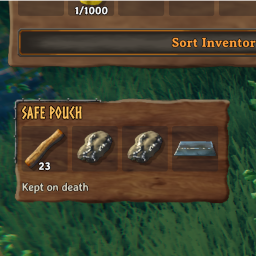
Safe Pouch
Four personal pouch slots that survive death. Large stacks for ordinary items, one-per-slot portal-restricted items, configurable weight, and adaptive inventory UI. Client-side.Safe Pouch
Keep a few essentials with you, even after death. Safe Pouch adds four permanent slots beneath your inventory using Valheim's own UI elements.
Features
- Four protected slots: contents remain with your character after death and follow that character between worlds.
- Large stacks: ordinary, portal-friendly stackable items can stack to 99,999 per slot. Equipment that normally does not stack stays separate.
- Limited portal transport: portal-restricted items have a stack limit of one and can travel through portals while in the pouch. Restricted items in your normal inventory still follow world rules.
- Adjustable weight: choose 0–100% of normal pouch contents' weight.
- Adaptive position: the pouch follows the inventory background and footer buttons. A manual offset is also available.
- Client-side design: no custom wearable, item prefab, or networked container. No server installation is intended or required by the plugin; compatibility with an unmodified dedicated server has not yet been verified.
Installation
Install through Thunderstore Mod Manager with the required BepInExPack_Valheim, then launch Modded.
For manual installation, place SafePouch.dll in your profile's BepInEx/plugins/SafePouch folder. Close the game before installing or updating. If you previously installed a development copy manually, remove that old DLL before installing the Thunderstore package so only one copy loads.
Controls
- Click an item in your normal inventory, then a pouch cell to deposit it. Split the normal stack first if you want to deposit only part of it.
- Depositing a restricted stack distributes one item into each available pouch cell, beginning at the clicked cell. The remainder stays in your inventory.
- Click a pouch item, then a normal inventory cell to withdraw it there.
- Right-click a pouch item to withdraw as much as fits. Large stacks split into normal inventory-sized stacks; overflow stays in the pouch.
- Occupied cells accept matching stacks only; items are not swapped.
Close an open chest to reveal the pouch. Withdraw items before equipping, consuming, crafting with, dropping, or putting them in a chest. Mouse input is supported; dedicated controller and touch navigation are not implemented.
Configuration
After the first launch, edit BepInEx/config/local.valheim.safepouch.cfg with the game closed, then restart. An in-game BepInEx configuration editor can also change these settings.
[Pouch]
WeightPercent = 100

[Interface]
Gap = 8
VerticalOffset = 0
| Setting | Effect |
|---|---|
WeightPercent |
Integer from 0 to 100: 0 = weightless, 50 = half weight, 100 = normal weight. Withdrawn items always regain normal weight. |
Gap |
Space below the detected inventory bounds in UI units. Default: 8. |
VerticalOffset |
Additional vertical adjustment. Negative moves up; positive moves down. Default: 0. |
Layouts outside the inventory hierarchy may need a manual offset. Compatibility with every UI overhaul is not guaranteed.
Saving and uninstalling
Contents are stored in the character's custom data and saved with the character. They are not stored in a separate world container or editable config file. Unsaved changes can roll back with the character after a crash.
Before uninstalling, empty the pouch and log out normally. Contents are inaccessible without this plugin.


