SmartContainers
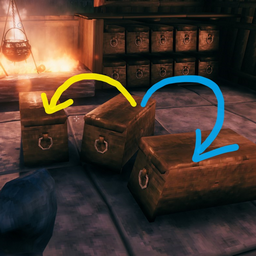
Want to quickly drop your loot? Tired of looking for chest with a specific item-stack in order to store some more of it? Teach your containers to arrange items with their neighbors!Smarter containers
Features
- Teaches your containers to automatically send items you put in them to other containers if they are already containing this item-stack.
- Puts same-kinded items to their siblings: copper-ore goes to chest containing tin-ore and so on.
- You can create such item-groups from any items combination - just put your carrots, stones and feathers in one box, click the button and from now on your carrots will go to chest with feathers.
- Configure mod to load-out all specific loot-items from your inventory to a proper chests via a single button click.
How it works:
When you put an item stack to a container via [Ctrl + Click] If container is full or doesn't contain same items:
- check each nearby container and if it is not full and has same item (stack) - your item is routed there.
- otherwise (if none found) check each nearby container and if it is not full and has "relevant" group items - your items are routed there.
In other words: If group contains your item and chest contains any other item from a group, then your item will go to this chest.
General Configuration parameters
    - range - defines area to locate "nearby" containers
    - onlyStackableItems - (enabled by default) when enabled - non stackable items (tools, weapons, armor) are NOT rearranged
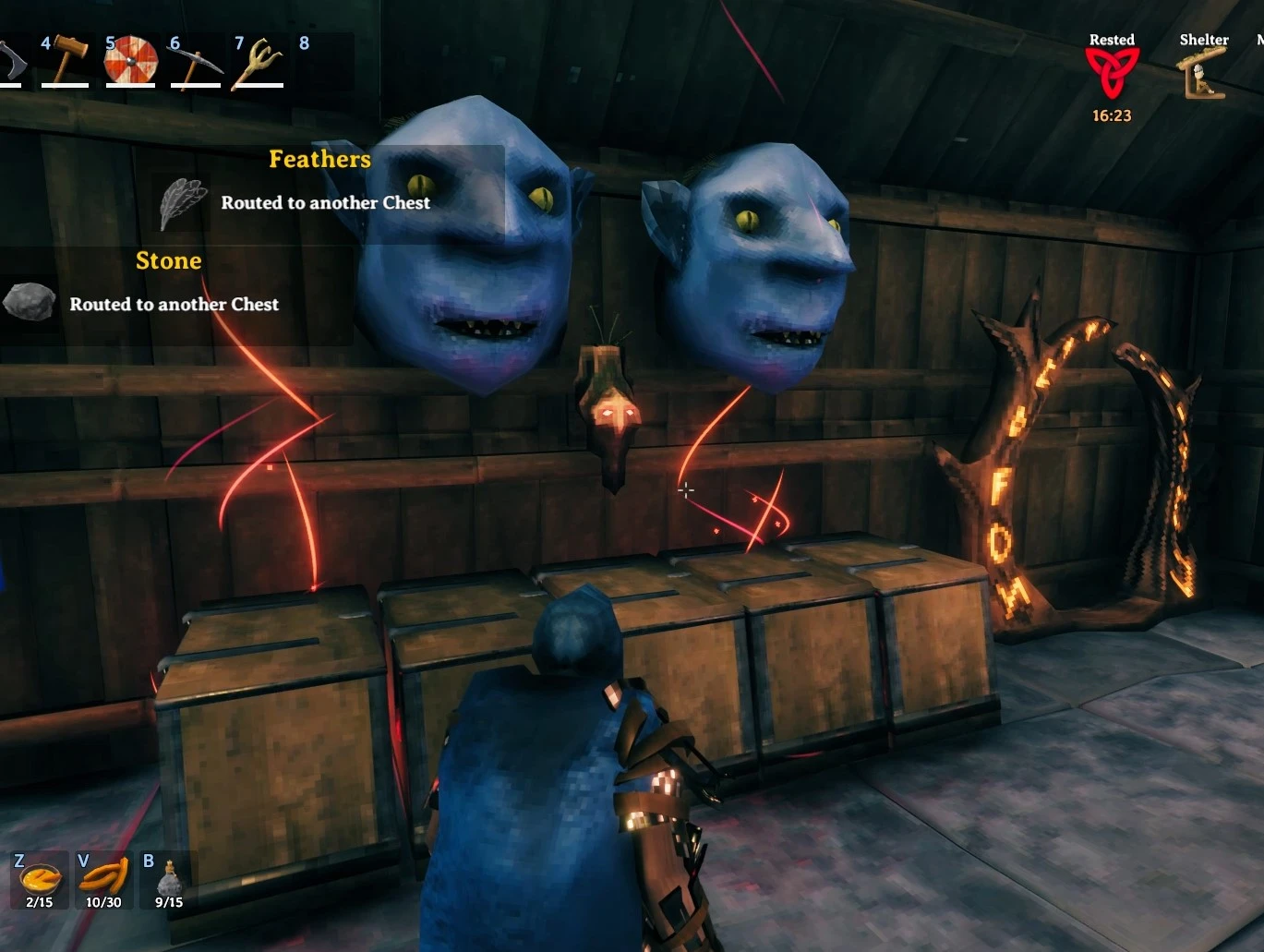
    - hudMessageEnabled - (enabled by default) Enables hud message indicating that item was placed to some other chest.
    - hudMessageText - HUD message consists of Icon, item-name plus this hudMessageText
    - audioFeedbackEnabled - play ingame-sound if items are successfully distributed
    - effectFeedbackEnabled - display a temporary visual effect over chests where your items were distributed
Grouping items
There are three available options to define an item-group:
- by explicitly listing all item-names of group-members
- by matching item-name prefixes: trophyboar and trophytroll are members of group with 'trophy' prefix
- by matching item-name postfixes: carrotSeeds and turnipSeeds are members of group with 'seeds' postfix
- by matching in-game
item-type: Tool, Weapon, Ammo, Armor, Trophie
Grouping Configuration parameters
    - enabled - (true by default) enables item groups logic
    - itemTypeGroupsEnabled - enables grouping by item-types (Trophie, Tool, Ammo, Armor, Weapon).
    - groupingKeyModifier - LeftControl. Change to "LeftControl + LeftShift" if you want separate hotkey for triggering grouping logic.
        (holding ctrl is mandatory since it's a "move-stack" ingame key)
    - createGroupBtnEnabled - (true by default)  adds a UI button which helps to create custom item-groups
    - createGroupBtnPos - adjusts button position
    - fuzzyGroupingEnabled - (false by default) enable grouping by more broad criteria.
Preconfigured item groups
[ItemGroup] config section contains a set of item-names based groups:

    valuables = ruby,coins,amber,amberpearl
    ore = copperore,flametalore,ironore,silverore,tinore,ironscrap,blackmetalscrap
    rock = stone,flint,obsidian
    ingots = copper,bronze,flametal,iron,silver,tin,blackmetal
    wood = wood,finewood,corewood,ancientbark
    mushrooms = Mushroom,MushroomBlue,MushroomYellow
    berries = Blueberries,Cloudberry,Raspberry,Honey
    vegetables = Carrot,Turnip
    cookedMeat = CookedLoxMeat,NeckTailGrilled,MeatCooked,FishCooked,SerpentMeatCooked
    food = CarrotSoup,Sausages,QueensJam,SerpentStew,TurnipStew,BloodPudding
Preconfigured groups matching item-names by postfixes or prefixes:
    [PostfixedItemGroups] posfixes = cone,seeds,pelt,hide # i.e. CarrotSeeds will go to TurnipSeeds
    [PrefixedItemGroups] prefixes = trophy,mead,arrow,armor,cape,helmet,atgeir,bow,battleaxe,knife,mace,shield,sledge,spear,sword,tankard # i.e. ArrowFire will go to ArrowFlint
How it works:
When you put an item stack to container via [Ctrl + Click]
- if simple container lookup by same-item-name described above has no results then:
- check each nearby container and if both container and your item are
- members of same item-names based group (either preconfigured or user-created group form [ItemGroup] config section)
- or members of same item-names-prefix based group
- or members of same item-names-postfix based group
- then item is routed there.
- if none matched - check each nearby container and if container has any item with
item-typesame as your items type then item is routed there (could be disabled withitemTypeGroupsEnabledconfig option) - if none of the above matched and
fuzzyGroupingEnabledoption enabled - additionalitem-typesbased groups are checked: IsMaterial, IsConsumable, IsCustomization, IsMisc
Adding custom item groups
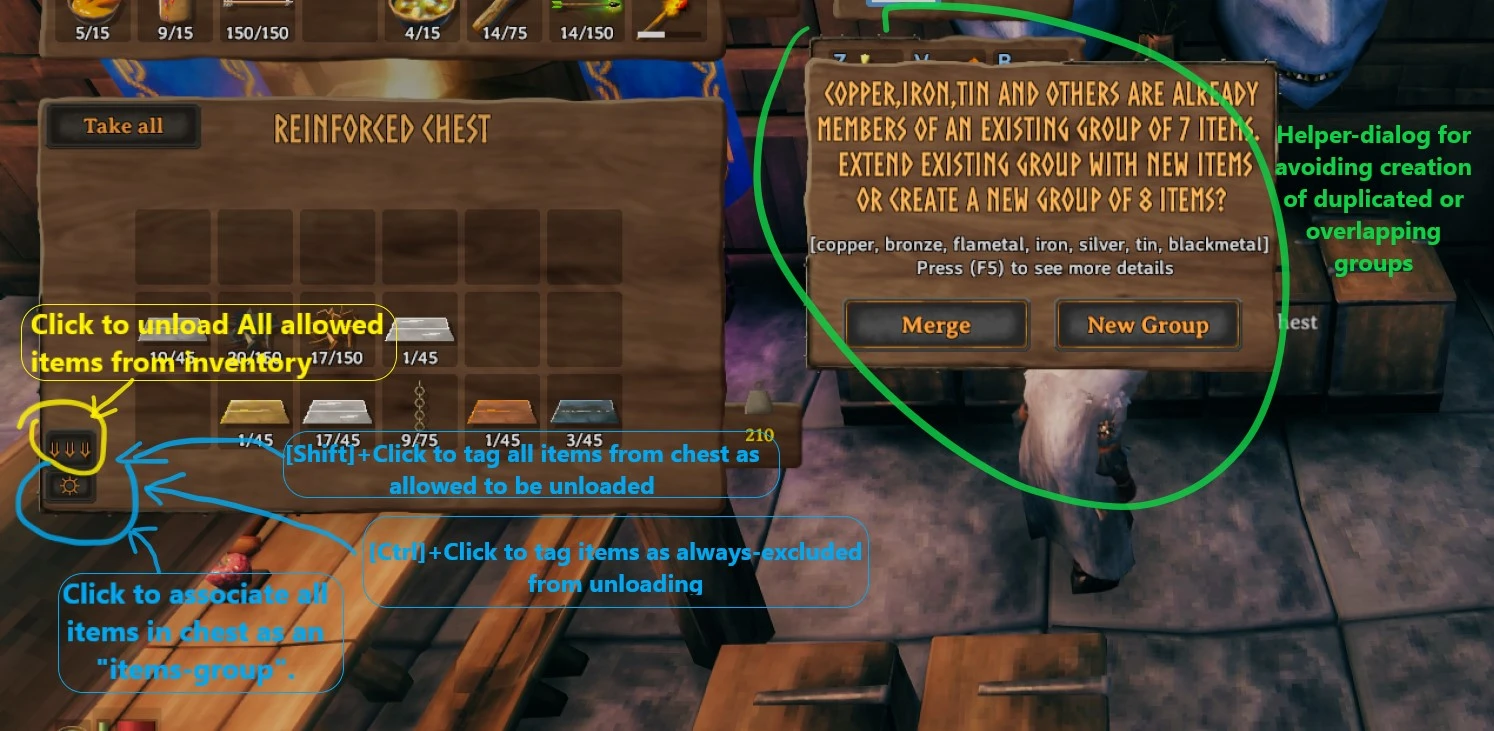
Put desired items set to a chest, click the [☼] button (at the bottom-left corner of chest panel). New group will contain all unique item-names from this chest.
Merging or extending item groups
When you click the [☼] button - mod will check if items in the current chest are already members of some item-names based group.
In such case - a prompt dialog will appear showing all info about detected 'conflicts' and available options to fight ambiguity:
- extend selected (or new) group with items from container that are not members of any group
- same as previous + move all conflicting items to selected (or new) group
- flatten content of all conflicting groups into a single one
Unloading items.
Configure item-groups & names which should be allowed for 'unloading'. Open any chest and click the [⇓⇓] button.
'Unloading' Configuration parameters
    enabled - (true by default) enables unloading logic & UI button
    btnPos - adjust button position
    groupsList - List of items group-ids from [ItemGroup] config section allowed to be "unloaded"
    itemsList - List of item-names allowed to be "unloaded"
    itemsSkipList - High-priority list of item-names to exclude from being "unloaded"
    alwaysGrouping - (true by default)  - grouping logic is always on for uloading. Otherwise - pressing of groupingKeyModifier required.
    addToItemsFilterKeyModifier - If pressed - overrides createGroupBtn behaviour by passing item-names to unload "itemsList" instead of creating new items group
    addToSkipItemsFilterKeyModifier - If pressed - overrides createGroupBtn behaviour by passing item-names to unload "itemsSkipList" instead of creating new items group
    materialsFiltering - always allow "materials" item type to be "unloaded"
    trophiesFiltering - always allow trophies to be "unloaded"
    consumableFiltering - (disabled by default) always allow any consubable item to be "unloaded"
###How it works: Checks each non-equipped item in your inventory and:
- if item is NOT in
itemsSkipListconfig option- if item matches any group from
groupsListconfig option - or item-name is listed in
itemsListconfig option - or item-type is
MaterialsandmaterialsFilteringconfig option enabled - or item-type is
TrophyandtrophiesFilteringconfig option enabled - or item-type is
ConsumableandconsumableFilteringconfig option enabled
- if item matches any group from
- try to move item to nearby 'relevant' chest
Configuring from game UI
- Shift + click [☼] button: allow all items in currently opened chest to be unloaded by adding their names to
itemsListconfig option. - Ctrl + click [☼] button: disable all items in currently opened chest to be unloaded by adding their names to
itemsSkipListconfig option.
Disabling preconfigured groups
You can disable any preconfigured group
- in config file: by deleting part after '=' symbol. Example: "vegetables ="
- from ConfigurationManager UI: by setting value to empty string
ⓘ You can manually verify, merge or add new groups to [ItemGroup] config section.
Example: "fishes = FishRaw,FishCooked". (requires game-restart)
Item-names could be discovered:
- by googling some "valheim Spawn items list".
- by pressing "Ctrl + L + click" (instead of Ctrl + click) while moving item to chest: item-name will be printed to console (F5).
Controller support
-  set [Grouping] groupingKeyModifier to JoystickButton0 value: RTrigger+A will always use grouping.
   Alternatively - set it to JoystickButton6 (map button)
-  RightStick click : trigger Create group ([☼]) while at containers-panel .
-  RightStick click  + RTrigger : same as addToItemsFilterKey.
-  RightStick click  + LTrigger  :  same as addToSkipItemsFilterKey.
-  menuButton (☰) : triggers  Unload-all-items button ([⇓⇓]) while at containers-panel.
-  merge-or-create dialog: LeftBumper= Merge, RightBumper=Create
-  I've tried to mimic games tooltips but they overlap with buttons a bit now. Set [Unload] btnPos = {"x":1.5,"y":7.9}
-  from 1.6.0 version merge-prompt dialog is not fully supported :!


## Configuring mod:

- Recommended: enable in-game console (opened by F5) by adding `-console` launch option.
- Recommended: install latest [BepInEx.ConfigurationManager](https://github.com/BepInEx/BepInEx.ConfigurationManager/releases/)
  - Start the game. Adjust config via ConfigurationManager while playing game (press F1 while in menu or at inventory UI)
- From a config file at `Valheim\BepInEx\config\flueno.SmartContainers.cfg`. Requires game restart.

## Installation

### automatic:
1. Install this mod manager: [r2modman](https://valheim.thunderstore.io/package/ebkr/r2modman/)
2. Install the mod by clicking the button "Install with Mod Manager" on this page or by directly installing it inside of the mod manager
3. Launch the game

### manual:
1. Install [BepInExPack Valheim](https://valheim.thunderstore.io/package/denikson/BepInExPack_Valheim/)
2. Extract this mod's dll file into folder: `Valheim\BepInEx\plugins`
3. Launch the game


Changelog
Version 1.6.0
    - Enhanced merge-groups helper dialog.
    - The later items-group were created the more priorities it will have in case of ambiguity.
    - User-created item-groups now have more priority over predefined item-groups.
    - Fixed an issue when sometimes after tweaking config with ConfigurationManager mods ui-buttons disappeared.
    - Removed strict container-names checking so hopefully modded chests are supported now.
Version 1.5.4
    - Removed unsupported markup elements from readme
Version 1.5.3
    - Improved groups editing from BepInEx.ConfigurationManager by using multiline input element.
    - Added logging(to Console) of matched grouping criteria which caused item to be routed.
Version 1.5.1
    - Fixed mod initialization issue after a logout & new login
Version 1.5.0
    - Enhanced item-groups management with UI dialog helping to deduplicate or merge overlapping groups.
    - Currently-opened-contained will now also be a possible target for group-based items sorting.
    - Tweaked some processing priorities so that now user-groups will be always processed before checking item-types.
    (My arrows occasionally were sent to a chest with fish-bait since they are both "ammo" ¯\_(ツ)_/¯)
    - added preconfigured "rock" items group (stone,flint,obsidian)
Version 1.4.5
    - fixed and improved gamepad/controller support
Version 1.4.4
    - fixed Unload-itemsList & Unload-itemsSkipList configurability
Version 1.4.3
    - Added "Unload" ability - click button to automatically distribute all allowed item-types from your inventory to their corresponding chests.
    - Added audio & visual effects feedback for highliting containers where you items were moved.
    - Added full support of changing config from within game via BepInEx.ConfigurationManager (usefull for moving buttons, changing hotkeys, etc).
    - Implemented workarounds for concurrent contaniner modifications.
Version 1.2.1
    - added ability to setup item-groups using chest-inventory UI
    - internal stability fixes
Version 1.1.0
    - Improved "grouping" mod and made groups configurable via config-file.
    - Added HUD message indicating that item was routed to some other Chest
Version 1.0.0
    - initial release
## Screenshots
UI notifications
Additional UI buttons