


Beastferry
Transport tamed Bjorn, Lox, Asksvin, Moose and companions by boat. Saved berths, optional cages, feeding troughs, boarding, landing and rescue. Optional Taming, VikingSeafarer and SimpleAccessControl. FR/EN.Beastferry
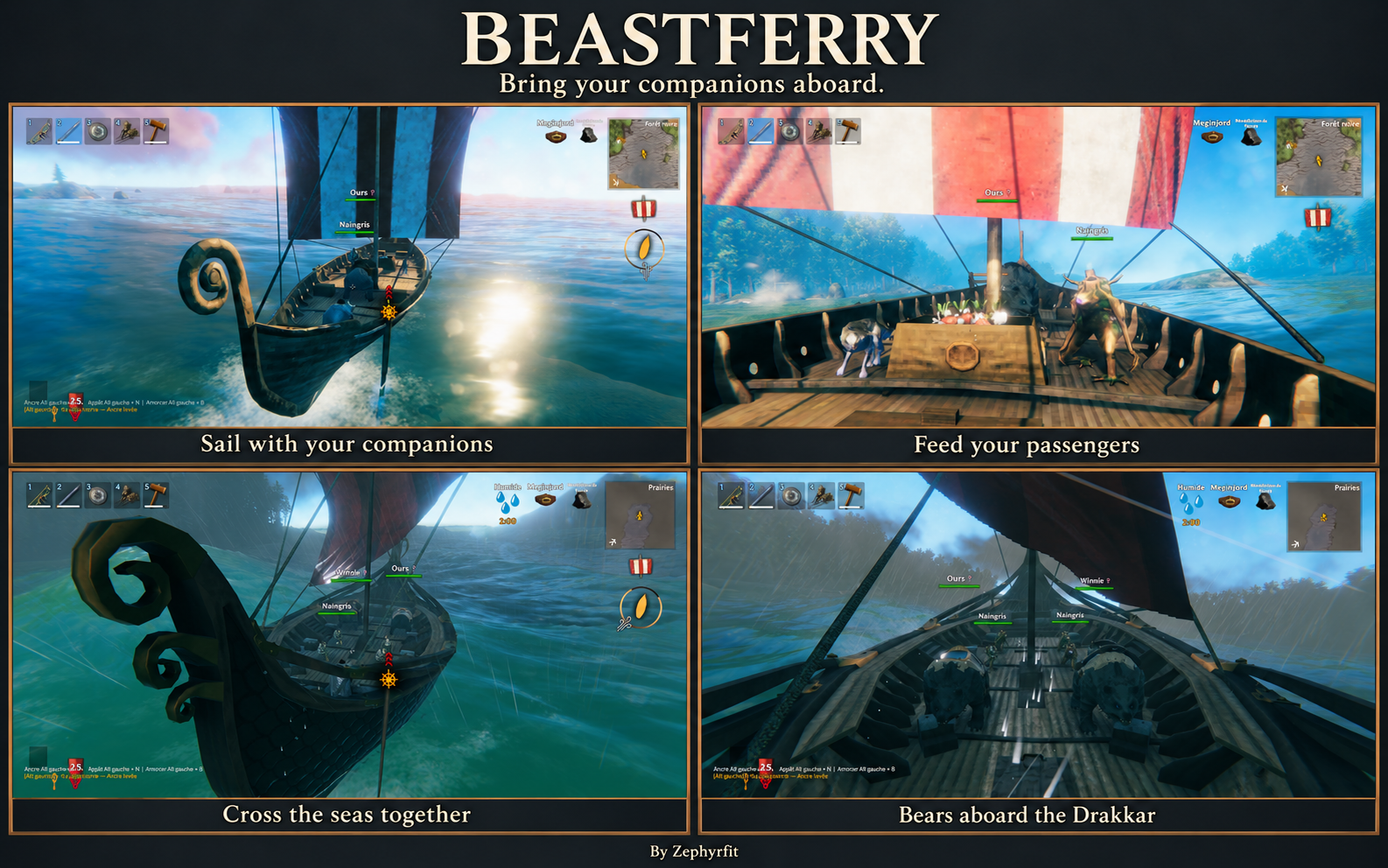
Bring your companions aboard.
Take your tamed animals across Valheim's seas. Give them a place on deck, feed them during the crossing, and bring them ashore when you reach your next adventure. Each passenger keeps its name, health, appearance and equipment.
Solo & multiplayer · French & English · Optional Taming, VikingSeafarer and SimpleAccessControl integrations
⚓ A place for your companions
| Boat | Mounts | Companions |
|---|---|---|
| Longship | 1 | 2 |
| Ashlands Drakkar | 2 total | 4 |
| Karve | 0 | 2 |
| Raft | 0 | 1 small companion |
The Drakkar's two mount places are shared by Bjorn, Lox, Asksvin and Moose, in any combination. Their young use mount places too. A reduced animal still uses a mount place. Raft and Karve capacities are configurable; custom boats and creatures require explicit transport profiles.
Profiles cover Bjorn, Lox, Asksvin, Moose, wolves, boars, hares, Greylings and Greydwarfs. Animals must already be tamed through the game or another mod. Asksvin hatchlings and Moose calves share their species' mount places and retain their native growth and feeding behavior. With Taming, passengers retain their individual sex, coat and native star traits. Their fitted display size stays fixed while the boat moves.
🐾 Board together, land together
Bring an animal within boarding range of both you and the boat's hull, then choose Board. The default range is 20 metres. Stop the boat and dismount before boarding a ridden animal. Board my followers lets you review your selection before confirming; animals staying behind are excluded.
Passengers stay visible on deck and keep their assigned berth between saved sessions. Land and Land all passengers search for dry ground or a clear dock; animals without a suitable destination remain aboard. Follow/stay orders resume after landing.
New mating is suspended aboard. Existing pregnancies continue, with births held until landing. After a shipwreck, passengers regain normal movement and seek a nearby living player to follow.
🥕 Feed your passengers
The open wooden trough displays a full pile of carrots, vegetables, meat and fish. This display is decorative: feeding uses the real food you place in its inventory. The trough keeps its stock and remains associated with its boat between saved sessions.
Feed an animal from your own inventory or from the shared trough. Optional automatic feeding is disabled by default. You can hide or show the trough for your own view while keeping its inventory and feeding access.
🪵 Choose your view
Cages are hidden by default. Show an optional wood-and-metal enclosure for any passenger when you want one; your explicit choice is remembered per animal. Visible cages block your movement, while hidden cages have no local collision. The passenger keeps its berth either way.
The passenger panel opens through the boat's storage or deck mooring ring. It separates mounts and companions, shows health and pending births, and can be dragged by its title. With Taming, click an animal's portrait to open its accessible saddlebags.
Panel position and size, cage choices, trough visibility and camera transparency are personal preferences saved separately for your character on your computer.
🎮 Controls
| Action | Control |
|---|---|
| Open the passenger panel | Open boat storage or use the deck mooring ring |
| Board an animal | Board in the passenger panel |
| Select your followers | Board my followers, review, then confirm |
| Bring passengers ashore | Land or Land all passengers |
| Display an enclosure | Show cage / Hide cage |
| Feed a passenger | Feed (inventory) or Feed (trough) |
| Manage shared food stock | Open feeding trough |
| Choose trough visibility | Show trough / Hide trough |
| Open accessible Taming saddlebags | Click the passenger portrait |
| Release a stuck passenger | Red Rescue control |
| Rescue the nearest stuck animal | Red Rescue nearest stuck animal control |
| Move / close the panel | Drag its title / Escape |
The rescue controls stay inside the boat inventory/mooring panel and do not require administrator status. Boat and animal permissions still apply. Rescue searches for safe ground near you; if no dry destination exists, normal swimming and gravity resume near you.
An additional panel shortcut is configurable and disabled by default.
🛠️ Console commands & administration
Enable the -console game launch option, then press F5 in game. Use the following commands for transport diagnostics, recovery and host configuration:
| Command | Purpose | Access |
|---|---|---|
bf_status |
Show loaded passenger count and nearby stuck animals, including their IDs and transport state. Read-only. | Players and administrators |
bf_rescue |
Release the nearest accessible stuck animal within rescue range. | Players and administrators, subject to normal permissions |
bf_rescue <UID> |
Release a specific nearby tamed animal using its exact reported ID. | Players and administrators, subject to normal permissions |
bf_reload |
Reload Beastferry configuration from disk. | Server/host process only |
bf_profiles |
Import BepInEx/config/Beastferry/profiles.json into Beastferry's configuration. |
Server/host process only |
For recovery, stand on dry land near the animal and run bf_status. Copy its exact ID, then run bf_rescue 1:12345, replacing the example ID with yours. Rescue also works when the original boat no longer exists. Dismount and close the animal's inventory before recovery. Boat/animal permissions and wards still apply; the default rescue range is 40 metres and is configurable. If no dry destination is found, normal swimming and gravity resume near you.
bf_reload and bf_profiles must run in the server or local host process. Administrator status on a remote game client does not make these commands run on the server. The profiles JSON file must be on the server/host when importing it. These configuration commands do not force-land passengers or repair them; use the rescue controls or bf_rescue for that.
🔗 Optional integrations
| Mod | What it adds |
|---|---|
| Taming | Animal management, sex labels, saddles, saddlebags and existing map tracking |
| VikingSeafarer | Boat anchor state |
| SimpleAccessControl | Boat permissions |
Native wards also apply. Install each optional integration and its dependencies on the server and clients when using it.
The anchor requirement applies only when VikingSeafarer is installed and its anchoring feature is enabled. Without it, stop the boat before boarding or landing passengers.
📦 Installation & settings
Install BepInExPack Valheim, Jötunn and Beastferry through your mod manager. Multiplayer requires the same Beastferry version on the server and every client.
With Gale, import the mod ZIP into your selected profile. For manual installation, extract its BepInEx directory into your game or server directory. Keep one copy of BepInEx/plugins/Zephyrfit-Beastferry/Beastferry.dll and preserve existing configuration and saves. Dedicated-server and DatHost instructions are included in SERVER_INSTALL.md.
Gameplay settings are generated at BepInEx/config/Zephyrfit.Beastferry.cfg. Personal settings are stored in %LOCALAPPDATA%/Zephyrfit/Beastferry/players/. Custom layouts and species are described in the configuration guide.
💬 Help, bug reports & suggestions
Discord: zephyrfit
User ID: 251341133085540352
I can help in English and French with installation, bug reports and suggestions. Contributions are welcome. For a bug report, include the game and mod versions, reproduction steps and BepInEx/LogOutput.log. Screenshots or a short video help with visual issues.
Created by Zephyrfit · Independent community mod for Valheim.