

Valheim Compass
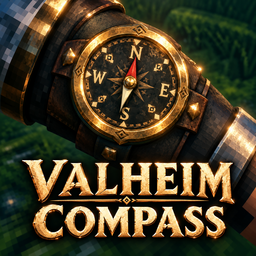
A forearm-mounted compass with a working needle, a custom sitting camera, a Longship helm holder, and automatic boss-direction viewing when using Vegvisirs in No-Map worlds.Valheim Compass
Version: 1.0.0 | Author: elHUDless
A forearm-mounted compass for navigating Valheim, with a working needle, a sitting camera for reading the compass, and a compass holder near the Longship helm.
Features
- Forearm-mounted compass with a working directional needle.
- Custom sitting camera for a clear view of the compass.
- Compass holder near the Longship helm.
- Compass moves from the forearm to the ship holder while steering, then returns to the forearm when leaving the helm.
- No-Map Vegvisir support: the character turns toward the boss direction, the camera turns, and the character automatically sits to show the compass.
- Smooth transitions between the normal and compass camera views.
The compass appears automatically. This release does not add an inventory item, equipment slot, crafting recipe, or trader purchase. The custom Vegvisir interaction runs only in No-Map worlds.
Requirements
- Valheim.
- BepInEx configured for Valheim (BepInExPack Valheim).
- Jotunn (the Jotunn Valheim Library).
Mod managers install the dependencies declared in this package automatically. For a manual installation, install the requirements separately.
BepInExPack Valheim: https://thunderstore.io/c/valheim/p/denikson/BepInExPack_Valheim/
Jotunn: https://thunderstore.io/c/valheim/p/ValheimModding/Jotunn/ https://www.nexusmods.com/valheim/mods/1138
Official dependency installation guide: https://valheim-modding.github.io/Jotunn/guides/installation.html
Mod manager installation
- Install this mod using Thunderstore Mod Manager or r2modman.
- Allow the manager to install BepInExPack Valheim and Jotunn.
- Launch Valheim using the manager's modded launch option.
Manual installation
-
Close Valheim.
-
Install BepInExPack Valheim and Jotunn if they are not already installed.
-
Extract this ZIP into the main Valheim game folder (the folder containing valheim.exe). Merge the included BepInEx folder with the existing one.
-
Confirm these two files are directly inside BepInEx/plugins:
BepInEx/plugins/ValheimCompass.dll BepInEx/plugins/valheimcompass
-
Launch Valheim and load your character.
The extensionless file named valheimcompass is the required Unity asset
bundle. Keep its name exactly as supplied, beside ValheimCompass.dll.
Both files can be placed together in a plugin subfolder; mod managers
manage this folder automatically.
When updating a manual installation, replace both files and remove older
copies of ValheimCompass.dll from other plugin folders.
Using the compass
- Sit on the ground using Valheim's normal sit control to read the compass.
- Stand up to return to the normal camera view.
- Take the Longship helm to use the ship compass. Leave the helm to return the compass to your forearm.
- In a No-Map world, interact with a Vegvisir to turn toward the boss direction and automatically view the compass.
This build also sets the starting camera distance to 3. There are no user-configurable mod settings in this release.
Troubleshooting
If the compass does not appear, confirm that valheimcompass and
ValheimCompass.dll are in the same folder and that Jotunn is installed. Check BepInEx/LogOutput.log for
Valheim Compass load messages or missing dependency errors.
Uninstallation
With a mod manager, close Valheim and uninstall this mod from your profile. For a manual installation, close Valheim and remove only these two files:
- BepInEx/plugins/ValheimCompass.dll
- BepInEx/plugins/valheimcompass
Compatibility
Dedicated-server behavior, multiplayer compatibility, other ship types, and interactions with other camera mods have not yet been confirmed.
Credits
Mod author: elHUDless. Requires BepInEx and Jotunn; these projects are maintained by their respective contributors.