

Continue
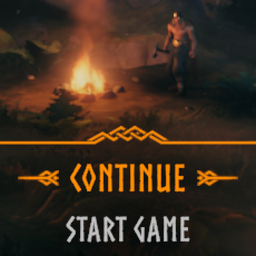
A Continue button in the main menu: rejoin your last server or world in one click, with the same character and the password typed for you. Quick connect to dedicated servers, Steam friends, crossplay and your own worlds. Client-side only.Continue
A Continue button at the top of the main menu: one click takes you back to your last game, server or world, with the same character.

What awaits you
- From the menu straight into the game. No server list, no character screen, no world screen.
- The password is typed for you. It stays on your computer, encrypted for your Windows account.
- Every kind of game: dedicated servers, a friend's game on Steam or in crossplay, and your own worlds, alone or open to others, with the same options.
- In your language: the button is the game's own Continue, translated like the rest of the menu.
Getting started
Play once as usual: join a server or start a world. The next time you open the main menu, Continue is waiting at the top.
Only a game you actually reached is remembered: a failed connection does not replace it. The button does not appear if the world or the character has been deleted, and a friend's game must still be running. If a server's password has changed, the game asks for it once. If a world you host needs a password the mod does not have, the world screen opens with everything already chosen: type the password and start.
Multiplayer
Client-side only: the server and the other players do not need the mod. It adds nothing to your worlds or characters, and can be removed at any time.
Configuration
Configuration Manager compatible, and changes apply right away.
ShowGameName adds the server's or world's name to the button, ButtonLabel
gives it your own text, and RememberPassword stops the mod from keeping
passwords and erases the one it has. To forget the last game, delete
BepInEx\config\grogui.Continue.last.txt.
Installation
With a mod manager: I recommend Gale or Vortex.
By hand: install BepInExPack Valheim first, then put Continue.dll in
BepInEx/plugins/Continue/.
Built with Claude
Made with Claude, Anthropic's AI model, which wrote the code and this page. I review the code and test it extensively in game before each release.