

Bindrune
Every keybind from the game and your mods in one panel, with clashes between them explained and rebinding from the same place.Bindrune
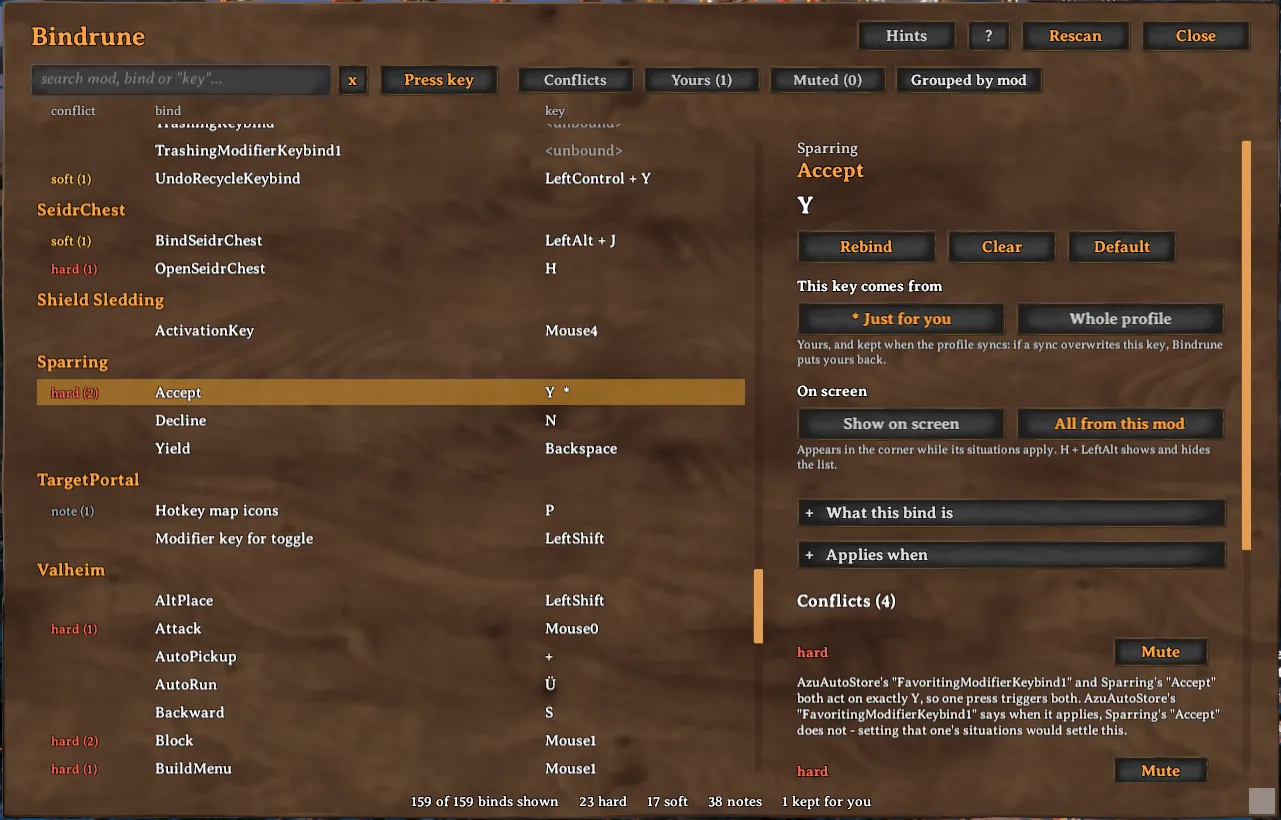
Bindrune shows every keybind in your game in one panel: the game's own controls and the keybinds of every installed mod. When two binds share a key, it tells you whether they will actually get in each other's way, and why. It never blocks a binding. It explains what will happen and leaves the choice to you.
AI notice
Most of Bindrune was written by Claude Code (Anthropic), which did the heavy lifting on implementation and design. Heads-up so you can judge for yourself.
Using it
Press Insert in game to open the panel. Select a bind to see what it clashes with, change its key from the same place, or mute a clash you are happy with. Before a new key is saved, Bindrune shows what it would run into.
You can tell Bindrune where a bind is used, for example only in the build menu or only with a pickaxe in hand. Binds that can never be active at the same time are then no longer reported as clashes.
Any bind can also be pinned to a small list of hints on screen, which only shows a bind while it applies. Alt+H shows and hides that list.
Your own keys
When a shared modpack profile is synced, it overwrites your config files and your rebinds with them. Bindrune can keep the keys you mark as your own outside the synced config and puts them back after every sync.
Requirements
Bindrune needs BepInEx 5 and Jotunn. Mod managers install Jotunn along with it.
More
Settings, the files Bindrune keeps, how it reads the game's binds, notes for mod authors and build instructions are on GitHub at https://github.com/isimp/Bindrune


