

PoV Tree Helper
Browse allocated and unallocated PoV tree effects, find their nodes, sort by distance, and queue shortest connection paths within your available points.Screenshot
PoV Tree Helper
Find effects in the skill and crafting trees of Path of Valheiman (PoV), see where they come from, and select a connection path to a distant node.
This is a client-side add-on. Each player who wants the helper installs it; a dedicated server does not need it.
Features
- Unallocated effects: browse remaining nodes and alternative choices to decide what to take next.
- Allocated effects: find the base effects and selected options on nodes you already own.
- Search: look up effect descriptions, names, categories or node IDs. Switch between effect-text and name view.
- Filters: show all results, major nodes or choice effects. Identical effects are grouped while retaining each node location.
- Node navigation: jump to a result or open its native details to review choices and refund controls.
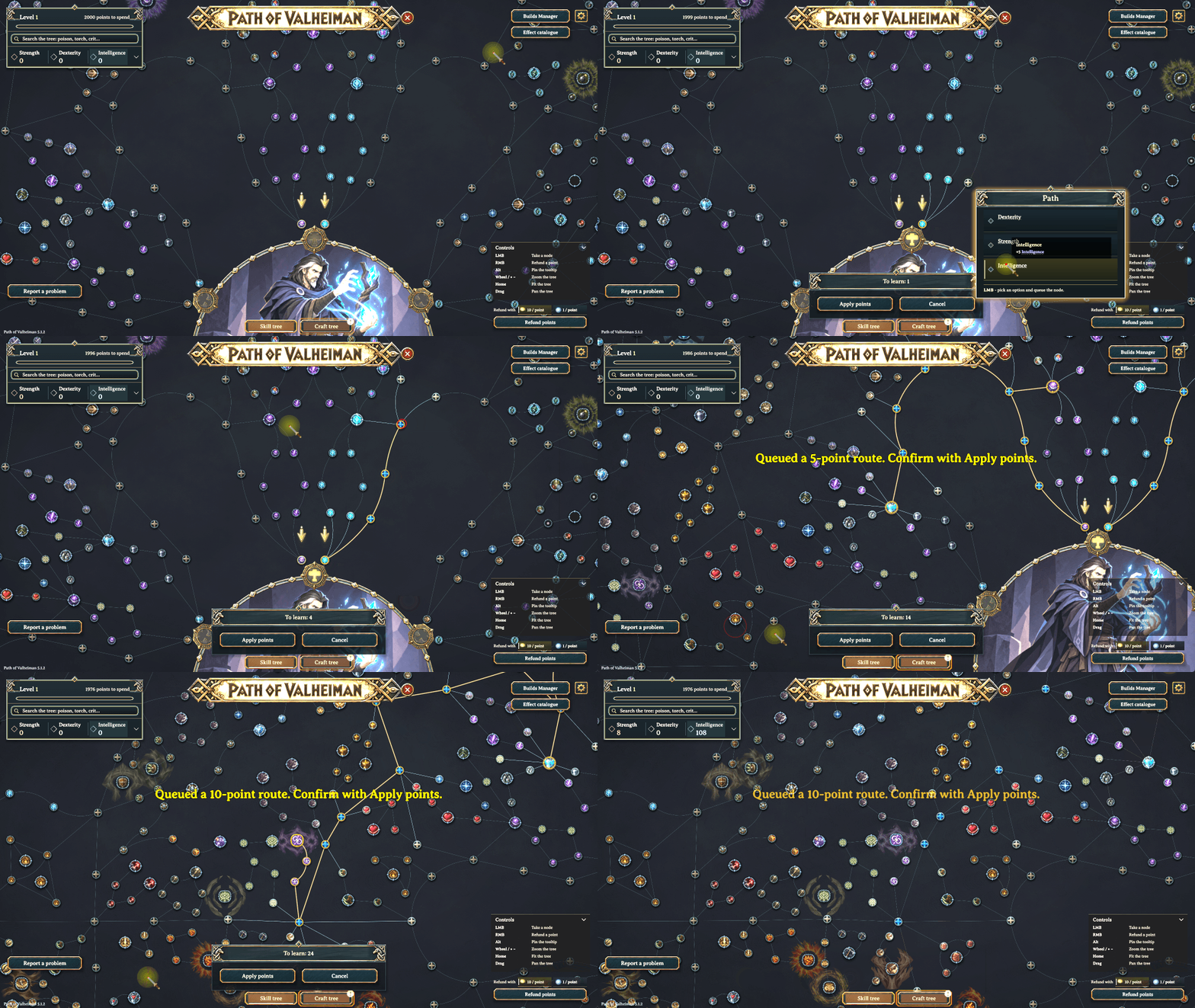
- Shortest connections: queue a path to a distant eligible node within your available points, then confirm it with PoV's own Apply points button.
- Optional distance sorting: list unallocated effects by the additional nodes needed to reach them. Distance maps are calculated on demand and reused while your selection remains unchanged.
- English and Korean: the helper follows Valheim's game language setting.
How to use
- Open PoV's skill tree or crafting tree and click Effect catalogue in the upper-right corner.
- Choose Unallocated or Allocated. Search for an effect and select a result to read its details.
- Use the location arrows when the same effect exists on several nodes. Click Show node to find it on the tree.
- In Unallocated, click Select route to queue the connection. Clicking a distant node directly also works when
AutoRouteOnClickis enabled. - Review the pending path and confirm with PoV's Apply points button.
- In Allocated, click Open node details, then use PoV's normal choice or refund controls to make changes.
For example, search allocated effects for knockback, aftershock or explosion to locate possible source nodes.
Click Sort: text/name to enable Sort: distance in the unallocated list. Distance includes the destination's base node and treats already allocated or pending nodes as connected. Extra option purchase/change costs are separate. Nodes with no currently eligible route appear last. Distances can be viewed with zero available points; selecting a path still requires enough points.
If an intermediate node needs a choice, the helper opens PoV's choice panel and pauses there. Choose the effect, then request the original destination again. Unmet side-branch prerequisites must be taken first. The helper selects a connection path; you review and confirm the result in PoV.
Installation
Requires BepInExPack Valheim and Path of Valheiman 5.1.2 or newer. A mod manager installs the declared dependencies automatically.
- Mod manager: install this package, then launch your selected profile.
- Manual: copy the package's
BepInEx/plugins/PoVTreeHelperfolder into your profile'sBepInEx/pluginsfolder, then restart the game.
Keep one copy of the helper DLL in each profile. Your settings are stored separately from the plugin files.
Configuration
After the first launch, settings are saved to BepInEx/config/PoVTreeHelper.cfg.
| Setting | Default | Effect |
|---|---|---|
UnallocatedEffects |
true |
Show the allocated/unallocated catalogue button |
AutoRouteOnClick |
true |
Queue a connection when clicking a distant node |
EffectContentView |
true |
Show effect descriptions; false uses names |
SortByDistance |
false |
Sort unallocated results by additional node count |
The catalogue's Select route button remains available when direct-click routing is disabled. Display and sorting preferences can also be changed from the catalogue.
Language
Choosing Korean in Valheim selects Korean helper text. Every other or unavailable game language uses English. After changing the game language, reopen the tree to refresh its text. Original node names and descriptions use PoV's own translations.
Editable helper packs are in PoVTreeHelper/Localization/english.txt and korean.txt. They use UTF-8, with a tab between @key and text. Keep formatting arguments such as {0} and {1}; use \n for line breaks. Restart after editing. Missing or invalid entries use the defaults embedded in the DLL.
Compatibility and scope
Built against Path of Valheiman 5.1.2 and Valheim 1.0.20. On another PoV build, the helper logs a warning and checks the catalogue, routing and distance-sorting interfaces separately. Features that pass remain available; incompatible features are disabled with a reason in the log. Actual route selection still goes through PoV's current point and node checks, and you confirm with its Apply points button.
These checks detect interface changes, but they cannot fully verify changed game rules or UI layouts. New PoV releases may still need a helper update. Distance is a connection estimate; PoV determines whether the requested path can actually be selected.
Allocated results use confirmed allocation and choice records. Pending changes are excluded, and granted nodes carry a note. Text and values describe the source node; equipment and buffs can change the final totals. This list helps locate sources rather than attributing every combat event.
Path of Valheiman is created by treextr. PoV Tree Helper is an independent add-on.
한국어
Path of Valheiman(PoV)의 기술·제작 트리에서 효과를 찾아 해당 노드로 이동하고, 먼 노드까지 연결 경로를 선택하는 도우미입니다.
클라이언트 애드온입니다. 도우미를 사용할 플레이어가 설치하면 되며, 전용 서버에는 설치할 필요가 없습니다.
주요 기능
- 미할당 효과: 남은 노드와 대안 선택 효과를 보며 다음에 찍을 효과를 찾습니다.
- 할당 효과: 이미 보유한 노드의 기본 효과와 현재 선택한 효과를 확인합니다.
- 검색: 효과 설명·이름·분류·노드 ID로 검색하고, 효과 내용 보기와 이름 보기를 전환합니다.
- 필터: 전체·주요 노드·선택 효과로 좁혀 봅니다. 동일한 효과는 묶되 각 노드 위치를 유지합니다.
- 노드 이동: 결과의 위치나 기본 상세 창으로 이동해 선택 효과와 환불 조건을 확인합니다.
- 최단 연결 경로: 보유 포인트 안에서 먼 노드까지 경로를 선택 대기에 넣고, PoV의 포인트 적용 버튼으로 확정합니다.
- 가까운 순 정렬: 미할당 효과를 추가로 필요한 노드 수가 적은 순으로 봅니다. 필요할 때 거리표를 계산하고, 선택 상태가 같으면 재사용합니다.
- 영어·한국어: 도우미 문구는 Valheim의 게임 언어 설정을 따릅니다.
사용법
- PoV의 기술 트리 또는 제작 트리를 열고 오른쪽 위 효과 목록을 누르세요.
- 미할당 / 할당을 선택하고, 효과를 검색한 뒤 결과를 눌러 설명을 확인하세요.
- 같은 효과가 여러 곳에 있으면 위치 옆 화살표로 대상을 바꿀 수 있습니다. 위치 보기로 해당 노드에 이동합니다.
- 미할당에서 경로 선택을 누르면 연결 경로를 선택 대기에 넣습니다.
AutoRouteOnClick이 켜져 있으면 먼 노드를 직접 눌러도 됩니다. - 대기 중인 경로를 확인한 뒤 PoV의 포인트 적용 버튼으로 확정하세요.
- 할당에서는 노드 상세 열기로 이동한 뒤 PoV의 기존 선택·환불 기능으로 변경하세요.
예를 들어 할당 목록에서 넉백, 여진, 폭발을 각각 검색하면 관련 효과를 부여하는 노드를 찾는 데 도움이 됩니다.
미할당 목록의 정렬: 기본 버튼을 누르면 정렬: 가까운 순으로 바뀝니다. 거리는 대상 기본 노드까지 추가로 필요한 노드 수이며, 이미 할당했거나 선택 대기 중인 노드는 연결된 것으로 계산합니다. 선택 효과의 별도 구매·변경 비용은 포함하지 않습니다. 현재 조건으로 경로가 없는 항목은 마지막에 표시합니다. 포인트가 0이어도 거리는 볼 수 있지만, 실제 경로 선택에는 충분한 포인트가 필요합니다.
중간 노드에서 효과를 골라야 하면 PoV의 선택창을 열고 멈춥니다. 효과를 고른 뒤 원래 목표를 다시 선택하면 이어서 경로를 잡을 수 있습니다. 별도 가지의 선행 조건은 먼저 선택해야 합니다. 도우미가 연결 경로를 선택하면, 최종 결과는 PoV에서 검토하고 확정합니다.
설치
BepInExPack Valheim과 Path of Valheiman 5.1.2 이상이 필요합니다. 모드 매니저를 사용하면 의존성을 자동으로 설치합니다.
- 모드 매니저: 이 패키지를 설치한 뒤 사용할 프로필로 실행하세요.
- 수동 설치: 패키지의
BepInEx/plugins/PoVTreeHelper폴더를 프로필의BepInEx/plugins안에 복사한 뒤 게임을 재시작하세요.
프로필마다 헬퍼 DLL은 한 개만 두세요. 설정 파일은 플러그인 파일과 별도로 보관됩니다.
설정
첫 실행 후 BepInEx/config/PoVTreeHelper.cfg에 설정이 저장됩니다.
| 설정 | 기본값 | 기능 |
|---|---|---|
UnallocatedEffects |
true |
할당·미할당 효과 목록 버튼 표시 |
AutoRouteOnClick |
true |
먼 노드를 누르면 연결 경로 선택 |
EffectContentView |
true |
효과 내용 보기. false면 이름 보기 |
SortByDistance |
false |
추가로 필요한 노드 수가 적은 순으로 정렬 |
직접 클릭 경로 선택을 꺼도 목록의 경로 선택 버튼은 사용할 수 있습니다. 보기·정렬 설정은 목록 안에서도 바꿀 수 있습니다.
언어
Valheim에서 **한국어(Korean)**를 선택하면 도우미도 한국어로 표시합니다. 그 외 언어이거나 언어 정보를 확인할 수 없으면 영어로 표시합니다. 게임 언어를 바꾼 뒤 트리를 다시 열어 문구를 확인하세요. 원래 노드 이름과 효과 설명은 PoV의 번역을 사용합니다.
언어팩은 PoVTreeHelper/Localization/english.txt와 korean.txt입니다. UTF-8 형식이며 @키와 문구 사이에 탭을 넣습니다. {0}, {1} 같은 서식 인자는 유지하고, 줄바꿈은 \n으로 적으세요. 수정한 뒤 게임을 재시작하면 반영됩니다. 누락되거나 잘못된 항목은 DLL에 포함된 기본 문구를 사용합니다.
호환성과 표시 기준
Path of Valheiman 5.1.2, Valheim 1.0.20을 기준으로 제작했습니다. 다른 PoV 빌드에서는 경고를 남기고 목록·경로 선택·거리 정렬의 함수 구조를 각각 확인합니다. 검사에 통과한 기능은 계속 사용하고, 맞지 않는 기능은 이유를 로그에 남긴 뒤 비활성화합니다. 실제 경로 선택은 현재 PoV의 포인트·노드 조건 검사를 거치며, 포인트 적용 버튼으로 확정합니다.
구조 검사는 변경된 게임 규칙이나 화면 배치까지 모두 검증하지는 못하므로, 새 PoV 버전에 따라 헬퍼 업데이트가 필요할 수 있습니다. 거리는 연결 경로의 예상값이며, 실제로 선택 가능한지는 PoV가 판단합니다.
할당 목록은 확정된 할당·선택 기록을 사용하며, 적용 전 대기 중인 변경은 제외합니다. 무료 부여된 노드는 안내를 표시합니다. 설명과 수치는 원래 노드를 기준으로 하므로 장비·버프를 반영한 최종 합산 수치와 다를 수 있습니다. 전투에서 발생한 효과의 출처 후보를 찾는 데 활용하세요.
Path of Valheiman의 제작자는 treextr입니다. PoV Tree Helper는 독립적인 애드온입니다.