
You are viewing a potentially older version of this package. View Latest Version
New plug and play version!
Note for Thunderstore users: Manual install strongly advised! I have no idea if this works with a mod manager!
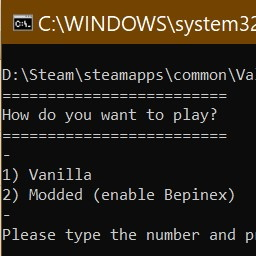
This is a batch (.bat) file that switches Bepinex on and off so you can play either vanilla or modded easily. It is useful if you are in a couple of different servers - some with mods and some that don't allow mods.
Download the mod and put bepswitch.bat in your Valheim folder.
Depending on your install, this should look like:
D:\Steam\steamapps\common\Valheim
The contents of your folder should look something like this:

Just double click on bepswitch.bat and you're good to go :)

I suggest creating a shortcut of the file and putting it in a more easy to find location.
This new version works by editing the text inside the doorstop_config.ini file.
It switches between enabled=true and enabled=false to enable/disable Bepinex from loading.
Yes, you can just do this manually by editing the text in doorstop_config.ini each time.
I made this because I prefer to manage mods manually rather than using a manager, and did not want to have to edit files each time I wanted to play vanilla (I'm lazy).
I also like learning new code-ish stuff, and figuring this out was fun :)
The idea for this was from here: https://steamcommunity.com/app/892970/discussions/0/3069740625181087689/?l=portuguese
Sample code for first iteration was from here: https://stackoverflow.com/questions/4051294/how-to-overwrite-existing-files-in-batch
Thanks to LuxZg on Nexus who pointed me to here: https://stackoverflow.com/questions/60034/how-can-you-find-and-replace-text-in-a-file-using-the-windows-command-line-envir
LuxZg also explained to me about replacing strings, so if you like this version 2.0, maybe give them a kudos too :)
