
MapAutoSync
Share explored map and pins with everyone on a dedicated server automatically, without a cartography table. Install on the server and on each player who wants it.MapAutoSync
Shares every player's explored map and pins on a Valheim dedicated server automatically, without anyone visiting a cartography table.
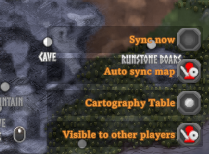
- A new tick-box on the large map, Auto sync map, next to "Visible to other players".
- A Sync now button above it, to sync straight away whenever you like.
- While the tick-box is on, your map is shared when you join and once every in-game day.
- You receive everyone else's explored areas and pins the same way.
- It works between players who are never online together: the server keeps the shared map.
Screenshots
The two new rows on the large map, above the game's own "Cartography Table" and "Visible to other players":
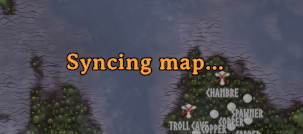
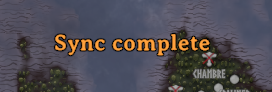
Clicking Sync now tells you what is happening, in large text at the top of the map:
Who installs it
| Where | What it does there |
|---|---|
| The dedicated server | Keeps the one shared map and hands it to players who sync. |
| Each player who wants it | Adds the tick-box and does the syncing. |
It is the same DLL in both places. Players without it are not affected: they keep using cartography tables as usual, and can play alongside players who have it.
How it works
A sync is exactly what a cartography table does, done for you:
- Your game sends its shared map data to the server (the same data "record discoveries" writes to a table).
- The server merges it into its one shared map and sends that back.
- Your game merges it in (the same as "read map" at a table).
The merge on the server follows two rules:
- Explored areas are only ever added. Nothing anyone explored is lost.
- Your pins are yours. Each sync replaces your pins on the shared map with the set you have now, so deleting one of your own pins removes it for everyone at their next sync. Other players' pins are never changed by your sync.
As with a table, death markers are not shared, and other players' areas and pins show as shared map data (the game's "shared map" display toggle applies to them).
When it syncs
- About 20 seconds after you spawn into the world.
- Each time a new in-game day begins.
- Straight away when you switch the tick-box on.
- Straight away when you click Sync now. This works even while the tick-box is off. The button's label and large text at the top of the map say "Syncing", then "Sync complete" once the server's map has arrived, usually within a second or two. If the server does not answer within 10 seconds (for example because it does not have the mod), they say so instead.
After an automatic sync you are told "Map synced": in the same large text on the map if the map is open, otherwise as a short message at the top left.
In-game time on a dedicated server only moves while someone is online, so "once every in-game day" is about every 20 minutes of play.
Installation
Requires BepInEx 5.
- Server: put
MapAutoSync.dllinBepInEx/plugins/and restart. - Player: put
MapAutoSync.dllinBepInEx/plugins/in your Valheim folder, or install it with a mod manager.
It is meant for dedicated servers. In single player, or when hosting a game from your own client, it does nothing.
Versions
Keep the server and the players on the same version where you can. Update the server first:
- A server on 0.3.0 or later still syncs players who are on an older version, including the ones from when the mod was called AutoSyncMap. After their first sync of a session it tells them, in the middle of their screen, to update.
- A player on 0.3.0 or later needs the server to be on 0.3.0 or later.
- The mod was called AutoSyncMap before 0.3.0. Remove any old
AutoSyncMap.dllwhen you update; never run both. A server's shared map from before 0.3.0 is carried over by itself.
Like any BepInEx mod, a new version is loaded when the game or the server starts. So an update means restarting the game for a player, and restarting the server for its owner, unless the server uses ScriptEngine as described below.
Updating a server without a restart (optional)
MapAutoSync has no hot reloading of its own. It is written so that BepInEx's own ScriptEngine can reload it:
- Install ScriptEngine in
BepInEx/plugins/. - Put
MapAutoSync.dllinBepInEx/scripts/instead ofBepInEx/plugins/. Never keep a copy in both folders. - To update, replace the DLL in
BepInEx/scripts/. With ScriptEngine's file watcher switched on (EnableFileSystemWatcher = truein its settings) it reloads by itself a few seconds later; otherwise press ScriptEngine's reload key. Nobody is disconnected, and the shared map is kept.
This is only worth doing on a server. Players can simply use BepInEx/plugins/.
Settings
BepInEx/config/liekos47.mapautosync.cfg, written on first run. These are per player.
| Setting | Default | What it does |
|---|---|---|
AutoSync |
true |
The tick-box on the map. Off: nothing is sent or received unless you click "Sync now". |
ShowMessage |
true |
Tell you after each automatic sync. "Sync now" always reports on screen. |
Label |
Auto sync map |
The text beside the tick-box. |
SyncNowLabel |
Sync now |
The text beside the "Sync now" button. |
Size |
36 |
Text size of the message on the large map. Rejoin to see a change. |
OffsetFromTop |
90 |
How far below the top of the screen that message sits. Rejoin to see a change. |
OffsetX |
0 |
Moves the tick-box sideways. Rejoin to see a change. |
OffsetY |
0 |
Moves the tick-box up or down. 0 puts it one row above "Visible to other players", or above the game's "Cartography Table" row when that is showing; a negative number moves it down. |
What the server stores
One file beside the world save: worlds_local/<world>.mapautosync.dat, the shared map in the
game's own format, compressed. Keep it with the world when you back it up or move it. Deleting it
resets the shared map; players' own maps are not affected, and it fills up again as they sync.
Licence
MIT.