


ShipwrightsTouch
Name your ships, color their sails any color, and add custom sail textures shared across your server, with moderation.Shipwright's Touch
A Valheim mod that lets you name your ships, color their sails any color, and put your own images on them, shared with everyone on your server.
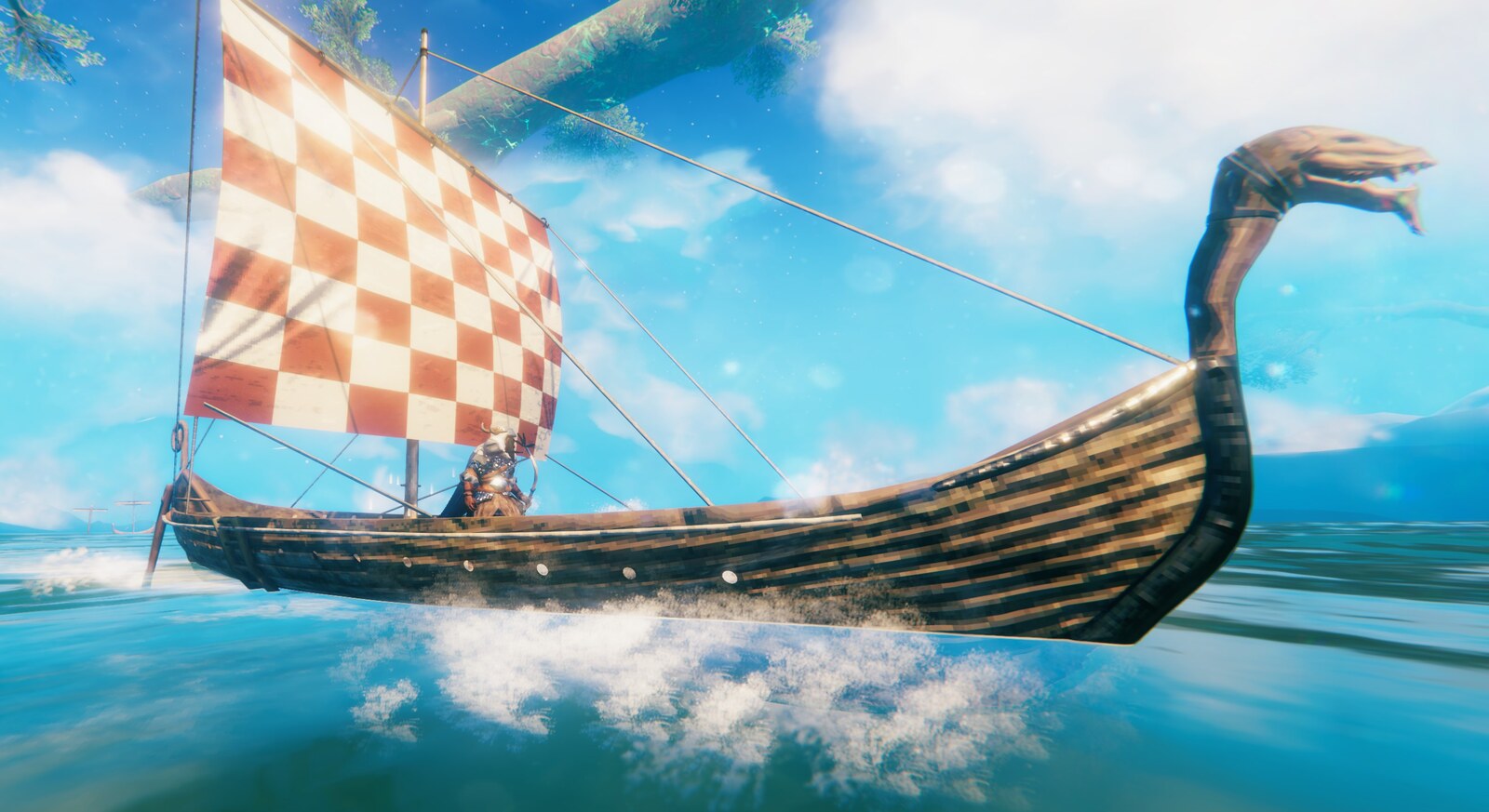
Features
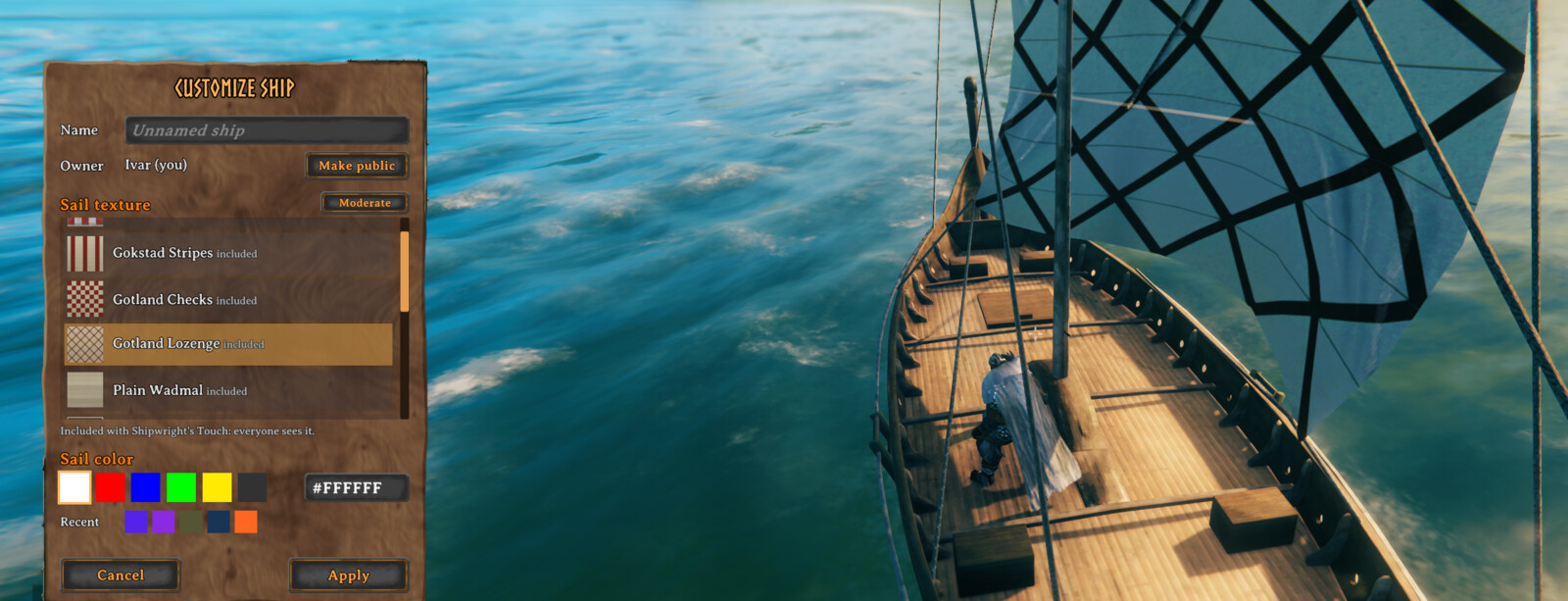
- Customization Panel: Press
Left Shift + Ewhile looking at a ship (rudder, seats, mast, or hull) to open a panel where you name the ship, pick its sail color and sail texture, and choose who owns it. Changes preview live on the ship and are saved when you click Apply. - Any Sail Color: Pick a preset swatch or type any
#RRGGBBcolor. Your last few custom colors are kept as swatches for next time. PressEwhile placing a ship with your Hammer to cycle the presets before it's built. - Custom Sail Textures: Four historically inspired Viking Age sails are included, and you can add your own PNG or JPG images and choose them in the panel. The sail color tints the image; pick white to show it as-is.
- Sharing on Servers: On a server with this mod, a texture you put on a ship is shared with the server the first time you use it, so everyone sees it. Server owners decide whether players may share, set limits, and can require a moderator's approval first.
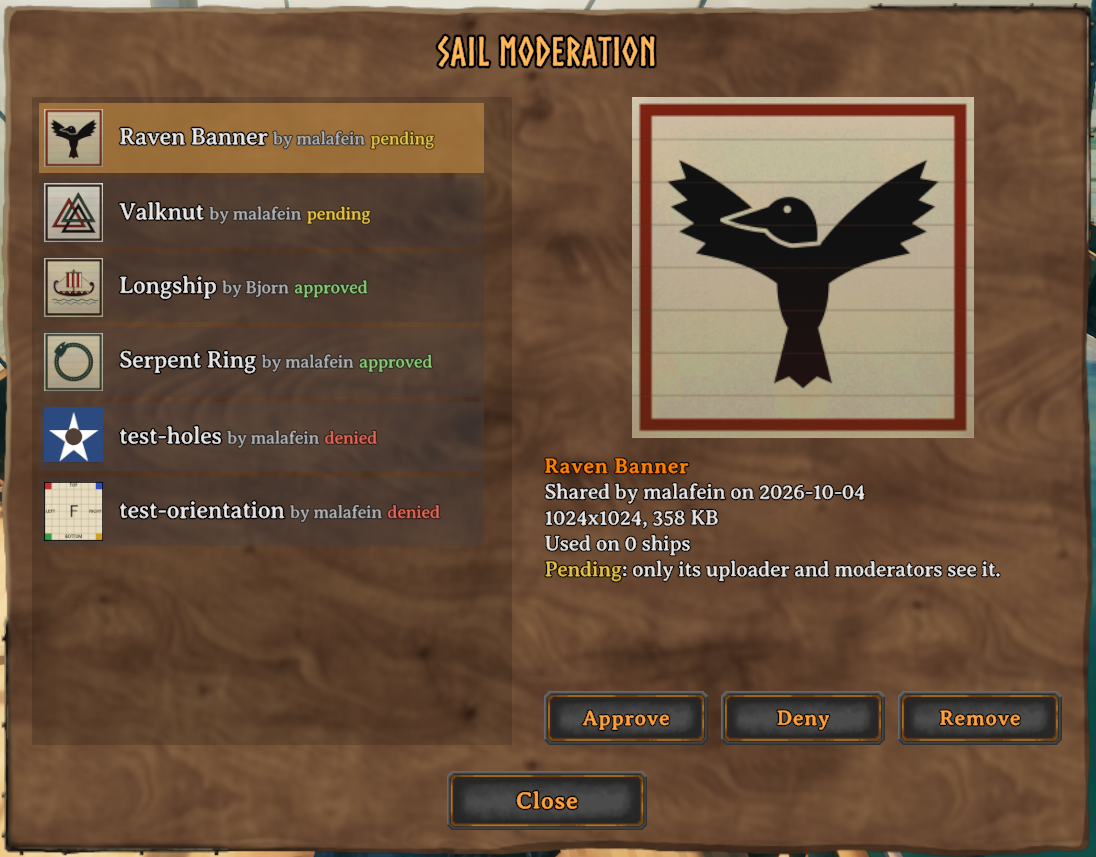
- Moderation: Server admins, and moderators they choose, review shared textures in an in-game panel: approve, deny, or remove them.
- Dynamic Hover Text: The ship's name is displayed in yellow at the top of the hover text for all ship parts, including storage containers.
- Builder Identity & Restrictions: When a ship is constructed, the builder is recorded as its owner. Only the owner can customize or deconstruct it; a ship made public can be customized by anyone. The owner's name is displayed in the hover text.
- Configurable Keybindings: Every keybinding can be changed in the config, and the hover text always shows the keys you have set.
- Mod Compatibility: Designed to work alongside popular mods like
QuickStackStore. Interaction prompts are disabled on containers to ensure no conflict with storage-specific features.
Installation
Thunderstore / r2modman (Recommended)
- Install via Thunderstore Mod Manager or r2modman.
-or- - Download the mod from Thunderstore, and follow the Manual Installation instructions below.
Nexus Mods / Vortex
- Install via Vortex Mod Manager.
-or- - Download the mod from Nexus Mods, and follow the Manual Installation instructions below.
Manual Installation
- Install BepInExPack Valheim.
- Download the latest release of Shipwright's Touch from GitHub.
- Extract the contents of the zip's
pluginsfolder (ShipwrightsTouch.dlland theShipwrightsTouch-Sailsfolder) into your<Valheim Install Folder>\BepInEx\pluginsdirectory.
On a dedicated server, install it the same way to share textures between players. Without the mod on the server, names and colors still work for everyone who has the mod, but custom textures show only to the player who chose them.
Compatibility: tested with Valheim 1.0.
Custom Sail Textures
Included sails
Four sails come with the mod, styled after surviving Viking Age sails, all woven wool sewn together from strips of cloth:
- Gokstad Stripes: white wool with sewn-on red stripes, after the sail remnants found with the Gokstad ship.
- Gotland Lozenge and Gotland Checks: diamond and chequered sails, as carved on the Gotland picture stones.
- Plain Wadmal: undyed wool (vaðmál), the everyday sailcloth.
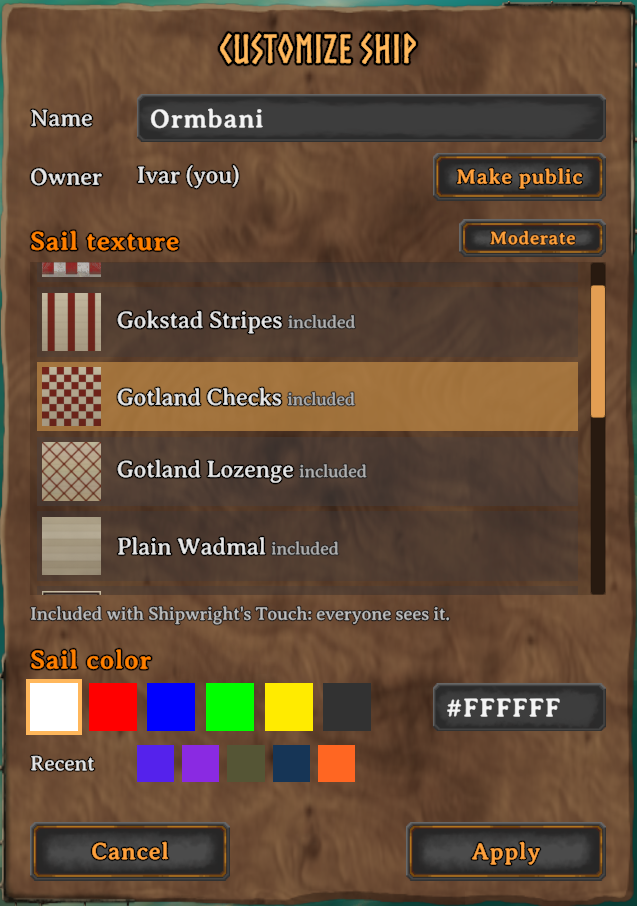
On a server with this mod they're the server's own textures: everyone sees them, no download or approval needed. Sail packs installed with a mod manager work the same way: any ShipwrightsTouch-Sails folder under BepInEx/plugins is used.
Your own sails
Put PNG or JPG images in BepInEx/config/ShipwrightsTouch/sails (the folder is created on first run) and pick them in the customization panel. Keep your own images here, not under plugins: mod managers replace a mod's plugin folder when it updates.
- The image is stretched to fill the sail, on every ship type. Square images work well.
- Up to 2048×2048 pixels and 4 MB. Servers may set lower limits for shared textures (1024×1024 and 1 MB by default).
- Transparent areas show as holes in the sail.
- The sail color tints the image: white shows it unchanged.
- Only PNG images are shared with other players. JPG images work, but only on your own screen: photos can carry the location where they were taken, and shared files reach every player as they are.
- Images are downloaded the first time a ship using them comes near, then cached in
BepInEx/config/ShipwrightsTouch/cache.
Each texture's status shows in the panel's list: shared (everyone sees it), pending (waiting for a moderator's approval; until then only you see it), or denied (only you see it). If a texture can't be shared, the panel says why.
Sharing settings
- ShareMyTextures: Set to
falseto keep your textures to yourself: they show only on your own screen. - ShowOtherPlayersTextures: Set to
falseto show other players' textures as the vanilla sail. The server's own textures still show.
Server Setup
A server's own textures go in its BepInEx/config/ShipwrightsTouch/sails folder; every player sees them, no approval needed. Textures shared by players are kept in BepInEx/config/ShipwrightsTouch/uploads.
The [Server] settings apply when your game is the server (a dedicated server, or you hosting). While connected to a server with this mod, they show the server's values, and its admins can change them live from Configuration Manager.
- AllowCustomSailTextures: Set to
falseto turn custom textures off for everyone, including a player's own textures on their own screen. - AllowPlayerSailTextures: Set to
falseto stop new sharing. Textures approved earlier stay visible. - RequireApproval:
true(default) keeps a new texture visible only to its uploader until a moderator approves it. Whenfalse, it's shown to everyone right away; moderators can still deny it later. - MaxTextureFileKB: Largest file a player may share. Default
1024. - MaxTextureSize: Largest width or height a player may share, in pixels. Default
1024. - MaxTexturesPerPlayer: How many textures each player may share, denied ones included (a moderator's Remove frees a slot). Default
10.
Moderation
Admins (the server's adminlist.txt) can moderate, and so can moderators: players listed in the server's BepInEx/config/ShipwrightsTouch/moderators.txt, one player ID per line, written the same way as in adminlist.txt. Moderators get only sail moderation, not the admin console, kick, or ban. The file is created the first time the server checks it, and changes take effect within about 10 seconds, without a restart.
Moderators open the moderation panel with the OpenModeration key (unbound by default), with the Moderate button in the customization panel, or by pressing Left Shift + E on another player's ship that uses a shared texture. The panel lists every shared texture, pending ones first, with a full-size preview, who shared it, how many ships use it, and who last approved or denied it.
- Approve: everyone sees it.
- Deny: ships using it show the vanilla sail to everyone but its uploader, and it can't be shared again. Approving it later undoes this.
- Remove: deletes it from the server and frees the uploader's slot; it may be shared again.
Uploaders only see a texture's status, never which moderator decided.
Configuration
The mod generates a configuration file at BepInEx/config/com.malafein.shipwrightstouch.cfg after the first run. Settings can also be changed in-game with a configuration manager such as shudnal's Configuration Manager.
General
- AssignBuilderIdentity: Set to
true(default) to assign your character as the owner when constructing a ship, restricting modifications to yourself. - AllowShipDeconstruction: Set to
trueto allow removing ships with the hammer tool. Off by default, and we suggest leaving it off: the hammer's remove action takes a ship apart in one click, even one you're sailing, and anything aboard that isn't in a container can be lost. Somewhere at the bottom of the sea lies a growing pile of iron nails. Don't add to it. - ScrollSensitivity: Mouse-wheel scroll speed in the panels' lists.
- CompressTextures:
true(default) stores custom sail textures compressed in video memory, like the game's own textures: about a quarter of the memory each, with slight artifacts on hard edges and smooth gradients. Turn it off for exact images if your graphics card has memory to spare.
Controls
- CustomizeShip: Open the customization panel for the ship you are looking at. Default
Left Shift + E. (Called RenameShip in 1.1.1 and earlier; your saved key carries over.) - ChangeSailColor: Quickly cycle the sail color presets of the ship you are looking at. Unbound by default.
- ChangeSailColorWhilePlacing: Cycle the sail color while placing a ship with the Hammer. Default
E. - OpenModeration: Open the moderation panel (moderators and admins only). Unbound by default.
Left and right Shift, Ctrl, and Alt are separate keys, as they are in the game. Plain E still works as normal on a ship: it takes the helm or sits you down.
If one of these keybindings is also bound to a game action, a warning is written to the BepInEx log (LogOutput.log) at startup and whenever a binding changes.
Technical Details
- Custom data is stored in ZDO keys:
custom_ship_name,custom_sail_style,shipwrightstouch.sail_color,shipwrightstouch.sail_texture,shipwrightstouch.builder_id, andshipwrightstouch.builder_name. - A ship stores only its texture's hash (SHA-256); the image itself travels from the server on demand.
License & Development
This project is licensed under the GNU General Public License v3.0 (GPLv3). You are free to modify and redistribute this mod under the same license terms.
Development Note: This mod was primarily developed with the assistance of Google Antigravity, Gemini, and Claude. The source code is open to the community to learn from, modify, and improve.