


Fysik
Structural physics for building. Shape matters: arches carry load in compression, triangulated trusses stay rigid, cantilevers bend. Replaces vanilla support with a frame solver; overloaded pieces crack before they fall. Work in progress.Fysik
Structural physics for Valheim building. In vanilla Valheim, a piece only cares about how far it is from the ground. With Fysik, the shape of your build matters, in the spirit of Poly Bridge and Bridge Constructor.
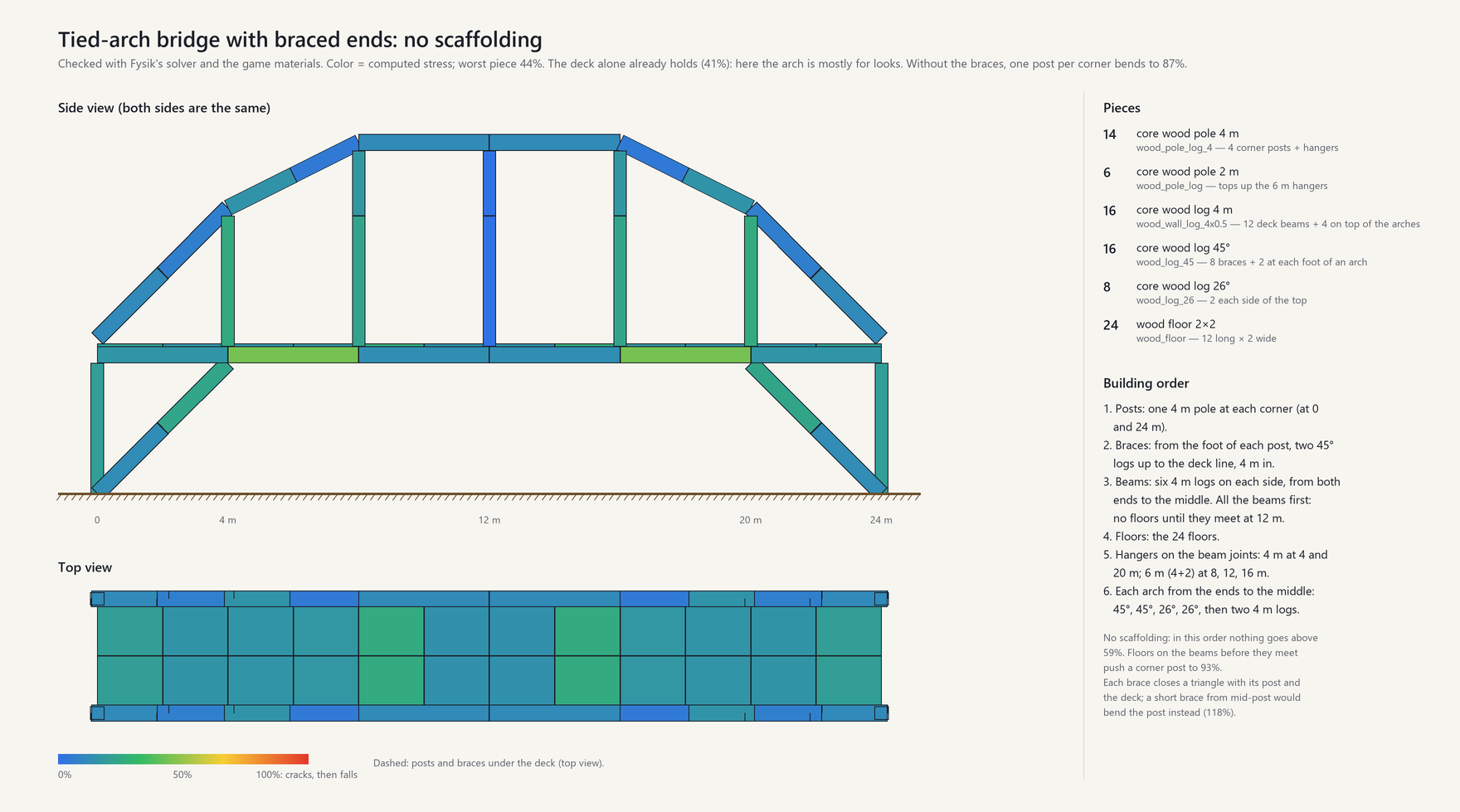
A 24 m bridge from the building guide, every piece colored by the stress Fysik computes: the worst is at 44%, and it goes up without scaffolding. The parts list and building order are in the picture.
How it works
- Everything weighs, and the weight has to reach the ground through the pieces below. Fysik calculates the forces in every piece as you build.
- Shape matters. Arches carry their load in compression and span gaps a flat beam cannot. Braces and triangles carry load along their length instead of bending. Cantilevers bend, more the further they reach.
- Colors show the stress: blue is relaxed, green is fine, yellow is getting close, red is at the limit.
- Overloaded pieces crack before they fall: they turn red, shake and creak for a few seconds, time to shore them up. Then whatever they held comes down with them.
- Not only the pieces weigh: furniture, full chests, players walking across, a loaded cart rolling over a bridge and the snow piling up on roofs in the Deep North.
Quick start
- Back up your world, or better, start a new one (see the warning below).
- Install with r2modman or Thunderstore Mod Manager. On a server, the server and every player need Fysik, with the same version.
- Watch the ghost while building: before you place a piece, it is colored by the stress it would have. Red would break.
- Aim the hammer at a piece to read its stress (Bending 72%), its weight, the weight it holds up (Holds 6.5 t) and whether it stands on the ground (Rests on the ground).
- Press F7 for the X-ray: every piece within 40 m colored by stress (Ctrl+F7 widens it).
- When something cracks, put a post or a brace under it, or take the load off, before it falls.
- Build like a carpenter: posts every 2 to 4 m, a diagonal brace under anything that reaches out, an arch or a truss to cross a wide gap.
Worked examples, every number explained and answers to common questions are in the wiki.
⚠ Before you install
Fysik is on from the start. As soon as a world loads, every building made by players is checked against the physics Fysik applies, and buildings that do not respect it will crack and fall, including bases you built before installing it. Back up your world first. We recommend starting a new world with Fysik, so everything you build is designed for it from the first post.
Buildings that come with the world (stone towers, abandoned houses, villages, ruins) are not simulated: they keep vanilla support, unless the server sets
Structure.WorldBuildings = Physics(see Server admins in the wiki).
Status
Early access. Material values are still being calibrated. Back up your worlds before trying it.
Installation
Install with a mod manager (r2modman, Thunderstore Mod Manager) or manually:
- Install BepInExPack_Valheim and Jötunn.
- Copy
plugins/Fysik.dllintoBepInEx/plugins/Fysik/.
Fysik must be installed on the server and on every client, with exactly the same version (every player who owns part of a structure must calculate it exactly as the others do). Players without it cannot join a server that has it, and vice versa.
Existing player buildings follow the new rules as soon as the mod is enabled: back up your world,
and preferably start a new one. To look at an old base before letting it settle, set
Structure.Mode = Sandbox (nothing falls for lack of support) or DisplayOnly (vanilla decides).
Wiki
Everything else is in the wiki:
- Getting started: installing, the three modes, old bases and your first builds.
- Reading the forces: the colors, every line next to the crosshair, the X-ray, the placement preview and how cracking works.
- What weighs: pieces, furniture, piles, chests, players, carts and snow, with typical weights.
- Building guide: balconies, arches, trusses, stone bridges, snow on roofs and carts on bridges, with worked examples.
- Server admins: multiplayer, versions, world buildings, big bases and the settings worth knowing.
- FAQ: common questions, and how to send a build that behaves strangely.
- How it works: the calculation behind it.
Roadmap
Next:
- Masonry: stone blocks that only hold by pressing on each other, interlocking walls, arches built on wooden centering
Later:
- Creatures' weight (tamed lox, trolls) on bridges and floors
- Calibration with player builds (feedback welcome)
- Faster recalculation for very large bases
- Translations into every language Valheim supports
- A website to plan and test a build in the browser with the same solver
Configuration
BepInEx/config/menezesbruno.fysik.cfg. Settings marked server are enforced by the server and
synced to every client; they can also be edited in game with a configuration manager (F1).
| Section | Setting | Default | Range | Description |
|---|---|---|---|---|
| Structure | Mode (server) | Physics | Physics, DisplayOnly, Sandbox | Physics: Fysik decides what falls. DisplayOnly: vanilla decides, Fysik only shows. Sandbox: nothing falls for lack of support. |
| Structure | WorldBuildings (server) | Vanilla | Vanilla, Physics | Buildings that come with the world (stone towers, abandoned houses, villages, ruins). Vanilla: they keep vanilla support, are not simulated and show in grey; player builds rest on them as on rock. Physics: simulated like player builds. Warning: many were not built for real forces and will crack and fall when players come near, changing the game. |
| Failure | CrackWarningSeconds (server) | 5 | 0–60 | Seconds an overloaded piece stays cracked before it falls, when it is just past its limit (up to 110%); shorter the further past, none at twice its limit. |
| Failure | DamageWeakens (server) | on | Pieces below half health are weaker, down to 25% strength at the brink of breaking; rain wear alone never weakens them. Off: damage never changes strength. | |
| Structure | Difficulty (server) | Normal | Relaxed, Normal, Strict | Relaxed: materials 50% stronger (longer spans and cantilevers). Strict: 30% weaker. |
| Structure | MaxFrameBodies (server) | 2000 | 500–5000 | Largest structure solved with the full frame analysis; bigger ones use a simplified model that does not recognise arches. Higher values take longer to update (about 0.5 s for 2000 pieces, 2 s for 5000). |
| Material.<type> | Density, CompressiveStrength, TensileStrength, ShearStrength, BucklingSlenderness (server) | per material | Density (kg/m³) gives structural pieces their weight; strengths in MPa. Stone is strong in compression and weak in tension. Objects weigh their materials instead (see Weight). | |
| Weight | Wood, Stone, MetalBar, Nail (server) | 4, 10, 4, 0.1 | 0–1000 | Kilograms per item used to build an object (furniture, crafting stations, chests, torches); objects weigh their materials, not their volume. |
| Weight | PerItemWeight (server) | 2 | 0–100 | Kilograms per unit of the game's item weight, for every other material in an object's recipe. |
| Weight | LiveLoads (server) | on | Chest contents, players, carts and Deep North snow weigh on the structure. Off: only the pieces and the objects built on them (piles and stacks included) weigh. | |
| Weight | Contents (server) | 1 | 0–20 | Kilograms per unit of the game's item weight for stored items: inside chests, carts and players' inventories, and in piles and stacks (at 1, the game's weights read as kilograms). |
| Weight | Player (server) | 80 | 0–500 | Body weight of a player, kilograms; their inventory adds to it. |
| Weight | Snow (server) | 150 | 0–1000 | Weight of a full layer of Deep North snow, kilograms per square metre of ground; roofs hold less of it the steeper they are. 0: snow weighs nothing. |
| Display | HammerInfo | on | Stress color and the lines next to the crosshair for the piece under the hammer: stress, weight, weight held, what it rests on, damage. | |
| Display | PlacementPreview | on | Predicted stress and weight held on the piece being placed. | |
| Display | CollapseAnimation | on | Falling pieces come down as debris and burst on impact (off: they shatter in place, as in vanilla). | |
| Display | XRayKey | F7 | Toggles the X-ray view. | |
| Display | XRayRadius | 40 | 40–80 | X-ray radius, metres. |
| Display | XRayRadiusKey | Ctrl+F7 | Widens the X-ray radius by 10 m (after 80 m, back to 40 m). | |
| Performance | FrameBudgetMs | 1.5 | 0.25–10 | Time per frame spent on calculations. |
| Performance | BackgroundSolver | on | Solve structures on a worker thread, without taking frame time. | |
| Debug | LogSolves | on | One log line per structure solved. | |
| Debug | LogGeometry | on | One log line per kind of piece: colliders, size, weight. | |
| Debug | DumpKey | Ctrl+F8 | Writes the structure under the hammer to BepInEx/fysik-dump.txt. |
The console command fysik stats, fysik recalc, fysik dump or fysik hash (F5; the game must be
started with -console) shows solver statistics, recalculates everything, writes the structure under
the hammer to BepInEx/fysik-dump.txt or prints a fingerprint of its result, the same on every
player's game when they calculate it alike.
Compatibility
Fysik takes over structural integrity, so it is expected to conflict with other mods that change it,
such as NoBuildIntegrity, Forever Build or Balrond Better Build. Pieces added by other mods will use
conservative default material properties, with a warning in the log for each unknown material.
Their furniture and other objects weigh their recipe: Fysik knows the vanilla wood, stone, metal bars
and nails, and counts any other resource by its weight in the inventory (Weight.PerItemWeight).
Links
- Source code and issues: https://github.com/menezesbruno/Fysik
- License: MIT