
You are viewing a potentially older version of this package. View Latest Version
Server-enforced global portal limits and optional discovery-locked portals for Valheim servers.
PortalLimit lets server owners limit how many portals each player can own across the whole world, including unloaded zones. Admins can also mark special portal pairs so one entrance stays locked until each player discovers and uses the other side first.
Install the Thunderstore package on both the dedicated server and players.
The package includes:
PortalLimitServer.dll: runs only on the dedicated server.PortalLimitClient.dll: runs only on player clients.BepInEx/config/AzuAntiCheat_Whitelist/PortalLimitClient.dll: convenience copy for servers using AzuAntiCheat.If installing manually, install:
PortalLimitServer.dllto:
BepInEx/plugins/
Install:
PortalLimitClient.dllto:
BepInEx/plugins/
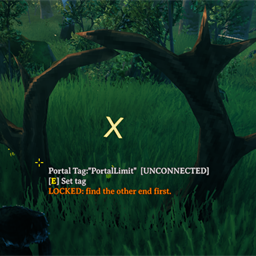
The server plugin enforces the portal limit. The client plugin adds the player /portals command, placement feedback, locked-portal visuals, hover text, and the admin UI.
If your server uses AzuAntiCheat, whitelist the exact PortalLimitClient.dll that players install. The Thunderstore package already includes a copy at this path.
Copy it to:
BepInEx/config/AzuAntiCheat_Whitelist/PortalLimitClient.dll
Players can build and use normal Valheim portals as usual until they reach the server portal limit.
Players can type:
/portals
to see their current portal count and the server limit.
Counts are calculated server-side from saved portal ZDOs, so portals in unloaded zones still count.
The server also writes an admin-readable count export at:
BepInEx/config/PortalLimit/portal_counts.tsv
This report includes creator ID, saved creator name when available, portal count, and portal ZDO IDs. The Valheim world save remains the source of truth; the TSV is for audit/review.
If a portal is marked as a locked discovery portal, players must find and use the unlocked entrance before they can use the locked entrance.
Admins can open the PortalLimit UI with:
/portallimit
or press F10.
Admins can also look at a portal and press E to edit that portal's PortalLimit settings.
The admin UI has two tabs:
Server Settings: global portal limit and discovery portal behavior.This Portal: settings for the portal the admin is looking at.To create a discovery-locked portal pair:
This Portal.Bog Witch.LOCKED ENTRANCE.Apply.Then configure the far-side portal:
UNLOCKED ENTRANCE.Apply.Each player unlocks the route individually after using the unlocked entrance.
The server creates:
BepInEx/config/keith.valheim.portallimit.server.cfg
Important settings:
MaxPortalsPerPlayer: maximum counted portals per player. 0 disables the limit.AdminBypass: lets Valheim admins exceed the portal limit.EnforceOnServer: removes newly placed portals that exceed the limit.PortalPrefabNames: comma-separated prefab names counted as portals. Leave empty to count every loaded prefab type that has a TeleportWorld component.Discovery Portals.Enabled: enables discovery-locked portal behavior.Discovery Portals.ShowHoverText: shows lock/unlock text on portals.Discovery Portals.ShowWorldMarker: shows the portal marker text.Discovery Portals.SuppressLockedGlow: hides connected portal glow while locked.Player discovery unlocks are stored on the server at:
BepInEx/config/PortalLimit/discovery_unlocks.txt
Global portal counts are exported on the server at:
BepInEx/config/PortalLimit/portal_counts.tsv
Back up your world before installing.
Existing portals are not automatically deleted just because a player is already over the limit. The global limit applies when new portals are placed. Players who are already over the limit will need to remove portals before they can place more.
For a live server, consider installing with a high temporary limit first, confirming everything works, then lowering the limit after players have been warned.
