

Portaler
Every portal connects to every portal. Pick your destination from a searchable, sortable list or the map, share favorites with the whole server, see the last built portals, auto-name them by biome, rename from the list and jump back with one click.Portaler
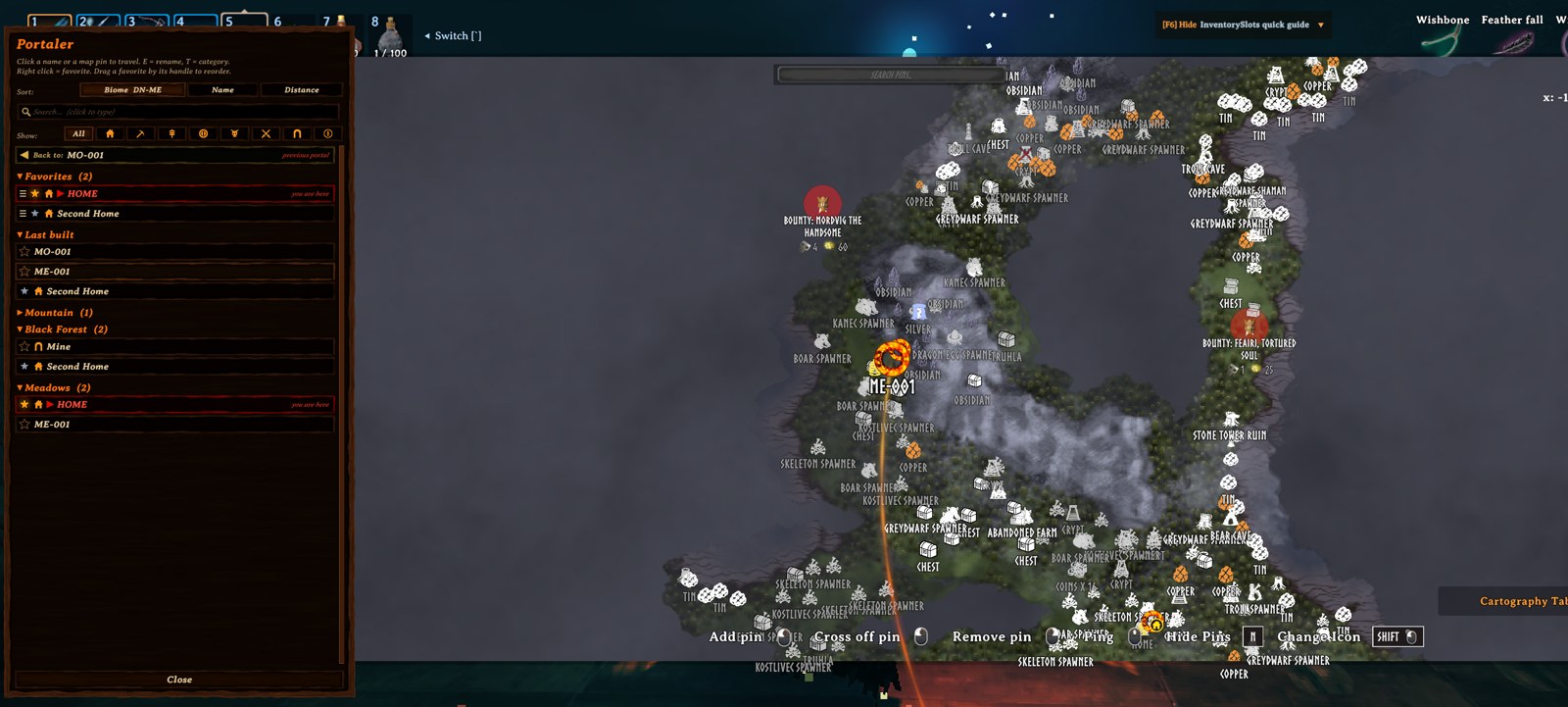
Every portal connects to every portal. Step into any portal and the map opens with a list of all portals on the server. Pick a name or click a pin and you're there. There's no pairing and no tag matching, and by default no item restrictions.
Built for servers that play together: favorites can be personal or shared with everyone, the newest portals show up for all players, and new portals name themselves after their biome (BF-007, MO-012). Find any portal in seconds with search, sorting and foldable biome groups, rename portals right from the list, and get home with the Back button.
Everything is synced through the server and kept with the world save, so it survives restarts and mod updates.
Source code, issues and ideas: github.com/nfp007/portaler
Features
Every feature says what is 🌐 shared (the same for everybody on the server) and what is 👤 personal (only for you).
1. Travel from any portal to any portal
- Walk into a portal: the big map opens with the portal list on the left.
- Click a name in the list, or a portal pin on the map, to travel.
- Vanilla name pairing is switched off, so every portal is always active.
- The portal you stand in stays in the list, marked in red with "you are here", and cannot be selected.
- 🌐 Shared: the list of portals (everybody sees every portal).
2. Map preview
- Rest the mouse on a name: the map glides to that portal, its pin gets bigger, and a soft fiery line flows from your portal to it.
- The map stays there 5 seconds after the mouse leaves the list, then glides back. Move or zoom the map yourself and it stays where you put it.
- 👤 Personal: only your own map moves. Timing, zoom and the line can be changed in your config.
3. Favorites
- Right click a name: mine (silver star), then shared (bigger glowing gold star), then off.
- Drag favorites by their handle into any order. New favorites go to the end.
- 🌐 Shared: gold stars. Everybody sees them, and anyone can add or remove them.
- 👤 Personal: silver stars and the order of your favorites (per character, saved on the server).
4. Categories & filter
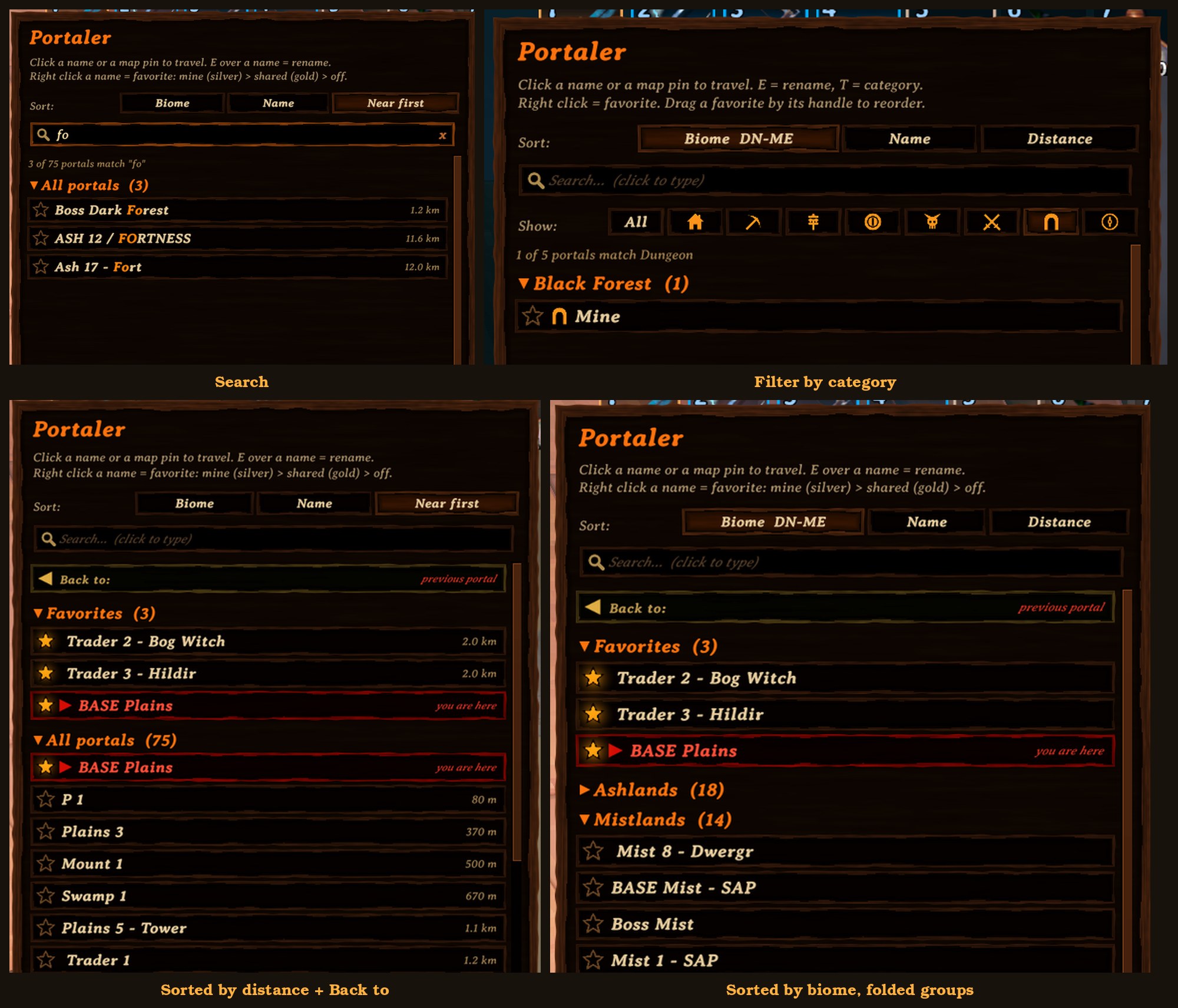
- Hover a name and press T to choose a category: Base, Mine, Farm, Trader, Boss, Danger, Dungeon or Explore.
- The icon shows in the list and inside the portal's ring on the map.
- One click on an icon in the Show: row lists only that category. Click it again (or All) to see everything.
- 🌐 Shared: the category of each portal (anyone can change it).
- 👤 Personal: which category you are filtering by.
5. Search
- Click the search box and type: only portals whose name contains the text are shown (any case), matching letters in gold.
- While typing, the game ignores your keys (no walking, the map stays open). Esc or x clears the search.
- 👤 Personal: your search (cleared each time you enter a portal).
6. Sorting & foldable groups
- Biome (default): grouped by biome, Deep North first. Click again for Meadows first.
- Name: one list A to Z, or Z to A.
- Distance: nearest first (or farthest first), with the distance shown next to each name.
- Click a group title (a biome, Favorites, Last built) to fold or unfold it.
- 👤 Personal: sort choice (per PC) and folded groups (per character).
7. "Back to"
- The portal you last travelled from, at the top of the list. One click takes you back.
- 👤 Personal: per character, saved on your PC.
8. "Last built"
- The 3 newest portals built by anyone on the server.
- 🌐 Shared: the same list for everybody.
9. Automatic names & rename from the list
- New portals are named after their biome plus a number, for example
BF-007orMO-012. Numbers keep counting up per biome and are never reused. - Portals you name yourself, and existing portals, keep their names.
- Hover a name in the list and press E to rename that portal from anywhere in the world (up to 25 characters).
- 🌐 Shared: portal names (anyone can rename any portal).
10. Map pins
- Every portal gets a fiery ring pin with its name, and its category icon in a round badge at the lower right.
- The previewed portal's pin is drawn bigger and stays big as long as the fiery line is shown; a pin under the mouse grows a little, so icon and name are easy to read.
- Pins from other mods (for example automatic pin mods) that sit on a portal are hidden, so each portal shows just one icon.
- While you choose a destination, portal pins, their names and the fiery line are drawn above all other pins and labels, at full brightness.
- 🌐 Shared: everybody sees the same pins, names and icons.
11. Optional vanilla restrictions
- By default every item can travel, metals included.
- Prefer the game's own rules? Switch on
VanillaRestrictionson the server (see Configuration). - 🌐 Shared: the server decides for everybody.
All shared data is stored on the server, next to the world save, and survives restarts and mod updates.
Controls (click to show)
| Action | How |
|---|---|
| Open the portal list | Walk into any portal |
| Travel | Left click a name in the list, or a portal pin on the map |
| Favorite: mine / shared / off | Right click a name (or click its star) |
| See a portal on the map | Hover its name for a moment |
| Rename a portal | Hover its name and press E, then Enter to save or Esc to cancel |
| Set a category | Hover its name and press T, click a category (Esc closes) |
| Show one category | Click its icon in the Show: row; click again or All for everything |
| Reorder favorites | Drag a favorite by its handle (the three lines on the left) |
| Search | Click the search box, type part of a name; Esc or x clears it |
| Go back | Click "Back to: ..." at the top of the list |
| Fold / unfold a group | Click the group title (biome, Favorites, Last built) |
| Change sorting | Click Biome, Name or Distance at the top of the list |
| Reverse sorting | Click the active sort button again |
| Scroll the list | Mouse wheel over the list |
| Close | Close button, Esc, or walk out of the portal |
Configuration (click to show)
Config file: BepInEx/config/nfp007.Portaler.cfg (created on first start). [Server] settings: only the server's (or the host's) value counts; it is sent to all players. All other settings are personal (each PC).
| Setting | Default | What it does |
|---|---|---|
[Controls] RenameKey |
E |
Key to rename the hovered portal. Any Unity key name, e.g. R, F2. |
[Controls] CategoryKey |
T |
Key to choose the hovered portal's category. |
[Map] HoverShowsMap |
true |
Hovering a name moves the map to that portal. |
[Map] HoverDelay |
0.4 |
Seconds the mouse must rest on a name before the map moves. |
[Map] HoverZoomMeters |
1500 |
How much of the world is shown around the portal (metres). The map only zooms in, never out. |
[Map] HoverReturn |
true |
When the mouse leaves the list, the map glides back to where it was (not if you moved or zoomed the map yourself). |
[Map] HoverReturnDelay |
5 |
Seconds the map stays on the previewed portal before gliding back. |
[Map] HoverLine |
true |
Draw the fiery line from your portal to the previewed one. |
[Map] PinSizePreview |
1.6 |
Size of the previewed portal's pin (1 = normal), as long as the fiery line is shown. |
[Map] PinSizeHover |
1.3 |
Size of a portal pin while the mouse is over it on the map. |
[Server] VanillaRestrictions |
false |
false = no restrictions, everything travels through every portal. true = the game's own rules: no metals/ores through the wooden portal, and the world modifiers "no portals" and "no portals during boss fights" apply. |
Everything else is set from inside the game:
| What | Where it is stored |
|---|---|
| Sort choice (per PC), folded groups and "Back to" portal (per character) | Portaler.prefs in Valheim's data folder (AppData\LocalLow\IronGate\Valheim) |
| Favorites and their order, categories, "Last built", name counters (per world) | <world>.portaler.txt next to the world save on the server |
- Keep
<world>.portaler.txttogether with your world backups. - Deleting it resets favorites and "Last built". Numbering then continues from the highest existing portal number.
Installation (click to show)
Portaler must be installed on the server and on every player, with the same version everywhere.
Players
- Install with a mod manager (Gale, r2modman, Thunderstore Mod Manager), or
- manually: copy
Portaler.dlltoBepInEx/plugins/Portaler/.
Dedicated server
- Copy
Portaler.dlltoBepInEx/plugins/Portaler/on the server and restart it.
Notes
- Do not run it together with other portal-list mods (for example PotalMap).
- Single player and self-hosted worlds work too: your game is then the server.
Dependencies (click to show)
- BepInExPack for Valheim 5.4.2351 or newer
Source code & feedback (click to show)
- Source code: github.com/nfp007/portaler
- Bugs and ideas: open an issue
- Building from source: see BUILDING.md
- License: MIT