
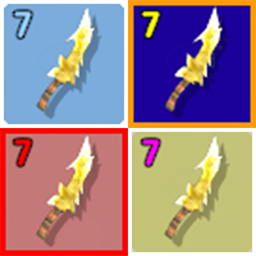
CustomHotbarColors
Recolors the hotbar: cell backgrounds, slot numbers, and a border on the equipped item.Description
Every element can be tuned separately, and each feature has its own on/off switch so you can keep the vanilla look for the rest:
- Backgrounds — a color under the content of every cell, and a different one for the cell holding the equipped item.
- Slot numbers — recolor the number of every cell, and the equipped one.
- Border — a frame around the equipped cell.
- Bar — an optional bar along one side of the equipped cell (top, bottom, left or right), as an alternative or addition to the border.
All settings live in the BepInEx config file, where colors are picked with a color picker. Changes are picked up live, without restarting the game, and a master switch restores the hotbar exactly as the game draws it.
Compatibility
This mod repaints the hotbar on a timer, so it can conflict with another mod that draws on the same cells.
If you already use a mod that changes, for example, the background color of the hotbar cells, disable the matching feature in either mod. The same applies to slot numbers, border and bar.
Examples

Installation
This mod is client-side only.
Using a mod manager (recommended)
You can install the mod using Vortex (nexusmods.com) or Gale (hexium.gg).
Manual
Install BepInExPack for Valheim. Copy the DLL file to
Steam\steamapps\common\Valheim\BepInEx\plugins\
Misc.
Source code: GitHub repositories for my Valheim mods