

BubbleBar
See remaining magic barrier capacity and refill on recast!BubbleBar
There are two things I dislike about the Staff of Protection's magic barrier:
- It gives you no way of knowing how much capacity is left (e.g. how close is it to breaking)
- When you re-cast the spell, it replenishes the time remaining, but not the capacity! So a barrier with 10 HP left now lasts for 3 minutes, but still is going to break after 10 HP. (Frankly, this "feels" like a bug, to me)
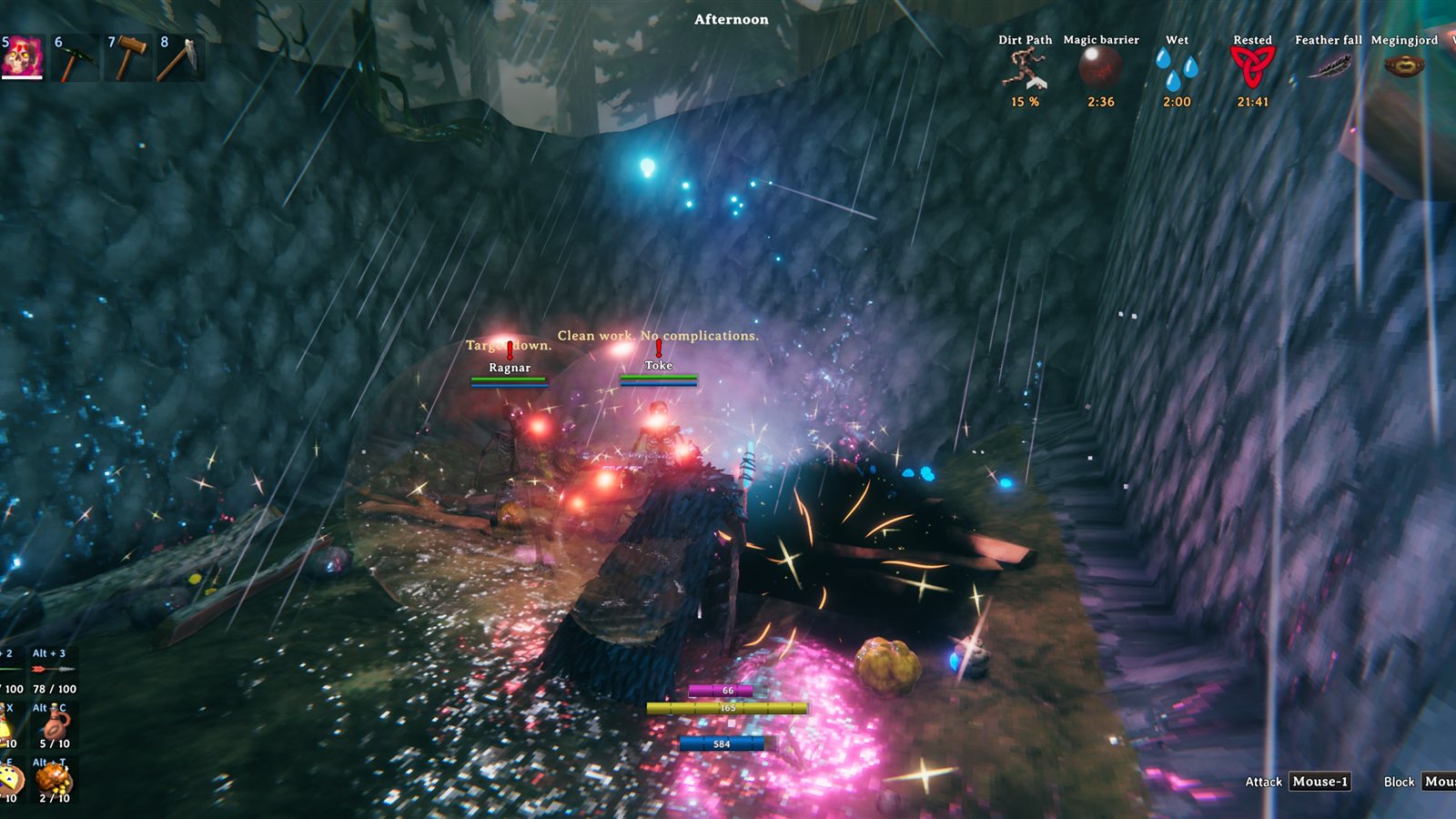
So I made BubbleBar! Now you can see the capacity remaining of you and your allies' barriers, and you can replenish upon a re-cast.
More Details
- You can see how much barrier capacity is left. You get a bar (and a number) on your own HUD, underneath stamina/eitr/adrenaline. Allies with a barrier get a bar under their health bar too (the one you see when you look at them).
- Recasting the barrier refills it. In vanilla Valheim, recasting only resets the time remaining before the barrier dissipates. With this mod, a recast puts it back to its full capacity, whatever that is (depending on the caster's Blood Magic skill).
If you feel that the recast/refill is too powerful an addition, you can turn it off with RestoreOnRefresh (in config settings), and you just get the visible capacity.
Does this work in multiplayer?
It does, with some minor caveats:
- The refill works for you no matter who cast the barrier, even if the other players aren't running this mod. The barrier is applied on the game of whoever receives it, so if you have the mod, your barrier refills (same for your own Skeletts or tamed creatures).
- Refilling another player's barrier requires they have the mod installed, because the effect of the refill happens on the game of whoever receives the cast.
- Seeing another player's bar requires they have the mod installed, because only their game knows how much of their barrier is left, so they need the mod installed to 'share' that data to you.
Known Bugs
- There MIGHT be some wonky behavior if you wander far enough away from one of your Skeletts that another player's game takes over running it. That one is vanilla Valheim, not this mod, but you're more likely to notice it now that there's a bar showing the capacity of a barrier.
- The bars are copied from the game's own HUD, so mods that heavily rearrange the HUD might put the bar somewhere silly. The position is adjustable in the config.
- Multiplayer hasn't been tested much yet! Work in progress.
Config
When you first run the mod, the config file BepInEx/config/pandincus.bubblebar.cfg will appear. Can be edited in the file, but I recommend the BepInEx ConfigurationManager (F1 key). Changes apply immediately.
| Setting | Default | Meaning |
|---|---|---|
General.Enabled |
true |
Master switch. false is completely vanilla: no bars, no refill. |
Barrier.RestoreOnRefresh |
true |
Recasting the barrier refills it, rather than only resetting its timer. |
Bars.ShowOwnBar |
true |
Show your barrier's bar on your own HUD. |
Bars.ShowOwnBarNumber |
true |
Show the capacity number atop your own bar, like stamina and eitr have. |
Bars.ShowAllyBars |
true |
Show the bars under your allies' health bars. |
Bars.BarColor |
#168DF5 |
The color of the bar. |
Multiplayer.ShowOthersBarriers |
true |
Whether other players' barriers (and their Skeletts') show a bar on your screen (assuming they have the mod installed). |
Diagnostics.LogBarrierEvents |
false |
Writes a line to the log every time a barrier refills. Handy for checking it's working. |
There are also a few dials for moving and resizing your own bar (OwnBarWidth, OwnBarThickness, OwnBarOffsetX, OwnBarOffsetY) and the ally bars (AllyBarOffsetY), in case another mod has your HUD laid out differently.
Future Work
- More testing, any bugfixing, and maybe an option to change the barrier bar's color as it empties (e.g. blue to red).
Requirements
Developing
Build instructions, tooling and tests are in the repo README.
This was built through a combination of code-diving and usage of Claude Code. Please feel free to offer feedback and I would happily accept community contributions!
The icon uses the 'Helina' font from Funtype Foundry, purchased with a Desktop License (support artists and font designers if you can, folks!).
See the CHANGELOG for release notes.