

TradersExtended
Extended trader UI, synchronized JSON/YAML lists, custom currencies, price tooltips, repairs, balances, and buyback.Traders Extended
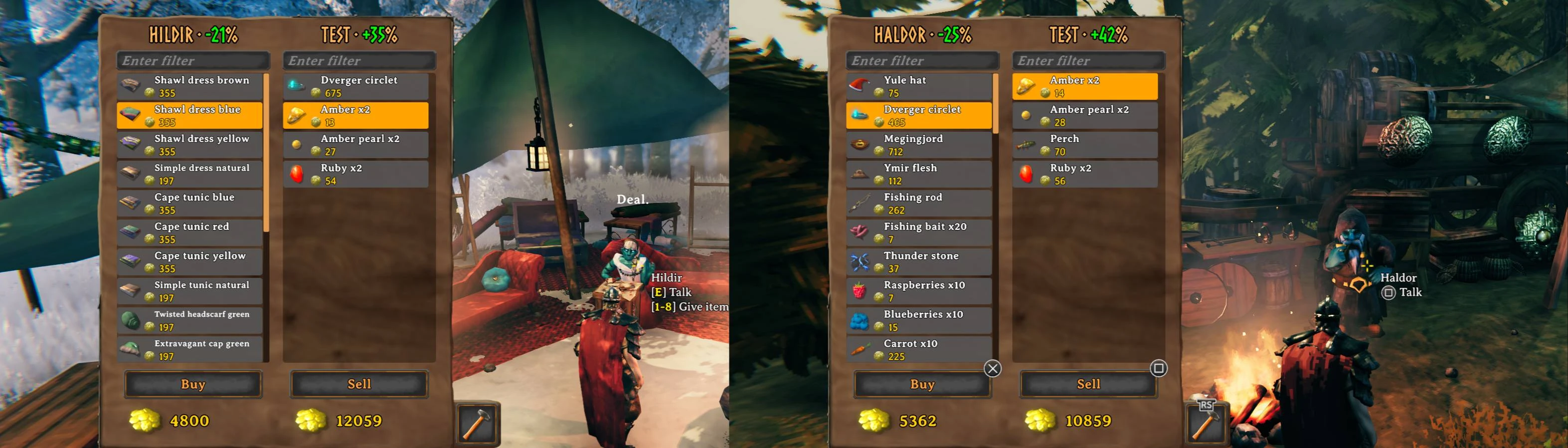
Traders Extended adds trader-specific and common buy/sell lists, a two-column store UI, item filtering, repairs, trader balances, flexible pricing, persistent buyback, configurable currencies, and live synchronized configuration.
Features
- Trader-specific and common buy and sell lists.
- JSON, YAML, YML, and CSV item config files.
- JSON, YAML, and YML personal settings files for individual traders.
- Built-in in-game editor for trader settings and item lists.
- Live config reload and server synchronization through Conditional Config Sync.
- Per-trader default currencies and per-item currency overrides for both buy and sell entries.
- Currency-aware purchases, sales, repairs, buyback, amount dialog, price icons, and balance accounting.
- Sell prices in regular item tooltips, grouped by common and trader-specific values.
- Non-teleportable marker on applicable items in the trader buy list.
- Optional discovery, global-key, and player-key requirements.
- Optional automatic addition of ObjectDB items with a positive vanilla value to the common sell list.
- Optional removal of vanilla or other-mod buy-list entries.
- Configurable trader repairs, finite balances, replenishment, discounts, and markups.
- Buy and sell amount dialog for stackable items.
- Persistent per-trader buyback with configurable expiration in world time.
- Gamepad navigation and independent buy/sell filters.
- Epic Loot Adventure mode compatibility configurable per trader.
- Optional coin weight and stack-size changes.
Requirements
- BepInEx Pack for Valheim
- Conditional Config Sync
- Json.NET
- YamlDotNet
A Thunderstore-compatible mod manager installs these dependencies automatically. For manual installation, install the dependencies before Traders Extended.
Item config files
New item files should be placed in BepInEx/config/shudnal.TradersExtended. Legacy files beginning with shudnal.TradersExtended. are still supported anywhere below BepInEx/config. Item configurations may also be embedded into the assembly under TradersExtended.Configs.
Supported extensions:
.json.yaml.yml.csv
New file names use this format:
<trader-or-common>.<buy-or-sell>[.<identifier>].<extension>
Examples:
haldor.buy.json
haldor.sell.yaml
hildir.buy.yml
bogwitch.sell.csv
common.buy.yaml
common.sell.json
hildir.buy.food.basic.json
hildir.buy.food.progression.csv
The legacy shudnal.TradersExtended. prefix remains accepted, for example shudnal.TradersExtended.haldor.buy.json. Existing files keep their original names when saved by the editor.
The optional identifier may contain multiple dot-separated segments. It is ignored when selecting the trader and list type, and exists only to split a trader list across multiple human-readable files.
All matching item files are merged. Embedded files are processed first and files below BepInEx/config last. Within each source, files are processed by file name; entries remain in their original order inside each file. Within sell lists, trader-specific entries override common entries for the same item, quality, and stack.
Names are case-insensitive on Windows. Prefab names inside files remain case-sensitive because they are resolved through ObjectDB. Invalid files or entries are logged and skipped without preventing the remaining files from loading.
Tradeable item model
{
  "prefab": "DragonEgg",
  "stack": 1,
  "price": 500,
  "quality": 0,
  "currency": "Coins",
  "requiredGlobalKey": "defeated_dragon",
  "notRequiredGlobalKey": "",
  "requiredPlayerKey": "",
  "notRequiredPlayerKey": ""
}
prefab: item prefab name.stack: number of items covered by the price. The default is1; values less than one disable the entry.price: price for the configured stack. The default is1; values less than one disable the entry.quality: required/generated quality. Zero means default quality for buy lists and any quality for sell lists.currency: optional currency prefab for this entry. It overrides the trader default for this buy or sell item only.requiredGlobalKey: comma-separated global keys; all must be present.notRequiredGlobalKey: comma-separated global keys; none may be present.requiredPlayerKey: comma-separated player unique keys; all must be present.notRequiredPlayerKey: comma-separated player unique keys; none may be present.
JSON buy-list example
[
  {
    "prefab": "DragonEgg",
    "stack": 1,
    "price": 500,
    "requiredGlobalKey": "defeated_dragon"
  },
  {
    "prefab": "RawMeat",
    "stack": 10,
    "price": 2,
    "currency": "Ruby"
  },
  {
    "prefab": "Cultivator",
    "stack": 1,
    "price": 500,
    "quality": 4,
    "requiredGlobalKey": "defeated_gdking"
  }
]
YAML sell-list example
- prefab: FishingRod
  stack: 1
  price: 200

- prefab: Wood
  stack: 50
  price: 25
  requiredGlobalKey: defeated_gdking

- prefab: Fish1
  stack: 5
  price: 500
  quality: 4
  currency: Ruby
CSV item-list example
The first row contains property names. prefab is required. Any other column may be omitted when it is not used by any row; omitted values use the same defaults as JSON and YAML.
prefab,stack,price,currency,requiredGlobalKey
FishingRod,1,200,,
Wood,50,25,,defeated_gdking
Fish1,5,500,Ruby,
Supported headers are:
prefab,stack,price,quality,currency,requiredGlobalKey,notRequiredGlobalKey,requiredPlayerKey,notRequiredPlayerKey
Quote a field according to normal CSV rules when it contains a comma, quote, or line break.
Personal trader settings
Each trader may have one personal settings file:
<trader>.config.json
<trader>.config.yaml
<trader>.config.yml
Examples:
haldor.config.json
hildir.config.yaml
bogwitch.config.yml
The legacy shudnal.TradersExtended. prefix remains supported for existing files.
Only one logical personal file is used per trader. Personal settings file names are fixed and do not support identifier suffixes after .config. The same source should contain only one of the JSON, YAML, or YML variants. When the same trader is configured in multiple sources, the whole higher-priority file replaces the lower-priority file:
embedded preset → file below BepInEx/config
Every section and field is optional. A missing value inherits the corresponding synchronized BepInEx setting. The examples below contain the complete supported personal trader schema and can be copied as-is, renamed for the required trader, and edited.
The personal schema intentionally contains only settings that are meaningful for an individual trader. Global-only settings such as General, Item coins, custom trader registration, quality multiplier, equipped-item filtering, and global repair trader lists remain in the BepInEx configuration.
Complete JSON personal-settings example
File name:
haldor.config.json
{
  "Item discovery": {
    "Sell only discovered items": true,
    "Undiscovered items list to sell": ""
  },
  "Trader repair": {
    "Weapons": true,
    "Armor": false,
    "Repair cost": 2,
    "Repair currency": "Coins"
  },
  "Trader coins": {
    "Use currency": true,
    "Use flexible pricing": true
  },
  "Trader pricing": {
    "Amount of currency after replenishment minimum": 2000,
    "Amount of currency replenished daily": 1000,
    "Amount of currency removed daily": 0,
    "Amount of currency after replenishment maximum": 6000,
    "Trader discount": 0.7,
    "Trader markup": 1.5,
    "Currency replenishment rate in days": 1,
    "Send replenishment message in the morning": true
  },
  "Trader currency": {
    "Override": "Coins"
  },
  "Trader buyback": {
    "Enable buyback for last item sold": true,
    "Buyback lifetime in world seconds": 1800
  },
  "Misc": {
    "Disable vanilla items": false,
    "Disable other mods items": false,
    "Add common valuable items to sell list": true,
    "Fixed position for Store GUI": {
      "x": 0,
      "y": 0
    },
    "Store GUI EpicLoot compatibility": true
  }
}
Complete YAML personal-settings example
File name:
haldor.config.yaml
"Item discovery":
  "Sell only discovered items": true
  "Undiscovered items list to sell": ""

"Trader repair":
  "Weapons": true
  "Armor": false
  "Repair cost": 2
  "Repair currency": "Coins"

"Trader coins":
  "Use currency": true
  "Use flexible pricing": true

"Trader pricing":
  "Amount of currency after replenishment minimum": 2000
  "Amount of currency replenished daily": 1000
  "Amount of currency removed daily": 0
  "Amount of currency after replenishment maximum": 6000
  "Trader discount": 0.7
  "Trader markup": 1.5
  "Currency replenishment rate in days": 1
  "Send replenishment message in the morning": true

"Trader currency":
  "Override": "Coins"

"Trader buyback":
  "Enable buyback for last item sold": true
  "Buyback lifetime in world seconds": 1800

"Misc":
  "Disable vanilla items": false
  "Disable other mods items": false
  "Add common valuable items to sell list": true
  "Fixed position for Store GUI":
    "x": 0
    "y": 0
  "Store GUI EpicLoot compatibility": true
Trader repair / Repair currency is the item prefab used to pay for repairs at this trader. It is independent of the trader's normal purchase, sale, balance, and buyback currency.
Trader currency / Override accepts one item prefab name, for example Coins, Ruby, or Pukeberries.
Misc / Store GUI EpicLoot compatibility enables the Epic Loot Adventure Mode Store GUI position adjustment for this trader only.
Misc / Fixed position for Store GUI must be an object or mapping with numeric x and y fields:
{
  "Misc": {
    "Fixed position for Store GUI": {
      "x": 100,
      "y": -50
    }
  }
}
The buyback item colors remain global BepInEx settings and cannot be overridden by a personal trader file.
In-game configuration editor
Press Ctrl+P or run:
tradersextended editor
The editor manages files directly in:
BepInEx/config/shudnal.TradersExtended
Existing supported files are grouped on the left as Buy items, Sell items, and Trader Settings. Each entry shows only the trader prefab, optional identifier, and extension; the complete original file name remains available as a tooltip. New item-list files can be created as JSON, YAML, YML, or CSV, while personal trader settings can be created as JSON, YAML, or YML. New files omit the legacy shudnal.TradersExtended. prefix. Existing files retain their current names when saved.
Item-list files open as a searchable table with localized item names, compact icons, editable prefab and rule fields, multi-row selection and deletion, and pickers for item prefabs, currencies, global keys, and player keys. Use Add items... to keep the item picker open while adding several entries, and press Ctrl+S to save the active file. The row order remains unchanged while values are edited. Dedicated controls below the table sort the stored list on demand, move individual rows up or down, and choose which columns are visible. When multiple rows are selected, sorting is limited to those rows and leaves every unselected row in its existing position. The item picker can be sorted by prefab or localized item name. Rows are validated before saving: item and currency prefabs must exist, configured keys must be present in the corresponding editor list, and the same key cannot be both required and blocked. Invalid rows are outlined in red; an invalid item prefab replaces the row icon with a red exclamation mark, while other invalid fields use red text. Large filtered lists are displayed in pages to keep the editor responsive.
The item picker hides AI equipment and non-user-facing or invalid entries by default. Enable Show all items to display the complete ObjectDB list. The available global-key and player-key lists are stored in the local Configuration editor / Global keys and Configuration editor / Player keys settings; custom keys can be added or removed directly in either picker, while the built-in defaults are protected. Active world keys and the current player's active player keys are marked in their respective pickers.
Personal trader settings use typed controls. Enable Override only for values that should differ for that trader; disabled values continue to inherit the synchronized BepInEx configuration. Item-prefab fields provide a searchable picker, and Store GUI position is edited as separate x and y values.
When connected to a dedicated server, the editor requests access from the server and the server checks the requesting peer directly against its current server administrator list (adminlist.txt). The client does not rely on LocalPlayerIsAdminOrHost() or a locally synchronized copy of the list. Every file operation is authorized again on the server before it is executed. Saving a file validates it, writes it to the selected local or server directory, and reloads the Traders Extended configuration.
The editor uses Valheim Profiler-style window behavior: monitor-aware GUI scaling, Valheim accessibility scaling, dragging, resizing from the right or bottom edge and the lower-right handle, a draggable separator between the file list and editor, and square scrollbars. Prevent input can be changed directly in the editor header and is also available as a local BepInEx setting. Configuration editor shortcut, window position and size, Scale, Use Valheim GUI scaling, Font size, File list width, Show all items, and Visible item columns are stored together in the local Configuration editor section. Visible item columns is a comma-separated list using the tokens Prefab, Name, Stack, Price, Quality, Currency, RequiredGlobalKey, BlockedGlobalKey, RequiredPlayerKey, and BlockedPlayerKey.
Custom currencies
The ordinary BepInEx setting Trader currency overrides accepts comma-, semicolon-, or line-separated pairs:
Haldor:Ruby, Hildir:Coins, BogWitch:CelestialFeather
The left side is the trader prefab/name and the right side is an item prefab used as that trader's default currency. The default applies to purchases, sales, trader balance, and buyback. Repair payments use the separate Trader repair / Repair currency setting.
A personal trader settings file can set Trader currency / Override to one currency prefab for that trader. Any buy- or sell-list entry can then override the trader currency again with its own currency field.
The amount dialog, affordability checks, list icons, sale payouts, buyback, and actual transaction all use the selected entry's currency. An invalid currency prefab is logged and falls back to the trader's normal currency.
Price tooltips
Items with entries in sell configs receive a Trader value section in their normal tooltip. Explicit common values are shown first, followed by trader-specific values. Automatically generated common values are shown as common when enabled for every known trader; otherwise they are shown only for the traders whose personal or BepInEx settings enable Add common valuable items to sell list.
A trader-specific value is not repeated when its applicable price, stack, and effective currency duplicate an explicit common value. Requirement-gated prices are shown only while their global-key and player-key requirements are met.
Discovery
When Sell only discovered items is enabled, configured buy items appear only after the local player has discovered them. Add prefab names to Undiscovered items list to sell to bypass this check. These settings may be overridden per trader.
Repairs
Configured traders can repair supported weapons or armor. Each personal trader file can independently enable weapon and armor repair and override both the repair cost and repair currency. Missing values inherit the global BepInEx repair settings.
Trader balance and flexible pricing
When trader balances are enabled, selling reduces the trader balance and buying increases it. Balances replenish on the configured day interval and may drive discounts or markups. Balance rules may be overridden independently for each trader.
Custom traders can be registered through Custom traders prefab names, an item config, or a personal trader settings file.
Server administrators can set a balance with:
settradercoins <trader-prefab> <amount>
When the amount is omitted, that trader's configured replenishment minimum is used. The command name is retained for backward compatibility even when the trader uses a custom currency.
Buyback
Buyback is stored separately for each trader. An item sold to one trader cannot be bought back from another trader.
Buyback data is saved in the character's custom data and grouped by world identifier, so it survives logout and does not leak between worlds. Buyback lifetime in world seconds controls expiration. Set it to 0 to keep buyback entries until they are replaced or purchased.
Epic Loot compatibility
The BepInEx setting Traders with shifted Store GUI position lists traders whose store panel is shifted while Epic Loot Adventure Mode is active. The default is Haldor. A personal trader file overrides this behavior with Misc / Store GUI EpicLoot compatibility for that trader.
Console exports
tradersextended save [json|yml|csv]
Saves the full ObjectDB item list to BepInEx/config/shudnal.TradersExtended. JSON is used when the format is omitted.
tradersextended save
tradersextended save json
tradersextended save yml
tradersextended save csv
The generated file is named ObjectDB.list.json, ObjectDB.list.yml, or ObjectDB.list.csv. Each entry contains the item prefab and its default price, so the file can be used as a starting point for a trader item configuration.
tradersextended itemlist
Writes the filtered item list to BepInEx/config/shudnal.TradersExtended/ItemList.csv. The export includes each item prefab, localized name, sell value and, where applicable, its trader buy price, stack size and trader prefab.
Gamepad controls
- Left stick: scroll the buy list.
- Right stick: scroll the sell list.
- D-pad: navigate both lists.
- X on Xbox / Square on PlayStation: sell the selected item.
- Alternate action + A on Xbox / Cross on PlayStation: open the amount dialog.
- Right-stick click: repair an item.
Compatibility
- Incompatible with AUGA and other mods that replace the vanilla store UI.
- Intended to remain compatible with mods that append trader items or change vanilla item values.
- Supports custom traders that use the vanilla
TraderandStoreGuiimplementation. - Supports Extra Slots and Azu Extended Player Inventory integration through their API assemblies.
Installation
Copy the TradersExtended folder into BepInEx/plugins and install all required dependencies. Configuration files can then be placed below BepInEx/config.
Configuration UI
The built-in editor handles Traders Extended item files and personal trader settings. The general BepInEx configuration can still be edited with a configuration manager: