

Groundwork
Pollination boosts honey and plant growth, rain speeds plant growth, hoe/cultivator ranges scale with grid views, pickaxes get scalable digging, scythes harvest all crops, and Farming skill scales mass planting, plant growth, and beehive capacity.Groundwork
Pollination boosts honey and plant growth, rain speeds plant growth, hoe/cultivator ranges scale with grid views, pickaxes get scalable digging, scythes harvest all crops, and Farming skill scales mass planting, plant growth, and beehive capacity.

Configurable terrain tool scaling with radius and cost. Larger terrain ranges can require proportionally more materials, stamina, and durability, making expanded tools powerful but balanced.
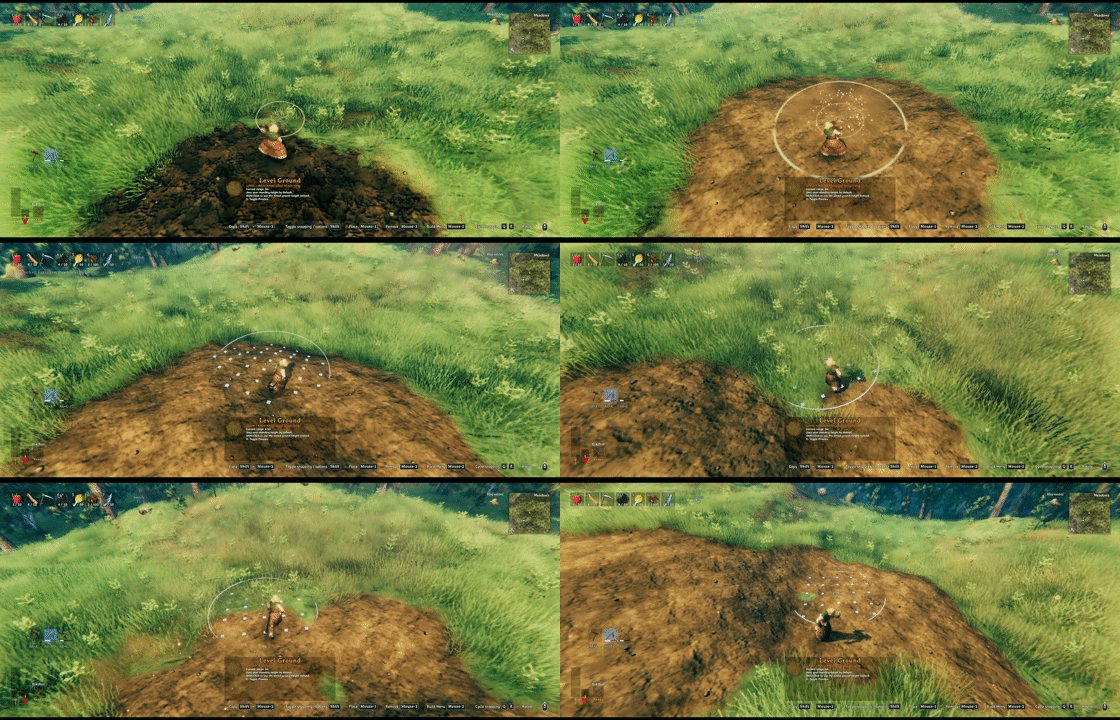
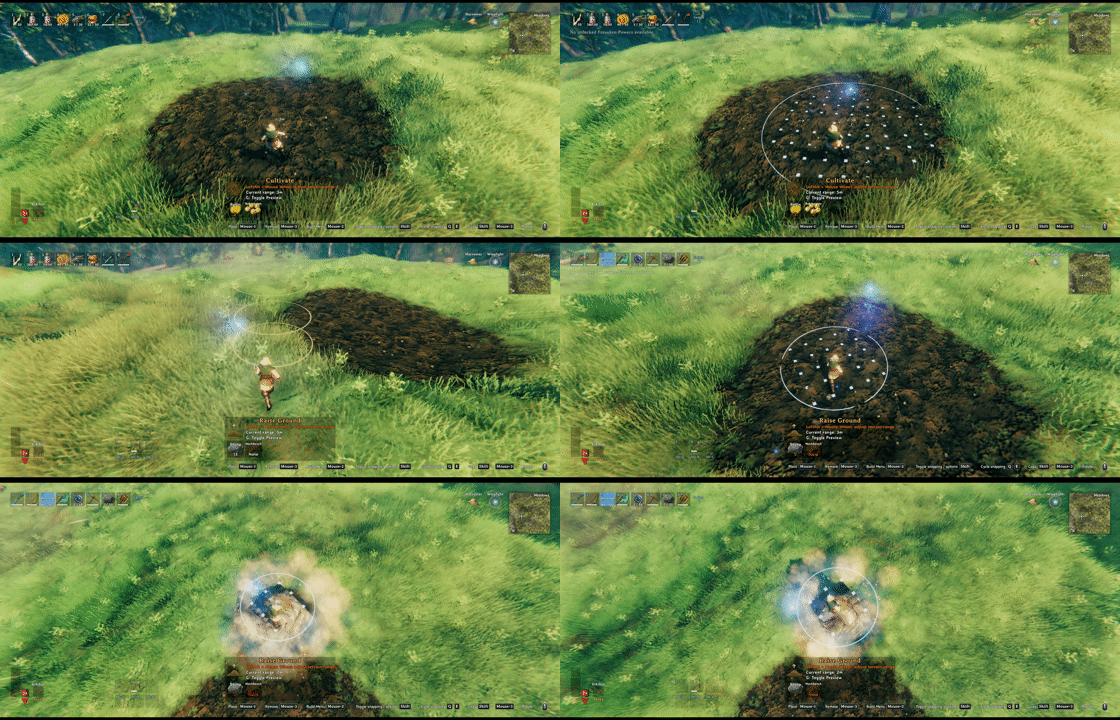
Hoe and Cultivator terrain range scaling with precision grid preview. Adjust tool radius with the wheel modifier, preview affected terrain cells, and see range/cost feedback before placing.
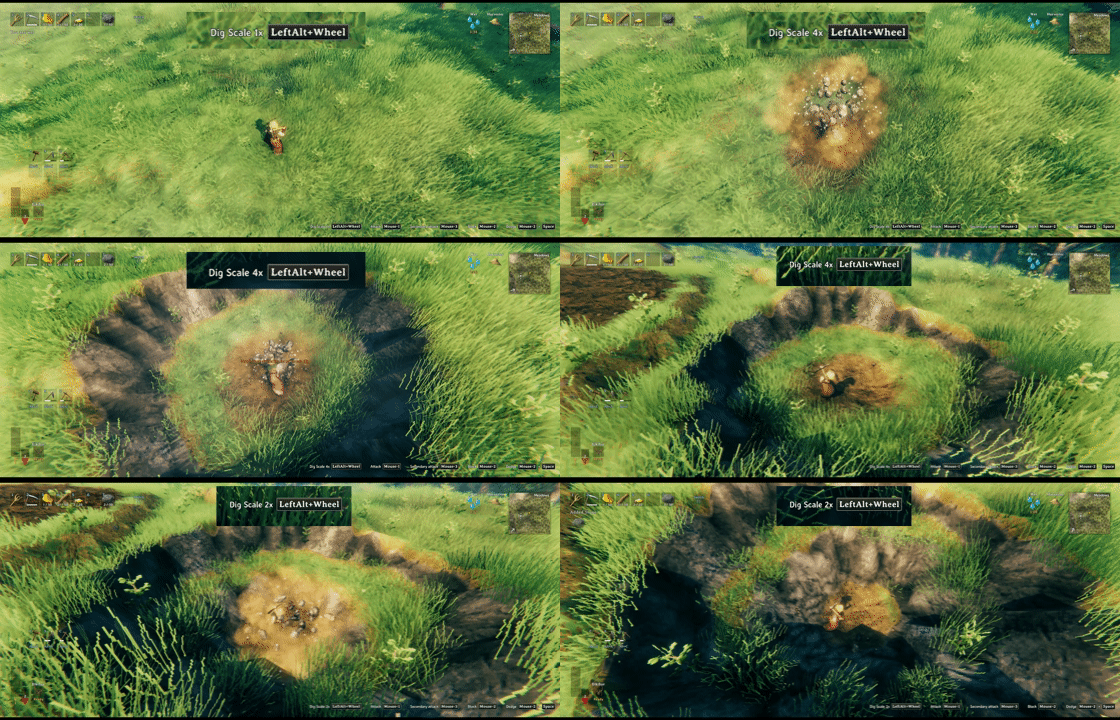
Scalable pickaxe terrain digging. Increase radius and depth per pickaxe, with stamina and durability costs scaling from the selected dig size.
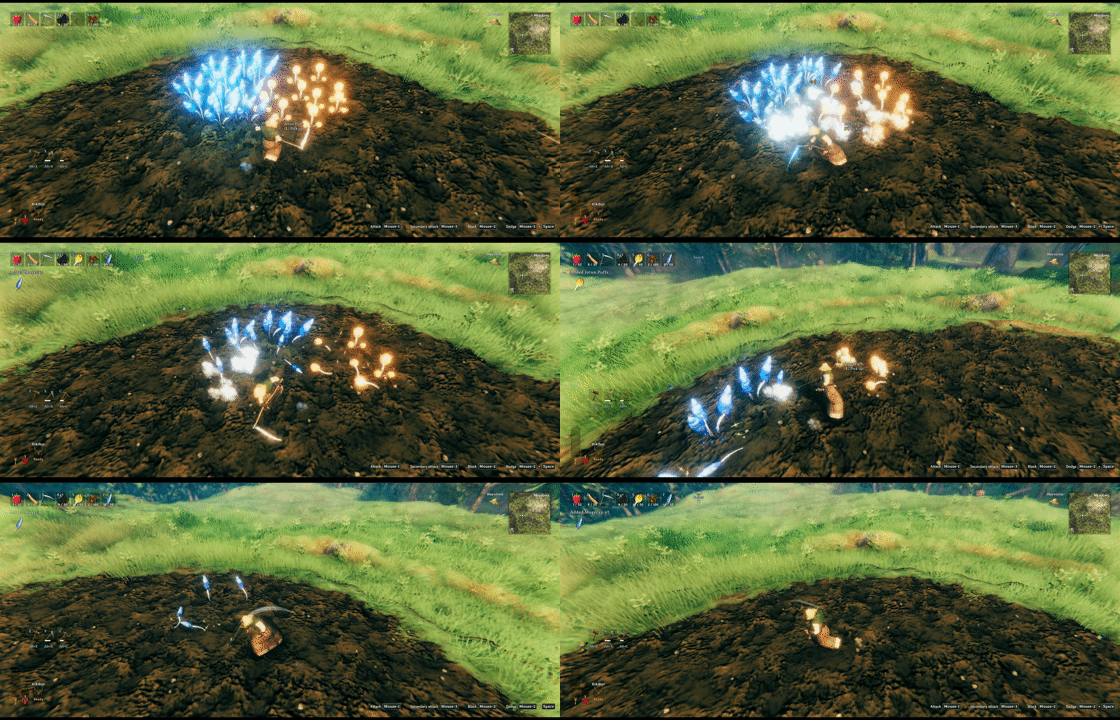
Scythe harvesting for all supported crops. Sweep through planted fields and harvest mature crops in a wide arc.
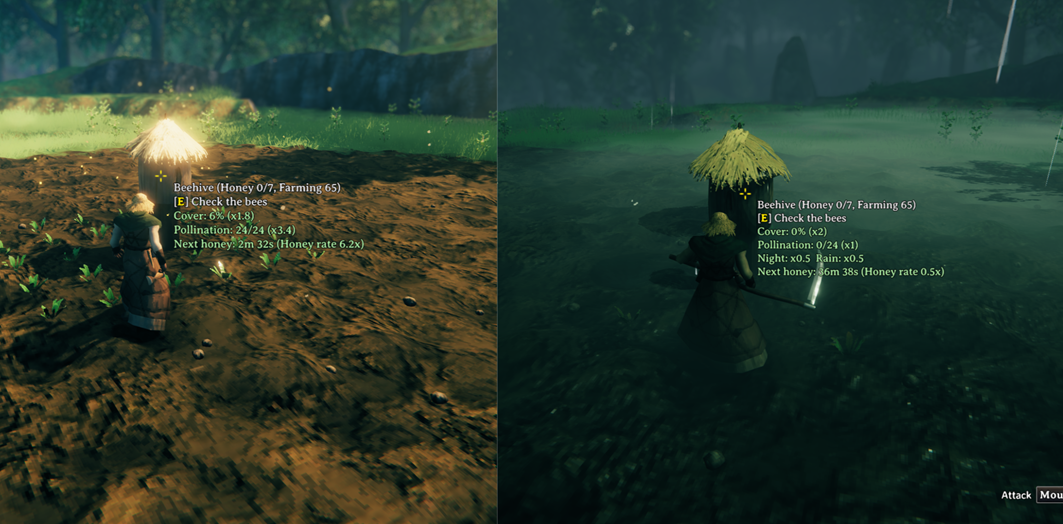
Beehive upgrades and hover details. Farming-scaled honey capacity, cover, pollination, night/rain modifiers, total honey rate, and next honey timing are shown at a glance.

Rain and pollination plant growth info. Hover text shows active Farming, pollination, and rain multipliers alongside the remaining growth time.

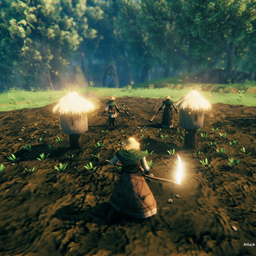
Farming-scaled mass planting, grid planting, and foraging pollination. Plant in clean grids, scale planting count by Farming level, and let beehives boost nearby foraging respawn when conditions are right.
Features
Farming and Planting
- Grid planting is always available while placing crops.
- Mass planting scales with Farming level:
- 0-19: Off
- 20-39: 5 plants
- 40-59: 10 plants
- 60-79: 15 plants
- 80-99: 20 plants
- 100: 25 plants
- Hold the tool wheel modifier hotkey and use the mouse wheel to change mass-plant count.
- Turn off
Mass Planting Enabledto disable only multi-plant placement; grid planting stays available. - Planted crops can grow faster based on the planter's Farming skill.
- Mass planting can grant extra Farming skill.
Foraging
- Edible respawning pickables, plus prefabs registered in
BepInEx/config/Groundwork/pickables.yml, can be affected by Farming skill. - Higher Farming skill can increase nearby pickup range.
- Higher Farming skill can speed up foraging respawn.
- Rain can speed up foraging respawn while the current environment is wet.
Beehives
- Beehive capacity can increase with Farming level.
- Newly placed hives store the builder's Farming level.
- Harvesting honey updates the hive's stored Farming level from the harvester.
- Harvesting honey can grant Farming skill.
- Lower cover increases honey production speed.
- Night honey production can be slowed or paused.
- Rain can slow or pause loaded honey production.
- Beehives can pollinate nearby growing plants and foraging targets, except while it is raining.
- Empty hives give stronger pollination bonuses; the bonus fades as the hive fills with honey.
- Growing nearby pollination targets can speed up honey production.
- Beehive hover text shows honey capacity in the title, plus cover, pollination, night/rain rates, and next honey time with total rate.
- One client setting controls both the centered terrain range guide and marker highlights around Plant/Pickable targets assigned to a hovered beehive. Raising a hive shrinks the guide, while slopes change it by direction. The range turns gray when unavailable or paused; assigned target markers turn gray while rain or night pauses pollination.
Terrain Tools
BepInEx/config/Groundwork/Groundwork.ymlcontrols Hoe and Cultivator piece costs and adjustable terrain ranges.- Hold the tool wheel modifier hotkey and use the mouse wheel to adjust terrain range.
- Preview mode can be vanilla ghost scaling or an exact grid preview.
- Paved Road can optionally skip vanilla smooth-height behavior.
- Pickaxe primary terrain digging can scale radius and depth.
- Pickaxe scaled digging has configurable stamina and durability cost factors.
Hover Info
Groundwork adds compact hover information to:
- Beehives: honey capacity in the title, cover, pollination, night/rain rates, next honey with total rate.
- Plants: remaining growth time, rain growth, pollination growth.
- Foraging pickables: remaining respawn time, rain respawn, pollination respawn.
Groundwork.yml
BepInEx/config/Groundwork/Groundwork.yml defines terrain tool piece costs and adjustable ranges.
Example:
Pickaxe:
  terrainDig:
    range:
      enabled: true
      radiusMax: 1.5
      depthMax: 1.5
      staminaCostFactor: 1
      durabilityFactor: 1

# Exact override for a specific pickaxe prefab.
# Unspecified values fall back to Pickaxe: terrainDig.
PickaxeBlackMetal:
  terrainDig:
    range:
      # Optional: overrides the generic Pickaxe enabled state.
      # enabled: true
      radiusMax: 2
      depthMax: 2

Hoe:
  raise_v2:
    cost:
      Stone: 2
    range:
      enabled: true
      min: 1
      max: 5
      materialCostFactor: 1
      staminaCostFactor: 1
      durabilityFactor: 1
Fields:
cost: replaces the build menu material cost. Use{}for no material cost.range.enabled: enables mouse-wheel range adjustment.range.min: minimum range.range.max: maximum range.range.default: optional default range.range.radiusMax: maximum radius scale forPickaxe: terrainDig.range.depthMax: maximum depth scale forPickaxe: terrainDig.range.materialCostFactor: material scaling above base range.0keeps base cost.range.staminaCostFactor: stamina scaling above base range.0keeps base cost.range.durabilityFactor: durability scaling above base range.0keeps base cost.
For Pickaxe: terrainDig, min and default scale are fixed at 1. Use range.enabled to turn the feature on or off, and use radiusMax and depthMax to set separate caps. staminaCostFactor and durabilityFactor apply to extra costs above x1; cost and materialCostFactor are ignored.
Specific pickaxe prefab blocks, such as PickaxeBlackMetal: terrainDig, override only the values they specify. Missing values fall back to the generic Pickaxe: terrainDig block, and an exact block can set range.enabled: true or false independently.
On multiplayer, the server's BepInEx/config/Groundwork/Groundwork.yml is synced to clients.
Pickable and Plant overrides
Groundwork keeps each growth domain in a separate file under BepInEx/config/Groundwork/:
pickables.reference.yml: generated Pickable values, grouped by the prefab's original provider.pickables.yml: editable Pickable and Farming overrides.plants.reference.yml: generated Plant values, grouped by the prefab's original provider.plants.yml: editable Plant grow-time and allowed-biome overrides.
Each override file is a root YAML sequence, not a pickables: or plants: mapping. Groundwork creates pickables.yml with Pickable_Dandelion and Pickable_Thistle registered as Farming targets:
- prefab: Pickable_Dandelion
  farming: [true, true, 0.25, 1]
- prefab: Pickable_Thistle
  farming: [true, true, 0.25, 1]
plants.yml starts as an empty root sequence:
[]
Copy only the entries you want to change from the corresponding generated reference. For example, a Plant override can be written as:
- prefab: Beech_Sapling, 3000~5000
- prefab: sapling_jotunpuffs
  biomes: [Mistlands, Meadows]
Tuple schema:
- Pickable:
prefab: <prefab>[, <respawnMinutes>]. The optional positive second value replaces a Pickable's base respawn time. Omitting it keeps the live value; a live value of0cannot be made respawning by this overlay. - Farming:
farming: [foragingTarget, bonusYield, maxChanceAtLevel100, bonusAmount]. When present, the tuple has exactly four positions; usenullto preserve automatic/live behavior in a position. - Plant:
prefab: <prefab>[, <growSecondsMin>~<growSecondsMax>]. The optional values are positive seconds and the maximum must be at least the minimum. Omitting the range keeps the live grow time. - Plant biomes:
biomes: [<biome>, ...]applies one non-empty list of biome names to both cultivator placement and the planted crop's health check. Omitting it keeps the live restrictions.None,All, and numeric masks are rejected. plants.reference.ymlreports the live Plant growth mask. An inline note marks entries whose live cultivator placement mask differs, because copyingbiomesalso replaces that placement mask.foragingTarget:trueopts in to range/scythe harvesting, Farming respawn scaling, pollination, rain effects, hover info, and missing bonus-effect fallback;falseopts out;nullkeeps automatic edible-pickable detection.bonusYield:trueopts in to Valheim's Farming skill gain and bonus-yield roll.falseornulldoes not add behavior and never disables a prefab's native Farming bonus.maxChanceAtLevel100: bonus probability at Farming 100, from0to1.bonusAmount: additional items on a successful roll.
On a successful configured or native Farming bonus roll, Groundwork temporarily supplies fallback VFX/SFX when the Pickable's m_bonusEffect is empty. This includes vanilla Farming pickables such as RaspberryBush and configured targets such as Dandelion.
When a respawning foraging target hides all of its natural hover colliders after harvesting, Groundwork keeps an invisible hover proxy at the original Pickable position. Aiming at that position shows the target name, active Farming, pollination, and rain factors, and the estimated respawn time. The same proxy keeps the hidden target discoverable by beehive pollination without adding a world-space marker. Existing post-harvest hover targets and PlantEverything's custom picked visuals are preserved.
Omitted Pickable/Plant times, omitted Plant biomes, and null Farming positions use live prefab values, including values supplied by mods such as PlantEverything. Explicit times form the base before Farming, pollination, and rain multipliers.
Expand World Data custom biome names are resolved after EWD's synchronized biome map is available. A custom biome configured with nature: Mistlands participates in Plant checks as Mistlands, so it belongs to the same effective group as vanilla Mistlands and other custom biomes with that nature; members of one nature group cannot be selected separately. An independent custom biome can be selected by its EWD biome name. Groundwork synchronizes names rather than EWD's order-dependent numeric bits; until every configured name resolves, the complete biome override stays inactive and live restrictions remain in effect.
Biome overrides do not alter independent cultivated-ground, heat/cold tolerance, roof, or spacing checks.
On each reload, Groundwork reads and validates both pickables.yml and plants.yml before replacing either in-memory rule set. If either file is invalid, Groundwork keeps the last-known-good rules from both files. On multiplayer, the server synchronizes the normalized pair to clients; the generated owner-grouped reference files remain local to the server or single-player source of truth.
The root-sequence compact tuple schema is the only accepted growth schema. Groundwork does not read, parse, or migrate previous root-level YAML files or the unreleased combined/expanded Growth layouts.
Notes
- Rain effects use the currently detected wet environment and are not accumulated while an area is unloaded.
Beehive Rain Honey Rateaffects loaded beehives only. Unloaded honey catch-up is processed without rain history; current rain applies after the beehive is loaded.- Rain disables beehive pollination while the area is loaded.
- Dedicated servers may not have precise per-position weather history.
- Plant and foraging targets store owner-authoritative dynamic bonus progress and the last loaded/unloaded rates in ZDOs so later honey, weather, or pollination changes affect only future time; transient target-assignment caches remain local.
- ZenBeehive beehive containers are supported: honey removed from the container counts as beehive harvest for Farming skill gain and capacity ownership.
BepInEx/config/Groundwork/Groundwork.yml,pickables.yml, andplants.ymlare created automatically if missing.pickables.reference.ymlandplants.reference.ymlare checked after each world prefab load and rewritten only when their settled content differs.