

ReferToCompendium
A persistent raven hint and personal compendium ordering, collapse, and restore. Client only.ReferToCompendium
A small client-side Valheim mod that makes the Compendium easier to find and keeps its list in your preferred order.

Many players often doesn't even bother clicking the Compendium button even though some mods would put useful info there.
So this mod gets players attention to the Compendium.
 Player can edit the order of Compendium entries. And Some entries can be hidden.
 Edited info of Compendium is located in %USERPROFILE%\AppData\LocalLow\IronGate\Valheim\ReferToCompendium\layout-shared.json
Features
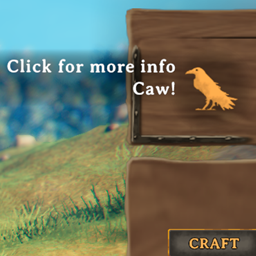
- Raven hint: a short message beside the raven's beak, styled like NPC speech. It stays visible while the inventory is open, without fading, and hides while another panel is in front.
- Personal order: move Compendium entries up or down, including entries added by other mods.
- Less clutter: move unwanted entries into a collapsible group at the bottom. Restore them whenever you want.
English and Korean UI text are included. The default English hint is “Click for more info” followed by “Caw!”
Edit the list
- Open the inventory and click the raven to open the Compendium.
- Click Edit order. Use the arrows to move entries and − to collapse them.
- Expand Collapsed entries at the bottom and use + to restore an entry.
- Click Done when finished. Changes save automatically.
Reset restores the default layout for currently available entries. Editing uses the mouse or virtual pointer. With a gamepad, select Collapsed entries and press A to expand or fold the group.
Configuration
Created after the first launch: BepInEx/config/sighsorry.ReferToCompendium.cfg.
| Setting | Default | Description |
|---|---|---|
| Raven hint / Enabled | true |
Show or hide the hint. Takes effect immediately. |
| Raven hint / Text | Empty | Custom message. Leave empty for the default English or Korean message based on the game language. |
All settings are local to your client.
Saved layout
Your entry order and collapsed entries are saved automatically in one shared layout. All characters and modpack profiles using the same Valheim user data folder share these preferences.
The layout is stored separately from the mod config. On Windows:
%USERPROFILE%\AppData\LocalLow\IronGate\Valheim\ReferToCompendium\layout-shared.json
Switching, moving, or renaming a modpack profile keeps your preferences. Entries from removed mods retain their saved order and collapsed state for when they return.
Back up this folder to transfer your preferences to another PC; Steam Cloud sync is not guaranteed.
Compatibility
Uses the existing Compendium entries and their content. Mods that replace the Compendium UI may need additional support. Renamed or translated mod titles can be treated as new entries. Compatibility with every mod combination has not been verified in-game.