virtualbjorn-NoMapDiscordAdditions icon

NoMapDiscordAdditions

Large-map capture to Discord/clipboard, plus a multi-table MAP COMPILE mode that stitches every cartography table you visit into a single high-res PNG. Server-synced settings, per-pin distance/bearing labels, clean shots with all UI overlays hidden.

Last updated a week ago
Total downloads 344
Total rating 2 
Categories Mods Misc Server-side Client-side Bog Witch Update AI Generated
Dependency string virtualbjorn-NoMapDiscordAdditions-1.1.1
Dependants 1 other package depends on this package

This mod requires the following mods to function

ValheimModding-JsonDotNET-13.0.4 icon
ValheimModding-JsonDotNET

Shared version 13.0.3 of Json.NET from Newtonsoft, net45 package for use in Valheim mods. Maintained by the ValheimModding team.

Preferred version: 13.0.4
denikson-BepInExPack_Valheim-5.4.2333 icon
denikson-BepInExPack_Valheim

BepInEx pack for Valheim. Preconfigured with the correct entry point for mods and preferred defaults for the community.

Preferred version: 5.4.2333
ValheimModding-Jotunn-2.29.0 icon
ValheimModding-Jotunn

Jötunn (/ˈjɔːtʊn/, 'giant'), the Valheim Library was created with the goal of making the lives of mod developers easier. It enables you to create mods for Valheim using an abstracted API so you can focus on the actual content creation.

Preferred version: 2.29.0
ZenDragon-ZenMap-1.7.8 icon
ZenDragon-ZenMap

Show map at the cartography table. Copy the map to parchment and take it with you. Attach pins to Signs. The viewable map area is based on the table's position in the world. Ships, carts, mounts, bonfires, and tombstones are auto-tracked.

Preferred version: 1.7.8

README

NoMapDiscordAdditions

Two map workflows on Valheim's large map:

  1. SEND MAP / COPY MAP — capture the visible map and either post it to a Discord webhook or paste it directly into Discord, Slack, or an image editor.
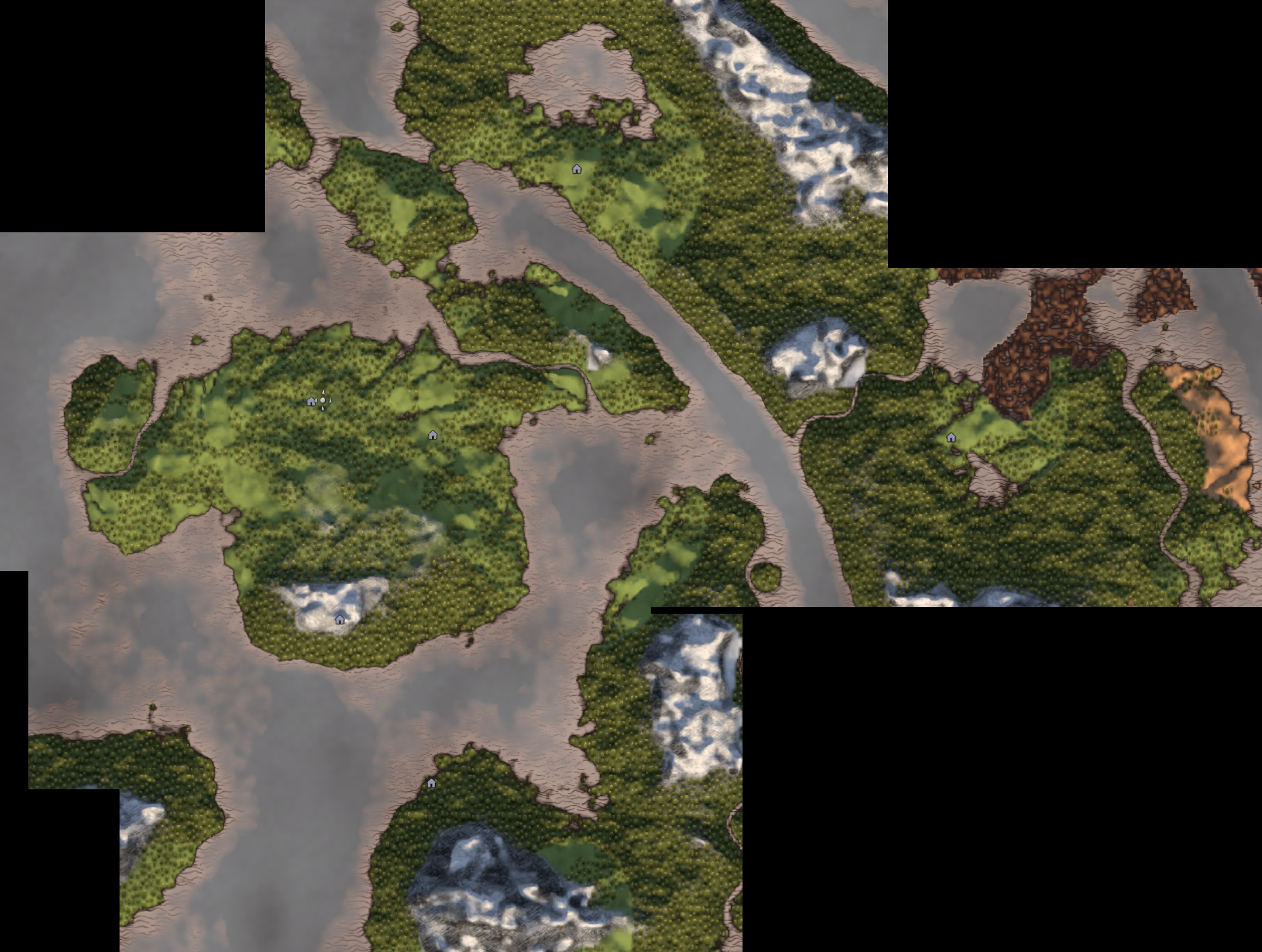
  2. MAP COMPILE — visit cartography tables one by one and stitch every reading into a single high-resolution PNG you can save, copy, or send to Discord.

Cartography-table pins are decorated with distance/bearing-from-spawn captions baked into the captured image, and every potentially-noisy setting (message templates, pin labels, output format) can be server-synced so a host enforces the same look for everyone.

SEND MAP / COPY MAP

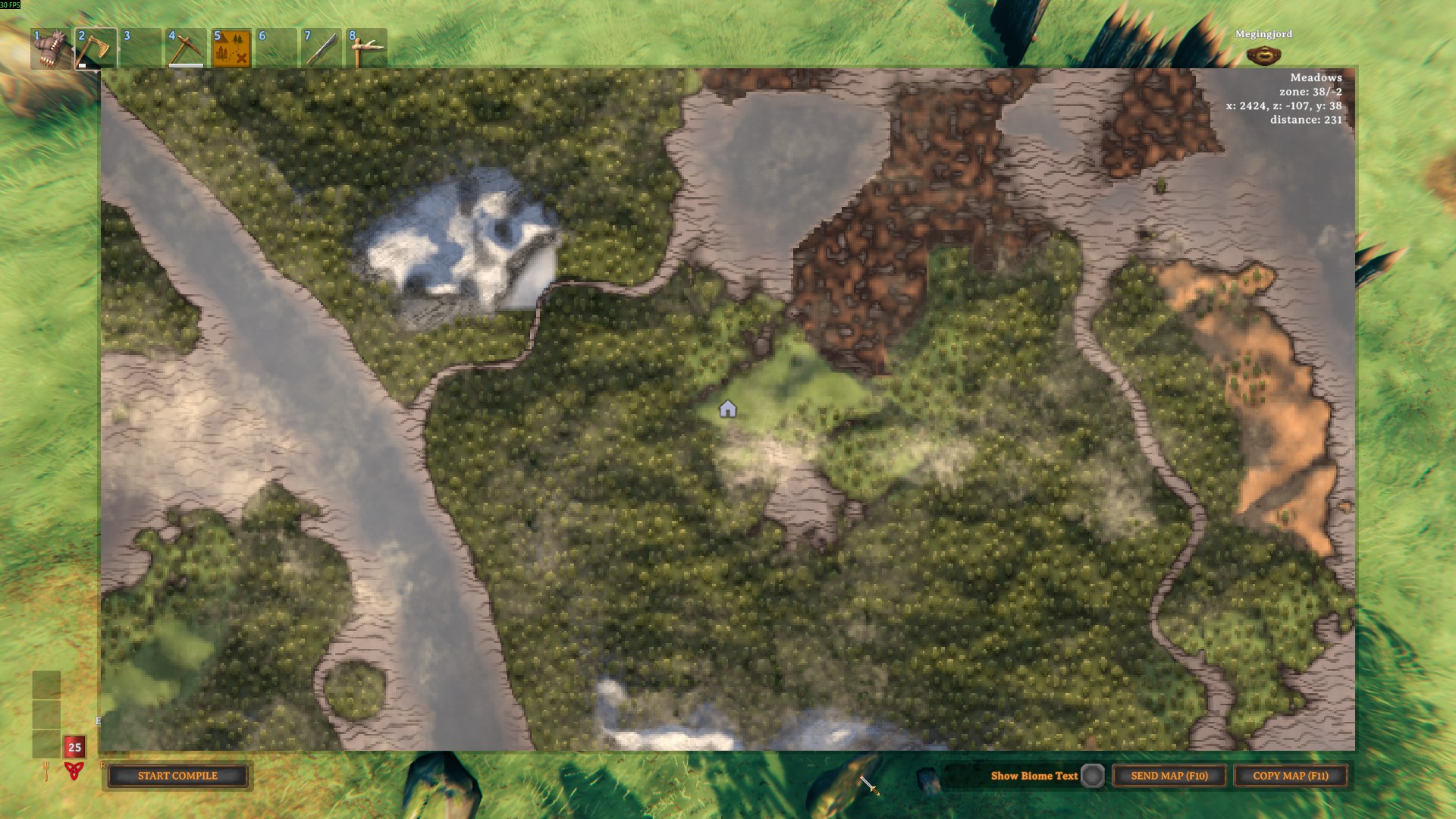
The bottom-right of the large map gets a Show Biome Text toggle, a SEND MAP button (default F10), and a COPY MAP button (default F11).

Large map UI — capture buttons in idle mode

  • SEND MAP posts the capture to your Discord webhook with a configurable message template — encoded as JPEG or IndexedPNG per the Output.Output Format config (see Output format)
  • COPY MAP writes the PNG to the system clipboard at full resolution (capped at 8192px on the long edge) — paste straight into Discord, Slack, or an image editor
  • The bound hotkey is shown in each button label (SEND MAP (F10) / COPY MAP (F11)) and updates automatically when the keys are re-bound
  • The SEND MAP button is hidden until a webhook URL is available (locally or server-pushed); COPY MAP is always available
  • Captures hide every UI overlay (panels, buttons, hints, hotbar) — only the map and (optionally) the biome label remain
  • Player and Death pins are hidden in the capture by default (they're session-scoped and the compile composite already excludes them). Hold Left CTRL at SEND / COPY click time to opt out for one-off shares (live deaths, party positions)
Discord post Spoiler-tagged
SEND MAP — Discord post with biome and spawn-direction caption SEND MAP — spoiler-tagged attachment

MAP COMPILE

A second panel appears on the bottom-left of the large map. The intent: walk between cartography tables, add each reading as a tile, and on COMPILE the mod composites every tile into a single PNG that preserves world coordinates. The session is never lost when you save/copy/send — pause your mapping adventure and resume it at the next table or after a restart.

Idle — START COMPILE / RESUME COMPILE (N) Compiling — ADD TILE (N) / REMOVE TILE / COMPILE (N) / SHARE (N) / CANCEL / CLEAR
Compile panel — idle Compile panel — adding tiles
  • ADD TILE is enabled only when the map was opened at a cartography table (no M-key adds, no portable map items)
  • Re-adding within ~8m of an existing tile replaces that tile in place — re-shoot a table without ending up with duplicates
  • REMOVE TILE appears next to ADD TILE when you're standing at a table whose tile is already in the session — deletes just that one tile and its PNG, leaving the rest of the session untouched. Stays greyed out and labelled REMOVE (L-CTRL) until you hold Left CTRL, so a misclick next to UPDATE TILE can't silently wipe a hard-won tile
  • The session is saved to disk after every add, scoped to the current world + character. If you crash, disconnect, or just go on an adventure, click RESUME COMPILE (N) the next time you open the map
  • CLEAR wipes the whole session — every in-memory tile and the on-disk session folder — and drops you back to idle. It sits next to CANCEL but stays greyed out and labelled CLEAR (L-CTRL) until you hold Left CTRL, so this destructive reset can't be hit by accident. Also offered next to RESUME COMPILE (N) in idle to discard a saved session without resuming it
  • COMPILE opens the result panel:

MAP COMPILED result panel — preview + SAVE / COPY / SEND TO DISCORD / DISCARD / DONE

  • SAVE writes a full native-resolution image to disk — it recomposes so the sharpest tile maps 1:1 and no tile is downscaled below what it was captured at (a 2000×500 capture stays 2000×500 in its region), giving you a zoomable, editable map. Capped at 8192px on the longest axis. The format follows Output.Output Format (JPEG or IndexedPNG — see Output format); the status line reports dimensions, format and encoded size (e.g. Saved 7234×4521px JPEG q88 3.4 MB native resolution), and the filename includes the dimensions. The button then morphs into COPY DIR so a second click puts the containing folder on the clipboard
  • COPY writes a JPEG to the clipboard at the preview size (4096px cap on the long edge)
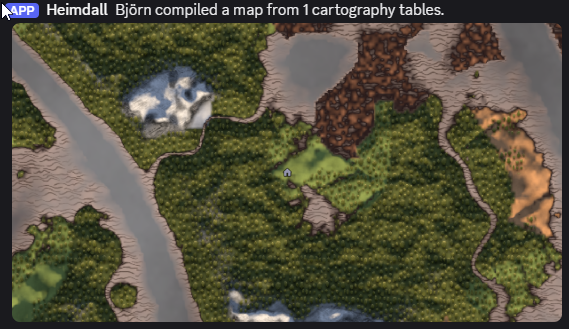
  • SEND TO DISCORD posts the composed image with the compile message template ({player}, {tileCount} placeholders), encoded per Output.Output Format — status updates to Sent to Discord. / Send failed — see log. when the request finishes
  • SAVE / COPY / SEND / DONE are all non-destructive — your session is kept on disk and stays resumable. DONE drops you back into compile mode with every tile intact so you can keep adding tables. Only DISCARD (or CANCEL while compiling) deletes the session
  • Closing the map while the result panel is open doesn't strand the session — on the next map open you get a RESUME COMPILE (N) button that drops you straight back into compile mode with every tile intact (it does not reopen the result panel; the transient compiled PNG is discarded — just click COMPILE again when you want a fresh result)

Sharing tiles between players

In a no-map world each player only reveals the area around the tables they visit. SHARE lets a group pool coverage:

  • SHARE (N) (shows EXPORT (N) if no webhook is set) exports every tile in your session as an individual PNG with its world rectangle embedded in the image itself. With a webhook configured the tiles are posted to Discord (one per message); copies are always saved to BepInEx/config/NoMapDiscordAdditions/compile-share/out/<world>/ so you can drag them in manually.
  • To receive: save the PNGs a teammate shared into BepInEx/config/NoMapDiscordAdditions/compile-share/incoming. The next time you open the large map during a compile session, tiles for your current world are merged into your active session automatically — then COMPILE composites yours and theirs together. (A Discord webhook is send-only, so import is folder-based rather than read back from Discord.)
  • Re-importing or re-sharing the same tile updates it in place; tiles for a different world are skipped. Handled files move into incoming/processed or incoming/ignored.
  • Tile sharing can be turned off entirely with Map Compile.Enable Map Sharing (server-synced) — the SHARE/EXPORT button disappears and nothing is auto-imported, so compile mode stays purely local.
Composed PNG (4 tables stitched) Sent to Discord Spoiler-tagged
Composed map — 4 tiles stitched Compile — Discord post Compile — spoiler-tagged Discord post

Cartography-table pin labels

Every visible cartography-table pin in a capture is decorated with {distance}m {Direction} ({bearing}°) — e.g. 1240m NorthEast (45°). Labels render only during the capture, never in the live UI, and respect Valheim's icon filters, viewport, and shared-map fade. The Discord message template gets a matching {spawnDir} placeholder; if your map is opened via the M key (no table involved), {spawnDir} falls back to the player's current position so Discord captures always include a direction.

Naming a table

A table can carry a human-readable name that flows into the Discord message ({table} placeholder) and the compiled-map captions ({name} — {distance}m {Direction}). There's no separate naming UI — the mod reads the closest named map pin sitting on the table (within ~8m):

  • ZenMap auto-pins every cartography table with the vanilla "house" icon. Rename that pin and you've named the table.
  • Or drop a Town pin on the table and name that.

Leave the pin unnamed and nothing changes — captions and messages fall back to just the direction, exactly as before. The name is captured the moment you add a tile in MAP COMPILE and stored in the session, so it stays correct even when the table is far away or unloaded at compile time.


Map styles

Map Style.Style (client-only) replaces the live in-game map look with a stylized render for SEND / COPY captures and MAP COMPILE tiles, reconstructed from Valheim's own map data — explored areas show full detail, unexplored areas stay fogged. Five settings:

  • None (default) — the normal in-game map look (no styling)
  • Old Map — aged-parchment chart: biome wash, Perlin grain, height-contour and biome-edge lines (a faithful reimplementation of ASpy's MapPrinter GenerateOldMap look)
  • Chart — flat topographic chart, contour and biome-edge lines, no parchment grain
  • Topographical — shaded-relief terrain with hillshading, contours and biome-edge lines
  • Satellite — naturalistic shaded terrain, no line work

MAP COMPILE tiles render through the same pipeline at tile resolution and the composite stitches stylized terrain together. The per-pixel passes run on a background thread so the game doesn't stall during a capture. The full pipeline (biome wash, contours, hillshade, fog smoothing) renders at the native on-screen map size — the styled output is intrinsically low-frequency so this is visually indistinguishable from a full-resolution render while keeping SEND/COPY responsive.


Output format

Output.Output Format drives the on-disk format for compile SAVE and the wire format for every SEND TO DISCORD capture (single SEND or compile SEND). The file extension follows the format (.jpg / .png).

  • JPEG (default) — 24bpp DCT at the configured quality. Smallest files (~5-8× smaller than a lossless PNG); pin captions stay readable at quality ~85 and above, below that the edges noticeably soften.
  • IndexedPNG — 8bpp palette built via median-cut on a 15-bit colour histogram with Floyd-Steinberg dither at the configured colour count. Lossy in colour count only — no DCT ringing, so pin labels stay crisp. Maps quantize very well (~6 dominant biome colours), so 32-64 is usually indistinguishable from a full-colour PNG while being ~5× smaller.

COPY MAP clipboard output always uses JPEG (regardless of this setting) — indexed-PNG palette quantization on an 8192² image takes multiple seconds on the main thread, long enough that the COPY button looks frozen.


Configuration

Discord

Key Notes
Discord.Webhook URL Discord incoming webhook. Server-synced so sending works for every client; hidden from the in-game ConfigurationManager window so non-admin players can't read a server-pushed URL from the settings UI.
Discord.Message Template Supports {player}, {biome}, {spawnDir} (e.g. — 1240m NorthEast (45°)), and {table} (the cartography table's name — see below). When {spawnDir} or {table} is missing from the template it is appended automatically. Server-synced.
Discord.Spoiler Image Data Tag attachments as Discord spoilers; default false. Server-synced.
Discord.Hide Clouds Strip the cloud overlay before capture; default true. Server-synced.
Discord.Show Biome In Capture Include biome label in captured map images; default false. Client-only — also toggled via the Show Biome Text toggle on the map.

Output

Key Notes
Output.Output Format JPEG (default) or IndexedPNG. Drives the on-disk format for compile SAVE and the wire format for every SEND TO DISCORD capture. Client-only. See Output format.
Output.JPEG Quality 50-100, default 88. JPEG encoder quality used when Output Format = JPEG and for COPY MAP (which is always JPEG). 88 keeps pin captions readable; values below 80 noticeably blur text. Client-only.
Output.Indexed PNG Colours 16-256, default 64. Palette size for the indexed-PNG encoder. 32-64 is usually indistinguishable from full colour for maps; 128-256 if you have Map Style on and gradient shading is banding. Client-only.

General

Key Notes
General.Normalize Capture Lighting Render the map at fixed neutral-noon lighting so tiles captured at different times of day (or in different biomes) don't produce dark/light seams in a compiled map; default true. Client-only.
General.Enable Logs Print info/warning messages to the BepInEx console and Player.log; default false. Turn on if you need to investigate a problem.

Map Style

Key Notes
Map Style.Style Stylized rendering for SEND / COPY captures and MAP COMPILE tiles, reconstructed from Valheim's own map data. None (default), OldMap, Chart, Topographical, Satellite — see Map styles above. Client-only.

Map Compile

Key Notes
Map Compile.Compile Message Template Discord message used by SEND TO DISCORD in the compile result panel. Supports {player}, {tileCount}. Default "{player} compiled a map from {tileCount} cartography tables." Server-synced.
Map Compile.Enable Map Sharing Master toggle for cross-player tile sharing; default true. When off, the SHARE/EXPORT button is hidden and the compile-share/incoming folder is no longer auto-imported — compile mode stays purely local. A server can disable sharing for everyone. Server-synced.
Map Compile.Share Message Template Discord message sent once (with the first attachment) by SHARE TILES. Supports {player}, {tileCount}. Default points teammates at the compile-share/incoming folder. Server-synced.

Pin Label

Key Notes
Pin Label.Enabled Master toggle for the per-pin labels baked into the screenshot; default true. Server-synced.
Pin Label.Include Distance Prepend the distance (1240m NorthEast (45°) vs NorthEast (45°)); default false. Server-synced.
Pin Label.Include Direction from Spawn Include the compass direction/bearing from spawn (NorthEast (45°)); default false. If both distance and direction are off, no label is drawn. Server-synced.
Pin Label.Include Map Item Sources Also show the spawn label when the map is opened from a portable map item (e.g. ZenMap parchment), not just from a cartography table; default false. Server-synced.
Pin Label.Show on Compile Mode Whether the captions are stamped onto the MAP COMPILE composite — one per cartography table, drawn on top with an outline (still gated by Pin Label.Enabled); default true. Disable for label-free compiled maps without affecting plain COPY/SEND. Server-synced.

Controls

Key Notes
Controls.Send Key SEND MAP hotkey while the large map is open; default F10.
Controls.Copy Key COPY MAP hotkey while the large map is open; default F11.

Server behavior

Config sync is handled by Jotunn's SynchronizationManager (Jotunn is a required dependency). On connect, the server pushes its value for every synced setting to all clients, the entry is locked client-side, and each client's local value is cached and restored on disconnect. There is no separate ServerSync install or RPC protocol version to keep in step.

These settings are server-synced (a host enforces one look for everyone):

  • Discord.Spoiler Image Data
  • Discord.Hide Clouds
  • Discord.Message Template
  • Discord.Webhook URL — synced so sending works for everyone, but hidden from the in-game ConfigurationManager window so non-admin players can't read it from the settings UI
  • Map Compile.Compile Message Template
  • Map Compile.Enable Map Sharing
  • Map Compile.Share Message Template
  • Pin Label.Enabled
  • Pin Label.Include Distance
  • Pin Label.Include Direction from Spawn
  • Pin Label.Include Map Item Sources
  • Pin Label.Show on Compile Mode

The Output.* settings, Map Style.Style, Show Biome In Capture, Normalize Capture Lighting, Enable Logs, and hotkey bindings are always local to each client (bound synced: false) — output format and styling are personal preferences, and forcing one client's encoder choice on the whole party would be noisy.


Dependencies

  • BepInEx Pack for Valheim 5.4.2333 (declared in the manifest)
  • JsonDotNET 13.0.4 (declared in the manifest) — used to persist compile sessions to disk
  • Jotunn 2.29.0 (declared in the manifest) — provides the server-authoritative config sync (SynchronizationManager). ZenMap already depends on Jotunn, so most setups already have it
  • ZenMap ≥ 1.7.8 (declared in the manifest) — required for MAP COMPILE. Recent ZenMap also fixes a Graphics.CopyTexture size-mismatch error on expanded worlds (e.g. a 4× map); update ZenMap if you see that error

Support & questions

Found a bug, have a question, or want to request a feature? Reach me as virtualbjorn on either of the Valheim modding Discord servers:

Ping virtualbjorn in the relevant modding/support channel and include your BepInEx/LogOutput.log if you're reporting an issue. You can also open an issue on the GitHub repo.