

You are viewing a potentially older version of this package. View Latest Version
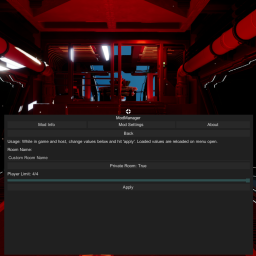
InGameRoomMenu
Allows host to manage room settings during gameplay. Accessed with F5 menu.


InGameRoomMenu
version 1.0.0
For Game Version 0.25.1
Developed by Dragon
Requires VoidManager 1.0.3
💡 : Function : Allows host to manage room settings during gameplay. Accessed with F5 menu.
- Creates GUI for in-game management of the room name, room private toggle, and player limit.
🎮 : Client Usage :
- Push F5 and navigate to Mod Settings > In-Game Room Menu. Clients can view the current room settings, and the host can change room settings.
👥 : Multiplayer Functionality :
- ✅ Client
- ✅ Host
- ⬜ All
🔧 : Install Instructions : Install following the normal BepInEx procedure.
Ensure that you have BepInEx 5 (stable version 5 MONO) and VoidManager installed.
✔️ : Mod install : Unzip the contents into the BepInEx plugin directory
Drag and drop InGameRoomMenu.dll into Void Crew\BepInEx\plugins