Multiplayer Expansion Rossi
联机扩展-洛茜模组 · CllIEBEMultiplayer Expansion – Rossi Mod
| Item | Content |
|---|---|
| Mod Name | Multiplayer Expansion – Rossi Mod |
| Model from | 茶叶味香皂 |
| Final model rights | Hypergryph |
| AI involvement | Almost entirely – ChatGPT 6.1sol |
Mod Description
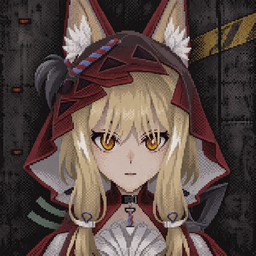
This mod ports Rossi from Arknights: Endfield as a player model. It is built on the Simple Multi Player mod and is a model expansion for multiplayer, so it will have no visible effect in single-player mode. Please use it together with the multiplayer mod and your friends.
Installation
Via mod manager (r2modman, Gale, etc.)
- Open r2modman.
- Search for
Multiplayer Expansion Rossiin the Online tab. - Click Download.
Manual Installation
- Ensure you have BepInEx and Simple Multi Player installed.
- Download
Multiplayer_Expansion_Rossi.zip. - Extract the contents and use the extracted
BepInExfolder to overwrite the folder with the same name in the game root directory.
How to Use
After enabling the multiplayer mod, an AVATAR button will appear in the top-right corner of the Multi Play menu on the main screen. Click it to open the model menu, select Rossi, and click APPLY below to activate it. Your friends with the same mod will then see you using this model.
Notes
- After selecting and activating the Rossi model, you can fine-tune some settings under DETAILS. The first two options, hands and cursor, are still work-in-progress and do not work properly, so they are disabled by default. The third and fourth options, materials and lighting, are advanced material and advanced lighting effects respectively. If you notice a performance drop while playing, try turning these two options off.
- If your friends do not have this mod, they will not be able to see your model. For the best experience, everyone participating in the multi play mode should install this mod.
- If you have any problems when using this mod, you can submit your problem here:
https://github.com/KBIAstecepes/WKPmxAvatar/issues
联机扩展-洛茜模组
| 项目 | 内容 |
|---|---|
| 模组名称 | 联机扩展-洛茜模组 |
| 模型来自 | 茶叶味香皂 |
| 模型最终解释权 | 鹰角网络 |
| AI 参与部分 | 几乎全部-ChatGpt 6.1sol |
模组介绍
本模组移植了《明日方舟:终末地》的角色洛茜作为玩家模型使用,基于站内联机模组(Simple Multi Play)制作,属于多人游戏的模型拓展。因此在单人模式中将无法看到任何实际效果,请搭配多人模组与你的好友使用。
安装方法
通过模组管理器(r2modman、Gale 等)
- 打开 r2modman。
- 在 Online 标签页中搜索
Multiplayer Expansion Rossi。 - 点击 Download。
手动安装
- 确认已安装 BepInEx 和 Simple Multi Player。
- 下载
Multiplayer_Expansion_Rossi.zip。 - 解压文件,并使用解压出的
BepInEx文件夹覆盖游戏根目录中的同名文件夹。
使用方法
启用了联机模组后,主界面的 Multi Play 菜单右上角会多出一个 AVATAR 按钮。点开之后进入模型菜单,选择 Rossi 并点击下方的 APPLY 进行应用即可激活。此时你在好友的视角里则会以该模型显示。
注意事项
- 选择并激活洛茜模型之后,可以在 DETAILS 里面微调部分设置。其中第一个与第二个选项 hands 和 cursor 还只是半成品,无法正常使用,因此默认关闭。而第三个与第四个选项 materials 和 lighting 分别为高级材质和高级光照效果,如果你在游玩过程中觉得性能有所损耗,可以尝试关闭这两个选项试试。
- 如果联机的好友没有这个模组,他是无法看见你的模型的,因此想要最佳效果需要参与联机的所有人都安装本模组。
- 如果你在使用过程中遇到什么问题,可以在github提交你遇到的情况:https://github.com/KBIAstecepes/WKPmxAvatar/issues