

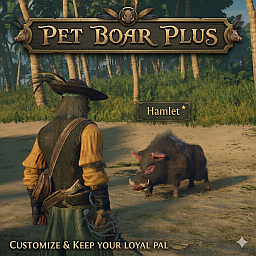
PetBoarPlus
Rename your pet boar, make him permanent until killed in combat, and dismiss with a hotkey. Single-player only in v1.0; multiplayer support planned.
Pet Boar Plus
Three minutes. That's how long Windrose lets you keep your pet boar before he politely vanishes into the ether like he was never there. Three. Whole. Minutes. You blow the Boar Whistle, you say "Hi, Truffle," you head off to chop a tree, and by the time you turn around your loyal companion has ascended.
Pet Boar Plus is a small set of upgrades that makes your boar feel like an actual companion instead of a 180-second cameo.

Features
- Rename your boar. Tired of "Truffle"? Call him Bacon. Sir Oinks-A-Lot. Boris. Whatever you want. Edit one line in
config.txt. - Make him permanent. No more 3-minute despawn timer. Your boar stays where you summoned him until killed in combat (he has health and can fight, so wolves and pirates can still take him down). The whistle's normal cooldown still applies, so you can resummon him in a new spot when ready.
- Dismiss hotkey. Press
0to send your boar away whenever you want. The dismiss key is configurable. - Fully configurable. Each feature toggles independently. Use what you want, ignore the rest.
Single-Player Only (For Now)
This version (v1.0) is designed for single-player. It also works fine when you are the host of a listen-server.
Multiplayer and dedicated server compatibility is on the roadmap but not in this release. The mod uses some techniques that don't yet behave correctly in server-authoritative networking — installing on a dedicated server can produce unexpected results (such as orphaned pet boars persisting in the world even after you log out). Future versions will address this.
If you're a server admin or you mostly play in dedicated MP, please hold off and check back when v1.1+ ships with proper multiplayer support.
Installation
Via mod manager (recommended) Install through r2modman, Gale, or the Thunderstore app. The mod manager handles the UE4SS shim loader dependency automatically.
Manual install This mod requires UE4SS. If installing manually:
- Install UE4SS and configure it for Windrose (engine version override
MajorVersion = 5,MinorVersion = 6). - Drop the contents of this mod's
mod/folder into your\Windrose\R5\Binaries\Win64\ue4ss\Mods\PetBoarPlus\directory so the structure looks like:PetBoarPlus\enabled.txt PetBoarPlus\config.txt PetBoarPlus\scripts\main.lua - Launch the game.
Configuration
Open config.txt inside the mod folder. The settings are clearly labeled and commented. Change what you want, save, and either restart all mods (UE4SS menu) or relaunch the game.
pet_name = Truffle
enable_rename = true
enable_duration_override = true
enable_dismiss_hotkey = true
dismiss_key = 0
Defaults are sensible — install and play, or tinker if you want.
Tip: keep pet names under 30 characters for the cleanest in-game display.
FAQ
Q: My boar isn't following me through fast travel. A: Your boar is a boar, not a teleporter. He'll do his best to follow you on foot, but he can't fast travel and he can't swim. If you've left him on another island, his run-toward-you logic gets stuck at the shoreline. The simplest fix: press the dismiss key and resummon at your new location once the whistle cooldown is up.
Q: I summoned a boar but I don't see him anywhere. A: He may be running back to your last position from where he was previously. Give him 20-30 seconds, or just dismiss and resummon. Or look for the wolves — he might be busy.
Q: My boar disappeared after I died. A: Yes, that's expected. When you die, the world cleans up your pet along with you. Resummon when you're ready.
Q: I logged out and back in. Where's my boar? A: Pet boars don't persist across sessions. Just resummon him.
Q: Does this work in multiplayer? A: v1.0 is designed for single-player. It also works in listen-server hosting (when you are the host). Dedicated server / general multiplayer compatibility is being worked on for a future release.
Q: Can I rename him to something with spaces or special characters?
A: Yes. Just type whatever you want after pet_name = in the config. No quotes needed. Examples: pet_name = Sir Oinks-A-Lot, pet_name = Boar-O-Vision.

Q: Will my boar fight things? A: Yes, he engages enemies the same as the vanilla boar (because mechanically he is the vanilla boar — we just removed his expiration date). He has health and can be killed.
Q: I want to change the dismiss key.
A: Edit dismiss_key in the config. Supports 0-9, A-Z, F1-F12. Or set enable_dismiss_hotkey = false if you don't want the hotkey at all.
Troubleshooting
After launching, check this file for confirmation that the mod loaded:
\Windrose\R5\Binaries\Win64\ue4ss\UE4SS.log
You should see lines like:
Mod 'PetBoarPlus' has enabled.txt, starting mod.
[PetBoarPlus] Loading config from: ...
[PetBoarPlus] Config: ...
If those lines aren't there, the mod didn't load correctly. Check that UE4SS itself is running (the log file should exist) and that the mod folder structure is right.
Credits
Made with thanks to the UE4SS team and the Windrose modding community. Special thanks to Dracconus for the code review and suggestions that helped polish this release. Boar generously played by Truffle.