ATS-StockAlert
ATS-StockAlert is a BepInEx mod for Against the Storm that warns you when your stock of a good drops below its in-game global production limit.
What it does
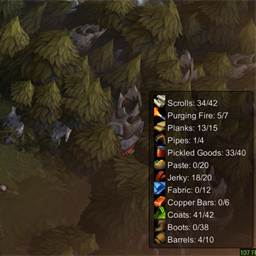
Displays goods that have a production limit set in the Recipes menu, and shows their current/max stock in a compact, movable, hideable HUD in the bottom-right corner.
Stock below production limit that cannot be produced further (after current in-progress productions), are now marked in red.
It can also optionally auto-adjust production limits for all goods you currently have a recipe for, based on the number of people consuming them and an adjustable multiplier.
It can also optionally auto-adjust the Purging Fire production limit in blight posts to the number of existing cysts plus one.
It can also optionally queue a chosen race for a worker slot, so the slot auto-fills the next time it becomes empty and a matching free villager becomes available.
- possibly fixed Options Menu text display issue on Linux/Proton and improved overall window visibility and design
- added optional alert for idle builders that auto updates with the count of idle builders
- added optional alert+pause 3 seconds before season ends to check if you have a trade route you still want to start before it changes
It can also optionally highlight recipe buildings in the world when they have an enabled recipe for goods that are currently under threshold:
- red when the building can help, but has no workers assigned
- yellow when the building can help, has at least one worker, but is not fully staffed
- normal white vanilla icon when the building is unmanned but none of its recipes are currently under threshold
Integrated Builder Icon mod made by ~DGH into my mod with some changes:
- the exclamation marker for builders that are idling
- the hammer icon for all other builders
Newly triggered shortages go at the top of the list.
Options for movable, hideable, building indicators, builder status icons, idle builders alert, queued worker assignments, season ending trade routes alert, Purging Fire auto-adjust, and production limit multiplier are available in the F8 settings window.
If a good has no production limit, it is ignored by the mod.
Usage
- Set a global production limit for a good in the Recipes menu.
- When your current stock drops below that limit, the good appears in the Stock Alert HUD.
- Press
F8 to edit the hide and movable HUD settings.
- Optional: enable auto-adjust in the
F8 window to make the mod set eligible global production limits for you.
- Optional: enable Purging Fire auto-adjust in the
F8 window to make blight posts keep that limit at existing cysts + 1.
- Optional: enable building shortage indicators in the
F8 window to spot where extra staffing would help with current shortages.
- Optional: enable builder status icons in the
F8 window to distinguish idle free builders from busy free builders.
- Optional: enable queued worker assignments in the
F8 window to reserve a race for a worker slot until the next vacancy.
Auto-adjust option
- off by default
- when enabled, the mod checks how many alive villagers can consume a good and sets that good's global production limit to
consumers x multiplier
- the multiplier is editable in the
F8 window from 1.0 to 9.0
- values round up to the next whole number
- only goods for recipes you currently have available in the settlement are adjusted
- disabling the option stops further automatic changes, but does not restore previous manual limits
Purging Fire auto-adjust option
- off by default
- when enabled, the mod sets the Purging Fire production limit in blight posts to
existing cysts + 1
- disabling the option stops further automatic changes, but does not restore the previous manual limit
Queued worker assignments
- off by default
- when enabled, you can pick a race for a worker slot even if no free villager of that race is currently available
- the queued race appears to the left of the normal worker slot icon
- clicking the queued icon lets you change or clear the queued race
- queued workers only auto-fill when the slot becomes empty and a matching free villager becomes available
- if multiple slots are waiting for the same race, the oldest queue is filled first
- queues last only for the current session
Requirements
- Against the Storm
- BepInEx 5
- ATS API 3.7.0 or newer
Credits
- Builder status icon feature adapted from
BuilderIcon source by ~DGH
Build
Update StormPath in StockAlert.csproj to match your game install, then build the project.