
AtlyssPlayerCollision
Adds local-client player collision, static/dynamic boxes, head and chest platforms, Emote stick, CodeYapper helper sync, tiny-player safety, performance options, presets, and EasySettings controls for ATLYSS.A little bit about me and this project/Disclaimer
I started coding in 2026 and am still learning. AI assistance was used for organization, planning, debugging, and understanding/fixing errors. Unless clarified otherwise, the rest is not AI. Apologies for any misunderstanding or lack of clarification.
ATLYSS Player Collision
Adds local-client player collision to ATLYSS. You can bump into other players, stand on head or chest platforms, use stick mode while riding, and tune boxes in EasySettings.
This is not server-authoritative physics. Each client creates and handles its own collision boxes.
Requirements
- BepInExPack
- EasySettings
- AtlyssCommandLib
- CodeYapper
Main Features
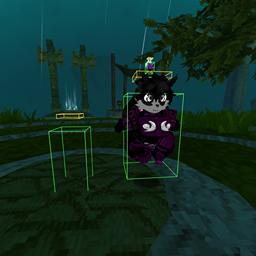
- Green body colliders around remote players.
- Yellow head platforms so players can stand on each other.
- Optional chest platform mode.
- Static and Dynamic box modes.
- Emote-friendly stick mode for sitting/emoting while riding.
- Old strict stick behavior for players who prefer stronger holding.
- Race, scale, visible-renderer, and pose-aware box sizing.
- Tiny-player safety that hides body/head/chest boxes with
reason=tiny. - Whitelist controls.
- Compatible-client
/remove, whitelist sync, and pose helper messages through CodeYapper. - Performance options for distance limits, nearest-player caps, and debug wire control.
- Three box preset slots.
Quick Commands
| Command | Description |
|---|---|
/stick |
Toggle stick mode |
/remove |
List riders detected on your head platform |
/remove <name> |
Remove a rider locally and request removal on compatible clients |
/collider status |
Show local diagnostics |
/collider status all |
Show diagnostics for all tracked players |
/collider reset |
Reset collider tuning |
/collider panic |
Emergency disable and reset grace |
/boxallow <name> |
Add a player to the whitelist |
/boxdeny <name> |
Remove a player from the whitelist |
/boxlist |
Show saved whitelist Steam64 IDs |
Useful aliases:
/col,/collision,/pcollision/anchor,/ca/boxwhitelist,/boxwl,/cwl,/wl/boxsave 1,/boxload 1,/boxdel 1,/boxpresets
Box Modes
Static boxes are the default. They are more stable and cheaper.
Dynamic boxes update from renderer/body-mesh measurements more often. They can follow race, scale, and pose changes more closely, but cost more performance.
Only one mode can be enabled at a time. If the config ever ends up invalid, the mod fixes it automatically and prefers Static boxes.
Static mode can briefly use Dynamic-style measurement after scale changes, sit/emote pose changes, visual pose drift, or occasional refreshes. This helps correct placement without leaving Static mode on expensive measuring all the time.
Stick Modes
Emote stick is the default. It is designed to avoid interrupting sitting and emoting while still following the carrier.
Old strict stick behavior is stronger and more forceful. Use it if you prefer tighter holding over emote freedom.
Only one stick safety mode can be enabled at a time. If the config is invalid, the mod fixes it automatically and prefers Emote stick.
Chest Platforms
Chest mode moves the standing platform from the head area to a lower-middle chest target. It uses detected chest/body renderers when possible and falls back to scale-aware body sizing when needed.
EasySettings includes chest width, depth, thickness, height, and forward offset controls.
EasySettings
The mod adds a Player Collider tab.
Common controls:
- Local collision
- Mod enabled
- Debug wires
- Static boxes / Dynamic boxes
- Stick to carrier
- Rotate with carrier
- Emote stick / Old strict stick behavior
- Whitelist mode
- Push strength / Max push
- Limit boxes by distance
- Reduce rendered boxes
- Max rendered boxes
Collapsed tuning groups:
- Body box
- Head platform
- Chest platform
- Stick/runtime safety
- Size limits/presets
Performance Tips
For lower-end systems:
- Use Static boxes.
- Turn on Limit boxes by distance.
- Turn on Reduce rendered boxes and use a cap around
6-10. - Keep debug wires off unless testing.
- Leave
UseBakedPoseBounds=falseunless you are testing exact pose bounds.
Dynamic boxes, baked pose bounds, debug wires, and crowded servers can cost more performance.
Multiplayer Notes
- Collision is local-client only.
- Every player needs the mod for their own collision experience.
- CodeYapper helper messages only work with compatible clients.
- Unmodded or incompatible clients will not receive remote remove, whitelist, or pose helper packets.
- Pose helper packets can improve collider placement for sitting/emoting, but they do not force ATLYSS visuals to match on every client.
Diagnostics
Use /collider status all when testing scale, race, static/dynamic mode, chest placement, tiny-player safety, or pose issues.
Useful fields:
boxModemeasurescaletinychestposeLoweredremotePosebodyTopheadTopreason
Tiny players should show reason=tiny and should not have visible colliders or wires.
Known Issues
- Collision is not server-authoritative.
- Stick mode can still jitter during lag, fast movement, or some pose transitions.
- Some custom races, accessories, or unusual model setups may need manual tuning.
- Sitting/emoting can look different between clients.
- Chest forward offset assumes the model's local forward direction matches the visible character.
- Old configs with a nonzero
Max size capmay still cap giant players until set back to0.
Manual Install
Install the required dependencies, then place AtlyssPlayerCollision.dll in:
BepInEx/plugins/AtlyssPlayerCollision/
- Made by AzraeL0534
Special Thanks
- Nessie for EasySettings
- Soggy_Pancake for AtlyssCommandLib
- Soggy_Pancake for CodeYapper
- The BepInEx team for BepInExPack